
raccoon_dataset
 raccoon_dataset copied to clipboard
 datitran
unable complete Generatetfrecords.py
after following all steps mentioned by dar itran , i got following errors even after put return 0 instead of none.
pi@pi-HP-280-G1-MT:~/Downloads/new$ source activate tensorflow
(tensorflow) pi@pi-HP-280-G1-MT:~/Downloads/new$ python3 generate_tfrecord.py --csv_input=data/test_labels.csv --output_path=data/test.record
Traceback (most recent call last):
File "generate_tfrecord.py", line 99, in
please help to solve this.... thank you


@D0o0D , i think the issues bcz of you have images with png extention . And image format written in generate_tfrecord.py is jpg. so i think due its mismatch some files having png format can convert. so pls verify whether you have all images having jpg format

@fawadhussain703 check whether u have jpg or png format in generate_tfrecord.py
yes i have resolved this issue by making changes yo xml_to_csv script - value = (root.find('filename').text+'.jpg',
after following all steps mentioned by dar itran , i got following errors even after put return 0 instead of none.
pi@pi-HP-280-G1-MT:/Downloads/new$ source activate tensorflow (tensorflow) pi@pi-HP-280-G1-MT:/Downloads/new$ python3 generate_tfrecord.py --csv_input=data/test_labels.csv --output_path=data/test.record Traceback (most recent call last): File "generate_tfrecord.py", line 99, in tf.app.run() File "/home/pi/anaconda3/envs/tensorflow/lib/python3.6/site-packages/tensorflow/python/platform/app.py", line 126, in run _sys.exit(main(argv)) File "generate_tfrecord.py", line 90, in main tf_example = create_tf_example(group, path) File "generate_tfrecord.py", line 45, in create_tf_example encoded_jpg = fid.read() File "/home/pi/anaconda3/envs/tensorflow/lib/python3.6/site-packages/tensorflow/python/lib/io/file_io.py", line 120, in read self._preread_check() File "/home/pi/anaconda3/envs/tensorflow/lib/python3.6/site-packages/tensorflow/python/lib/io/file_io.py", line 80, in _preread_check compat.as_bytes(self.__name), 1024 * 512, status) File "/home/pi/anaconda3/envs/tensorflow/lib/python3.6/site-packages/tensorflow/python/framework/errors_impl.py", line 519, in exit c_api.TF_GetCode(self.status.status)) tensorflow.python.framework.errors_impl.NotFoundError: /home/pi/Downloads/new/images/raccoon-1.png; No such file or directory
please help to solve this.... thank you
I have JPG format and the images converted to csv are jpg too, also i have replaced the NONE with 0, the problem still persisits

after following all steps mentioned by dar itran , i got following errors even after put return 0 instead of none. pi@pi-HP-280-G1-MT:/Downloads/new$ source activate tensorflow (tensorflow) pi@pi-HP-280-G1-MT:/Downloads/new$ python3 generate_tfrecord.py --csv_input=data/test_labels.csv --output_path=data/test.record Traceback (most recent call last): File "generate_tfrecord.py", line 99, in tf.app.run() File "/home/pi/anaconda3/envs/tensorflow/lib/python3.6/site-packages/tensorflow/python/platform/app.py", line 126, in run _sys.exit(main(argv)) File "generate_tfrecord.py", line 90, in main tf_example = create_tf_example(group, path) File "generate_tfrecord.py", line 45, in create_tf_example encoded_jpg = fid.read() File "/home/pi/anaconda3/envs/tensorflow/lib/python3.6/site-packages/tensorflow/python/lib/io/file_io.py", line 120, in read self._preread_check() File "/home/pi/anaconda3/envs/tensorflow/lib/python3.6/site-packages/tensorflow/python/lib/io/file_io.py", line 80, in _preread_check compat.as_bytes(self.__name), 1024 * 512, status) File "/home/pi/anaconda3/envs/tensorflow/lib/python3.6/site-packages/tensorflow/python/framework/errors_impl.py", line 519, in exit c_api.TF_GetCode(self.status.status)) tensorflow.python.framework.errors_impl.NotFoundError: /home/pi/Downloads/new/images/raccoon-1.png; No such file or directory please help to solve this.... thank you
I have JPG format and the images converted to csv are jpg too, also i have replaced the NONE with 0, the problem still persisits
Show your Error please???
should provide the path of image where you store in my case : python generate_tfrecord.py --csv_input=data/train_labels.csv --output_path=data/train.record --image_dir=images/

yes you should provide the full path unless you have the files running from the same directory Thanks and Regards,
Aishwarya Murkute.
(424) 381 - 8357 | [email protected]
On Thu, May 23, 2019 at 9:34 PM YOGENDER SINGH [email protected] wrote:
should provide the path of image where you store in my case : python generate_tfrecord.py --csv_input=data/train_labels.csv --output_path=data/train.record --image_dir=images/
— You are receiving this because you commented. Reply to this email directly, view it on GitHub https://github.com/datitran/raccoon_dataset/issues/64?email_source=notifications&email_token=AKSBL3OMWVMX6LYVHHMSP2TPW5V5RA5CNFSM4FK5YFV2YY3PNVWWK3TUL52HS4DFVREXG43VMVBW63LNMVXHJKTDN5WW2ZLOORPWSZGODWEEDSA#issuecomment-495469000, or mute the thread https://github.com/notifications/unsubscribe-auth/AKSBL3P64VARERCHGDXUOPTPW5V5RANCNFSM4FK5YFVQ .
The solution to this is to edit xml_to_csv.py file and remove the concatenation
for i in xml_df['filename']: names.append(i) + '.jpg' xml_df['filename']= names
Then, edit it to something like this below. Also, remove the concatenation value = (root.find('filename').text + '.jpg', here too.
for i in xml_df['filename']: names.append(i) xml_df['filename']= names
after following all steps mentioned by dar itran , i got following errors even after put return 0 instead of none.
pi@pi-HP-280-G1-MT:~/Downloads/new$ source activate tensorflow (tensorflow) pi@pi-HP-280-G1-MT:~/Downloads/new$ python3 generate_tfrecord.py --csv_input=data/test_labels.csv --output_path=data/test.record Traceback (most recent call last): File "generate_tfrecord.py", line 99, in tf.app.run() File "/home/pi/anaconda3/envs/tensorflow/lib/python3.6/site-packages/tensorflow/python/platform/app.py", line 126, in run _sys.exit(main(argv)) File "generate_tfrecord.py", line 90, in main tf_example = create_tf_example(group, path) File "generate_tfrecord.py", line 45, in create_tf_example encoded_jpg = fid.read() File "/home/pi/anaconda3/envs/tensorflow/lib/python3.6/site-packages/tensorflow/python/lib/io/file_io.py", line 120, in read self._preread_check() File "/home/pi/anaconda3/envs/tensorflow/lib/python3.6/site-packages/tensorflow/python/lib/io/file_io.py", line 80, in _preread_check compat.as_bytes(self.__name), 1024 * 512, status) File "/home/pi/anaconda3/envs/tensorflow/lib/python3.6/site-packages/tensorflow/python/framework/errors_impl.py", line 519, in exit c_api.TF_GetCode(self.status.status)) tensorflow.python.framework.errors_impl.NotFoundError: /home/pi/Downloads/new/images/raccoon-1.png; No such file or directory
please help to solve this.... thank you

The solution to this is to edit xml_to_csv.py file and remove the concatenation
for i in xml_df['filename']:
names.append(i)+ '.jpg'
xml_df['filename']= names
Then, edit it to something like this below. Also, remove the concatenation
value = (root.find('filename').text + '.jpg', here too.
for i in xml_df['filename']:
names.append(i)
xml_df['filename']= names
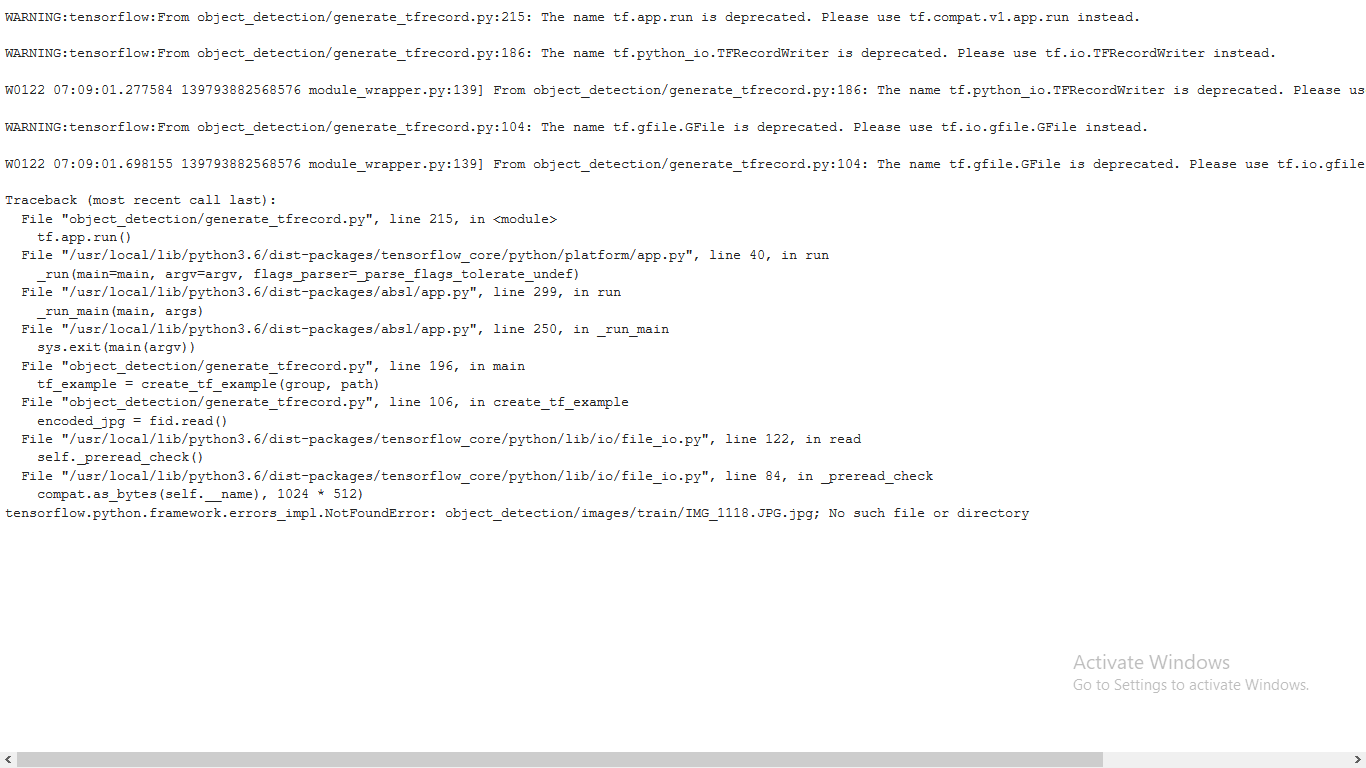 Look at the error and open your test_labels.csv, the filename column, compare it with the Error generated. You can edit the csv file manually and change it ton racoon.png to test the cause..
Goodluck!
Look at the error and open your test_labels.csv, the filename column, compare it with the Error generated. You can edit the csv file manually and change it ton racoon.png to test the cause..
Goodluck!