
restreamer
 restreamer copied to clipboard
 datarhei
HDMI Support
On the YouTube description of the restreamer video, I saw:
🟡 HDMI OUTPUT Restreamer supports HDMI-OUT and can output network video as an HDMI signal.
but I can't find anywhere in the interface how to do this (and couldn't find anything in the documentation), other than:
--privileged just for local devices like soundcard or HDMI-out.
which I've enabled already. Has anyone else managed to set this up yet?

The HDMI output is done by writing into the framebuffer device. In the publication services you should see "Framebuffer" in the "Protocols" tab. There you can select the framebuffer representing the HDMI.
Beforehand you might need to configure the framebuffer device with the resolution of the stream, e.g. fbset -fb /dev/fb0 -g 1280 720 1280 720 24.
This has been tested with a Raspberry Pi 3 connected to a TV.

On the Raspberry Pi 4 it's a bit different. There you have to edit the /boot/config.txt in order to set the correct resolution:
- Open
/boot/config.txtin an editor, e.g.sudo nano /boot/config.txt - Set
hdmi_force_hotplug=1 - Set
hdmi_group=1 - Set
hdmi_mode=4(for 1280x720) orhdmi_mode=16(for 1920x1080) - Set
hdmi_pixel_encoding=2 - At the bottom in the
[pi4]section, setdtoverlay=vc4-fkms-v3d
Reboot the Pi and the docker container. Now you should see the Framebuffer publication service, where you select the /dev/fb0 device and the matching color settings.
Thanks for the instructions. I have tried to follow your instructions for the Raspberry Pi 4 (both using the Raspberry Pi OS with desktop image and the Raspberry Pi OS Lite images), but unfortunately, nothing happens on the HDMI-connected screen when I add the Framebuffer, and I start a stream to Restreamer (from OBS). I am running the docker container with --privileged and I can see the output device on the settings screen (which leads me to believe that docker isn't the issue as otherwise, I probably wouldn't see a device in the drop-down):
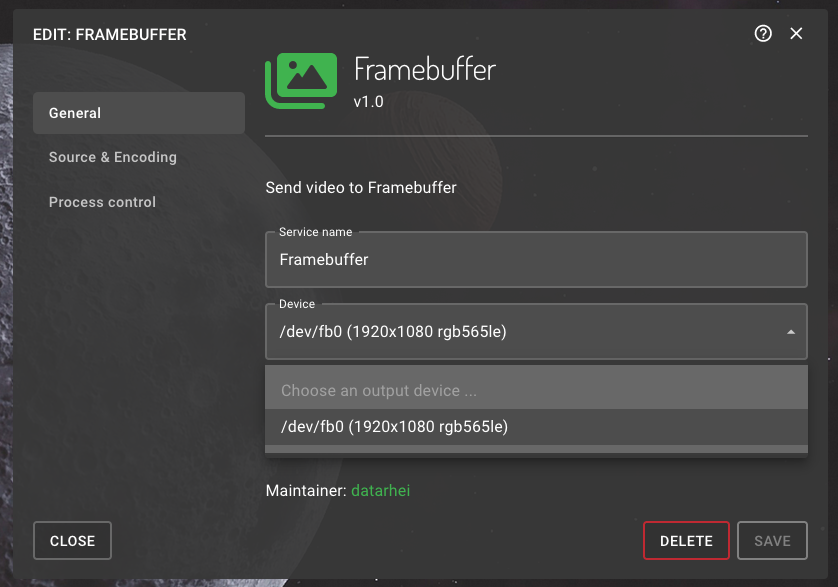
Here's my /boot/config.txt for reference: config.txt
I was also wondering what I need to do on just an ordinary computer to make the Framebuffer option appear (it's currently greyed out on my workstation).
In the config.txt at the bottom, you should have the value vc4-fkms-v3d for dtoverlay. Also select RGB565 Little Endian for the pixel format.
Thanks! I think I already had vc4-fkms-v3d in the config.txt so setting the pixel format to RGB565 Little Endian seemed to do the trick :)
Do you have any suggestions on how I would make this work on a generic ubuntu machine (i.e. an Intel NUC)?
On the Pi, the HDMI output is accessed via the framebuffer (/dev/fb0). It should be similar on the NUC.
If you don't see this file, you might need to enable the framebuffer in ubuntu, however I don't know to do this.
Hello @RubenWaterman we are closing your issue #387.
This may be due to the following reasons:
- Problem/inquiry has been solved
- Ticket remained unanswered by you for a longer period
- Problem was explained and handled in another ticket
You can reopen this ticket at any time!
Please only open related tickets once! Always answer/ask in the original ticket with the same issue!
With kind regards, Your datarhei team

I'm trying to establish a Raspberry Pi 4 setup in which Restreamer (Docker) catches an RTMP stream and redirects it to the HDMI output of the Pi.
The above solution (by @ioppermann) didn't work for me, the addition of hdmi_pixel_encoding=2 to the config.txt even bricked the Pi boot sequence, so I had to re-flash the SD card.
Is there anything I can do to enable the Framebuffer Publication option? (it is greyed out in the UI and reports 'Incompatible. Check the requirements')
