

 dataplat
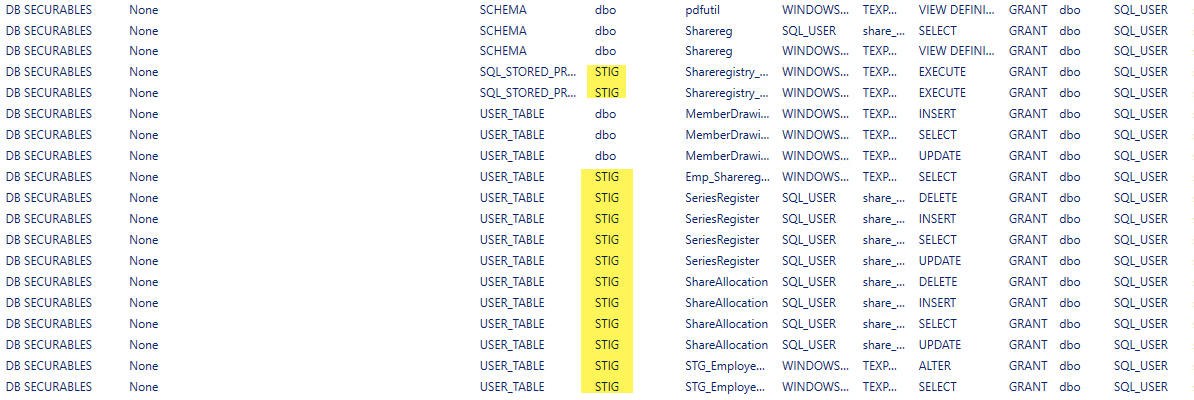
Get-DbaUserPermission shows STIG Schema not correct Schema
Verified issue does not already exist?
I have searched and found no existing issue
What error did you receive?
No error received, just incorrect output.
Steps to Reproduce
# provide your command(s) executed pertaining to dbatools
# please include variable values (redacted or fake if needed) for reference
Get-DbaUserPermission -SqlInstance ServerName-ExcludeSystemDatabase
Please confirm that you are running the most recent version of dbatools

Other details or mentions
What PowerShell host was used when producing this error
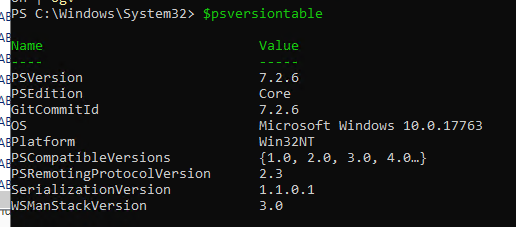
PowerShell Core (pwsh.exe)
PowerShell Host Version
SQL Server Edition and Build number
Microsoft SQL Server 2016 (SP3-CU1-GDR) (KB5015371) - 13.0.7016.1 (X64) May 21 2022 01:00:03 Copyright (c) Microsoft Corporation Enterprise Edition: Core-based Licensing (64-bit) on Windows Server 2016 Datacenter 10.0 <X64> (Build 14393: ) (Hypervisor)
.NET Framework Version
.NET 6.0.8

I can not easily reproduce. Can you check if the issue still exists in the current version and provide a script to create a database that shows the issue? Thanks.

If there is a problem, then this is in \bin\stig.sql - but the CASE statement for that column is rather complex so not easy to spot the error.
So I would need an example configuration with database objects and permissions that show the problem to start working on this.
@gbargsley - Can you help with this?
I also am getting the 'STIG' schema/owner when using Get-DbaUserPermission. Below is a script to create a database that shows the issue for me (assumes the 'user1' login already exists). Basically one table in the dbo schema and another in a second schema. A user has SELECT permission to both tables.
The output from Get-DbaUserPermission for the two tables shows the schema correctly for the table in the dbo schema, but 'STIG' for the table in the 'SecondSchema' schema. I've had to remove all the other lines of output so as not to reveal other logins etc - and realise that might be relevant! But can the problem be reproduced with the DB script below? I am running Get-DbaUserPermission as a SQL login with sysadmin membership.
Looking at the stig.sql script in the dbatools install directory, I've run the big SELECT statement with the CASE conditions and lots of OUTER JOINS on my database and get output rows for objects in all schemas, as I'd expect.
And... not sure if it's related or relevant but in my real database with about a dozen schemas, I only get permissions output for objects in the dbo schema and one other schema (where it shows the schema name as 'STIG') - I can't see an obvious reason for just this one other schema when I compare it to others.
Environment:
| OS | Windows Server 2019 |
| Powershell | 5.1.17763.6640 |
| dbatools | 2.1.26 |
Hope this helps to track down the issue!
Steve.
ComputerName  InstanceName SqlInstance   Object        Type              Member                         RoleSecurableClass SchemaOwner Securable             GranteeType   Grantee                        Permission                 State Grantor         GrantorType   SourceView
------------  ------------ -----------   ------        ----              ------                         ------------------ ----------- ---------             -----------   -------                        ----------                 ----- -------         -----------   ----------
...
XXXXXXXXXXXXX MSSQLSERVER  XXXXXXXXXXXXX DbaToolsIssue DB SECURABLES     None                           USER_TABLE         dbo         Table_1               SQL_USER      user1                          SELECT                     GRANT dbo             WINDOWS_USER  sys.all_objects
XXXXXXXXXXXXX MSSQLSERVER  XXXXXXXXXXXXX DbaToolsIssue DB SECURABLES     None                           USER_TABLE         STIG        Table_2               SQL_USER      user1                          SELECT                     GRANT dbo             WINDOWS_USER  sys.all_objects
...
SET NUMERIC_ROUNDABORT OFF
GO
SET ANSI_PADDING, ANSI_WARNINGS, CONCAT_NULL_YIELDS_NULL, ARITHABORT, QUOTED_IDENTIFIER, ANSI_NULLS ON
GO
USE [DbaToolsIssue]
GO
SET XACT_ABORT ON
GO
SET TRANSACTION ISOLATION LEVEL Serializable
GO
BEGIN TRANSACTION
GO
DECLARE @associate bit
SELECT @associate = CASE SERVERPROPERTY('EngineEdition') WHEN 5 THEN 1 ELSE 0 END
IF @associate = 0 EXEC sp_executesql N'SELECT @count = COUNT(*) FROM master.dbo.syslogins WHERE loginname = N''user1''', N'@count bit OUT', @associate OUT
IF @associate = 1
BEGIN
    PRINT N'Creating user [user1] and mapping to the login [user1]'
    IF DATABASE_PRINCIPAL_ID(N'user1') IS NULL
CREATE USER [user1] FOR LOGIN [user1]
END
ELSE
BEGIN
    PRINT N'Creating user [user1] without login'
    IF DATABASE_PRINCIPAL_ID(N'user1') IS NULL
CREATE USER [user1] WITHOUT LOGIN
END
GO
IF @@ERROR <> 0 SET NOEXEC ON
GO
PRINT N'Creating schemas'
GO
IF SCHEMA_ID(N'SecondSchema') IS NULL
EXEC sp_executesql N'CREATE SCHEMA [SecondSchema]
AUTHORIZATION [dbo]'
GO
IF @@ERROR <> 0 SET NOEXEC ON
GO
PRINT N'Creating [SecondSchema].[Table_2]'
GO
IF OBJECT_ID(N'[SecondSchema].[Table_2]', 'U') IS NULL
CREATE TABLE [SecondSchema].[Table_2]
(
[ID] [int] NOT NULL,
[Name] [varchar] (50) COLLATE SQL_Latin1_General_CP1_CI_AS NOT NULL
)
GO
IF @@ERROR <> 0 SET NOEXEC ON
GO
PRINT N'Creating primary key [PK_Table_2] on [SecondSchema].[Table_2]'
GO
IF NOT EXISTS (SELECT 1 FROM sys.objects WHERE object_id = OBJECT_ID(N'[SecondSchema].[PK_Table_2]', 'PK') AND parent_object_id = OBJECT_ID(N'[SecondSchema].[Table_2]', 'U'))
ALTER TABLE [SecondSchema].[Table_2] ADD CONSTRAINT [PK_Table_2] PRIMARY KEY CLUSTERED ([ID])
GO
IF @@ERROR <> 0 SET NOEXEC ON
GO
PRINT N'Creating [dbo].[Table_1]'
GO
IF OBJECT_ID(N'[dbo].[Table_1]', 'U') IS NULL
CREATE TABLE [dbo].[Table_1]
(
[ID] [int] NOT NULL,
[Name] [varchar] (50) COLLATE SQL_Latin1_General_CP1_CI_AS NOT NULL
)
GO
IF @@ERROR <> 0 SET NOEXEC ON
GO
PRINT N'Creating primary key [PK_Table_1] on [dbo].[Table_1]'
GO
IF NOT EXISTS (SELECT 1 FROM sys.objects WHERE object_id = OBJECT_ID(N'[dbo].[PK_Table_1]', 'PK') AND parent_object_id = OBJECT_ID(N'[dbo].[Table_1]', 'U'))
ALTER TABLE [dbo].[Table_1] ADD CONSTRAINT [PK_Table_1] PRIMARY KEY CLUSTERED ([ID])
GO
IF @@ERROR <> 0 SET NOEXEC ON
GO
PRINT N'Altering permissions on  [SecondSchema].[Table_2]'
GO
GRANT SELECT ON  [SecondSchema].[Table_2] TO [user1]
GO
IF @@ERROR <> 0 SET NOEXEC ON
GO
PRINT N'Altering permissions on  [dbo].[Table_1]'
GO
GRANT SELECT ON  [dbo].[Table_1] TO [user1]
GO
IF @@ERROR <> 0 SET NOEXEC ON
GO
COMMIT TRANSACTION
GO
IF @@ERROR <> 0 SET NOEXEC ON
GO
DECLARE @Success AS BIT
SET @Success = 1
SET NOEXEC OFF
IF (@Success = 1) PRINT 'The database update succeeded'
ELSE BEGIN
	IF @@TRANCOUNT > 0 ROLLBACK TRANSACTION
	PRINT 'The database update failed'
END
GO

@andreasjordan was I supposed to create a new issue or will you re-open this one?
Thanks for your script. I'll reopen the issue and try to reproduce ist in the next days,..