

 datactive
Addressing Cell Overflow
The bigbang tool doesn't take into account cells overflowing when there is too much data in a single cell. This happens with any particular mailing lists that have email bodies that exceed the Excel/CSV 32,767 character limit for a cell and so what ends up happening is the content of the email body takes up the subsequent rows.
Considering how big some of these email threads are, quite a large number of these emails overflow. which usually needs some automated/manual cleaning afterwards.
You can see the image here:
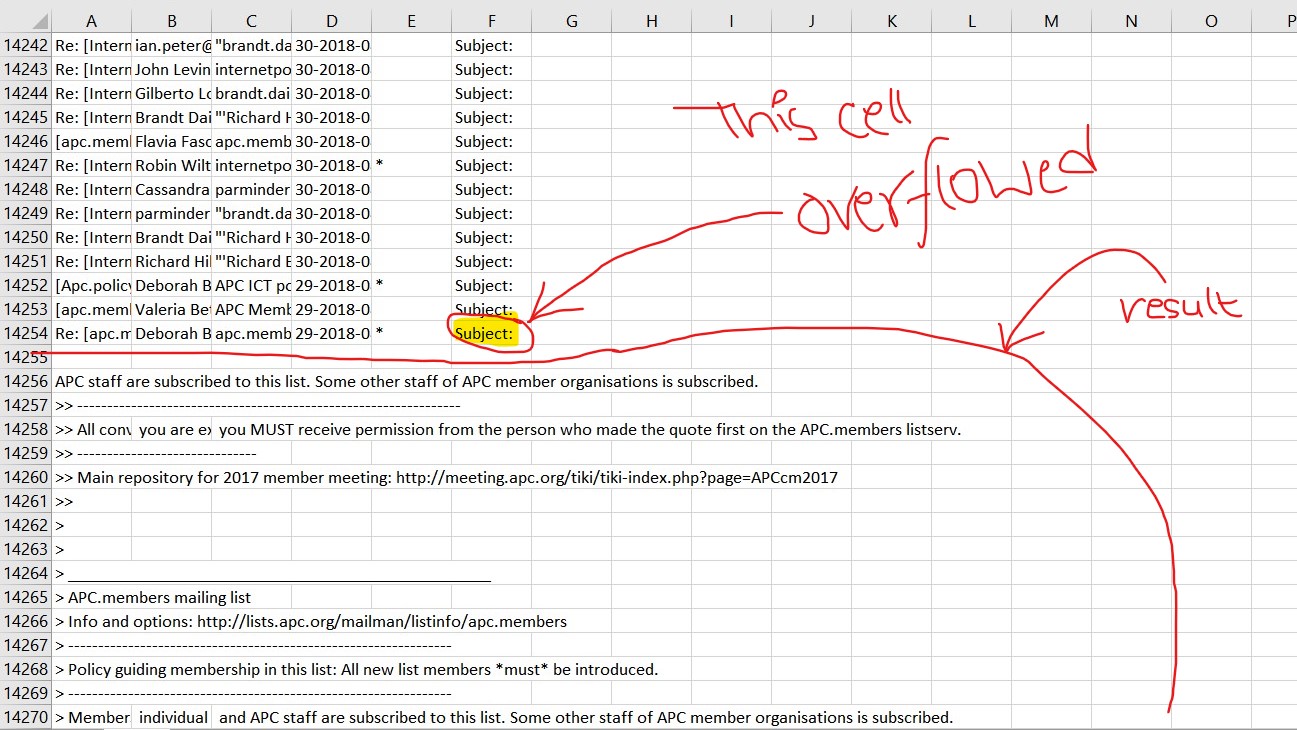
When the subject body ends, the subsequent emails that come after that row show up as expected.

Could you please clarify where you are seeing these "cells"?
As far as I know the only cells BigBang uses are in Jupyter notebooks.
If a CSV file is properly formatted, but contains data that does not render well in Excel, I don't think that's a bug in BigBang.
