python-ecology-lesson
 python-ecology-lesson copied to clipboard
 datacarpentry
Bad links in Data Analysis and Visualization in Python for Ecologists: Setup
In the Data Analysis and Visualization in Python for Ecologists: Setup lesson page (https://datacarpentry.org/python-ecology-lesson/setup) the links for download of Anaconda and Miniconda direct to pages that no longer exist.
The following links appear to be the most up to date for download of these programs. Anaconda: https://www.anaconda.com/distribution/ Miniconda: https://docs.conda.io/en/latest/miniconda.html

Thanks, @ebeagle1. Would you like to submit a PR fixing these links? I'd be happy to help you with that.

Yes – that would be great!
From: Maxim Belkin [email protected] Reply-To: datacarpentry/python-ecology-lesson [email protected] Date: Thursday, April 4, 2019 at 2:36 PM To: datacarpentry/python-ecology-lesson [email protected] Cc: "Beagle, Emily A" [email protected], Mention [email protected] Subject: Re: [datacarpentry/python-ecology-lesson] Bad links in Data Analysis and Visualization in Python for Ecologists: Setup (#368)
Thanks, @ebeagle1https://github.com/ebeagle1. Would you like to submit a PR fixing these links? I'd be happy to help you with that.
— You are receiving this because you were mentioned. Reply to this email directly, view it on GitHubhttps://github.com/datacarpentry/python-ecology-lesson/issues/368#issuecomment-480034182, or mute the threadhttps://github.com/notifications/unsubscribe-auth/Ao1Ie2X8iBAtP_ul-SPftKfHmVNMH8W5ks5vdlQcgaJpZM4cdfe5.
Great! So, here are the steps:
-
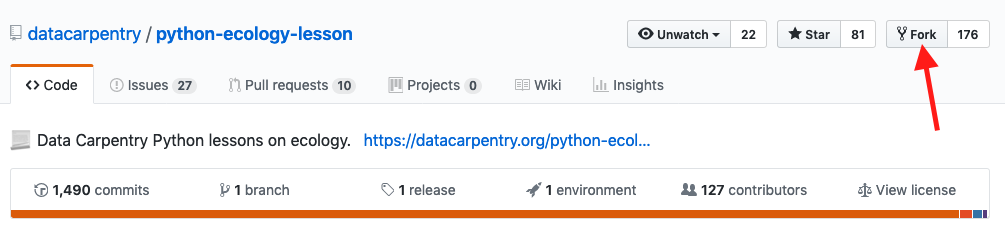
Navigate to https://github.com/datacarpentry/python-ecology-lesson and fork this repository:
-
Navigate to your fork (it will be located at https://github.com/ebeagle1/python-ecology-lesson) and create a new branch:

You should see a "Branch created" message and GitHub will switch you to that new branch:

-
Now you have to change the file that is rendered as https://datacarpentry.org/python-ecology-lesson/setup. As you could guess, this file is called
setup.md. It is at the very bottom of the list of files in the root folder.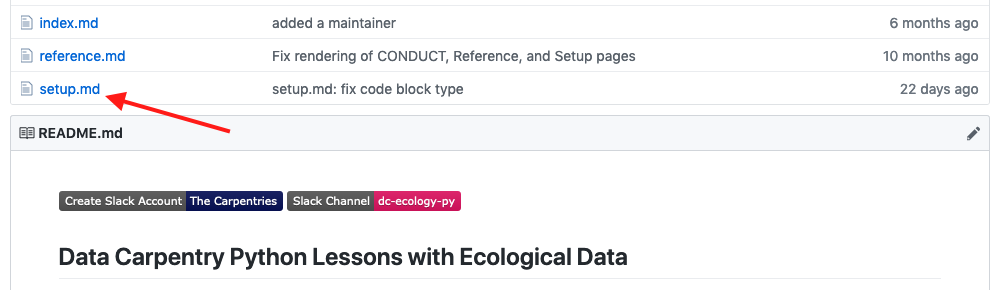
Click on its name (
setup.md). You should see this:
Click on the pencil (or pen?) icon. You will find yourself in a text editor -- make appropriate changes. Scroll to the bottom of the page, specify a good title for your changes, provide any additional details, and click "Commit changes":

-
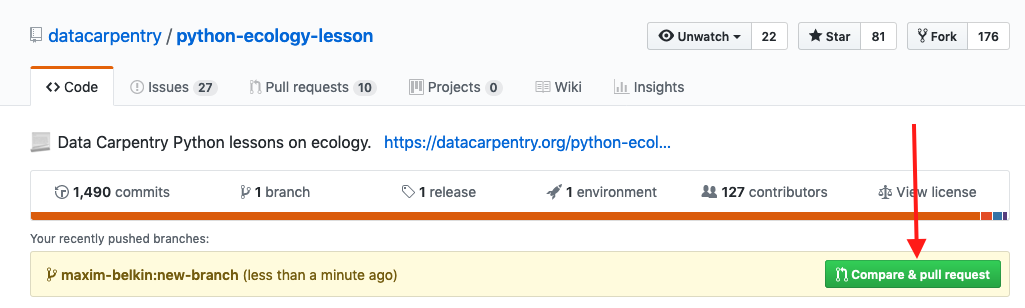
Navigate back to this repository at https://github.com/datacarpentry/python-ecology-lesson. You should see a yellow strip with a green "Compare and pull request" button:
-
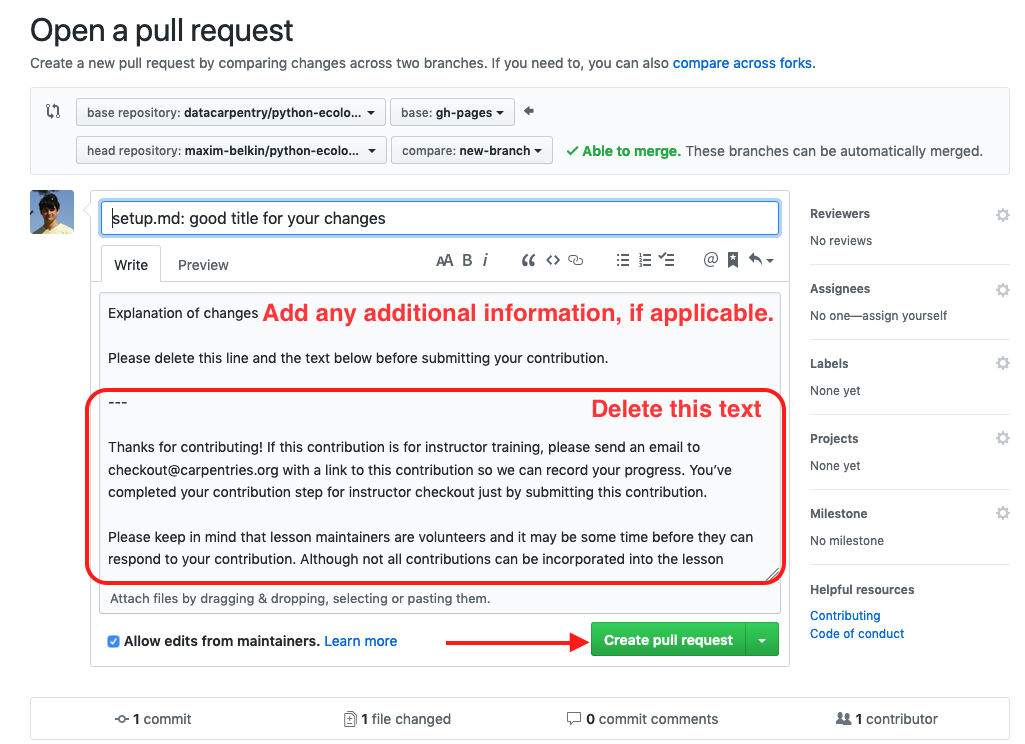
On a new page, add any additional information about your changes, remove the PR template text and click "Create pull request":

Fixed submitted, please accept PR =)
Are you @ebeagle1 ?
No I am not, currently taking the trainer training course and was looking for ways to contribute as an exercise. ;P Nice to meet you. Your PR instruction is awesome, I learn a lot today.
Closing issue for following reasons:
- Original Setup page moved.
- New setup encourages full anaconda with working url / guidance for three major platforms and contains no links to miniconda that I could find.
- Package information for miniconda users left in as a self-service convenience for presumed more experienced users.