

 dart-lang
Help unblock DartCode backlog on web integration
Issues: https://github.com/Dart-Code/Dart-Code/labels/in%20web
This is a meta tracking issue for @DanTup, so he can focus on non-web for the time being on DartCode until we have a better (and documented) integration story for him to follow.
/cc @DanTup @kevmoo @devoncarew

Hi,
I'm interested in helping for DartCode web support (especially breakpoints for both serve and tests). Where can I start ? 😄

I think a good first step would be:
- Try and get something running via a task in
task.jsonthat watches for changes in the BG (so you can make code changes and hit save, and they're recompiled). @matanlurey I presume something likepub run build_runner serveis the new equiv ofpub serve? - See if you can debug this code using Chrome Debugger Extension and the source maps
Both of these can be done without any changes to Dart Code, and will likely form the foundation of it's web support :-)

As of now, Chrome Debugger successfully attach to Chrome.
But source maps don't works as we get 2 errors in vscode's debug console :
SourceMaps.loadSourceMapContents: Could not download sourcemap from http://localhost:8080/packages/$sdk/dev_compiler/web/dart_stack_trace_mapper.js.map
SourceMaps.loadSourceMapContents: Could not download sourcemap from http://localhost:8080/packages/$sdk/dev_compiler/amd/dart_sdk.js.map
These files don't exists (but the version without .map does).
Setting breakpoints in vscode won't work due to source maps.
On the other hand, setting some in chrome does trigger vscode's debug mode. But pointing to .ddc.js files instead of .dart.
fwiw, those files are not intended to have source maps. You should be able to ignore the error, and if not we should file bugs to get the sourcemap lines removed.

Theses errors don't seems to have any impact.
For actual projects sources ; the source map problem seems to come from Chrome Debugger looking for .dart files in project/packages/projectname/file.dart instead of project/lib/file.dart
Confirmed, as copy pasting sources to this actual directory will make debugging work.
OH - ya that makes sense. Do we have any hooks to tell it how to interpret a specific uri?
Fwiw - on the web package: uris don't work (they have no meaning) so we have this convention around a packages/ directory mapping to package:.
We also can't use absolute paths because that would point into your pub cache which would mean non-hermetic builds.
Seems like. There's a sourceMapPathOverrides property we can set in the launch.json. Currently trying to get it working.
Ok - you should be able to look in the .packages file to get almost all the info you need for the mapping. There is also the pesky issue of generated files though which for build_runner live in .dart_tool/build/generated.
For pub serve they don't exist on disk at all so I don't see what can be done there.
Hum...
The only way I found to get things to work is to have a custom sourceMapPathOverrides per source file.
By running vscode Chrome Debugger .script command inside the debug console on Angular Tour of Heroes we get the following :
...
› http://localhost:8080/packages/angular_tour_of_heroes/src/dashboard_component.ddc.js
    - dashboard_component.dart (myproject/packages/angular_tour_of_heroes/src/dashboard_component.dart)
...
Which imply that to override the path, we have to use the following sourceMapPathOverrides :
"sourceMapPathOverrides": {
   "dashboard_component.dart":  "${webRoot}/lib/src/dashboard_component.dart"
}
Notice how the key is not path/dashboard_component.dart. Just the filename. Preventing us from using * or similar.
Interestingly, reading the extension's logs, we can see SourceMap: no sourceRoot specified, using webRoot + script path dirname: myproject/packages/angular_tour_of_heroes/src.
Considering dashboard_component's map contains "sourceRoot":"","sources":["dashboard_component.dart"] everything above is makes sense.
Is there anything we can do about that ?
Notice how the key is not path/dashboard_component.dart. Just the filename.
Wait.... isn't that super broken? You can't have files with the same name under different paths?
Well yeah. I guess we're supposed to play around sourceRoot and sources of .map files to fix this issue.
create-react-app seems to have relative path to sources inside their .map files. Not just the filename. That may be a solution.
Any ideas ?
Changing sources inside .map files to an absolute path pointing to the real .dart works. But it breaks debugging from Chrome.
This is a bit tricky if there is only a single sourceRoot. When we serve files the path from the web can be translated to one of 2 different places:
/some_file.dart could be web/some_file.dart or .dart_tool/build/generated/<package_name>/web/some_file.dart
And /packages/package_name/some_file.dart could be ~/.pub-cache/hosted/pub.dartlang.org/package_name-version/lib/some_file.dart or .dart_tool/build/generated/package_name/lib/some_file.dart or even other paths on the machine.

I'll admit I have no knowledge on what can be done here.
I made a small dart script which fixes vscode debugging (by breaking chrome). But that's far from optimal.
Would it work to use the --output argument and point the sourceRoot to that directory?
The --output directory should mirror the structure that the browser sees.
Sorry but I don't see how --output would change anything here.
Mimicking the browser structure indeed does work. The thing is that inside the browser, sourcemap and .dart files are located next to each others. So we'd have to fork .dart files.
But then breakpoints have to be added on the forked .dart file, not the original.
Ah yeah, it would mean that breakpoints need to be on the .dart files in the output directory.
I guess this might be a fundamental limitation of vscode? I don't think we're ever going to have a source tree that mirrors the structure of the "built" version of the code.
I've read this case a few times, but I don't totally understand the problem being described :(
I guess this might be a fundamental limitation of vscode?
Debugging and source maps is all handled by extensions, so I don't think there should be anything we can't make work as long as the logic is sound :)
Yeah true.
Fundamentally I think our problem is with Vscode Chrome Debug sourceMapPathOverrides being unusable in our use-case.
And we most likely will need to create the same issue on Vscode Node Debug for VM debugging on dart2js. As it face the same problem.
But at the same time, is the generated output architecture fixed ?
I think it'd be much easier if we could override the current behavior to have built generate stuff based on the original .dart file location instead of creating a fork.
Can someone explain the problem in simple terms? I'm not familiar with any of these tools yet, so a lot of the comments above didn't make much sense to me. What's the layout of files, and why don't we think they will match up? Isn't that what the source maps are supposed to give us?
consider the following project
myproject/
    pubspec.yaml
    lib/
        main.dart
When we debug it in the browser or using node the architecture is different :
myproject/       // same folder as before
    packages/
        myproject/
            lib/
                main.dart
                main.dart.js
                main.dart.map
but that main.dart is a fork of the original file. So Vscode chrome debug and node expects us to add our breakpoints inside the forked main.dart file instead of the original.
It is possible to edit those sourcemaps make the following work it vscode. But that architecture doesn't work in the browser (I don't know the specifics here).
myproject/       // same folder as before
    packages/
        myproject/
            lib/
                main.dart.js
                main.dart.map
   lib/
      main.dart
The apparent structure that the browser sees is:
/main.dart, /main.template.dart, /packages/some_package/foo.dart etc so the source maps will point like main.dart.js -> main.dart, and main.template.dart.js => main.template.dart.
The "real" structure on disk is more like
web/main.dart, .dart_tool/build/generated/main.template.dart, ~/.pub_cache/.../some_package/lib/foo.dart
So there is a completely different hierarchy to describe the mapping from main.dart.js to main.dart compared to the mapping formmain.template.dart.js to main.template.dart. The source maps we generate are based on the structure the browser sees, which we are creating artificially in our server.
The source maps that VSCode needs don't work sine the structure is different on disk.
Aha, gotcha. I guess this is a similar problem to anything with virtual directories where the url structure isn't the same as on disk, so maybe it's not entirely Dart-specific. I wonder if @roblourens might have any suggestions?
Interesting case, the part I don't follow is where you have two copies of main.dart, and
but that main.dart is a fork of the original file
So the sourcemaps point to the second main.dart, but is it the same as the original one? I assume you want to set breakpoints in the original main.dart file, but if it's not the same as the version that the sourcemap is mapping back to, then there will be problems.
What the Chrome debugger expects you to do is to either change your build process so the sourcemap has paths that point to the real path of the original source, or, to use the sourceMapPathOverrides tool to tell it where the original sources are.
If you're copying the second main.dart to somewhere under the webserver so chrome devtools can see it, another option would be inlining the sources for chrome devtools, then changing the paths in the sourcemap to more accurately reflect the location of the original source file.
If that's not easy to do, you can experiment more with sourceMapPathOverrides. For example,
"sourceMapPathOverrides": {
  "*": "web/*",
  "*.template.dart": ".dart_tool/build/generated/*.template.dart",
  ...
}
If that can't cover it in general, we would need a more powerful sourceMapPathOverrides, like the ability to search in multiple places per matching pattern?

@roblourens The long-term goal would be to invoke this all from Dart Code - could we dynamically provide sourceMapPathOverrides and launch from another extension?
If that's not easy to do, you can experiment more with sourceMapPathOverrides. For example,
I tried that before. sourceMapPathOverrides is definitely not powerful enough. As we have some .dart files that need to be redirected and some that should be left unchanged.
But the only information we can use to differentiate them in our architecture is the filename.
You can use registerDebugConfigurationProvider to intercept the debug configuration and modify it before it runs, or you can use startDebugging to create your own debug config from scratch.
That would make it easy to start a config with sourceMapPathOverrides for every individual file, if that's what you need to do. Obviously it would be simpler if the file layout was more predictable, but I have no idea what your constraints are.
@roblourens Thanks for the info, seems like we have some options :)
@rrousselGit
I tried that before.
sourceMapPathOverridesis definitely not powerful enough
From the sample given above, it seems like we can pretty much include every file we want in sourceMapPathOverrides so in the absolute worst case, we could just build a big mapping of every file, and that work would, right? While that's not realistic to maintain, if it works then Dart Code can generate this mapping and pass it into the Chrome debugger to launch it? As long as we know the rules (and there isn't missing information), we should be able to do it. Probably it would actually only need to be per-package rather than per-file at worst though?
I posted some notes at https://github.com/Dart-Code/Dart-Code/issues/68#issuecomment-379337028 about how to make F5 run pub run build_runner serve and launch the Chrome debugger once the build finishes. Source maps for your files in the web folder just work out of the box.
I had a quick look, and I can't get source maps for the SDK to work in Chrome (no VS Code here, just running pub run build_runner serve and opening Chrome manually). I put a breakpoint in main.dart and then stepped into an SDK function, but I end up in JS. There's a banner saying source maps are detected, but I can't figure out if I have to do something to make it work (I also can't see the SDK dart source anywhere in the file list on the left):
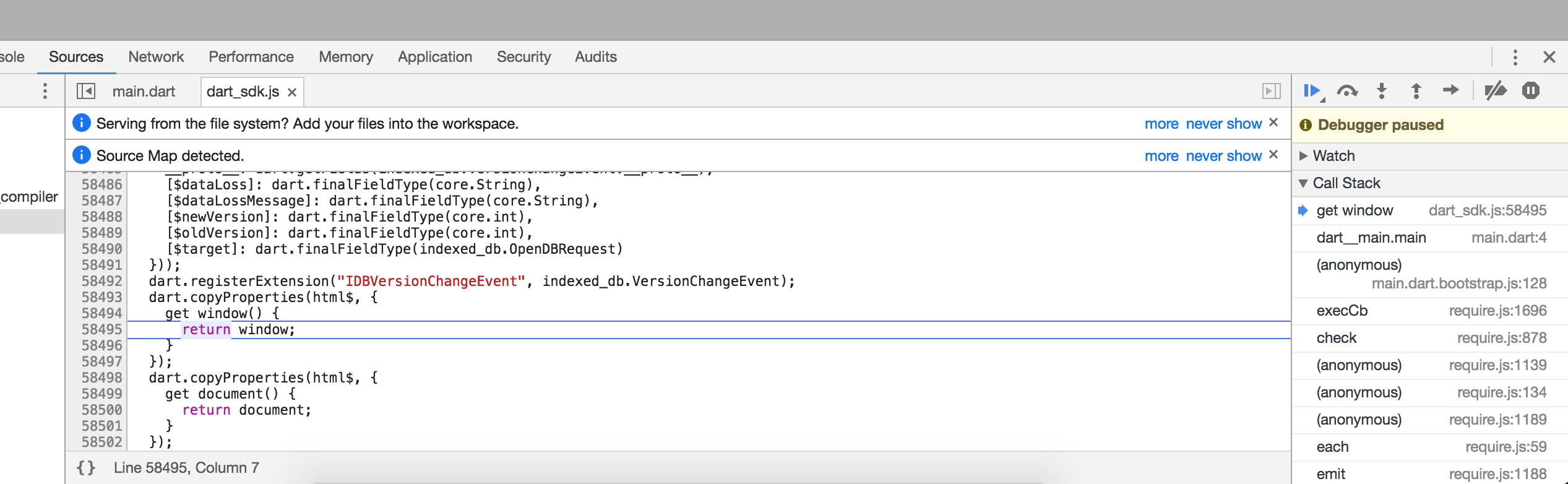
Is Chrome supposed to support stepping into the SDK dart files? If so, how does it work, and what's the path from this JS file into the dart file (all via urls is fine at this point, let's ignore the complications of the filesystem paths for now).