

 darktable-org
Ability to cancel image import?
Is your feature request related to a problem? Please describe. Never knew darktable would try to make a file for every image in the same directory. It's a write-only Syncthing folder, so all the writes fail. This happens a few thousand times taking a while to finish.
Describe the solution you'd like Ability to cancel an import process.

why not simply spend some time reading the manual? https://docs.darktable.org/usermanual/4.0/en/preferences-settings/storage/#xmp

There's not information there on how to cancel an import process?
Most users won't read the manual before using the app.
@MStraeten answer is about file written for every image. It's what you describe for the reason to cancel. Even if removing xmp writing is not recommended. Considering that cancel an import process would solve that, so you will never import images on darktable?
About cancelling import process, it's absolutely possible during import (of course, this will not cancel images that are already importing): when the import is processing, just check bottom left of darktable app. You will see import process and so just click on cross button.
Note that ctrl+z undo a lot of things, like on other apps. I'm not sure if this works to cancel import as I never does that. Another thing to cancel already importing images, is just to select them and click on delete buttons (right panel).
So what you ask for is already possible (and quite simple).

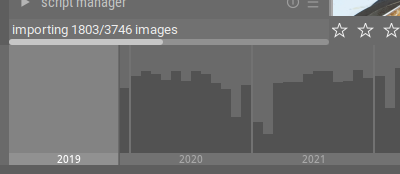
Which darktable version do you use? It's strange that you don't have cross button
Ok, forget my comment. Indeed there's no button to cancel import. I never need it and as it's possible for other things where same progress bar appear (for example export images), I thought there such button. There's not indeed for import images.
Could be good of course. It's so a feature request. (No need for this one to precise darktable version so as it's a feature not implemented ; remains good to precise such thing usually anyway).
This issue did not get any activity in the past 60 days and will be closed in 365 days if no update occurs. Please check if the master branch has fixed it and report again or close the issue.
![github-actions[bot] avatar](https://avatars.githubusercontent.com/in/15368?v=4 "Published by a pub.dev verified publisher")

there is a "X" which appears above the import progress bar at lower left panel during import of of images. does it not suffice?
it works for me.
ps: this is darktable, not AUR and I seriously doubt that AUR difficulties that do not affect darktable will be addressed here.

I am on 4:7.9.0-0xneon+22.04+jammy+release+build8 and I don't see any "x" around the progress bar...
I see now that many of the ubuntu/neon repo versions are quite dated.... trying a manual install of the latest release :)
@ptilopteri: it's about import not export. See my comments above. As you, I thought it was there but no for that part. It's possible to cancel export but not import. So this FR is valid.
@bjmuld: no need to bump. It's a free software made by people freely on their free time, so this will done if a developer want to do it and spent time on it. So, maybe one day or never.
This issue did not get any activity in the past 60 days and will be closed in 365 days if no update occurs. Please check if the master branch has fixed it and report again or close the issue.