
darkreader

darkreader copied to clipboard
 darkreader
[Broken Website] html pages from extensions are not recognised via chrome-extension:// urls
Website Address
chrome-extension://hkhggnncdpfibdhinjiegagmopldibha/reminders.html
Internal pages from Chrome Extension Checker Plus for Google Calendar which opens a window for notification popups
Steps To Reproduce
- Install Chrome Extension
- Right Click on Extension and select Options
- Try to use dark reader, it doesn't recognise the site since it uses "chrome-extension://" url Test with a popup window:
- Desktop notifications -> Click bell to open a test notification window and keep open
- Right click on Extension -> Manage Extension and add "reminders.html" at the end of the browser url and in the front change to "chrome-extension://" followed by the extension id
- Click on dark reader extension which doesn't show the website name from the browser url, for me it shows "www.amazon.co.uk".
Problematic Observation
Dark reader doesn't seem to recognise internal pages from other extensions via "chrome-extension://" urls.
I tried manually adding the url under "Site List" which didn't work, and dark reader site access is set to "on all sites" (even allow access to file URL's didn't make any difference).
Screenshots

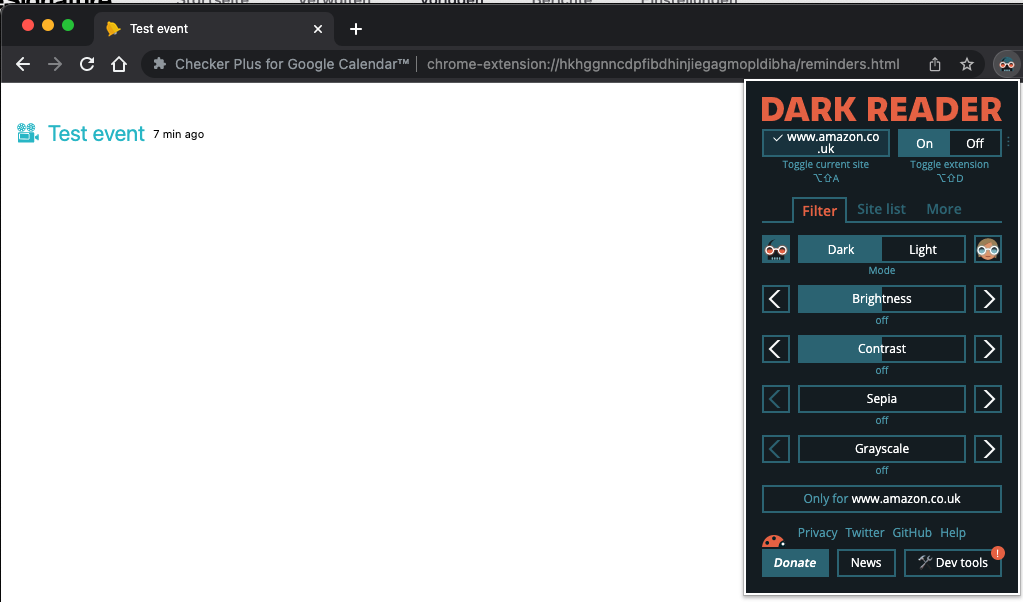
System Information
- OS: macOS 12.6
- Browser: Chrome Version 105.0.5195.125 (Official Build) (x86_64)
- Dark Reader Version: 4.9.57
Additional Context
This limitation will likely affect all other extension that have internal pages
