

 darkoperator
I could not connect to device after update
Hello, good evening
I could not connect in fortianalyzer device after device update to version 7.0.4, I am getting the following error on device:
SSH unable to negotiate with 192.168.10.10 port 63012: no matching host key type found. Their offer: ssh-ed25519,ecdsa-sha2-nistp256,ecdsa-sha2-nistp384,ecdsa-sha2-nistp521,ssh-rsa,ssh-dss
I got the following SSH Error on machine:

Below there is my machine configuration:
PS U:> Get-Module posh-ssh
ModuleType Version Name ExportedCommands
Manifest 3.0.8 Posh-SSH {Get-SCPItem, Get-SFTPItem, Get-SSHHostKey, Get-SSHJsonKnownHost...}
PS U:> $PSVersionTable
Name Value
PSVersion 5.1.22000.832 PSEdition Desktop PSCompatibleVersions {1.0, 2.0, 3.0, 4.0...} BuildVersion 10.0.22000.832 CLRVersion 4.0.30319.42000 WSManStackVersion 3.0 PSRemotingProtocolVersion 2.3 SerializationVersion 1.1.0.1
I am getting the same error in another machines.
Obs. It is working fine using "Putty".
Thanks in advance.


That is a fortinet fortianalyzer.
Get Outlook for Androidhttps://aka.ms/AAb9ysg
From: Carlos Perez @.> Sent: Thursday, November 3, 2022 7:43:50 PM To: darkoperator/Posh-SSH @.> Cc: marcelo-0511 @.>; Author @.> Subject: Re: [darkoperator/Posh-SSH] I could not connect to device after update (Issue #495)
What is the “device”? Cisco? H3C?
— Reply to this email directly, view it on GitHubhttps://github.com/darkoperator/Posh-SSH/issues/495#issuecomment-1302760895, or unsubscribehttps://github.com/notifications/unsubscribe-auth/AP7LJRMYCSXLDDBFEG4DLV3WGQ52NANCNFSM6AAAAAARWS2ND4. You are receiving this because you authored the thread.Message ID: @.***>
Any way to change the host key on it to one of the supported algorithms by the library (list is in the readme.md)? Seems it upgraded to ciphers that are not supported by the module Sent from my iPhoneOn Nov 3, 2022, at 6:45 PM, marcelo-0511 @.***> wrote: That is a fortinet fortianalyzer.
Get Outlook for Androidhttps://aka.ms/AAb9ysg
From: Carlos Perez @.> Sent: Thursday, November 3, 2022 7:43:50 PM To: darkoperator/Posh-SSH @.> Cc: marcelo-0511 @.>; Author @.> Subject: Re: [darkoperator/Posh-SSH] I could not connect to device after update (Issue #495)
What is the “device”? Cisco? H3C?
— Reply to this email directly, view it on GitHubhttps://github.com/darkoperator/Posh-SSH/issues/495#issuecomment-1302760895, or unsubscribehttps://github.com/notifications/unsubscribe-auth/AP7LJRMYCSXLDDBFEG4DLV3WGQ52NANCNFSM6AAAAAARWS2ND4. You are receiving this because you authored the thread.Message ID: @.***>
—Reply to this email directly, view it on GitHub, or unsubscribe.You are receiving this because you commented.Message ID: @.***>
The host keys supported are
ssh-ed25519 ecdsa-sha2-nistp256 ecdsa-sha2-nistp384 ecdsa-sha2-nistp521 ssh-rsa ssh-dss
maybe Posh-SSH was already connecting to the device with an RSA key, so maybe you need to remove the old device key from the Posh-SSH keystore and reconnect

Hello, good morning, sorry for my delay.
maybe Posh-SSH was already connecting to the device with an RSA key, so maybe you need to remove the old device key from the Posh-SSH keystore and reconnect
I Tried it but without sucess.
The host keys supported are ssh-ed25519 ecdsa-sha2-nistp256 ecdsa-sha2-nistp384 ecdsa-sha2-nistp521 ssh-rsa ssh-dss
I am checking it with device maker, I will post the reply soon.
https://docs.fortinet.com/document/fortigate/7.0.4/administration-guide/484445/fortigate-encryption-algorithm-cipher-suites
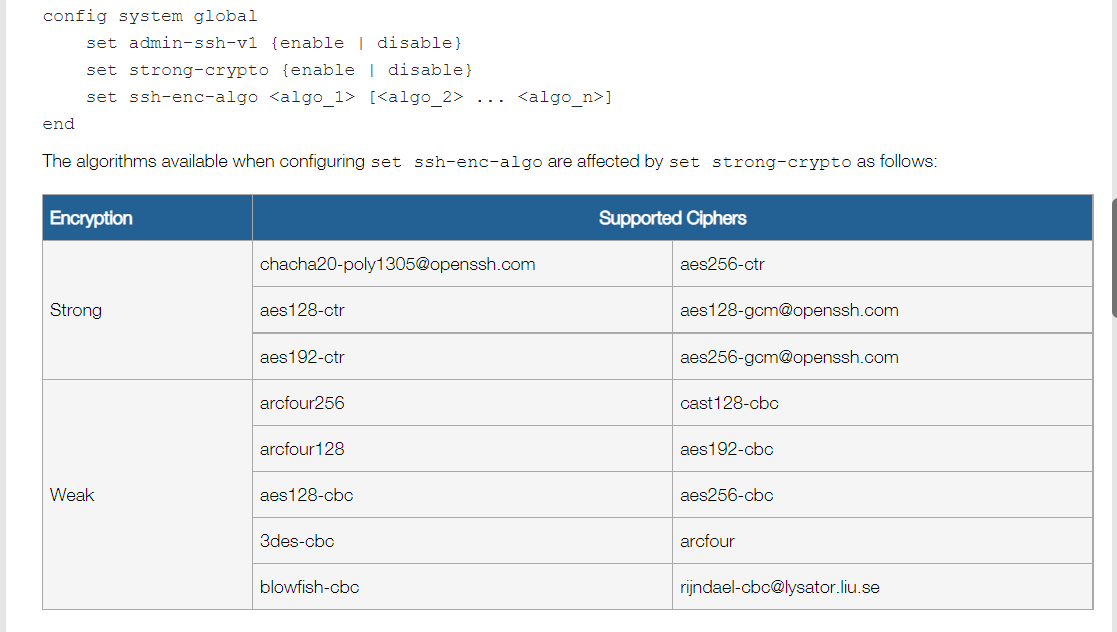
It's about encryption, not host keys
You can try to use ssh-keyscan yourhostname and look at second column
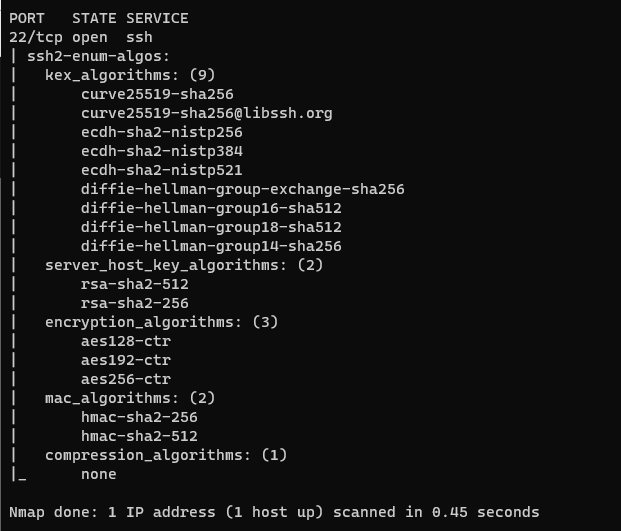
After some testing I think this could be a problem that Renci has with rsa-sha2-512 and rsa-sha2-256, I had to change a recent server to ECDA to get it working and there are several discussion in Renci.SSH repo on it