

 darkoperator
New-SSHSession : An established connection was aborted by the server
Hi Team,
While am running the below PowerShell code getting the below error for few host IP's
New-SSHSession : An established connection was aborted by the server
request you to provide some solution
Code to connect to Cisco Devices
$userId = "
$hostnames = Get-Content "<path/file>"
$ErrorActionPreference = 'Continue'
foreach($hostname in $hostnames)
{
$A = $ssh=New-SSHSession -ComputerName $hostname -Credential $cred -Force -OperationTimeout 300 -ConnectionTimeout 300
if ($A)
{
$ErrorOccured=$False
$stream = $ssh.Session.CreateShellStream("dumb", 0, 0, 0, 0, 1000)
$stream.Write("terminal length 0n") $stream.Write("show inventoryn")
$stream.Write("show ip int brief | ex unassn") $stream.Write("sh version | i Versionn")
$stream.write("enablen") $stream.write("<enable>n")
$stream.Write("show runn | i comm`n")
Start-Sleep -Seconds 5
$streamoutput = $stream.read()
$streamoutput |Out-File "<path\file>"
Remove-SSHSession -SSHSession $ssh | Out-Null
}
else
{
#write-host "Something went wrong"
}
}
Regards, Shivakumar T

To be honest no clue since I do not have Cisco gear in my home lab
Sent from my iPhone
On Dec 1, 2020, at 8:42 AM, shivakumartalla [email protected] wrote:
Hi Team,
While am running the below PowerShell code getting the below error for few host IP's
New-SSHSession : An established connection was aborted by the server
request you to provide some solution
Code to connect to Cisco Devices
$userId = "" $pwd = Get-Content "$userId.Pw.txt" $pwd1 = ConvertTo-SecureString -AsPlainText $pwd -Force $cred = New-Object System.Management.Automation.PSCredential -ArgumentList $userId, $pwd1 #$enable = Get-Content "enable.txt"
$hostnames = Get-Content "<path/file>" $ErrorActionPreference = 'Continue' foreach($hostname in $hostnames) { $A = $ssh=New-SSHSession -ComputerName $hostname -Credential $cred -Force -OperationTimeout 300 -ConnectionTimeout 300 if ($A) { $ErrorOccured=$False $stream = $ssh.Session.CreateShellStream("dumb", 0, 0, 0, 0, 1000) $stream.Write("terminal length 0n") $stream.Write("show inventoryn") $stream.Write("show ip int brief | ex unassn") $stream.Write("sh version | i Versionn") $stream.write("enablen") $stream.write("
n") $stream.Write("show runn | i comm`n") Start-Sleep -Seconds 5 $streamoutput = $stream.read() $streamoutput |Out-File "<path\file>" Remove-SSHSession -SSHSession $ssh | Out-Null } else { #write-host "Something went wrong" } } Regards, Shivakumar T
— You are receiving this because you are subscribed to this thread. Reply to this email directly, view it on GitHub, or unsubscribe.

Please test the alpha release to see if issue is resolved https://github.com/darkoperator/Posh-SSH/releases/tag/3.0.0-Alpha
This is a major release with breaking changes and it is cross platform for the latest version of powershell.
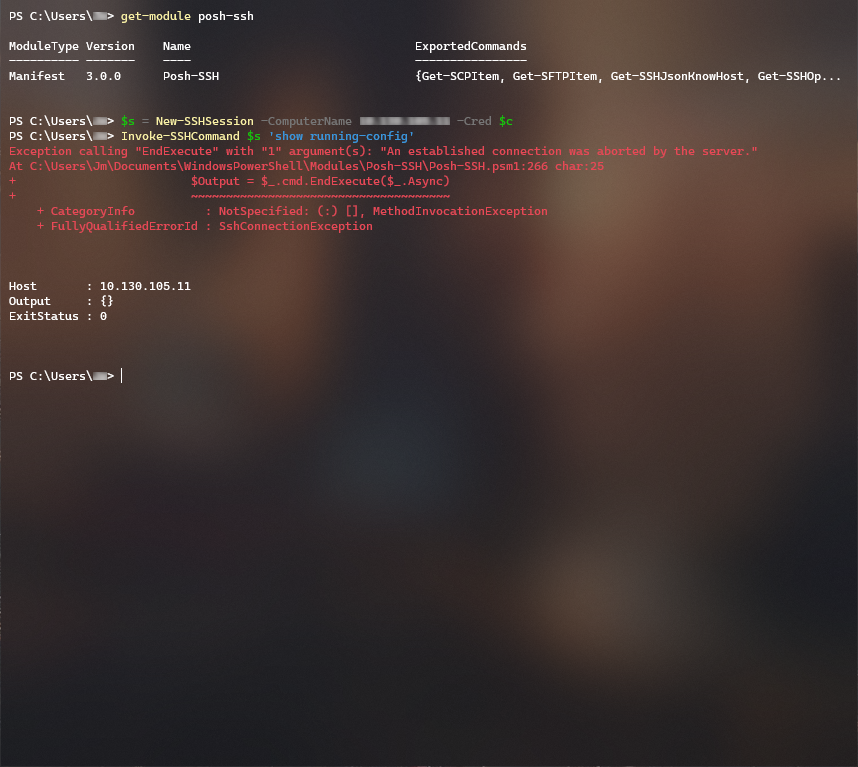

That looks like a cisco device, they don’t support plink or invoke-sscommand because they use a special shell, you need to use a shellstream
Sent from my iPhone
On Jul 23, 2021, at 12:10 AM, jakem72360 @.***> wrote:
Still facing this issue in Posh-SSH v3.0.0 (with PowerShell v5.1)
— You are receiving this because you commented. Reply to this email directly, view it on GitHub, or unsubscribe.
I recently upgraded ESXi from 6.7 (which worked with Posh-SSH 2.2) to 7.0 U2c and had to update Posh-SSH to 3.0.0 to be able to connect. Updating ESXi to 7.0 U2d seems to have "broken" this because I now get this same message but only when trying to connect to 7.0 U2d hosts.
PS C:\Users\Somebody> $Session = New-SSHSession -ComputerName $VMHost -Credential $RootCred -AcceptKey
New-SSHSession : An established connection was aborted by the server.
At line:1 char:18...

Anything on the server ssh logs? Also did it change key algorithms or formats ?
Sent from my iPhone
On Nov 12, 2021, at 5:57 PM, DougFergusonHCA @.***> wrote:
I recently upgraded ESXi from 6.7 (which worked with Posh-SSH 2.2) to 7.0 U2c and had to update Posh-SSH to 3.0.0 to be able to connect. Updating ESXi to 7.0 U2d seems to have "broken" this because I now get this same message but only when trying to connect to 7.0 U2d hosts. PS C:\Users\Somebody> $CurSshSession = New-SSHSession -ComputerName $VMHost -Credential $RootCred -AcceptKey New-SSHSession : An established connection was aborted by the server. At line:1 char:18
— You are receiving this because you commented. Reply to this email directly, view it on GitHub, or unsubscribe. Triage notifications on the go with GitHub Mobile for iOS or Android.
Sorry about the delay... I checked release notes and ran a diff between the 7.0U2c and 7.0U2d sshd_configs and nothing appears to have changed. No CVEs addressed that might explain the difference in handshake/connection setup behavior. Host Key Algorithms are all the same as well: ecdsa-sha2-nistp256,ecdsa-sha2-nistp384,ecdsa-sha2-nistp521,rsa-sha2-256,rsa-sha2-512
On the other hand, I noticed there is a -Force switch for New-SSHSession that is working for me so far (instead of -AcceptKey). I'll run some more tests against our 7.0U2d hosts and see if this is going to be acceptable to use going forward.
If the -Force switch solve your problem, try to connect server with this flag and without it at the same time with the -verbose flag and compare hostkey algorithms and host keys on output

Version 3.1.2 includes the latest version of SSH.NET, which should address this.