

 darklife
Compiling error
Hello @samsoniuk,
First of all thank you for this amazing project. I am new to this field and currently pursuing my masters. I want to develop my skills in VLSI and someday make a career out of it.
I am facing some issues while compiling the environment. Please see below the error.

Error: Command not found.
As mentioned in the readme, I made some changes to the makefile to choose only the default paths and boards.
My run did not generate the same results as in the screenshot in the readme.

I am unable to find the reason of this error. Your help is much appreciated.
Best, Avro Mukherjee

Thank you @jeshu54
According to your screen, the "make" checked about the sources (and they are already compiled), checked the simulation (and the simulation is already generated) and then tried to build the FPGA. The command that failed is the "xst" and, in order to run this command, you need prepare your environment. Here, in my system, I use the following command to prepare the Xilinx environment:
. /opt/Xilinx/14.7/ISE_DS/settings64.sh
Please note that there is an space between the '.' and the /opt. In my case, the environment is 64-bit, which means that I use the "settings64.sh", but in case of a 32-bit machine, you need to use the "settings32.sh". That scripts are provided by Xilinx, supposing that you installed the Xilinx ISE 14.7 in the same path as above.
Well, note that even the build work without errors and the darkrsocv.bit is available in the tmp directory, the screen will not appears the same because in my case I take a screen after a change in the code. The makefile detects the change and build a new simulation to ensure that the change will work. In you case the simulation appears as ok, because the simulation already tested that the code will work.
Just in case, you can clean the simulation and try run again with the following command:
make -C sim clean make
In this case the simulation will run again and, case it is correctly generated, the synthesis will start (supposing that you prepared the Xilinx environment before).
Anyway, you pointed a good area to improve and I will try make some changes in order to make the build process more informative, such as pre-check the "xst" command in the path and print a more friendly diagnostic message!
Best regards, Marcelo

@samsoniuk Thank you for the detailed information. I did not setup the Xilinx environment as this is not available on macOS.
Any other alternative that you can suggest me?
Best, Avro
Hi @jeshu54
I love my two macs and I have the same problem here! But, there are two different solutions that can be used:
a) WineSkin, which is a kind of Windows emulator that runs the Windows application natively but intercepts and emulate the Windows calls to map directly in the macOS. b) VirtualBox (or VMware, Parallels, etc) in order to run a complete Windows OS or Linux, which appears to be far better than the WineSkin option.
In fact, some years ago I started use the Xilinx ISE in the macOS via WineSkin and later I switched to the VirtualBox running Linux. One point that makes the VirtualBox appears better is that is more easy to integrate the RISCV compiler, the Icarus Verilog and the Xilinx tools in the same Linux command line environment, which I think works better than the Windows commando line environment. In some sense, this makes the environment much more standard, since the in the Windows I use the WSL environment, which is a kind of virtual machine that runs a Linux in a native way.
Just to complement, in the case of compile with GCC and simulation with Icarus Verilog (90% of time), I use the macOS environment directly, which is for more comfortable and faster than the Linux in a VM. When I need build and test a real FPGA, I switch to the Linux VM just to build and download the images in the FPGA.
Best regards, Marcelo
@samsoniuk Thank you, this really helps. I am going with the second option and installing Mint Linux which should do the trick. I agree windows makes things a bit complex due to multiple setup to run different things, which can be easily done in line under one place.
I am really excited to get this setup and get my first design run. I am currently working as a research intern under my professor and he asked me to go through all the processes of chip design. I think slowly and steadily, I will be able to grasp all the processes. I am also learning Verilog to improve my understanding regarding RTL step.
I will keep you posted with my results. And I am glad that I could be of any help to improve this project.
Looking forward for more interactions!!
Best, Avro
HI @jeshu54
Some additional tips regarding the Xilinx environment:
- the Spartan-3 and Spartan-6 FPGAs only work with Xilinx ISE 14.7.
- the Spartan-7 only work with Xilinx Vivado.
- some Artix, Kintex and Zynq may work with the old ISE 14.7, but newer models will work only with Vivado.
Basically, for a long time the main tool was the ISE, but at some moment Xilinx switched to Vivado. Some early serie-7 FPGAs (Artix, Kintex and Zynq) are supported, but the newer serie 7 FPGAs are supported only in Vivado. To make everyone sad and confused, the old serie-3 and serie-6 FPGAs are supported only in the old tool ISE.
Also, that tools are available in 32 and 64-bit versions. The 64-bit version is recommended because the large simulations need lots of memory and the 32-bit version is unable to handle more than 2GB of memory.
As final tip, the large size of the FPGA tools generate a big headache managing space in the virtual disks. The solution that I found in the case of VirtualBox is create a small virtual disk for the Linux installation itself and mount the ~/Documents/Xilinx from the macOS filesystem into the Linux VM (there are some extensions that the Virtual Box installs in the VM in order to enable this trick), in a way that the /op/Xilinx in the VM is mapped in the real filesystems. Thanks to this trick, I can install multiple tools, update the tools, etc without need to add new virtual disks. The Linux itself cannot reside in a macOS volume, but the big tools from Xilinx (and also Intel, Lattice and Microsemi) appears to work well.
Well, I will try add that tips in the darkriscv documentation in the future.
Good hacking! Marcelo
@samsoniuk thank you. I am at a point where I am installing Xilinx directly into my Linux as I have allowed 50 gb space. However, I am facing another error while installing the Xilinx.
Steps:
- Downloaded Xilinx 14.7 ISE.
- Unpacked it.
- Ran the code shown below on terminal.

I googled and found that this is due to libncurse. Some solutions suggested to install libncurses and update it to the latest version, which I did. One possible reason could be because of 32/64 bit difference in lib and OS, not sure though.
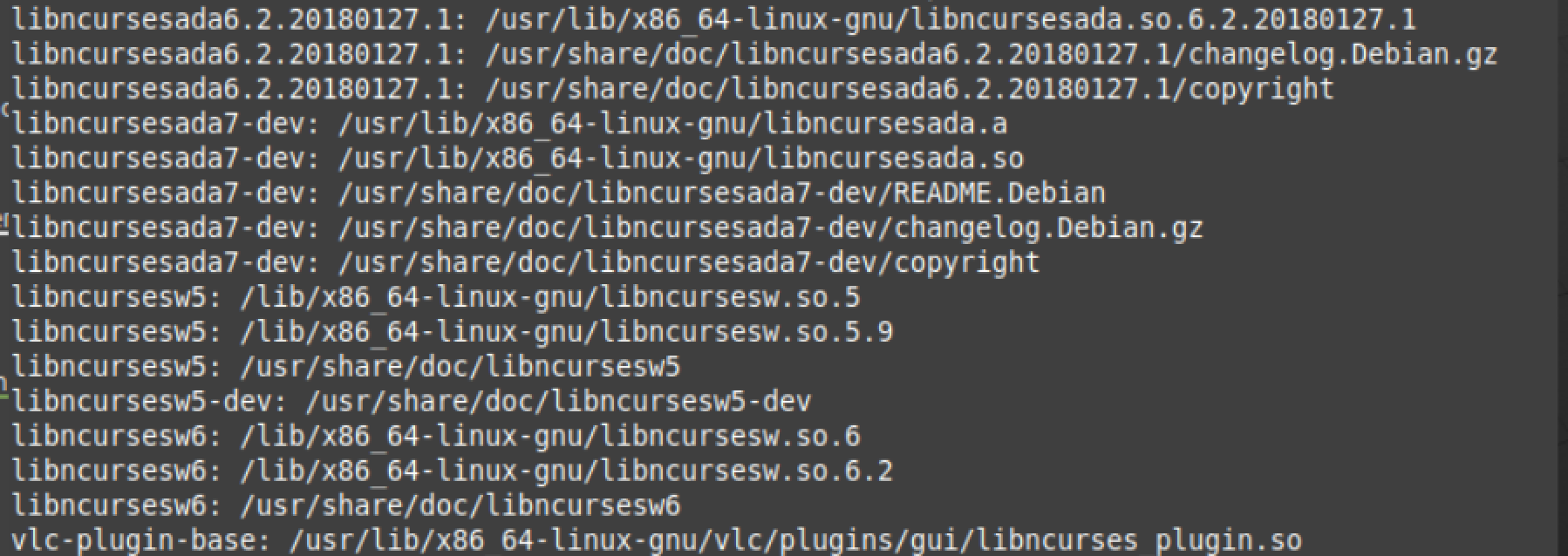
I am still searching the reason for this on google but any insight will be really helpful.
Best, Avro
Hi @jeshu54
I re-installed the ISE 14.7 some weeks ago in a new machine and I did not remember of a similar problem.
Just in case, here ome details of my environment in the macOS, in the case, it is an old Slackware 14.2 w/ kernel 4.4.14:
root@darkstar:/opt/Xilinx/14.7/ISE_DS/.xinstall/bin/lin64# file xsetup xsetup: Bourne-Again shell script, ASCII text executable root@darkstar:/opt/Xilinx/14.7/ISE_DS/.xinstall/bin/lin64# file _xsetup _xsetup: ELF 64-bit LSB executable, x86-64, version 1 (SYSV), dynamically linked, interpreter /lib64/ld-linux-x86-64.so.2, not stripped root@darkstar:/opt/Xilinx/14.7/ISE_DS/.xinstall/bin/lin64# ldd _xsetup linux-vdso.so.1 (0x00007fffb3d3b000) libwiclient.so => not found libInst_Client7z.so => not found libQt_Core.so => not found libQt_Gui.so => not found libxercesc.so => not found libboost_filesystem-gcc41-mt-p-1_38.so.1.38.0 => not found libboost_system-gcc41-mt-p-1_38.so.1.38.0 => not found libboost_regex-gcc41-mt-p-1_38.so.1.38.0 => not found libboost_thread-gcc41-mt-p-1_38.so.1.38.0 => not found libboost_program_options-gcc41-mt-p-1_38.so.1.38.0 => not found libOpenSSL_Crypto.so => not found libOpenSSL_SSL.so => not found libCurl_Curl.so => not found libstlport.so.5.1 => not found libdl.so.2 => /lib64/libdl.so.2 (0x00007f9b5ac3b000) libpthread.so.0 => /lib64/libpthread.so.0 (0x00007f9b5aa1d000) libncurses.so.5 => /usr/X11R6/lib64/libncurses.so.5 (0x00007f9b5a7c6000) libstdc++.so.6 => /usr/X11R6/lib64/libstdc++.so.6 (0x00007f9b5a44c000) libm.so.6 => /lib64/libm.so.6 (0x00007f9b5a142000) libgcc_s.so.1 => /usr/X11R6/lib64/libgcc_s.so.1 (0x00007f9b59f2b000) libc.so.6 => /lib64/libc.so.6 (0x00007f9b59b62000) libX11.so.6 => /usr/X11R6/lib64/libX11.so.6 (0x00007f9b59824000) /lib64/ld-linux-x86-64.so.2 (0x000055c47a73b000) libxcb.so.1 => /usr/X11R6/lib64/libxcb.so.1 (0x00007f9b59605000) libXau.so.6 => /usr/X11R6/lib64/libXau.so.6 (0x00007f9b59401000) libXdmcp.so.6 => /usr/X11R6/lib64/libXdmcp.so.6 (0x00007f9b591fc000)
I also have a notebook w/ Windows 10 and WSL, a kind of VM in the Windows, which runs a SUSE Linux Enterprise Server 12 SP3 w/ kernel 4.4.0 and I did not remember to had problems when installing:
marcelo@darkbook:/opt/Xilinx/14.7/ISE_DS/.xinstall/bin/lin64> file xsetup xsetup: Bourne-Again shell script, ASCII text executable marcelo@darkbook:/opt/Xilinx/14.7/ISE_DS/.xinstall/bin/lin64> file _xsetup _xsetup: ELF 64-bit LSB executable, x86-64, version 1 (SYSV), dynamically linked (uses shared libs), for GNU/Linux 2.6.9, not stripped marcelo@darkbook:/opt/Xilinx/14.7/ISE_DS/.xinstall/bin/lin64> ldd _xsetup linux-vdso.so.1 (0x00007fffe2a19000) libwiclient.so => not found libInst_Client7z.so => not found libQt_Core.so => not found libQt_Gui.so => not found libxercesc.so => not found libboost_filesystem-gcc41-mt-p-1_38.so.1.38.0 => not found libboost_system-gcc41-mt-p-1_38.so.1.38.0 => not found libboost_regex-gcc41-mt-p-1_38.so.1.38.0 => not found libboost_thread-gcc41-mt-p-1_38.so.1.38.0 => not found libboost_program_options-gcc41-mt-p-1_38.so.1.38.0 => not found libOpenSSL_Crypto.so => not found libOpenSSL_SSL.so => not found libCurl_Curl.so => not found libstlport.so.5.1 => not found libdl.so.2 => /lib64/libdl.so.2 (0x00007f9bee6f0000) libpthread.so.0 => /lib64/libpthread.so.0 (0x00007f9bee4c0000) libncurses.so.5 => /lib64/libncurses.so.5 (0x00007f9bee290000) libstdc++.so.6 => /usr/lib64/libstdc++.so.6 (0x00007f9bedf00000) libm.so.6 => /lib64/libm.so.6 (0x00007f9bedbf0000) libgcc_s.so.1 => /lib64/libgcc_s.so.1 (0x00007f9bed9d0000) libc.so.6 => /lib64/libc.so.6 (0x00007f9bed620000) libX11.so.6 => /usr/lib64/libX11.so.6 (0x00007f9bed2d0000) /lib64/ld-linux-x86-64.so.2 (0x00007f9beea00000) libtinfo.so.5 => /lib64/libtinfo.so.5 (0x00007f9bed090000) libxcb.so.1 => /usr/lib64/libxcb.so.1 (0x00007f9bece70000) libXau.so.6 => /usr/lib64/libXau.so.6 (0x00007f9becc50000) marcelo@darkbook:/opt/Xilinx/14.7/ISE_DS/.xinstall/bin/lin64>
Although some libraries are not found, the libncurses.so.5 is present in both systems! I am not sure that the libncursesw fully replaces the old libncurses and maybe you need have both, in order to support old software too.
Best regards, Marcelo
Hi @samsoniuk
I was able to fix the error.
The reason the issue happened is because I installed the libncurses5 and then immediately updated it to libncurses6. I then installed 32 bit version of libncurses5 and copied the files from lib/i386-linux-gnu to lib/x86_64-linux-gnu and ran xsetup. The error changed to incorrect elf class, making me sure that libncurses5 file needs to be in lib/x86_64-linux-gnu with correct architecture(64 bit or 32 bit depending on software architecture).
I ran the below command to install the libncurses5 :
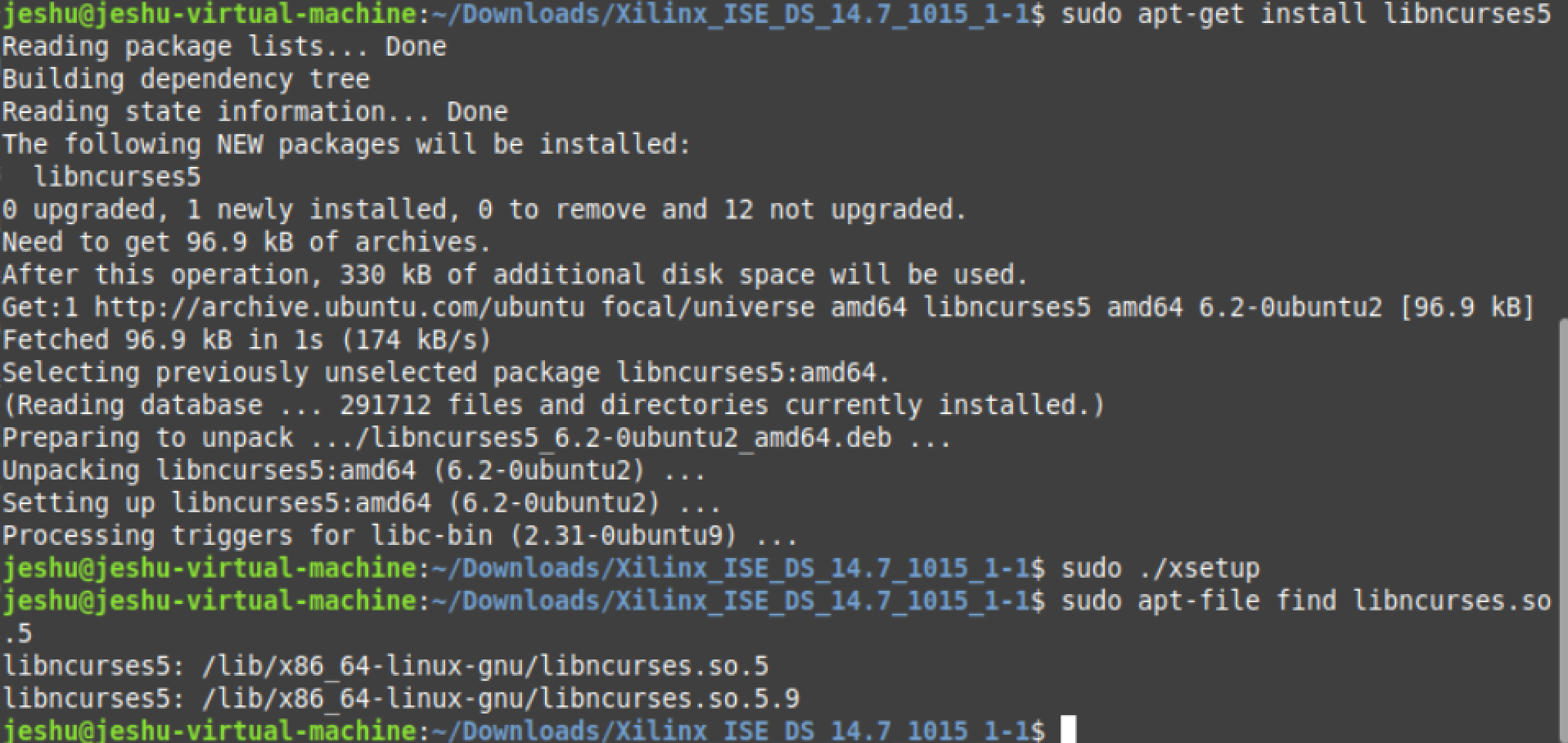
This fixed the error.
Best, Avro Mukherjee