

 danny0838
Page cannot be saved with error "response is undefined" occasionally
https://paperscan.orpalis.com/eula/ cannot be saved, webscrapbook says: Capturing (document) [197] https://paperscan.orpalis.com/eula/ ... Fatal error: response is undefined


0.23.0 is not the latest version. You could try latest 0.26.3 and see if the issue persists.
Caveats: 0.26.3 has passed the auto scanning but Mozilla AMO complained on our content script policy due to a potential security issue and insisted on disabling it until it passed a full staff review (see this issue for detail). Unfortunately their review process is very, very slow (this issue started 4 months ago and there's been no response for over a month).
We don't think there is a real security hazard in our latest version. But the latest version is disabled by AMO and won't be available until their review process has finished. If you don't want to wait for their slow review, you can download the mirror of the latest version here and use it at your own risk (of course you can review the source code by yourself to confirm whether it's really safe or not).
This is an old bug, I think. With some websites, only the first visited page will be captured correctly, after browsing to a different page WSB stops working.
In the OP example, going directly to https://paperscan.orpalis.com/eula/ WSB will work as expected as many times as wanted but after navigating to https://paperscan.orpalis.com/ it will output "Fatal error...".
To work around this bug until it is fixed, open about:addons in a new tab, disable then re-enable WSB, go back to the tab you want to capture and it should work again. This must be done every time the error occurs.

@cy7yz2rj Do you mean this:
- navigate https://paperscan.orpalis.com/eula/ in a tab (say X);
- capture tab X with WSB, which works successfully;
- navigate https://paperscan.orpalis.com/ in tab X;
- capture tab X with WSB, which shows "Fatal error"?
If that's what you mean. I cannot reproduce this issue.
i have tried and it is reproduced. but 1st stage i opened from gmail. at stage 4 says Capturing (document) [286] https://paperscan.orpalis.com/ ... Fatal error: response is undefined
I cannot reproduce the issue using the latest version of WSB (0.26.3) on Firefox 59.0.2. Which is the version you use?
Re: the 4 steps, yes, that's what I meant.
I've just made a fresh profile of 59.0.2 with WSB 0.26.3 and I can still reproduce. Fatal error on step 4, toggling WSB on then off on about:addons fixes it, navigating to another page breaks it again, etc
What is the capture settings you use? (You can export the options and paste the exported json file content here.)
my settings:
{ "capture.scrapbookFolder": "WebScrapBook", "capture.saveAs": "downloads", "capture.saveInScrapbook": true, "capture.saveAsciiFilename": false, "capture.saveBeyondSelection": false, "capture.saveFileAsHtml": false, "capture.saveDataUriAsFile": true, "capture.image": "blank", "capture.imageBackground": "remove", "capture.favicon": "remove", "capture.canvas": "save", "capture.audio": "blank", "capture.video": "blank", "capture.embed": "blank", "capture.object": "blank", "capture.applet": "blank", "capture.frame": "save", "capture.font": "remove", "capture.style": "save", "capture.styleInline": "save", "capture.rewriteCss": "url", "capture.script": "blank", "capture.noscript": "save", "capture.base": "blank", "capture.formStatus": "keep", "capture.downLink.mode": "none", "capture.downLink.extFilter": "###image\n#bmp, gif, ico, jpg, jpeg, jpe, jp2, png, tif, tiff, svg\n###audio\n#aac, ape, flac, mid, midi, mp3, ogg, oga, ra, ram, rm, rmx, wav, wma\n###video\n#avc, avi, flv, mkv, mov, mpg, mpeg, mp4, wmv\n###archive\n#zip, rar, jar, bz2, gz, tar, rpm, 7z, 7zip, xz, jar, xpi, lzh, lha, lzma\n#/z[0-9]{2}|r[0-9]{2}/\n###document\n#pdf, doc, docx, xls, xlsx, ppt, pptx, odt, ods, odp, odg, odf, rtf, txt, csv\n###executable\n#exe, msi, dmg, bin, xpi, iso\n###any non-web-page\n#/(?!$|html?|xht(ml)?|php|py|pl|aspx?|cgi|jsp)(.*)/i", "capture.downLink.urlFilter": "###skip common logout URL\n/[/=]logout\b/i", "capture.removeIntegrity": true, "capture.recordDocumentMeta": true, "capture.recordRemovedNode": false, "capture.recordRewrittenAttr": false, "capture.recordSourceUri": false, "capture.recordErrorUri": true, "viewer.useFileSystemApi": true, "viewer.viewHtz": true, "viewer.viewMaff": true, "indexer.autoDownload": false }
In my last test everything was defaults: new profile, only extension was WSB 0.26.3 from GitHub, no settings modified.
{ "capture.scrapbookFolder": "WebScrapBook", "capture.saveAs": "zip", "capture.saveInScrapbook": false, "capture.saveInMemory": false, "capture.saveAsciiFilename": false, "capture.saveBeyondSelection": false, "capture.saveFileAsHtml": false, "capture.saveDataUriAsFile": true, "capture.image": "save", "capture.imageBackground": "save", "capture.favicon": "save", "capture.canvas": "save", "capture.audio": "save", "capture.video": "save", "capture.embed": "blank", "capture.object": "blank", "capture.applet": "blank", "capture.frame": "save", "capture.font": "save", "capture.style": "save", "capture.styleInline": "save", "capture.rewriteCss": "url", "capture.script": "blank", "capture.noscript": "save", "capture.base": "blank", "capture.formStatus": "keep", "capture.downLink.mode": "none", "capture.downLink.extFilter": "###image\n#bmp, gif, ico, jpg, jpeg, jpe, jp2, png, tif, tiff, svg\n###audio\n#aac, ape, flac, mid, midi, mp3, ogg, oga, ra, ram, rm, rmx, wav, wma\n###video\n#avc, avi, flv, mkv, mov, mpg, mpeg, mp4, wmv\n###archive\n#zip, rar, jar, bz2, gz, tar, rpm, 7z, 7zip, xz, jar, xpi, lzh, lha, lzma\n#/z[0-9]{2}|r[0-9]{2}/\n###document\n#pdf, doc, docx, xls, xlsx, ppt, pptx, odt, ods, odp, odg, odf, rtf, txt, csv\n###executable\n#exe, msi, dmg, bin, xpi, iso\n###any non-web-page\n#/(?!$|html?|xht(ml)?|php|py|pl|aspx?|cgi|jsp)(.*)/i", "capture.downLink.urlFilter": "###skip common logout URL\n/[/=]logout\b/i", "capture.removeIntegrity": true, "capture.recordDocumentMeta": true, "capture.recordRemovedNode": false, "capture.recordRewrittenAttr": false, "capture.recordSourceUri": false, "capture.recordErrorUri": true, "viewer.useFileSystemApi": true, "viewer.viewHtz": true, "viewer.viewMaff": true, "indexer.autoDownload": false, "indexer.fulltextCache": true, "indexer.fulltextCacheFrameAsPageContent": true, "indexer.serverScripts": false }
I still cannot reproduce the issue using both of your options. If possible, providing a short video or a series of screenshots may help, at least before I can think of another factor to investigate.
I never said this explictly but opening the links in a new tab doesn't trigger the bug, so if I middle click my way through the OP site I can capture everything normally.
Another thing is that the small window that opens when WSB is capturing doesn't display the text unless it is maximised. But this must be unrelated because it happens everywhere, even in sites where the fatal error bug doesn't happen like github. Some screenshots:
- window with the fatal error but not displaying anything https://imgur.com/X1slWTK
- same window after maximising then minimising again (min. is optional, the text displays as soon as it is max.) https://imgur.com/CA9ecx3
I'm getting what appears to be the same bug on Kubuntu Linux 14.04.5 LTS with Firefox Developer Edition 63.0b4 (64-bit) and Web ScrapBook 0.27.0.
I was reading my way through this series of blog posts (The link is to page 1 of 12):
https://pharr.org/matt/blog/2018/04/18/ispc-origins.html
Once it got going, it was pretty reliable. If I'd left-clicked the "next" link to get to the page, Web ScrapBook would fail with this error. If I'd middle-clicked, it worked just fine.
Fatal error: response is undefined, can't access property "error" of it
I don't remember changing any of my Web ScrapBook settings from their defaults, but here they are just in case:
{
  "capture.scrapbookFolder": "WebScrapBook",
  "capture.saveAs": "folder",
  "capture.saveInScrapbook": true,
  "capture.saveInMemory": false,
  "capture.saveAsciiFilename": false,
  "capture.saveBeyondSelection": false,
  "capture.saveFileAsHtml": false,
  "capture.saveDataUriAsFile": true,
  "capture.image": "save",
  "capture.imageBackground": "save",
  "capture.favicon": "save",
  "capture.canvas": "save",
  "capture.audio": "save",
  "capture.video": "save",
  "capture.embed": "blank",
  "capture.object": "blank",
  "capture.applet": "blank",
  "capture.frame": "save",
  "capture.font": "save",
  "capture.style": "save",
  "capture.styleInline": "save",
  "capture.rewriteCss": "url",
  "capture.script": "blank",
  "capture.noscript": "save",
  "capture.base": "blank",
  "capture.formStatus": "keep",
  "capture.downLink.mode": "none",
  "capture.downLink.extFilter": "###image\n#bmp, gif, ico, jpg, jpeg, jpe, jp2, png, tif, tiff, svg\n###audio\n#aac, ape, flac, mid, midi, mp3, ogg, oga, ra, ram, rm, rmx, wav, wma\n###video\n#avc, avi, flv, mkv, mov, mpg, mpeg, mp4, wmv\n###archive\n#zip, rar, jar, bz2, gz, tar, rpm, 7z, 7zip, xz, jar, xpi, lzh, lha, lzma\n#/z[0-9]{2}|r[0-9]{2}/\n###document\n#pdf, doc, docx, xls, xlsx, ppt, pptx, odt, ods, odp, odg, odf, rtf, txt, csv\n###executable\n#exe, msi, dmg, bin, xpi, iso\n###any non-web-page\n#/(?!$|html?|xht(ml)?|php|py|pl|aspx?|cgi|jsp)(.*)/i",
  "capture.downLink.urlFilter": "###skip common logout URL\n/[/=]logout\\b/i",
  "capture.removeIntegrity": true,
  "capture.recordDocumentMeta": true,
  "capture.recordRemovedNode": false,
  "capture.recordRewrittenAttr": false,
  "capture.recordSourceUri": false,
  "capture.recordErrorUri": true,
  "viewer.useFileSystemApi": true,
  "viewer.viewHtz": true,
  "viewer.viewMaff": true,
  "indexer.autoDownload": false,
  "indexer.fulltextCache": true,
  "indexer.fulltextCacheFrameAsPageContent": true,
  "indexer.serverScripts": false
}
I'd been getting that same "WebScrapbook window is blank" problem ever since I installed it but, over the last few days, it seems to be displaying as intended. I got this without any resizing necessary:
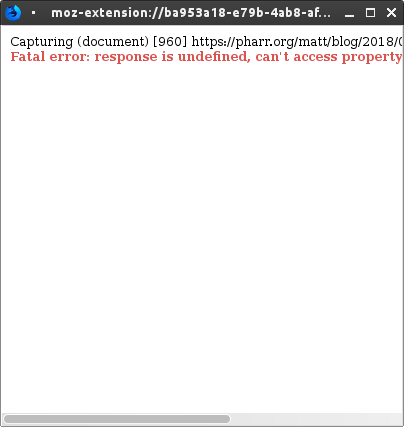

@ssokolow: The tab must be kept open during the capturing process, or an unexpected result would occur since the content of the page whose tab has been closed is no longer accessible.
I've know that for quite a while. That screenshot was taken while the tab was still open.
Speaking of which, that's very annoying because of how un-"fire and forget" it is compared to the original ScrapBook. Any chance of a "close associated tab on successful save" checkbox so I can just middle-click a "next" link, choose Web ScrapBook from the context menu, switch to the new tab, and know that, on success, the old tab will go away on its own?
Thank you for following up. We are closing the issue now. Reply if it appears again.

this error happens again. for example, i navigated, from yandex, to https://ru.wikipedia.org/wiki/%D0%90%D1%85%D0%BB%D1%8E_%D0%B0%D1%81-%D0%A1%D1%83%D0%BD%D0%BD%D0%B0_%D0%B2%D0%B0-%D0%BB%D1%8C-%D0%94%D0%B6%D0%B0%D0%BC%D0%B0%D0%B0 , saved it, it has been saved. then i navigated to https://ru.wikipedia.org/wiki/%D0%A1%D1%83%D0%BD%D0%BD%D0%B8%D1%82%D1%8B , tried to save, and it does not work.
@qdinar Please provide your version of OS, Firefox, and WSB. Also try using a new Firefox profile and see if the same issue persists.
ff 69.0.3 64 bit, wsb 0.56.1. it does not persist even in this profile. i have now opened it from here and saved.
ff 69.0.3 64 bit, wsb 0.56.1. it does not persist even in this profile. i have now opened it from here and saved.
You mean that after using a new profile, the capture works without problem?
no, i did not use a new profile. can using a new profile change behaviour in old profile? but maybe browser was restarted after os crash.
I've noticed that whether a page can be saved varies depending on how it was loaded within the same session.
(eg. I've had pages where they'll fail to save, but then opening them in a new tab will allow them to save, while reloading the original tab after said successful save still doesn't allow the original tab to save them.)
@ssokolow I have seen such issue a bit times recently. It happens on Firefox Developer Edition and opening the page in a new tab seems to resolve the issue. It also seems to be resolved after using a new profile. I haven't see this issue happen on Google Chrome and Release version of Firefox.
If someone still see this issue, please provide your OS, browser version (including Firefox channel), and WSB version, and test if using a new profile resolves it.
It happens so intermittently that I'd have to use the new profile as my normal profile to test it... and my profile is bother enough to rebuild that I'm still not feeling entirely charitable toward Mozilla for writing something buggy enough to make me do it twice and providing no programmatic way to build a profile from things like a list of AMO URLs.
(Once in the Firefox 3.6->4 upgrade in 2011 and once as a result of the flood of changes caused by the legacy->webext switch.)