

 danielpalme
Merging cobertura on mac produces different results
Merging the same cobertura files on windows vs mac produces a different output.
On a windows machine (using teamcity)
[16:31:50][Step 1/2] Starting: E:\BuildAgent7\temp\agentTmp\custom_script13456282315522100318.cmd
[16:31:50][Step 1/2] in directory: E:\w7\c307288456ca5252
[16:31:51][Step 1/2] Merge coverage
[16:31:52][Step 1/2] You can invoke the tool from this directory using the following commands: 'dotnet tool run reportgenerator' or 'dotnet reportgenerator'.
[16:31:52][Step 1/2] Tool 'dotnet-reportgenerator-globaltool' (version '5.1.9') was successfully installed. Entry is added to the manifest file E:\w7\c307288456ca5252\.config\dotnet-tools.json.
[16:31:53][Step 1/2] 2022-08-10T16:31:53: Arguments
[16:31:53][Step 1/2] 2022-08-10T16:31:53:  -reports:output/results/tests/**/coverage.cobertura.xml
[16:31:53][Step 1/2] 2022-08-10T16:31:53:  -targetdir:output/results/report/apicoverage
[16:31:53][Step 1/2] 2022-08-10T16:31:53:  -reporttypes:html;teamcitysummary
[16:31:53][Step 1/2] 2022-08-10T16:31:53:  -sourcedirs:E:/w7/c307288456ca5252
[16:31:54][Step 1/2] 2022-08-10T16:31:53: Writing report file 'output/results/report/apicoverage\index.html'
[16:31:54][Step 1/2] 2022-08-10T16:31:53: Report generation took 0.6 seconds
[16:31:54][Step 1/2] Process exited with code 0
On a mac (teamcity agent)
[16:32:57][Step 1/2] Starting: /Users/buildadmin/Documents/buildAgent/temp/agentTmp/custom_script9888885054801660460
[16:32:57][Step 1/2] in directory: /Users/buildadmin/Documents/buildAgent/work/c307288456ca5252
[16:32:57][Step 1/2] Merge coverage
[16:32:59][Step 1/2] You can invoke the tool from this directory using the following commands: 'dotnet tool run reportgenerator' or 'dotnet reportgenerator'.
[16:32:59][Step 1/2] Tool 'dotnet-reportgenerator-globaltool' (version '5.1.9') was successfully installed. Entry is added to the manifest file /Users/buildadmin/Documents/buildAgent/work/c307288456ca5252/.config/dotnet-tools.json.
[16:32:59][Step 1/2] 2022-08-10T16:32:51: Arguments
[16:32:59][Step 1/2] 2022-08-10T16:32:51:  -reports:output/results/tests/**/coverage.cobertura.xml
[16:32:59][Step 1/2] 2022-08-10T16:32:51:  -targetdir:output/results/report/apicoverage
[16:32:59][Step 1/2] 2022-08-10T16:32:51:  -reporttypes:html;teamcitysummary
[16:32:59][Step 1/2] 2022-08-10T16:32:51:  -sourcedirs:/Users/buildadmin/Documents/buildAgent/work/c307288456ca5252
[16:33:00][Step 1/2] 2022-08-10T16:32:52: Writing report file 'output/results/report/apicoverage/index.html'
[16:33:00][Step 1/2] 2022-08-10T16:32:52: Report generation took 0.4 seconds
[16:33:00][Step 1/2] Process exited with code 0
These are both run through teamcity and have the same artifacts provided to them to the source files are definitely the same. When i view the output report on mac its roughly half as covered as when its on windows, I can see some files are being listed twice as being covered and not covered
Windows Result:
Covered lines: 1256
Uncovered Lines: 262
Coverable Lines:1518
Total lines:2934
Line coverage:82.7%
Mac result
Covered lines:	1286
Uncovered lines:	1189
Coverable lines:	2475
Total lines:	4897
Line coverage:	51.9%
There are 2 cobertura files that get merged containing something like this (each one tests a different part of the app)
File 1
<class name="CommandHandler" filename="CommandHandler.cs" line-rate="1" branch-rate="1" complexity="1">
          <methods>
            <method name=".ctor" signature="(IHttpMessagesApiProxy)" line-rate="1" branch-rate="1" complexity="1">
              <lines>
                <line number="18" hits="2" branch="False" />
                <line number="19" hits="2" branch="False" />
                <line number="20" hits="2" branch="False" />
                <line number="21" hits="2" branch="False" />
                <line number="22" hits="2" branch="False" />
                <line number="23" hits="2" branch="False" />
              </lines>
            </method>
          </methods>
          <lines>
            <line number="18" hits="2" branch="False" />
            <line number="19" hits="2" branch="False" />
            <line number="20" hits="2" branch="False" />
            <line number="21" hits="2" branch="False" />
            <line number="22" hits="2" branch="False" />
            <line number="23" hits="2" branch="False" />
          </lines>
        </class>
File 2
 <class name="CommandHandler" filename="CommandHandler.cs" line-rate="0" branch-rate="1" complexity="1">
          <methods>
            <method name=".ctor" signature="(IHttpMessagesApiProxy)" line-rate="0" branch-rate="1" complexity="1">
              <lines>
                <line number="18" hits="0" branch="False" />
                <line number="19" hits="0" branch="False" />
                <line number="20" hits="0" branch="False" />
                <line number="21" hits="0" branch="False" />
                <line number="22" hits="0" branch="False" />
                <line number="23" hits="0" branch="False" />
              </lines>
            </method>
          </methods>
          <lines>
            <line number="18" hits="0" branch="False" />
            <line number="19" hits="0" branch="False" />
            <line number="20" hits="0" branch="False" />
            <line number="21" hits="0" branch="False" />
            <line number="22" hits="0" branch="False" />
            <line number="23" hits="0" branch="False" />
          </lines>
        </class>
Not sure whats going on here but in the meantime I'll switch to only using windows agents, I don't believe its due to different agent names as I have multiple windows agents and it doesnt have the issue when it runs on different ones of them.


Is it possible for you to share the Cobertura coverage files that you are merging? And the summary pages of the two reports would be helpful too.
I would like to figure out, which classes/files are causing the difference. Maybe there's an issue with a Windows vs. Linux file path format.
You can sent your files confidentially by email: [email protected]
I'm seeing a similar issue after moving all my tests to self hosted Ubuntu agents. Previously I was running some tests on Microsoft hosted Windows agents, some on self hosted Ubuntu and running the reportgenerator task on Windows. All those stages are now running on Ubuntu.
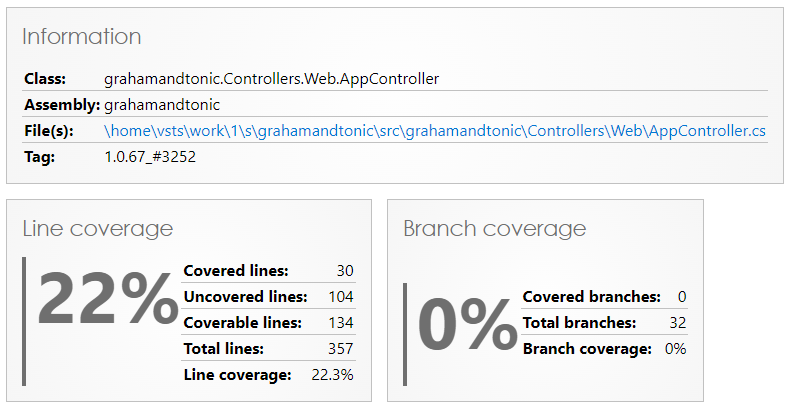
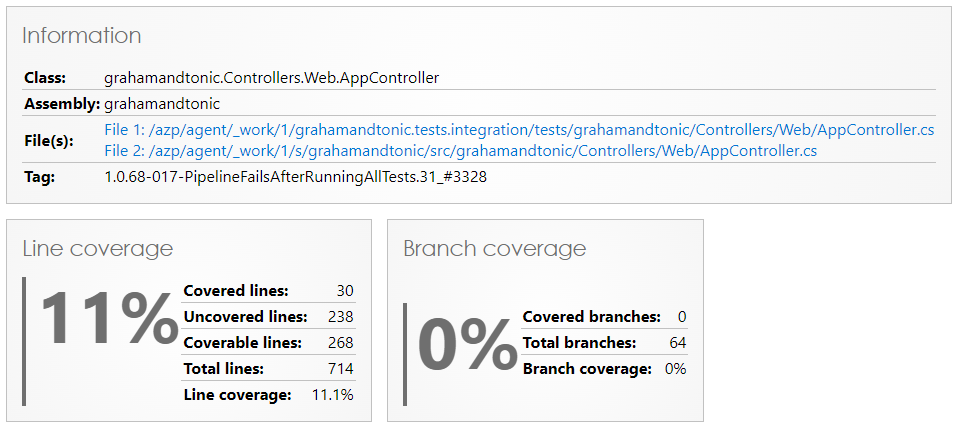
The code coverage has dropped because the Total Lines has doubled. It looks to be counting some classes twice, they have different file paths because the test artifacts are extracted to different locations but I'm not sure if this is the cause of the problem. Under the previous set up the paths were different as well, though in that case it was because the files were on different OSes.
Sample output - Mixed Windows & Ubuntu set up
Sample output - Ubuntu only set up

@NickGraham101 Thanks for sharing those details!
The problem is caused by the different file paths.
I'm not sure if I can solve this problem.
If several coverage files are merged, ReportGenerator detects that the class name is the same (here: grahamandtonic.Controllers.Web.AppController). Then it compares the files of the class, if the paths are the same, only one file is considered.
Here both files are considered because the paths are not the same.
In your case that's not what you might expect, in other situations it might be correct. E.g. a partial class may consist of two files with the same file name but in different directories.
Can you share the coverage files? You can sent your files confidentially by email: [email protected] Then I can have a closer look at your specific case.
Thanks @danielpalme for getting back to me. I've resolved my problem by aligning the paths in the different stages of my pipeline, the codecoverage is now back where it was. I probably should've done that in the first place 😳 Thanks for the explanation.
I did run some tests on different Microsoft hosted agents (windows-latest and ubuntu-latest) before I implemented the fix and saw different results from both. Windows reported as expected, Ubuntu was lower. I'll email you the coverage files and reports in case this is useful to you but my issue is fixed so no need to look into that further.
@NickGraham101: Thanks for sharing your files.
I just took a closer look. The problem is that your classes exist at two different locations.
- /azp/agent/_work/1/s/grahamandtonic/src/grahamandtonic/Controllers/Web/AppController.cs
- /azp/agent/_work/1/grahamandtonic.tests.integration/tests/grahamandtonic/Controllers/Web/AppController.cs
As stated above, there is nothing I can do about it, without causing other problems (e.g. incorrect handling of partial classes).
Aligning the paths manually is the best option here.