
Charts
 Charts copied to clipboard
 danielgindi
Xcode 14 Issues (ASAP fix needed)


Any solution for this? I face the same with this issue, anyway I trying to update to latest version and got another error(current target: 11.0)


I fixed it with the 4.1.0 update (min. deployment target should be iOS 12.)
pod 'Charts', '~> 4.1.0'
and
pod install --repo-update
for iOS 11 and below:
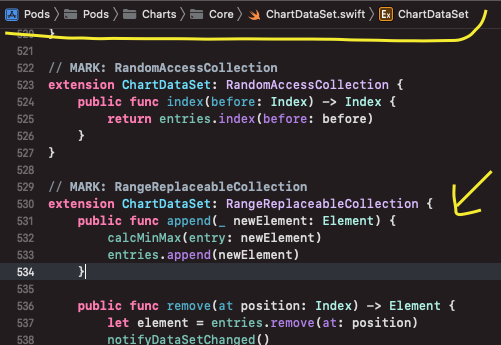
the following method should be added where shown in SS
public func replaceSubrange<C>(_ subrange: Swift.Range<Index>, with newElements: C) where C : Collection, Element == C.Element { entries.replaceSubrange(subrange, with: newElements) notifyDataSetChanged() }

有什么解决办法吗?我面临同样的问题,无论如何我尝试更新到最新版本并得到另一个错误(当前目标:11.0)
Podfile: platform :ios, '12.0'

Any solution for this? I face the same with this issue, anyway I trying to update to latest version and got another error(current target: 11.0)
[!] CocoaPods could not find compatible versions for pod "Charts": In Podfile: Charts (~> 4.1.0)
ChartsRealm was resolved to 3.4.0, which depends on
  Charts (~> 3.4.0)
Specs satisfying the Charts (~> 4.1.0), Charts (~> 3.4.0) dependency were found, but they required a higher minimum deployment target.

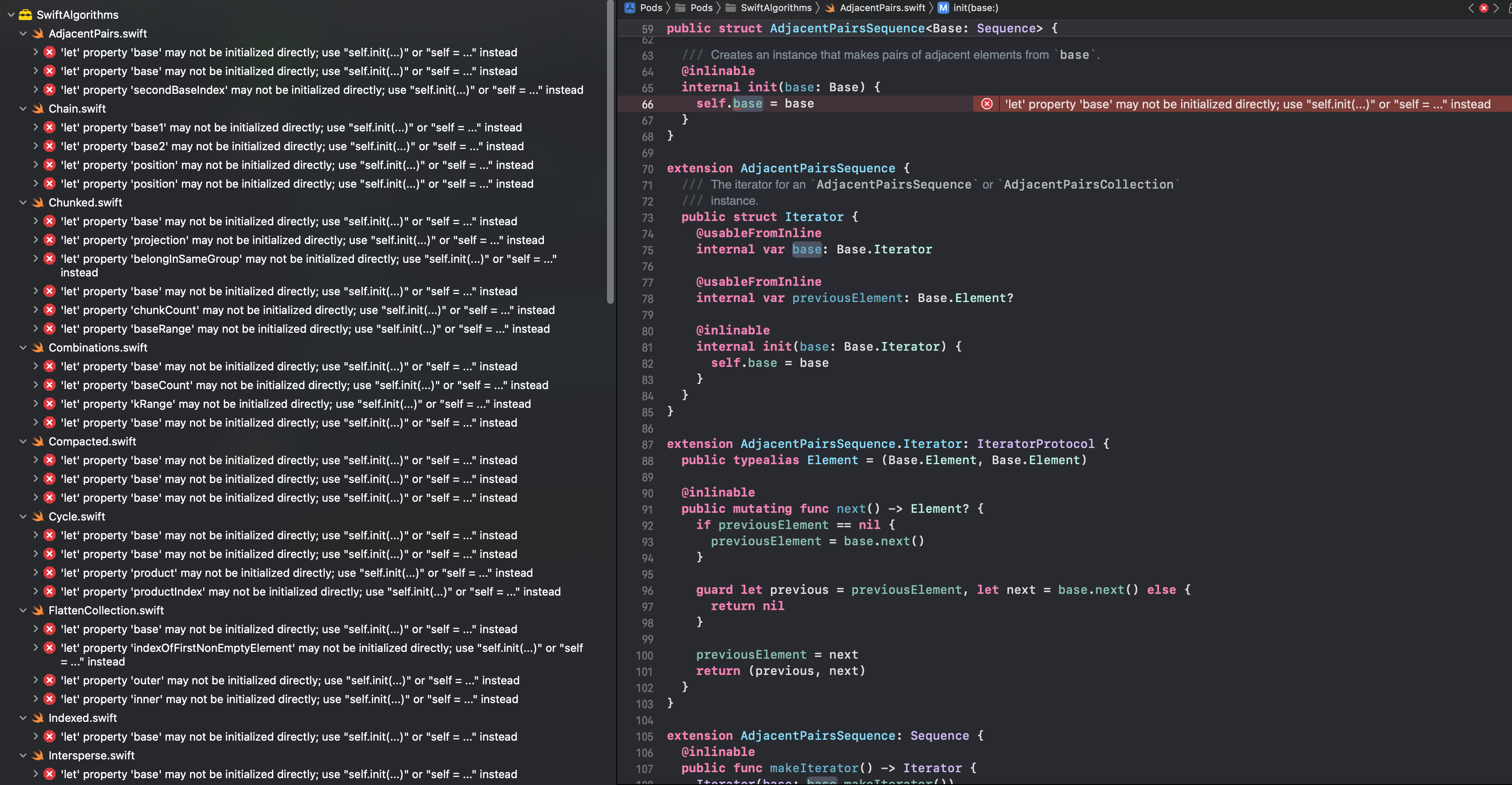 After i did
pod 'Charts', '~> 4.1.0'
and
pod install --repo-update
After i did
pod 'Charts', '~> 4.1.0'
and
pod install --repo-update
building the project would give these errors in Swift Algorithms that is a dependency from Charts.
Can someone help with the issue?

After i did pod 'Charts', '~> 4.1.0' and pod install --repo-update building the project would give these errors in Swift Algorithms that is a dependency from Charts.
Can someone help with the issue?
@klawsachkar were you able to solve this issue? I'm getting same error.

Any solution for this? I face the same with this issue, anyway I trying to update to latest version and got another error(current target: 11.0)
@sekny unfortunately it seems like ios 12 is the minimum supported version now.
UPDATE: The solution from xgjyjy mentioned below worked for me. Hooray!

Also seeing this issue, bumping version to 4.1.0 using SPM did not resolve the issue either.

@sethpoly for dependency rules select branch -> master using SPM. This fixed for me as of now.
ChartsRealm
Cool @EarthHeroOrg, Unfortunately my requirement is set the minimum target 11, is there any other better way?
@sethpoly for dependency rules select branch -> master using SPM. This fixed for me as of now.
are you sure, i tried that and it didnt work
Charts version: 3.6.0 Xcode version: 14.0 The solution is:
// MARK: RangeReplaceableCollection
extension ChartDataSet: RangeReplaceableCollection {

    // add this method
    public func replaceSubrange<C>(_ subrange: Swift.Range<Index>, with newElements: C) where C : Collection, Element == C.Element {
        entries.replaceSubrange(subrange, with: newElements)
        notifyDataSetChanged()
    }

    public func append(_ newElement: Element) {
        calcMinMax(entry: newElement)
        entries.append(newElement)
    }

Charts version: 3.6.0 Xcode version: 14.0 The solution is:
// MARK: RangeReplaceableCollection
extension ChartDataSet: RangeReplaceableCollection {

    // add this method
    public func replaceSubrange<C>(_ subrange: Swift.Range<Index>, with newElements: C) where C : Collection, Element == C.Element {
        entries.replaceSubrange(subrange, with: newElements)
        notifyDataSetChanged()
    }

    public func append(_ newElement: Element) {
        calcMinMax(entry: newElement)
        entries.append(newElement)
    }
have you used Pod or SPM for this?
and how did you add the missing conform to protocol method?
After i did pod 'Charts', '~> 4.1.0' and pod install --repo-update building the project would give these errors in Swift Algorithms that is a dependency from Charts.
Can someone help with the issue?
Try adding the following into post_install do |installer| in Podfile if you use Cocoapods so it looks like this:
post_install do |installer|
  installer.pods_project.targets.each do |target|
    target.build_configurations.each do |config|
        if target.name == "SwiftAlgorithms"
           config.build_settings['BUILD_LIBRARY_FOR_DISTRIBUTION'] = 'NO'
       end
    end
  end
end
and then run pod install. That might help

Any solution for SPM? I must use Charts version: 3.6.0. I can not update latest one. I need a solution for 3.6.0 via SPM.

Try adding the following into
post_install do |installer|in Podfile if you use Cocoapods so it looks like this:post_install do |installer| installer.pods_project.targets.each do |target| target.build_configurations.each do |config| if target.name == "SwiftAlgorithms" config.build_settings['BUILD_LIBRARY_FOR_DISTRIBUTION'] = 'NO' end end end endand then run pod install. That might help
that solved it for me, thank you a lot
@sethpoly for dependency rules select branch -> master using SPM. This fixed for me as of now.
@dhruvilpatel07 Thank you! This solved the issue for now.
Can anyone explain how I can run charts new version?
pod 'Charts', '~> 4.1.0'
pod install --repo-update
When I try I got below error on m1 mac
[!] CocoaPods could not find compatible versions for pod "Charts": In Podfile: Charts (~> 4.1.0)
Specs satisfying the Charts (~> 4.1.0) dependency were found, but they required a higher minimum deployment target.

Can anyone explain how I can run charts new version?
pod 'Charts', '~> 4.1.0'
pod install --repo-update
When I try I got below error on m1 mac
[!] CocoaPods could not find compatible versions for pod "Charts": In Podfile: Charts (~> 4.1.0)
Specs satisfying the
Charts (~> 4.1.0)dependency were found, but they required a higher minimum deployment target.
The minimum supported iOS version is 12 with Charts v4, so that might be your issue. See the conversation above for more details. If you are using iOS below 12 see the solution from xgjyjy
Try adding the following into
post_install do |installer|in Podfile if you use Cocoapods so it looks like this:post_install do |installer| installer.pods_project.targets.each do |target| target.build_configurations.each do |config| if target.name == "SwiftAlgorithms" config.build_settings['BUILD_LIBRARY_FOR_DISTRIBUTION'] = 'NO' end end end endand then run pod install. That might help
Thanks @idemche, That also worked for me...

Can anyone explain how I can run charts new version? pod 'Charts', '~> 4.1.0' pod install --repo-update When I try I got below error on m1 mac [!] CocoaPods could not find compatible versions for pod "Charts": In Podfile: Charts (~> 4.1.0) Specs satisfying the
Charts (~> 4.1.0)dependency were found, but they required a higher minimum deployment target.The minimum supported iOS version is 12 with Charts v4, so that might be your issue. See the conversation above for more details. If you are using iOS below 12 see the solution from xgjyjy
I changed the Minimum supported iOS version to 12 but still it's not working

Charts version: 3.6.0 Xcode version: 14.0 The solution is:
// MARK: RangeReplaceableCollection
extension ChartDataSet: RangeReplaceableCollection {

    // add this method
    public func replaceSubrange<C>(_ subrange: Swift.Range<Index>, with newElements: C) where C : Collection, Element == C.Element {
        entries.replaceSubrange(subrange, with: newElements)
        notifyDataSetChanged()
    }

    public func append(_ newElement: Element) {
        calcMinMax(entry: newElement)
        entries.append(newElement)
    }
可以!worked for me!

Can anyone explain how I can run charts new version? pod 'Charts', '~> 4.1.0' pod install --repo-update When I try I got below error on m1 mac [!] CocoaPods could not find compatible versions for pod "Charts": In Podfile: Charts (~> 4.1.0) Specs satisfying the
Charts (~> 4.1.0)dependency were found, but they required a higher minimum deployment target.The minimum supported iOS version is 12 with Charts v4, so that might be your issue. See the conversation above for more details. If you are using iOS below 12 see the solution from xgjyjy
I changed the Minimum supported iOS version to 12 but still it's not working
 Have you change the ios Version in podfile?

Can anyone explain how I can run charts new version? pod 'Charts', '~> 4.1.0' pod install --repo-update When I try I got below error on m1 mac [!] CocoaPods could not find compatible versions for pod "Charts": In Podfile: Charts (~> 4.1.0) Specs satisfying the
Charts (~> 4.1.0)dependency were found, but they required a higher minimum deployment target.The minimum supported iOS version is 12 with Charts v4, so that might be your issue. See the conversation above for more details. If you are using iOS below 12 see the solution from xgjyjy
I changed the Minimum supported iOS version to 12 but still it's not working
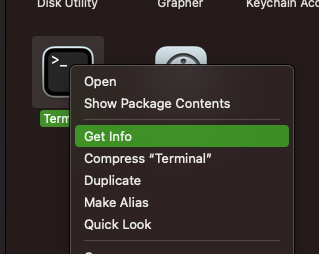
I had the same issue, if you're using Mac with M1 then before opening your terminal check the option Open using Rosetta and then open terminal and update your pods again.

Any solution for SPM? I must use Charts version: 3.6.0. I can not update latest one. I need a solution for 3.6.0 via SPM.
You have to add the repo (zip of 3.6.0) locally like described here: https://developer.apple.com/documentation/xcode/editing-a-package-dependency-as-a-local-package Then you can overwrite the function mentioned earlier in this thread.

I fixed it with the 4.1.0 update
pod 'Charts', '~> 4.1.0'andpod install --repo-update
Thank you very much for helping me out

