

 danfruehauf
Usability - why does it ask me to enter remote and local IP addresses, and the netmask?
Hi! Really cool initiative here. I'm looking forward to using it in a transparent way, instead of me needing to open up a SSH tunnel as a SOCKS proxy in a terminal and then telling networkmanager to use it as a proxy, which is painful because it's a heavily involved, non-automated process.
I tried testing your app but got blocked with this confusing part (just like the screenshot in your README):

When presented with that, I have no idea how to set it up. How would I know the remote and local IPs before connecting to the SSH tunnel? In case I'm representative of the target audience, here's all I want to set, nothing more:
- Nickname of the connection I'm setting up (the "Name" field at the top currently)
- Server hostname/IP
- Server port
- System username on that server (because it often will not match my local username)
That's it. All the rest could be shoved into the hidden "Advanced" button.
The UI also is a bit unclear in that it doesn't tell me if networkmanager will "enforce" this SSH tunnel. I'd like the assurance that it will force the SSH/VPN to be active before letting apps (other than captive portal handling like https://bugzilla.gnome.org/show_bug.cgi?id=769692) -- such as Evolution, the browser, Telepathy/xchat/etc. -- establish connections. I'd like the ability to set it to be used for specific known networks, or "all networks except X, Y, Z" (ex: "everything is untrusted except at home and the office".

Ouch, that's not good. The defaults should be filled in automatically when you create a new connection. By default it goes with: Remove IP Address - 172.16.40.1 Local IP Address - 172.16.40.2 Netmask - 255.255.255.252
I'll look into that, but it should have some default values.

I think I saw those defaults, but since I am not a networking geek I thought "What are those IPs? They have nothing to do with my IP. And why would I want IPs statically set into the settings? This must be a mistake, I just want to connect to my target server…"
Understood, yet this utility allows you to define what IPs you and your servers are going to have. You should change them only if you want to avoid a conflict. The defaults are probably OK for 99.9999% of the people :)
In that case, that should solve your problem, wouldn't it?
NetworkManager-ssh-1.2.6-1.fc25.x86_64
plasma-nm-ssh-5.9.5-1.fc25.x86_64
On Fedora 25 does not have default IPs set, so it's still very confusing.
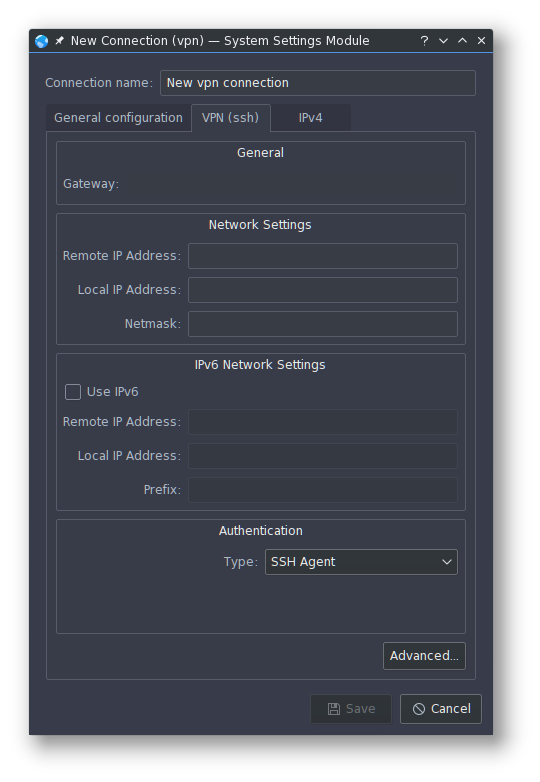

Ouch, I can see that. So that's the KDE/plasma interface. I'm not sure how the GTK interface is being transated to it. I'll have to have a look. I'm running f24 and this problem does not show up from the traditional nm-applet. I'm likely to update soon and see what happens.
This is relevant also to #59 - as the dialog you've shown there is also a KDE/plasma one.
Hi, I think @nekohayo would like to see a more general SSH plugin, where the user can decide if he want to use local port forwarding (-L), remote port forwarding (-R ), SOX proxy (-D), instead of the currently implemented VPN tunnel method. And those methods do not require the mentioned fields. They are only needed for tunneling.
And I would love to see that as well, so +1 for this feature request ;)
I also read your tip about how this can be solved, however that will fail if the server do not allow tunneling in general.
So if the tunneling part would be optional, then we could simply use the 'Extra SSH options' filed to achieve that...
And if you would rename that section to "Tunneling" instead of the current "Networking", then it would be more precise and probably less confusing.

I think @nekohayo would like to see a more general SSH plugin, where the user can decide if he want to use local port forwarding (-L), remote port forwarding (-R ), SOX proxy (-D), instead of the currently implemented VPN tunnel method. And those methods do not require the mentioned fields. They are only needed for tunneling.
That's a really good feature request. I'll have to find time to work on it as it'll require quite a bit of UI changes. But I like it - can't deny.
As an Idea how I would imaging a GUI
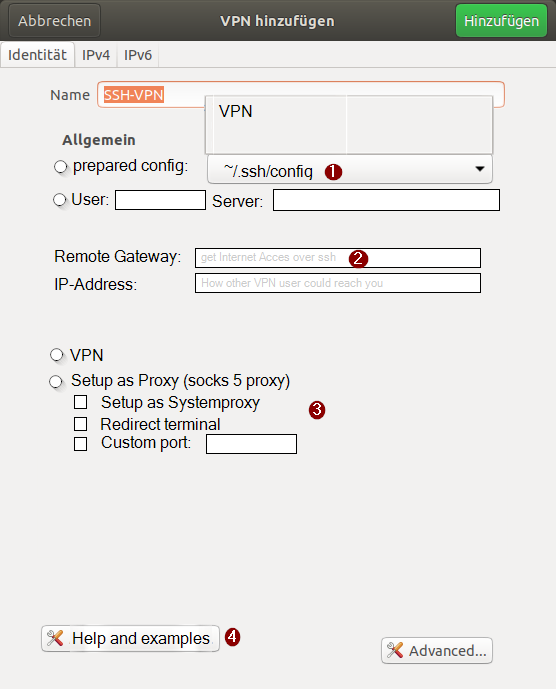
- Allow to link to ~/.ssh/config entry.
- Add some helping Text for not network specialists (like me)
- Maybe you could add some other system settings to.
- Maybe you could add a link to a page with examples.
My Idea is not a definitive GUI only an Idea


I can confirm the missing default IPs on Kubuntu 18.10
I'm not a Kubuntu user myself, but happy to fix what is required. Do they have a bug tracker?
perhaps here is the relevant information for submitting bugs and pull requests. https://community.kde.org/Kubuntu/BugTriage or https://bugs.kde.org/
I have the same problem and don't know which ip should I set for remote and local addresses! I think tunneling does not necessary needs that. I tried Remove IP Address - 172.16.40.1 Local IP Address - 172.16.40.2 Netmask - 255.255.255.252
but didn't work and failed to connect
