

 danesparza
Calendar to display
How do you select a calendar, it just says Loading... and never loads. I am hosting it on Dreamhost. Great work btw... exactly what I was looking for... a Dakboard replacement.

Well, there should either be a dropdown to select a calendar, or a button that lets you authorize your Google account. But after looking at the code, it looks like I forgot to pull over the 'authorize' button functionality when I migrated to create-react-app and ES2015.
Let me see if I can add that in easily in the near future.
Thanks for the reference to Dakboard - I didn't realize that product existed. 👍

Added the auth button back if there is an authorization failure when getting calendars. In testing, I discovered you might need to refresh the web app (ctrl-F5) after authorizing with Google. That seems like a bug -- let me know if you needed to do that too.
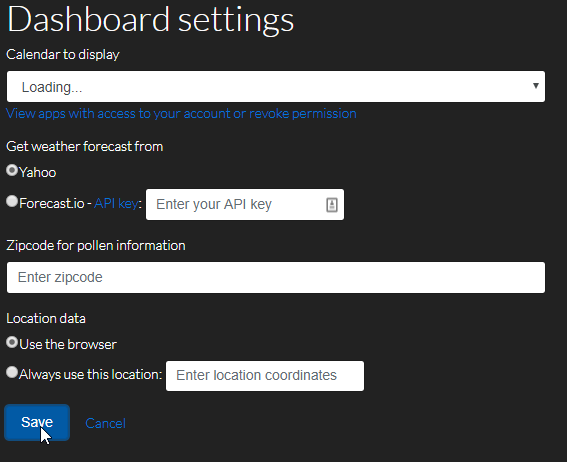
Does the button eventually display -- or does it just stay on 'loading' for more than 30 seconds?
the button never displays.
On Wed, Mar 28, 2018, 1:50 PM Dan Esparza [email protected] wrote:
Does the button eventually display -- or does it just stay on 'loading' for more than 30 seconds?
— You are receiving this because you authored the thread. Reply to this email directly, view it on GitHub https://github.com/danesparza/Dashboard/issues/4#issuecomment-376995918, or mute the thread https://github.com/notifications/unsubscribe-auth/AM6sx7DfRYLCmaUl7niPt9_4V86kC1DCks5ti9t9gaJpZM4S9OQi .
Thanks @ragincajunintx -- by any chance, can you try this in Chrome and show me what's in your developer console when this happens?
hi @danesparza i'm having the same problem with chrome on OS X right now. the "authorize" button does appear in safari just fine.


@mrtaco00 I have a suspicion: Are you attempting to load this on a non-HTTPS site? If you can, try loading this on an HTTPS based site and tell me if you have a different result. I suspect this is caused by browser restrictions on non-HTTPS cross-domain requests.
sorry for the delay in replying! I tried running via https (HTTPS=true yarn start --ssl), but saw the same behavior
The only error I see in the console is in SettingsUtils.js:32
There was a problem reading the cookie: SyntaxError: Unexpected token u in
JSON at position 0
at Object.parse (
[image: image.png]
On Thu, Jun 14, 2018 at 2:13 PM Dan Esparza [email protected] wrote:
@mrtaco00 https://github.com/mrtaco00 I have a suspicion: Are you attempting to load this on a non-HTTPS site? If you can, try loading this on an HTTPS based site and tell me if you have a different result. I suspect this is caused by browser restrictions on non-HTTPS cross-domain requests.
— You are receiving this because you were mentioned. Reply to this email directly, view it on GitHub https://github.com/danesparza/Dashboard/issues/4#issuecomment-397389244, or mute the thread https://github.com/notifications/unsubscribe-auth/AG7AAfG96qQYjdkI_1Q4KrVNCO6gjMyeks5t8qfVgaJpZM4S9OQi .