

 damienbod
Azure AD Refreshing Session
I am using Azure AD as the idp, and either when the accesstoken times out or issuing command forceRefreshSession, it causes the id token and access token to be null which looks like the user signed out.
To Reproduce To reproduce, either allow the access token to expire or execute the below command.
this.oidcSecurityService.forceRefreshSession().subscribe( () => { console.log("token refreshed succesfully"); });
See config below
config: {
authority: 'https://login.microsoftonline.com/
Expected behavior When the access token expires or if the user refreshes the access token manually, the access token and id_token do not return null
Screenshots
[DEBUG] 0-xxxxx - Getting signinkeys from https://login.microsoftonline.com/common/discovery/keys
angular-auth-oidc-client.js:160 [DEBUG] xxxxx - Did not find any configured route for route https://login.microsoftonline.com/common/discovery/keys
angular-auth-oidc-client.js:160 [DEBUG] 0-xxxxxxx - No id_token found, skipping id_token validation
angular-auth-oidc-client.js:160 [DEBUG] 0-xxxxxx - authCallback token(s) validated, continue
angular-auth-oidc-client.js:160 [DEBUG] 0-xxx - storing the accessToken
[DEBUG] 0-xxxxxx- Checking: silentRenewRunning: true - has idToken: false - has userData: true
Desktop (please complete the following information):
- OS: Windows 10
- Browser chrome
- Version 95


@everflux I am not sure if it is a duplicate. Essentially the issue still happens after about an hour after logging in. I am unable to find a way to get a new access token about an hour after logging in.
The default token lifetime of the access token is indeed an hour. I experience the same problem, but only after the second refresh. I hope #1342 is released soon.
@everflux My expectation would be the user shouldn't have to reauthenticate as long as he or she uses the application let's say once a day similar to how facebook and google work. For me that is not happening using Azure Ad. I am pretty new to this, and trying to understand what is happening in the oidc client. Would #1342 resolve this issue I am facing?
The thing about the user not having to re-authenticate while using the app is more or less exactly what refresh tokens are for. They can be rotated (refreshed) as well, theoretically providing the option of never having to re-authenticate again.
I assume that #1342 fixes the issue, therefore I hope that @damienbod can provide a release soon so I can test it.
I want to test this, but version 14 is only works with Angular 14. Is there a plan to have this working angular version 12? I am using 14.1.2 since I am not sure which version 14 was updated with this fix.
Just a followup, I used a test project to try, and still getting the same issue as before. The result of forcedRefresh service call is null. This looks related to #1431
Here is something strange, I added scopes of 'openid profile offline_access' to the refresh token request using variable customParamsRefreshTokenRequest and now I am getting an id token back in addition to the refresh token and access token. Now it is failing on the authentication the id token. Can you advise I am missing something? See the below screenshot of the issue.
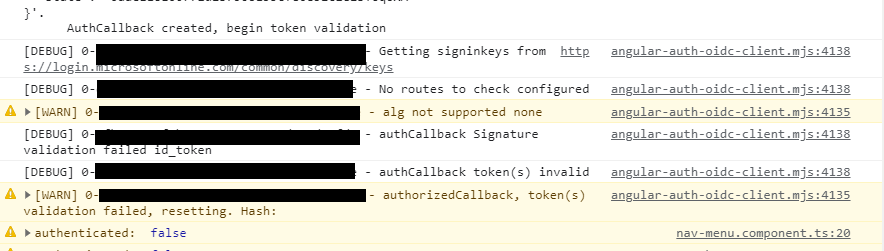
alg is invalid, how is the token signed? Do you run in https?
Greetings Damien
Update. I was able to by pass the "No routes to check configured" issue by adding https://login.microsoftonline.com/common/discovery/keys to the secured route. However, I still can't get past the alg no supported none issue. Somehow, the id_token seems to loose the algorithm. I am not sure if the request or azure is making the algorithm empty. Any suggestions?
If you are authenticating against Azure AD, here's an example to compare to:
https://github.com/damienbod/AzureADAuthRazorUiServiceApiCertificate/tree/main/AngularAzureADMultipleApis/AngularCliAzureAD
Or Azure AD B2C
https://github.com/damienbod/azureb2c-fed-azuread/tree/main/AngularB2CClient
@damienbod I resolved the issue and will request this issue to be closed. A few things were wrong on my end for configuration. Going through the 2.0 endpoint is very different than the 1.0 endpoint for Azure Ad. I am not sure if you want to add a comment for the newbies stating such so they won't run into the same mistake. Here is how I resolved the issue in case others are having the same problem.
- I needed to use the V2.0 and not the V1.0 endpoint which is
https://login.microsoftonline.com/<tenant id>/v2.0 - I needed to use the v2.0 and not v1.0 endpoint for the well known endpoint which is
https://login.microsoftonline.com<tenant id>/v2.0/.well-known/openid-configuration - Add the discovery keys endpoint as a "secure route" per the debug statement
- Set ignoreNonceAfterRefresh to true
- Add scopes of openid profile offline_access to variable customParamsRefreshTokenRequest