

 damentz
Strong performance issues on latest Liquorix versions
Hey,
Since some versions of Liquorix (maybe two-three weeks), I've got some CPU performance issue, with applications that suddenly takes way more CPU that they need and freezes a bit.
I'm using Liquorix for its ACS override patch for creating a GPU passthrough for my Windows 11 KVM, and KVM is probably the most affected by these freezes (cracking audio, freezing image, etc).
I was wondering if it was due to a faulty memory, but I did run multiple tests and everything seems okay. Same for my HDD/SDD, nothing is corrupted and everything seems fine.
My inxi -bxxzG:
System:
  Kernel: 5.19.0-1.1-liquorix-amd64 x86_64 bits: 64 compiler: gcc v: 11.2.0
    Desktop: GNOME 42.2 tk: GTK 3.24.33 wm: gnome-shell dm: GDM3
    Distro: Ubuntu 22.04.1 LTS (Jammy Jellyfish)
Machine:
  Type: Desktop Mobo: ASRock model: B450 Gaming K4
    serial: <superuser required> UEFI: American Megatrends v: P4.20
    date: 06/19/2020
Battery:
  Device-1: hidpp_battery_0 model: Logitech Wireless Keyboard
    serial: <filter> charge: 55% (should be ignored) status: Discharging
CPU:
  Info: 6-core AMD Ryzen 5 3600X [MT MCP] arch: Zen 2 speed (MHz): avg: 2841
    min/max: 2200/4409
Graphics:
  Device-1: NVIDIA GK104 [GeForce GTX 760] vendor: Micro-Star MSI
    driver: nvidia v: 470.141.03 pcie: speed: 8 GT/s lanes: 4 bus-ID: 01:00.0
    chip-ID: 10de:1187
  Device-2: NVIDIA TU116 [GeForce GTX 1660 SUPER] vendor: PNY
    driver: vfio-pci v: N/A pcie: speed: 2.5 GT/s lanes: 16 bus-ID: 0a:00.0
    chip-ID: 10de:21c4
  Display: x11 server: X.Org v: 1.21.1.3 compositor: gnome-shell driver: X:
    loaded: nvidia gpu: nvidia,vfio-pci display-ID: :0 screens: 1
  Screen-1: 0 s-res: 3840x1168 s-dpi: 96
  Monitor-1: DVI-D-0 pos: bottom-r res: 1920x1080 dpi: 102
    diag: 547mm (21.5")
  Monitor-2: DVI-I-0 pos: primary,top-left res: 1920x1080 dpi: 92
    diag: 609mm (24")
  OpenGL: renderer: NVIDIA GeForce GTX 760/PCIe/SSE2
    v: 4.6.0 NVIDIA 470.141.03 direct render: Yes
Network:
  Device-1: Realtek RTL8111/8168/8411 PCI Express Gigabit Ethernet
    vendor: ASRock driver: r8169 v: kernel pcie: speed: 2.5 GT/s lanes: 1
    port: c000 bus-ID: 09:00.0 chip-ID: 10ec:8168
Drives:
  Local Storage: total: 6.83 TiB used: 931.61 GiB (13.3%)
Info:
  Processes: 374 Uptime: 1h 7m Memory: 15.56 GiB used: 4.4 GiB (28.3%)
  Init: systemd v: 249 runlevel: 5 Compilers: gcc: 11.2.0 alt: 10/11/9
  clang: 14.0.0-1ubuntu1 Packages: 3820 apt: 3788 flatpak: 15 snap: 17
  Shell: Zsh v: 5.8.1 running-in: tilix inxi: 3.3.13
My grub cmdline options:
quiet splash vfio-pci.ids=10de:21c4,10de:1aeb,10de:1aec,10de:1aed,1b21:0612 amd_iommu=on pcie_acs_override=downstream,multifunction
Can reproduce 5.18-16 to 5.19.0-1 versions. Cannot test on older versions, I don't have them anymore and they are not available on the PPA!

Hey @Donokami, thanks for reaching out. A few things have changed in the last few weeks so I have a few questions and things you can try:
- What is the CPU freq scheduler you are using? Improper scaling can cause issues like you're describing. One change made recently is to disable schedutil and only support acpi-cpufreq performance / ondemand governors (and intel/amd-pstate if explicitly enabled). I recommend you stay on performance unless you really need power savings, such as on a laptop. You can use TLP to force the performance governor.
- What happens if you disable expedited RCU primitives? Pass
rcupdate.rcu_normal=1into kernel boot cmdline to revert the setting passed by the kernel. - There was large change to PDS made on August 1st, that reverted an optimization to make room for upstream fixes for priority. This was done on version 5.18-18 / 5.18.0-15.2. Does this version ring a bell or was the issue occurring earlier than that?
Sorry for the barrage of questions but I think this will get us closer to the issue.

Also, this issue opened on the official linux-prjc project might be related: https://gitlab.com/alfredchen/linux-prjc/-/issues/62
So another note, I can confirm that PDS performs poorly once the amount of work tasked is higher than the amount of cores to perform the work. This appears to be something internal to PDS, and perhaps the watermark preempt fix that I introduced lately made it worse.
In the meantime, what I can confirm is that priorities work very well. If you have any tasks that perform badly while under load, make sure their priorities are higher than the work being performed, or that the burst workload are lower priority on average than everything else.
This is a behavior that was common with MuQSS. A system overloaded will on average appear to perform worse than stock / CFS at times. However, with a small nudge to nice values, that's enough for interactive applications to perform deterministically. A good test I use is a kernel build with make -j$(nproc), while leaving https://www.vsynctester.com/ open. A simple nice adjustment will allow Firefox to reliably render at my refresh rate with minimal deviation. Without adjusting for nice on the build, Firefox will occasionally drop frames or miss render targets. Maybe this is something PDS/BMQ should be tuned for, but in the meantime you need to adjust nice levels.
Hey, And first, thank you so much for your patience and the interest you put in this issue, it means! I did not answer for a while, I made a lot of tests to understand my issue, and why it happens.
I'll start with the last test I made, which confirms that my hardware shouldn't be faulty : on a Win11 session (the one I usually host on KVM, but now as host, without emulation), this CPU stuttering issue doesn't happen at all. Other interesting test I made, is running a non-lqx Linux 5.15.0-46 kernel, and see if it fixes the issue : nope. So good news for you, I don't think the changes you made were at the source of the issue.
So I checked the APT logs to see which changes were made on the machine, and the Nvidia 470 driver has been updated at a date were I didn't see the issue (here is the changelog), so it was suspect. Back in the past I had a lot of issues with these drivers, so I tried to force manual install of the 470.129.06 version over the 470.141.03, it did not install successfully.
So I tried to install the 390 driver, it did not affect the issue. Same for the nouveau driver.
What is the CPU freq scheduler you are using?
I was using ondemand, but on your advice I switched to Performance with TLP (thanks for the tips btw, I was searching how to properly switch the governor for a while!) ; no effect on the issue (but better frequencies, hehe).
Pass rcupdate.rcu_normal=1 into kernel boot cmdline to revert the setting passed by the kernel.
It works same as before, not worse, not better!
leave vsynctester.com open
Just writing this current message while getting vsynctester open gets me this:
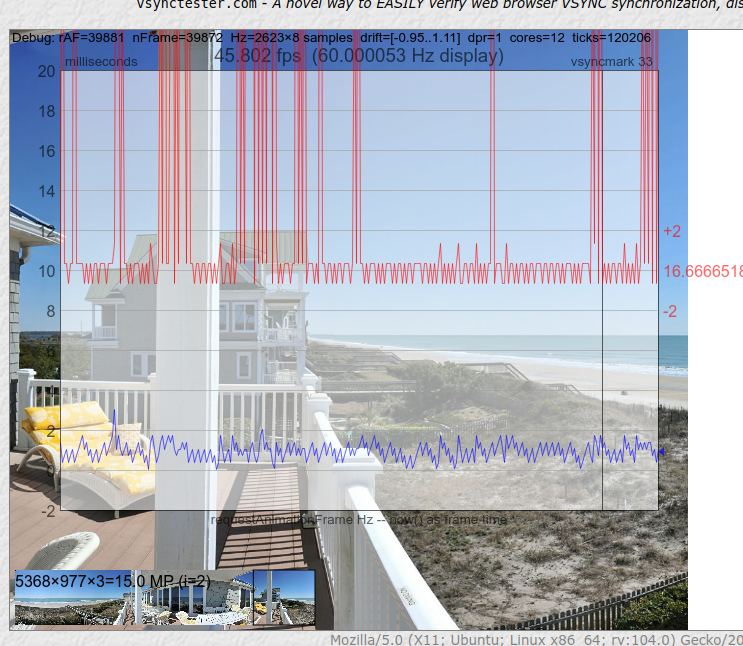 Another fun way to test it is to open a simple Minecraft session. It is totally unplayable, I got 6 fps ; I usually can play with shaders at 60 fps!
So as you see, I still don't get the source of my issue. Since it always happen when some application needs GPU acceleration, and how it corroborates with the nvidia driver update, I'm still suspecting the nvidia driver to be the source of the issue. I'm doing tons of tests, I still don't have any results. For now I can't really suspect liquorix, so if you want to close you can ! I'll anyways give an update when I fix this, my next tests are using my other GPU and if it doesn't work, I'll retry the nvidia driver 470.129.06 installation.
Ok, in the next 1-2 hours, a new release is coming out that I believe helps with this. I verified by running a kernel build at nice "0" on all threads, and Firefox behaved on vsynctester.com, for the most part.
As for what changed, three things are impacting it:
- Yielding is disabled by default. Firefox uses yielding to the detriment of PDS. It's better for Firefox to assume it's the only thing running on the system rather than yielding to other processes
- I reintroduced an optimization developed by @openglfreak, with help from @imaami and @torvic9: https://gitlab.com/alfredchen/linux-prjc/-/issues/63#note_1068859074
- Some stable sync commits may have improved the behavior of PDS, especially in regards to changes to time-to-wake-up code: https://github.com/zen-kernel/zen-kernel/commits/5.19/prjc
Things are better on my end, let me know if the latest update (coming soon), helps
Tests done, on 5.19.0-2.1-liquorix-amd64, and it sadly doesn't affect my issue.
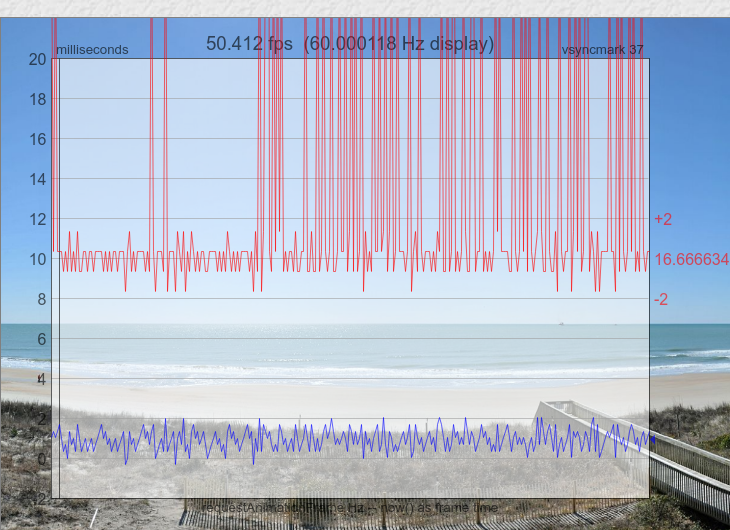 Howewer, starting Firefox from commandline give me something a bit interesting:
[GFX1-]: glxtest: VA-API test failed: failed to initialise VAAPI connection.
[GFX1-]: More than 1 GPU from same vendor detected via PCI, cannot deduce device
It looks like Firefox can't use the video acceleration API, explaining why my CPU is quickly overloaded. Another interesting bug I got since I switched from Ubuntu 21.10 to Ubuntu 22.04 is this message on all my flatpaks:
[19493:0819/014852.230570:FATAL:gpu_data_manager_impl_private.cc(442)] GPU process isn't usable. Goodbye.
To mitigate this, I always use the --disable-gpu flag and it works, but it really seems that the va-api doesn't do its job.
A sudo vainfo command give me this:
libva info: VA-API version 1.14.0
libva info: Trying to open /usr/lib/x86_64-linux-gnu/dri/nvidia_drv_video.so
libva info: va_openDriver() returns -1
vaInitialize failed with error code -1 (unknown libva error),exit
And I don't really get why libva is searching in this folder. I checked if the va-api packages were installed (mesa-va-drivers vdpau-driver-all libvdpau-va-gl1) and they are.
The Firefox message is quite interesting btw, since it meets the situation of my computer: I've got two GPUs, one loaded with nvidia driver, the other one with vfio-pci for KVM passthrough purpose (here the result of lshw -c video):
  *-display
       description: VGA compatible controller
       product: GK104 [GeForce GTX 760]
       vendor: NVIDIA Corporation
       physical id: 0
       bus info: pci@0000:01:00.0
       version: a1
       width: 64 bits
       clock: 33MHz
       capabilities: pm msi pciexpress vga_controller bus_master cap_list rom
       configuration: driver=nvidia latency=0
       resources: irq:71 memory:fb000000-fbffffff memory:c8000000-cfffffff memory:d0000000-d1ffffff ioport:f000(size=128) memory:fc000000-fc07ffff
  *-display
       description: VGA compatible controller
       product: TU116 [GeForce GTX 1660 SUPER]
       vendor: NVIDIA Corporation
       physical id: 0
       bus info: pci@0000:0a:00.0
       version: a1
       width: 64 bits
       clock: 33MHz
       capabilities: pm msi pciexpress vga_controller cap_list rom
       configuration: driver=vfio-pci latency=0
       resources: irq:255 memory:f9000000-f9ffffff memory:b0000000-bfffffff memory:c0000000-c1ffffff ioport:e000(size=128) memory:fa000000-fa07ffff
Since my GTX 760 GPU is really starting to be old (almost 9 years), I've bought an RTX 3060 to be my next vfio loaded GPU, so the next week I'll be able to try if the vaapi works correctly on this setup (on 515 nvidia driver). But thats quite a dirty way to fix this software issue, so before getting the hardware I'll continue to do tests: mainly disable any drivers on the 1660 Super, to see if the nvidia driver has some incompatibility with vfio ; and also debugging the vainfo output!
You're definitely on to something with Firefox. There's been lots of improvements to their GPU acceleration, but I'm very aware that before I threw away my last nvidia GPU, nvidia's drivers had really bad issues with rendering fairness. Especially on Firefox, I would always leave GPU acceleration off since you couldn't render a video on one window at 60fps while also scroll at 60fps on another.
These I found out later were nvidia specific bugs. I wonder if you're hitting them. On multiple systems between AMD and Intel, I don't have these rendering graphics bugs, but I did have to pay out of pocket to replace the graphics on my desktop last year to realize.
With all that said, if you're pretty certain you're hitting something new or that should be solved in PDS, I highly recommend you submit a bug to the Project-C Gitlab project here: https://gitlab.com/alfredchen/linux-prjc. What'll help most is coming up with an easy to reproduce scenario that most people can do without too much effort. And if the hardware required for reproducing is mostly generic, it'll help the primary maintainer of PDS/BMQ zero in on what the scheduler is doing wrong when overloaded.
Also I do want to remind you, like MuQSS, PDS performs best if you tier your application nice levels. If you get a burst of CPU activity, PDS simply picks the next deadline at nice level. However, if you tier important things, then PDS will know what's important.
For example, if you haven't already, make sure your sound server (pipewire or pulse), is configured to be not nice, or realtime. You're using KVM in this case, maybe there's something you can do here as well to improve things. The same may go for your compositor or display manager. Worst case, simple adjustments like a nice of -3 on Firefox will go a long ways; tools like ananicy (https://github.com/Nefelim4ag/Ananicy), were designed to handle this automagically.
I'll close this issue out for now. I've been running with Ananicy on all my systems for some time now, and the spurious make -j$(nproc) for testing kernel changes doesn't affect sites like vsynctester.com.
Keep in mind that this was an issue with MuQSS as well, and Con also recommended you simply nice processes. Without information on what's important, the scheduler will try to schedule everything as fairly as possible by deadline, but that makes for a poor experience for all applications in the same nice level..
If something comes up or changes in PDS to make this experience better without a nice configuration, I'll report it here (if I remember).