
M5Gemini
 M5Gemini copied to clipboard
 d4rkmen
M5Gemini
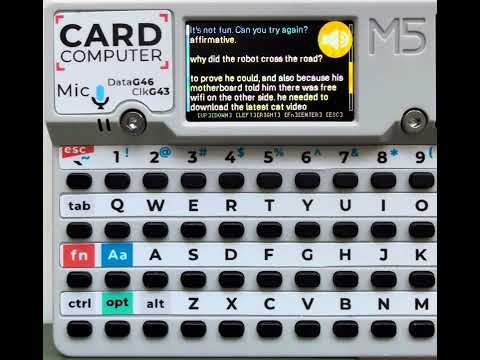
M5Gemini is a conversational AI assistant for the ESP32-S3 powered M5 Cardputer mini PC. It utilizes Deepgram API for Speech-to-Text (STT), Elevenlabs API for Text-to-Speech (TTS), and Google's Gemini API for AI response generation. The application uses the M5 Cardputer's built-in microphone and speaker for interaction.
Features
- Conversational AI interaction powered by Google Gemini.
- Speech-to-Text using Deepgram API.
- Text-to-Speech using Elevenlabs API.
- Utilizes the built-in microphone and speaker of the M5 Cardputer.
- Settings management compatible with M5Apps installer.
Prerequisites
- ESP-IDF v5.4 or later
- M5 Cardputer hardware
- WiFi internet connection (2.4GHz) for API access
- Google AI API Key ([Link to get Google AI Key])
- Deepgram API Key ([Link to get Deepgram Key])
- Elevenlabs API Key ([Link to get Elevenlabs Key])
Getting Started
1. Clone the Repository
git clone https://github.com/d4rkmen/M5Gemini.git
cd M5Gemini
2. Configuration
Configuration settings (WiFi credentials, API Keys) are compatible with and M5Apps.
-
Configuration Methods:
- Manual Configuration on Device:
- Press
ESCto enter Settings menu - Navigate using arrow keys and Enter to select
- Configure WiFi, API keys, and other settings
- Settings are automatically saved to M5Apps NVS storage and will remain even after app reinstallation
- Press
- Import Configuration File: - Create a
settings.txtfile with your configuration - Examplesettings.txt:
wifi-enabled=true wifi-ssid=YOUR_WIFI_SSID wifi-pass=YOUR_WIFI_PASS wifi-static_ip=false wifi-ip=192.168.88.101 wifi-mask=255.255.255.0 wifi-gw=192.168.1.1 wifi-dns=8.8.8.8 system-brightness=100 system-volume=70 system-boot_sound=true gemini-api_key=YOUR_GEMINI_API_KEY gemini-model=gemini-2.0-flash gemini-rules=you are conversational AI assistant with STT and TTS features running on M5 Cardputer the ESP32-S3 device. your name is Cardputer. always answer using ASCII characters only. limit your response to 800 tokens. give short direct and a quite funny answer to the question. start your answer with something like: 'yes, master', 'your wish is my command' and so on elevenlabs-enabled=true elevenlabs-volume=255 elevenlabs-api_key=YOUR_ELEVENLABS_API_KEY elevenlabs-voice=0sGQQaD2G2X1s87kHM5b elevenlabs-model=eleven_multilingual_v2 deepgram-enabled=true deepgram-sensetivity=2 deepgram-api_key=YOUR_DEEPGRAM_API_KEY deepgram-endpointing=600 deepgram-model=nova-3- Copy file to SD card root as
/sdcard/settings.txt - In Settings menu select:
Import (SD card)
- Manual Configuration on Device:
3. Build the Project
idf.py build
4. Flash onto M5Cardputer
Connect your M5 Cardputer via USB and run:
idf.py -p [Your-Serial-Port] flash monitor
(Replace [Your-Serial-Port] with the correct port, e.g., COM3 on Windows or /dev/ttyUSB0 on Linux).
Usage
- From the start screen press
ESCto enter Settings menu orENTERto start conversation - In chat screen hold [Fn] button to edit previous prompt
Contributing
Contributions are welcome! Please feel free to submit pull requests or open issues.
License
This project is licensed under the GNU General Public License
Acknowledgements
- Google AI (Gemini)
- Deepgram (STT)
- Elevenlabs (TTS)
- M5Stack (M5Unified library)
- LovyanGFX (Display)
 d4rkmen