

 d2phap
Add Touchpad "pinch-to-zoom"
From Google Group.
A request to add "pinch-to-zoom" when using precision touchpads.
I have confirmed that touchpad "swipe to scroll" works in IG. This seems to be tied to Mouse Wheel actions; is there a specific set of "touchpad gesture" messages we can support?
Determine which Windows 10 touchpad gestures we can support.

I found the settings for the mouse wheel, and made sure all these alternatives were set to "zoom". Then I tried swiping and swiping in all imaginable directions and ways, but absolutely noting happened. Tried Ctr and AltGr while swiping, and still no luck.
But suddenly, as I happened to do pinch and spread gestures instead on the touchpad - IT ZOOMED !!! (this time I was really laughing out, very loud!) -- I still have that older version of ImageGlass which I reinstalled, and will keep it as long as the zoom to pinch keeps working. Fingers crossed, as long as thislaptop keeps alive.
Need to understand / support touchpad gestures better.
I did some research today, as I'd love to use my precision touchpad to pinch-to-zoom and swipe-to-scroll. Windows translates these gestures into mouse scroll wheel events, and there seem to be no simple standard way to handle touchpad gestures separately.
I found which events some these gestures generate:
- Two fingers vertical swipe - high-precision vertical scroll (WM_MOUSEWHEEL). But compared to the regular mouse wheel, the Delta is not a multiple of 120, and can be as low as 1. This is where we get high scrolling precision.
- Two fingers horizontal swipe - high-precision horizontal scroll (WM_MOUSEHWHEEL). Similar to the vertical one.
- Two-fingers pinch - low-precision vertical scroll (WM_MOUSEWHEEL) with the Ctrl pressed. Delta is regular multiple of 120 (thus precision is low), and it is impossible to distinguish these events from a real mouse wheel scroll with the Ctrl key pressed.
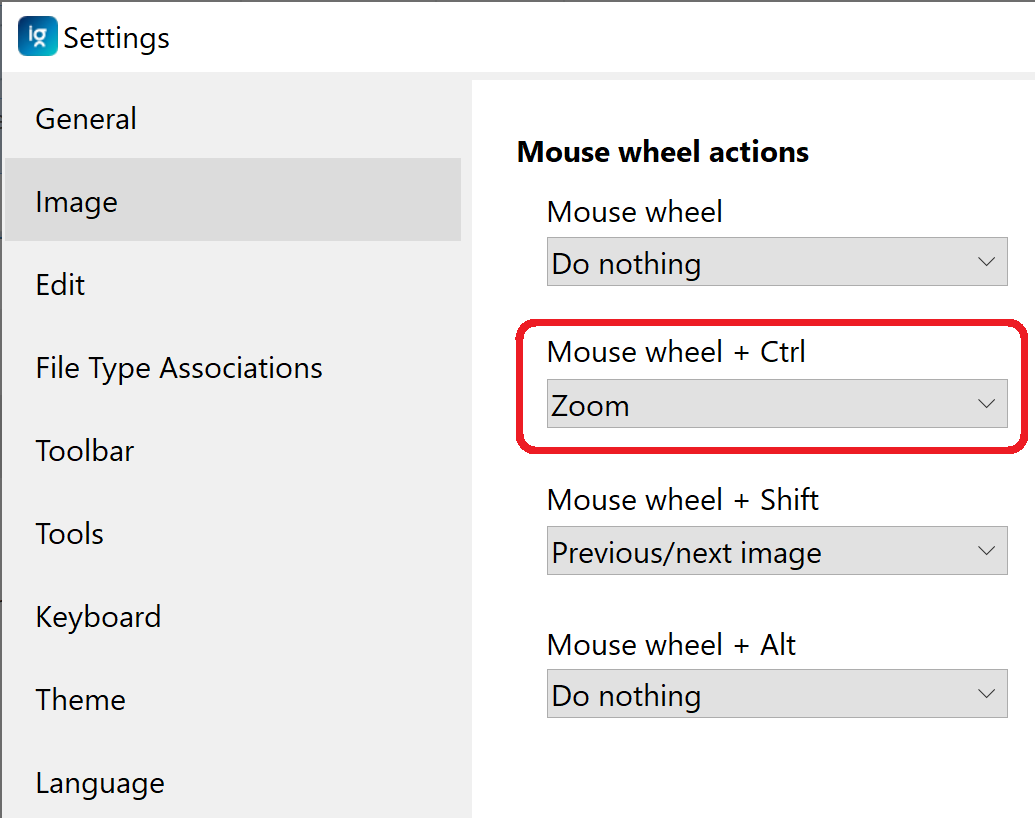
So it is possible to configure pinch-to-zoom functionality without any code changes. Just set the "Mouse wheel + Ctrl" action to "Zoom" (see screenshot below). But low precision doesn't allow like-touchscreen experience, when a slight move of your finger changes zoom level just a bit.
I was curious how the Photos app in Windows 10 achieves higher precision, but apparently it doesn't. Zoom level changes in exactly the same steps as just Ctrl + Mouse Wheel.
True touch screens is a completely different story though. It is possible to support any kind of touchscreen gestures, including smoother zoom.

Thanks @TheApX for your investigation Currently, I just can zoom by 2 fingers swiping up and down. I was surprised when they said they could pinch-to-zoom in v7.0 😳

Currently, I just can zoom by 2 fingers swiping up and down. I was surprised when they said they could pinch-to-zoom in v7.0 😳
I can pinch-to-zoom in v7.5. If you change your mouse wheel setting the way I did it (see screenshot above), pinch-to-zoom will work. The thing is that two-fingers up/down swipe is in fact just mouse wheel; and pinch is mouse wheel + Ctrl. Just set "Mouse wheel + Ctrl" to "Zoom", and it will work.
Let me explain why it's time to support pinch-to-zoom as most photo apps and web browsers support.
There are two types of scrolling when using a mouse:
a1. detent scrolling
a2. smooth scrolling (like Apple Magic Mouse on macOS, Microsoft Precision Mouse on Windows)

There are two types of scrolling when using a touchpad:
b1. detent scrolling with PC vendor touchpad driver
b2. smooth scrolling with Mac trackpad, smooth scrolling with Windows Precision Touhcpad

Others types of scrolling are uncommon, including:
c1. smoothened/enhanced detent scrolling (like Logitech MX Master)
c2. emulated/simulated smooth scroling (like Surface Dial on Windows, Mos app on macOS)
Nowdays, market share of these devices ( I guess) may be:
a1: 60%
a2: 2%
b1: 5%
b2: 30%
others: 3%
If almost so, why not optimizing for that 30% of users?
