

 d2phap
Making the window as the actual size of an image
When first opening an image, it's great to see it in it's actual dimensions.
This will return these benefits:
- It will give you a better Idea of how big is the image.
- It will Look nicer without the empty margins.
- It won't take screen space more than it needs to.
I don't know much C#, but I think making this change is possible through resizing the window to the size of the image at startup.
Things to take into consideration:
- an option should be added to resize the image keeping it's aspect ratio intact.
& Thx for the amazing application.

You can view the actual size of the image, then click on the "Lock zoom ratio" button. This will keep your image opened in 100% size.
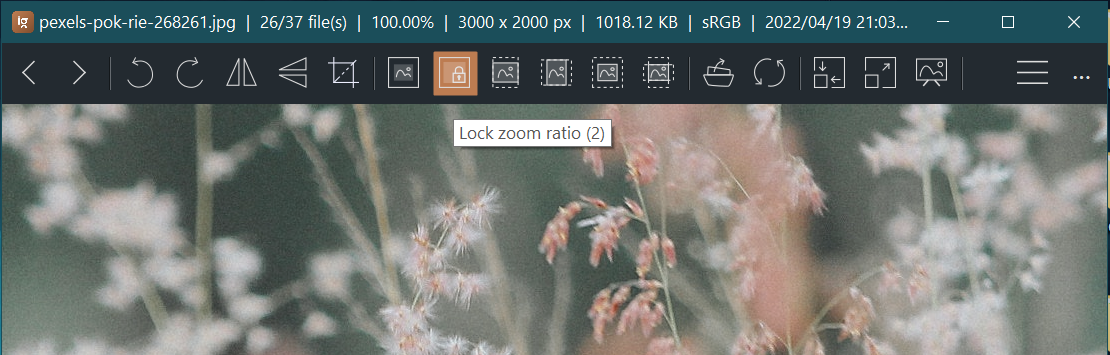
Or, you can create an igconfig.admin.xml file in the start up folder (where the ImageGlass.exe located) with the below content:
<ImageGlass>
  <Configuration>
    <Info description="ImageGlass Configuration file" version="7.5" />
    <Content>
      <Item key="ZoomMode" value="LockZoomRatio" />
      <Item key="ZoomLockValue" value="100" />
    </Content>
  </Configuration>
</ImageGlass>
This file forces IG to open in "Lock zoom ratio" mode, and set the zoom ratio to 100%.

Thanks for the response. doing this ( setting zoom to Actual size, and locking zoom), solves one problem but it doesn't scale the window to fit the image)
Good idea, as Picasa does when opening an image, zooming enlarges the image without cropping it.
