
laravel-jsonapi
 laravel-jsonapi copied to clipboard
 czim
czim
Basic setup framework for creating a Laravel JSON-API server



JSON-API Base
Basic application elements for JSON-API projects.
Offers means for quickly scaffolding JSON-API compliance for Laravel applications.
This does NOT provide the means to set up the API or the means for user authorisation.
Disclaimer
This is very much a work in progress at this time. Interface- and other breaking changes may happen.
The old, discontinued version of this project is in the 0.9.5 branch.
Version Compatibility
| Laravel | Package |
|---|---|
| 5.3 | 1.3 |
| 5.4 to 5.6 | 1.4 |
| 5.7 to 6.0 | 1.5 |
Note that version 1.5+ requires PHP 7.1.3+ and czim/laravel-dataobject 2.0+.
Changelog
View the changelog.
Installation
Via Composer
$ composer require czim/laravel-jsonapi
Add the JsonApiServiceProvider to your config/app.php:
Czim\JsonApi\Providers\JsonApiServiceProvider::class,
Publish the configuration file.
php artisan vendor:publish
Exceptions
In your App\Exceptions\Handler, change the render() method like so:
<?php

    public function render($request, Exception $exception)
    {
        if (is_jsonapi_request() || $request->wantsJson()) {
            return jsonapi_error($exception);
        }

        // ...
This will render exceptions thrown for all JSON-API (and JSON) requests as JSON-API error responses.
Middleware
To enforce correct headers, add the Czim\JsonApi\Http|Middleware\JsonApiHeaders middleware
to the middleware group or relevant routes. You can do this by adding it to your App\Http\Kernel class:
<?php
    protected $middlewareGroups = [
        'api' => [
            // ...
            \Czim\JsonApi\Http\Middleware\RequireJsonApiHeader::class,
        ],
    ];
Note that this will block access to any consumers of your API that do not conform their HTTP header use to the JSON-API standard.
Documentation
Request Data
Request Query String Data
JSON-API suggests passing in filter and page data using GET parameters, such as:
{API URL}?filter[id]=13&page[number]=2
This package offers tools for accessing this information in a standardized way:
Using the jsonapi_query() global helper function.
This returns the singleton instance of Czim\JsonApi\Support\Request\RequestParser.
<?php
    // Get the full filter data associative array.
    $filter = jsonapi_query()->getFilter();

    // Get a specific filter key value, if it is present (with a default fallback).
    $id = jsonapi_query()->getFilterValue('id', 0);

    // Get the page number.
    $page = jsonapi_query()->getPageNumber();
You can ofcourse also instantiate the request parser yourself to access these methods:
<?php
    // Using the interface binding ...
    $jsonapi = app(\Czim\JsonApi\Contracts\Support\Request\RequestQueryParserInterface::class);

    // Or by instantiating it manually ...
    $jsonapi = new \Czim\JsonApi\Support\Request\RequestQueryParser(request());

    // After this, the same methods are available
    $id = $jsonapi->getFilterValue('id');
Request Body Data
For PUT and POST requests with JSON-API formatted body content, special FormRequests are provided to validate
and access request body data: \Czim\JsonApi\Http\Requests\JsonApiRequest.
For POST requests where id may be omitted while creating a resource, use \Czim\JsonApi\Http\Requests\JsonApiRequest instead.
These classes may be extended and used as any other FormRequest class in Laravel.
There are also a global help functions jsonapi_request() and jsonapi_request_create(),
that returns an instance of the relevant request class (and so mimics Laravel's request()).
Using this approach guarantees that requests are valid JSON-API by validating the input against a JSON Schema.
<?php
    // Get the root type of the object (which may be 'resource', 'error' or 'meta').
    $rootType = jsonapi_request()->data()->getRootType();

    // Get validated data for the current request.
    // This returns an instance of \Czim\JsonApi\Data\Root, which is a data object tree.
    $root = jsonapi_request()->data();

    // You can check what kind of resource data is contained.
    if ( ! $root->hasSingleResourceData()) {
        // In this case, the request would either have no "data" key,
        // or it would contain NULL or an array of multiple resources.
    } elseif ($root->hasMultipleResourceData()) {
        // In this case, the request has a "data" key that contains an array of resources.
    }

    // Embedded data may be accessed as follows (for single resource).
    $resourceId     = $root->data->id;
    $resourceType   = $root->data->type;
    $attributeValue = $root->data->attributes->name;
    $relationType   = $root->data->relationships['some-relationship']->data->type;
The request data tree for a single-resource request:
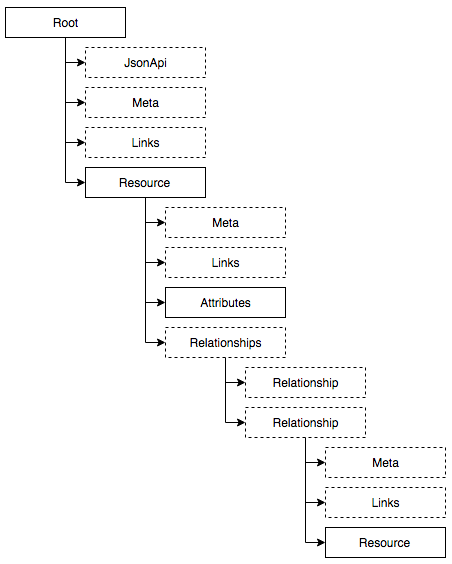
For more information on the data object tree, see the Data classes.
Encoding
This package offers an encoder to generate valid JSON-API output for variable input content.
With some minor setup, it is possible to generate JSON output according to JSON-API specs for Eloquent models and errors.
Eloquent models, single, collected or paginated, will be serialized as JSON-API resources.
More information on encoding and configuring resources.
Custom Encoding & Transformation
To use your own transformers for specific class FQNs for the content to be encoded, map them in the jsonapi.transform.map
configuration key:
<?php
    'map' => [
        \Your\ContentClassFqn\Here::class => \Your\TransformerClassFqn\Here::class,
    ],
This mapping will return the first-matched for content using is_a() checks.
More specific matches should be higher in the list.
As a last resort, you can always extend and/or rebind the Czim\JsonApi\Encoder\Factories\TransformerFactory
to provide your own transformers based on given content type.
Contributing
Please see CONTRIBUTING for details.
Credits
- Coen Zimmerman
- All Contributors
License
The MIT License (MIT). Please see License File for more information.
 czim
czim