

 cypress-io
Problems hitting requests in localhost
Current behavior:
I have a backend application running locally with xampp, this application have some API endpoints and the host of the application is http://testapi.localhost
For other side I have a html+js app runing with webpack-dev-server and runs in http://localhost:3000 , when this app load for the first time it makes a request to the API, something like "GET - http://testapi.localhost/user/1". This request is inside the javascrtip app code, is not inside in the Cypress test code.
Now this is the problem, outside Cypress the app works perfectly in any browser, the request is made succesfully but inside Cypress the request fail with the next error message: "net::ERR_EMPTY_RESPONSE"
I found some sort of "solution" but its not perfect, setting the variable HTTP_PROXY = localhost the app works inside Cypress but sometimes I receive this error in the console: "MaxListenersExceededWarning: Possible EventEmitter memory leak detected" and Cypress close.
Desired behavior:
Make a succesfully request locally that is not in the Cypress test but in the Application code
Versions
Cypress: 3.7.0 system: Windows 10 Browser: Chrome 78, Canary 80

After I change the end point of my API from http://testapi.localhost to http://testapi.anything the request started working properly. The word "localhost" was the problem, I don't know why
Having the same issue, my mock servers work but Cypress gets an empty response in Cypress

Having the same issue, my mock servers work but Cypress gets an empty response in Cypress
Are you also requesting a subdomain of localhost like http://foo.localhost?

No, in my case I'm trying to hit localhost:10008 directly. This is the exact command in my package.json:
"cypress": "./node_modules/.bin/cypress run --config baseUrl=http://localhost:10008",
For me it worked by hosting the API I was fetching locally on 0.0.0.0:8080 instead of on localhost:8080

@WouterSioen that worked for me as well. My setup is very similar to OP's:
- Ruby on Rails application hosted on localhost:3000 that serves JavaScript via webpack
- Sinatra API hosted on localhost:9070 that hosts most API endpoints
The JS browser client makes AJAX requests to localhost:9070:
const makeRequestToSinatra = (path, method, data) => {
  $.ajax({
    url: `http://localhost:9070/api/v1${path}`,
    type: method,
    data: JSON.stringify(data),
    headers: {
      "X-Requested-With": "XMLHttpRequest",
      "Content-Type": "application/json",
      Accept: "application/json",
    },

    // and so on
  });
};
Simply switching my Sinatra app to be hosted on 0.0.0.0 allowed Cypress to interact with the Sinatra API. I did not need to change anything else about my environment and applications:
# code specific to Sinatra http://sinatrarb.com/configuration.html#bind---server-hostname-or-ip-address
set :bind, '0.0.0.0' if cypress_environment?

We are encountering this issue as well, the URL http://local.oryapis.localhost:8080/ works but cy.request to http://pensive-diffie-cptl5ycy7k.projects.local.oryapis.localhost:8080/api/kratos/admin/health/alive fail within the cypress chrome window, but do not fail in the normal Chrome.
Tried the recommended approaches for HTTP_PROXY=localhost and also looked into NO_PROXY (which does not support wildcards?) without effect.
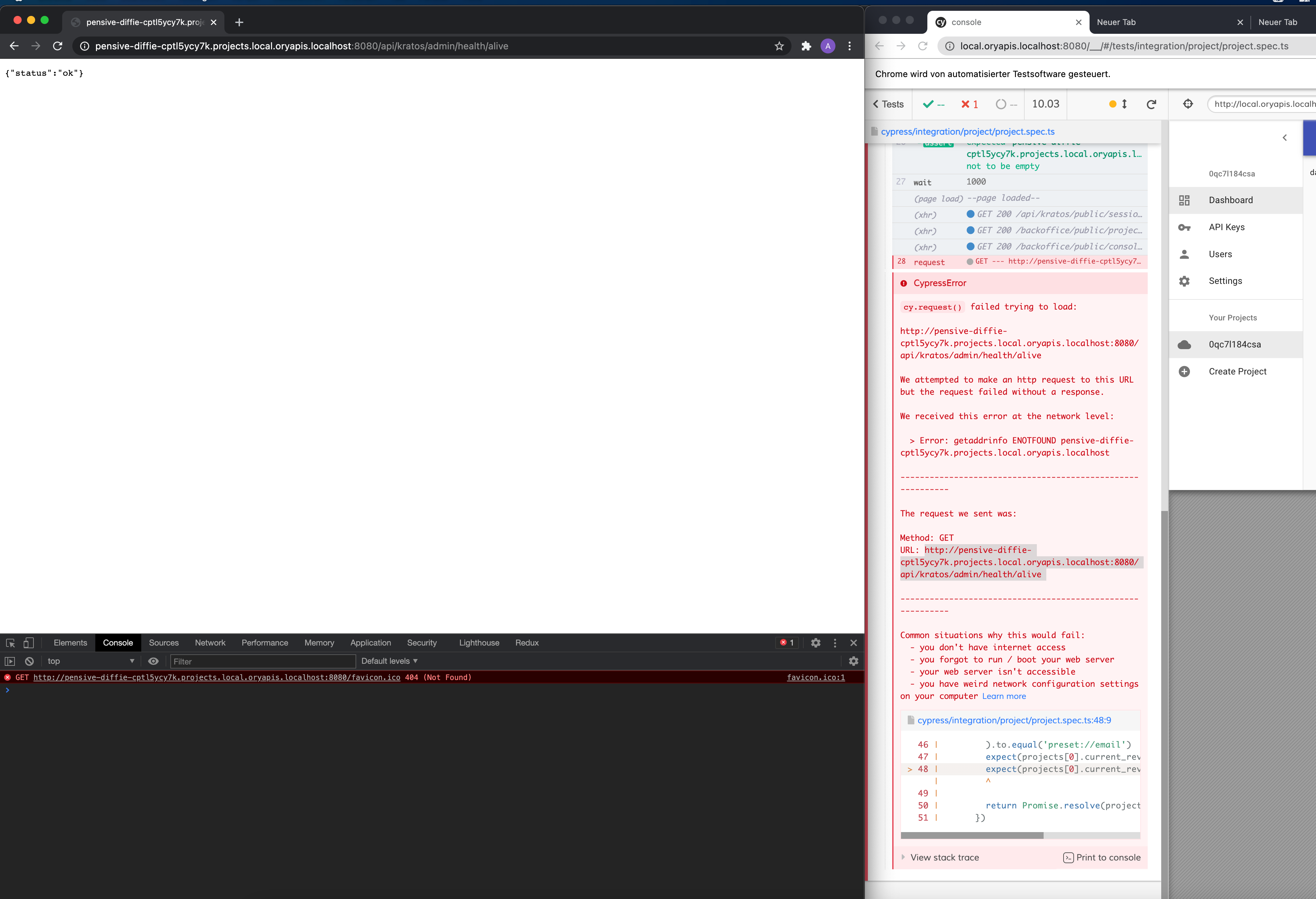

My bad, in fact, Google Chrome properly resolve the host, even if it is not explicitly set in /etc/hosts, but Safari, curl - and Cypress Chrome - do not resolve that host. Is there an option to enable in Cypress the same behaviour as in Google Chrome?
My bad, in fact, Google Chrome properly resolve the host, even if it is not explicitly set in
/etc/hosts, but Safari, curl - and Cypress Chrome - do not resolve that host. Is there an option to enable in Cypress the same behaviour as in Google Chrome?
Did you find any solutions?

Interesting enough, I have the exact same error, but my API is running on AWS. Are there any workarounds?

Hit the same here, puma server is hosted on 0.0.0.0:9292. Hitting localhost:9292 when run in cypress does not work ECONNREFUSED (although it works usually in chrome). Switching to hit exactly 0.0.0.0:9292 fixes the issue and the requests work ok.

This issue has not had any activity in 180 days. Cypress evolves quickly and the reported behavior should be tested on the latest version of Cypress to verify the behavior is still occurring. It will be closed in 14 days if no updates are provided.

Hi guys, I have almost the same issue and after ~10h of trying I decided to ask for your help.
I've got Cypress running in the Docker container, using cypress/included:12.13.0 image. My vue app is also containerized and running on localhost:3200. As docker container does not have access to the localhost, I've changed my CYPRESS_baseUrl to http://host.docker.internal:9200.
Front-end is consuming data from the containerized API which is hosted on localhost:9200. Vue frontend can access it when using the browser, however, when i run tests with Cypress it cannot fetch any data from it and all of the tests are failing. Tried Chrome, Electron and Firefox browsers.
Has anyone had any similar problems?
Here is my docker compose file for the Cypress service
version: '3.4' services: cypress: # the Docker image to use from https://github.com/cypress-io/cypress-docker-images image: 'cypress/included:12.13.0' environment: # pass base url to test pointing at the web application - CYPRESS_baseUrl=http://host.docker.internal:3200 # share the current folder as volume to avoid copying working_dir: /e2e volumes: - ./e2e:/e2e
Tried to host API on 0.0.0.0:9200 but it didn't fix the issue. Also tried to put all of the containers into one network and call API with its service name but it didn't work either.
I cannot install cypress inside the Front-end container as it is using node-alpine image, alpine linux does not have all dependencies available to run Cypress correctly.
Thanks in advance.

I was running into the same issue, ended up pointing my frontend app to 127.0.0.1 explicitly instead of localhost and fixed it. No idea what's actually happening or causing this, but it's a good enough workaround

What @Ribeiro-Tiago said worked for me as well.
I have no idea of what's causing this!

This is very weird. An old bug that's hauting everyone every once in a while.
I did the bind 0.0.0.0 solution which apparently worked, but then now after a few days the problem started happening again, it seems to be flaky.
And the most annoying thing is that npx wait-on works and cypress run doesn't because it fails to validate that the server is running.

Same for me.
- static requests to localhost.com work perfectly
- requests to a7.localhost fail
- a7.localhost is configured (and working besides cypress) in windows hosts


And now I hit it too ERR_EMPTY_RESPONSE while the same requests work in a normal Chrome outside Cypress.

And now I hit it too
ERR_EMPTY_RESPONSEwhile the same requests work in a normal Chrome outside Cypress.
same here. the ba kend api is reachable via localhost:4434 but cypress is not able to connect to it. 🤷♂️

I'm hitting the same issue. My web app runs locally on localhost:5050, and it loads a JS file from localhost:5173:
<html>
   <body>
      <script type="module" src="http://localhost:5173/src/pages/index/index.ts"></script>
   </body>
</html>
This works fine in a normal browser, but under Cypress index.ts fails to load. In Cypress tester, if I hit F12 I can see the request failing with ERR_EMPTY_RESPONSE for the script file.
I'll try the solutions posted here and will update this comment with the results.
UPDATE:
- On my Windows box, I tried the proposed solution of setting HTTP_PROXY environment variable to 127.0.0.1. That didn't fix the problem for me.
- Fixed! I changed my script from "http://localhost:5173" to "http://127.0.0.1", and that solved it. Since That service was running Vite, I just changed my Vite configuration in package.json:
"scripts": {
   "dev-server": "vite --host 127.0.0.1 --port 5173 --strictPort",
}

Related issues, https://github.com/cypress-io/cypress/issues/6489 and https://github.com/cypress-io/cypress/discussions/22340.
