

 cypress-io
Origin header is not getting passed while visiting the website using cypress
Current behavior
My Widgets in the website are not loading while trying to visit the site using cypress automation and it's showing 500 error response code. But I can see my website is loading successfully with all the widgets when I visit manually. I observed that origin header is missing while visiting the site using cypress.
I tried changing the websecurity in the cypress.config file to 'true'. But it didn't resolved my issue. Missing header:: Origin: https://esolution-citizenportal2.dev.esolg.ca code for visiting the page:
describe('Adding a single property', () => {

  it('T02 - check login credentials', () => {

    const sentArgs = { username: '[email protected]', password: 'Amstrong@66' }
    cy.origin('https://esolution-citizenportal2.dev.esolg.ca',


      { args: sentArgs },

      ({ username, password }) => {
        console.log('test2');
        cy.visit('/');
        console.log('test3');
        cy.get('#email').clear().type('[email protected]');
        cy.get('#password').clear().type('Amstrong@66');
        cy.get('#next').click();

      })

  })

})
Receiving the below error while using the above code:
Timed out retrying after 4000ms: The command was expected to run against origin https://esolution-citizenportal2.dev.esolg.ca but the application is at origin https://esolution-citizenportal2.dev.esolg.ca.
This commonly happens when you have either not navigated to the expected origin or have navigated away unexpectedly.
Desired behavior
Timed out retrying after 4000ms: The command was expected to run against origin https://esolution-citizenportal2.dev.esolg.ca but the application is at origin https://esolution-citizenportal2.dev.esolg.ca.
This commonly happens when you have either not navigated to the expected origin or have navigated away unexpectedly.
Test code to reproduce
describe('Adding a single property', () => {

  it('T02 - check login credentials', () => {

    const sentArgs = { username: '[email protected]', password: 'Amstrong@66' }
    cy.origin('https://esolution-citizenportal2.dev.esolg.ca',


      { args: sentArgs },

      ({ username, password }) => {
        console.log('test2');
        cy.visit('/');
        console.log('test3');
        cy.get('#email').clear().type('[email protected]');
        cy.get('#password').clear().type('Amstrong@66');
        cy.get('#next').click();

      })

  })

})
Cypress Version
v.10.11.0
Node version
v14.17.6
Operating System
Windows 10 Enterprise
Debug Logs
No response
Other
No response

Normal login code without using origin functionality: it('Login', () => { cy.visit('https://esolution-citizenportal2.dev.esolg.ca'); cy.visit('/login'); cy.get('#email').clear().type('[email protected]'); cy.get('#password').clear().type('Amstrong@66'); cy.get('#next').click();
})
code after adding origin function to pass the missing origin parameters describe('Adding a single property', () => {
it('T02 - check login credentials', () => {
const sentArgs = { username: '[email protected]', password: 'Amstrong@66' }
cy.origin('https://esolution-citizenportal2.dev.esolg.ca',


  { args: sentArgs },

  ({ username, password }) => {
    console.log('test2');
    cy.visit('/');
    console.log('test3');
    cy.get('#email').clear().type('[email protected]');
    cy.get('#password').clear().type('Amstrong@66');
    cy.get('#next').click();

  })
})
})
Hi @vijaykumar59694. Thank you for logging this issue. When I ran the sample code you listed, I saw the error:
Timed out retrying after 4000ms: The command was expected to run against origin https://esolution-citizenportal2.dev.esolg.ca but the application is at origin https://vulcantestfedration.b2clogin.com.
I noticed that https://esolution-citizenportal2.dev.esolg.ca redirects to https://vulcantestfedration.b2clogin.com. Thus, I believe the right way to write this is:
  it('T02 - check login credentials', () => {
    cy.visit('https://esolution-citizenportal2.dev.esolg.ca/')
    const sentArgs = { username: '[email protected]', password: 'Amstrong@66' }
    cy.origin('https://vulcantestfedration.b2clogin.com/',


      { args: sentArgs },

      ({ username, password }) => {
        console.log('test2');
        console.log('test3');
        cy.get('#email').clear().type('[email protected]');
        cy.get('#password').clear().type('Amstrong@66');
        cy.get('#next').click();

      })
  })
Notice that you visit first visit the site, and then do the interactions under the redirected origin. See this page for more examples on how to use cy.origin.
Let me know if the above code works for you!

Hello Ryan
I am facing a tough time regarding this origin header issue. I need your help on this issue. Can you please schedule a zoom meeting regarding this tomorrow. I am in EST time zone. Any time is good for me. But i need your help to fix this.
Thanks in advance Vijay Kumar Chinthalapudi
On Tue, Nov 15, 2022 at 3:59 PM Ryan Manuel @.***> wrote:
Hi @vijaykumar59694 https://github.com/vijaykumar59694. Thank you for logging this issue. When I ran the sample code you listed, I saw the error:
Timed out retrying after 4000ms: The command was expected to run against origin https://esolution-citizenportal2.dev.esolg.ca but the application is at origin https://vulcantestfedration.b2clogin.com.
I noticed that https://esolution-citizenportal2.dev.esolg.ca redirects to https://vulcantestfedration.b2clogin.com. Thus, I believe the right way to write this is:
cy.visit('https://esolution-citizenportal2.dev.esolg.ca/')
const sentArgs = { username: ***@***.***', password: ***@***.***' }
cy.origin('https://vulcantestfedration.b2clogin.com/',


  { args: sentArgs },

  ({ username, password }) => {
    console.log('test2');
    console.log('test3');
    ***@***.***');
    ***@***.***');
    cy.get('#next').click();

  })
Notice that you visit first visit the site, and then do the interactions under the redirected origin. See this page https://docs.cypress.io/api/commands/origin for more examples on how to use cy.origin.
Let me know if the above code works for you!
— Reply to this email directly, view it on GitHub https://github.com/cypress-io/cypress/issues/24622#issuecomment-1315856707, or unsubscribe https://github.com/notifications/unsubscribe-auth/AG5SK7RYPGKDG7ZNGJRI5XLWIP2TNANCNFSM6AAAAAAR3Y7Z3M . You are receiving this because you were mentioned.Message ID: @.***>
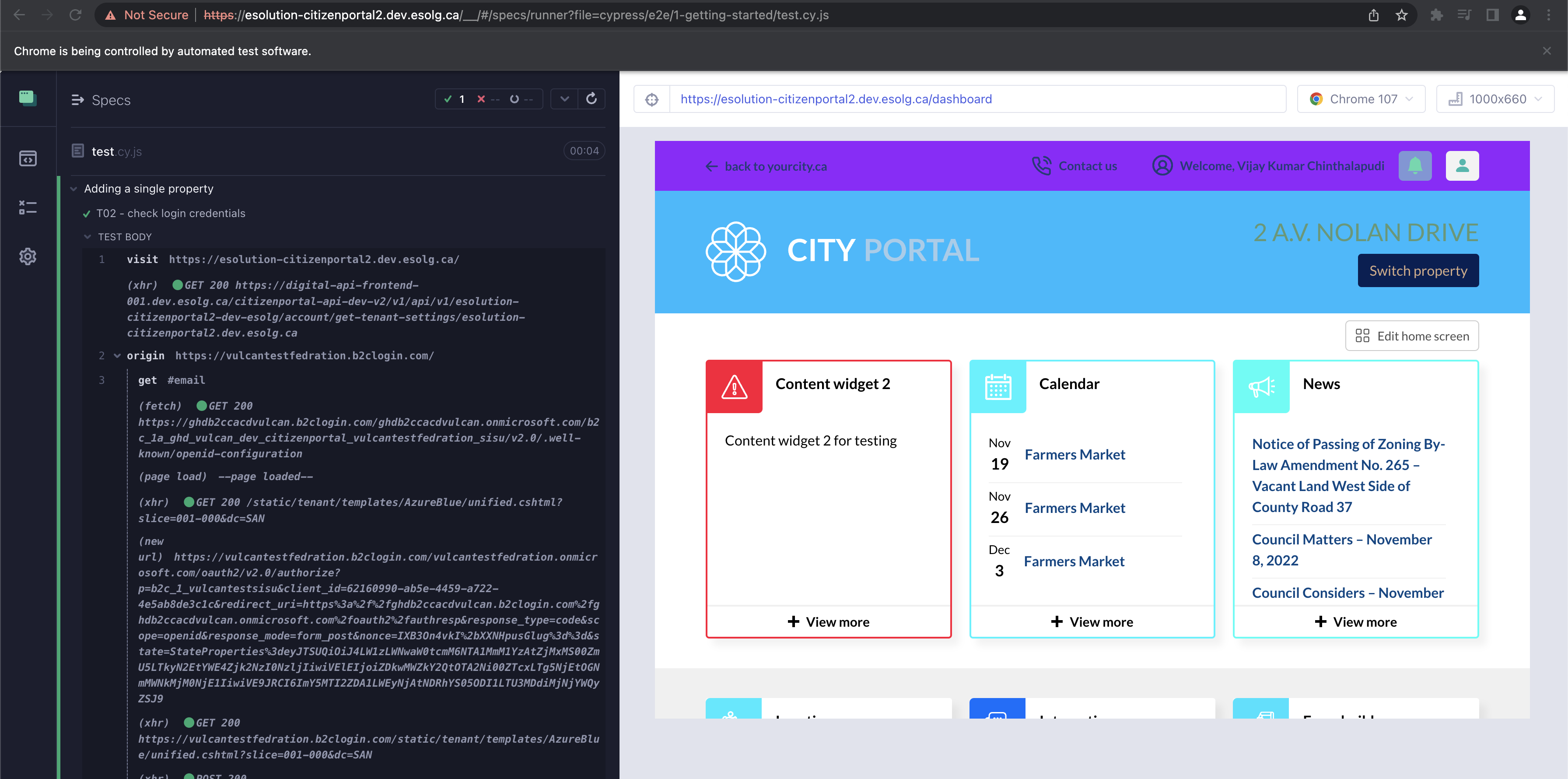
Hi @vijaykumar59694. Unfortunately I will not be able to do a zoom meeting. Did you try the code snippet I sent in the previous comment? With the original code I saw an error similar to what you were seeing and with it, I was able to sign in:
Hello Ryan,
I tried running your code in my machine. But i am getting the 500 error. Please refer the attached image below: [image: image.png] [image: image.png]
On Tue, Nov 15, 2022 at 3:59 PM Ryan Manuel @.***> wrote:
Hi @vijaykumar59694 https://github.com/vijaykumar59694. Thank you for logging this issue. When I ran the sample code you listed, I saw the error:
Timed out retrying after 4000ms: The command was expected to run against origin https://esolution-citizenportal2.dev.esolg.ca but the application is at origin https://vulcantestfedration.b2clogin.com.
I noticed that https://esolution-citizenportal2.dev.esolg.ca redirects to https://vulcantestfedration.b2clogin.com. Thus, I believe the right way to write this is:
cy.visit('https://esolution-citizenportal2.dev.esolg.ca/')
const sentArgs = { username: ***@***.***', password: ***@***.***' }
cy.origin('https://vulcantestfedration.b2clogin.com/',


  { args: sentArgs },

  ({ username, password }) => {
    console.log('test2');
    console.log('test3');
    ***@***.***');
    ***@***.***');
    cy.get('#next').click();

  })
Notice that you visit first visit the site, and then do the interactions under the redirected origin. See this page https://docs.cypress.io/api/commands/origin for more examples on how to use cy.origin.
Let me know if the above code works for you!
— Reply to this email directly, view it on GitHub https://github.com/cypress-io/cypress/issues/24622#issuecomment-1315856707, or unsubscribe https://github.com/notifications/unsubscribe-auth/AG5SK7RYPGKDG7ZNGJRI5XLWIP2TNANCNFSM6AAAAAAR3Y7Z3M . You are receiving this because you were mentioned.Message ID: @.***>
Attached again. Can you please confirm?
On Wed, Nov 16, 2022 at 9:35 AM vijay kumar @.***> wrote:
Hello Ryan,
I tried running your code in my machine. But i am getting the 500 error. Please refer the attached image below: [image: image.png] [image: image.png]
On Tue, Nov 15, 2022 at 3:59 PM Ryan Manuel @.***> wrote:
Hi @vijaykumar59694 https://github.com/vijaykumar59694. Thank you for logging this issue. When I ran the sample code you listed, I saw the error:
Timed out retrying after 4000ms: The command was expected to run against origin https://esolution-citizenportal2.dev.esolg.ca but the application is at origin https://vulcantestfedration.b2clogin.com.
I noticed that https://esolution-citizenportal2.dev.esolg.ca redirects to https://vulcantestfedration.b2clogin.com. Thus, I believe the right way to write this is:
cy.visit('https://esolution-citizenportal2.dev.esolg.ca/')
const sentArgs = { username: ***@***.***', password: ***@***.***' }
cy.origin('https://vulcantestfedration.b2clogin.com/',


  { args: sentArgs },

  ({ username, password }) => {
    console.log('test2');
    console.log('test3');
    ***@***.***');
    ***@***.***');
    cy.get('#next').click();

  })
Notice that you visit first visit the site, and then do the interactions under the redirected origin. See this page https://docs.cypress.io/api/commands/origin for more examples on how to use cy.origin.
Let me know if the above code works for you!
— Reply to this email directly, view it on GitHub https://github.com/cypress-io/cypress/issues/24622#issuecomment-1315856707, or unsubscribe https://github.com/notifications/unsubscribe-auth/AG5SK7RYPGKDG7ZNGJRI5XLWIP2TNANCNFSM6AAAAAAR3Y7Z3M . You are receiving this because you were mentioned.Message ID: @.***>
I still don't see the images. It looks like you're responding via e-mail. Can you try attaching them via the github website at https://github.com/cypress-io/cypress/issues/24622?

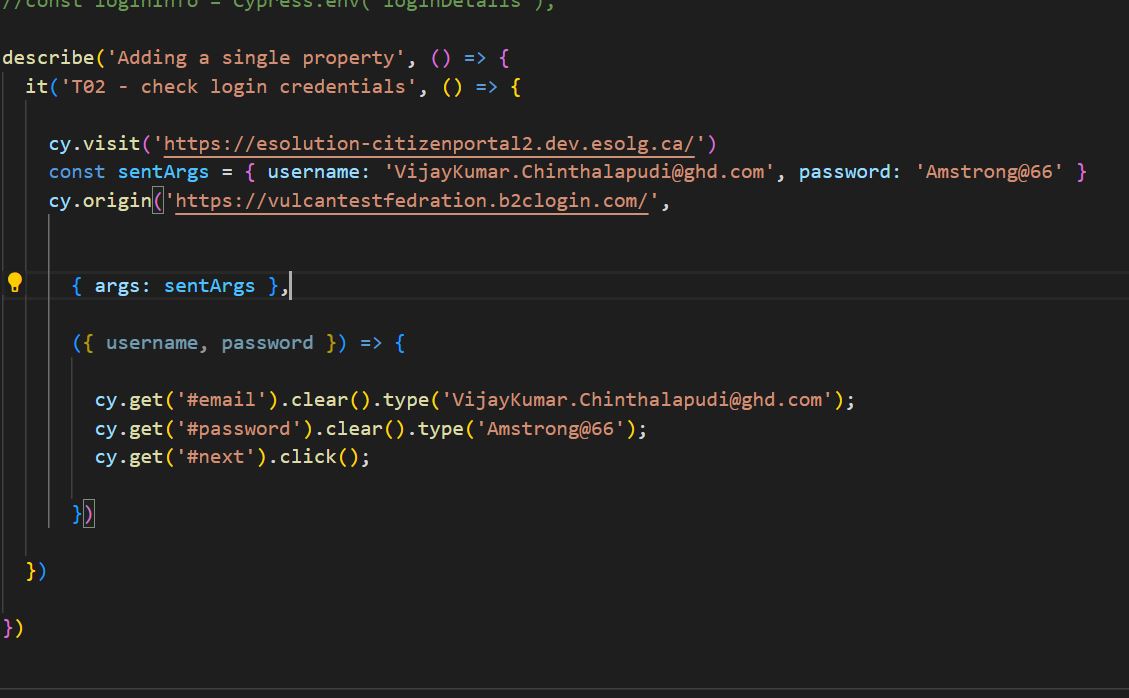
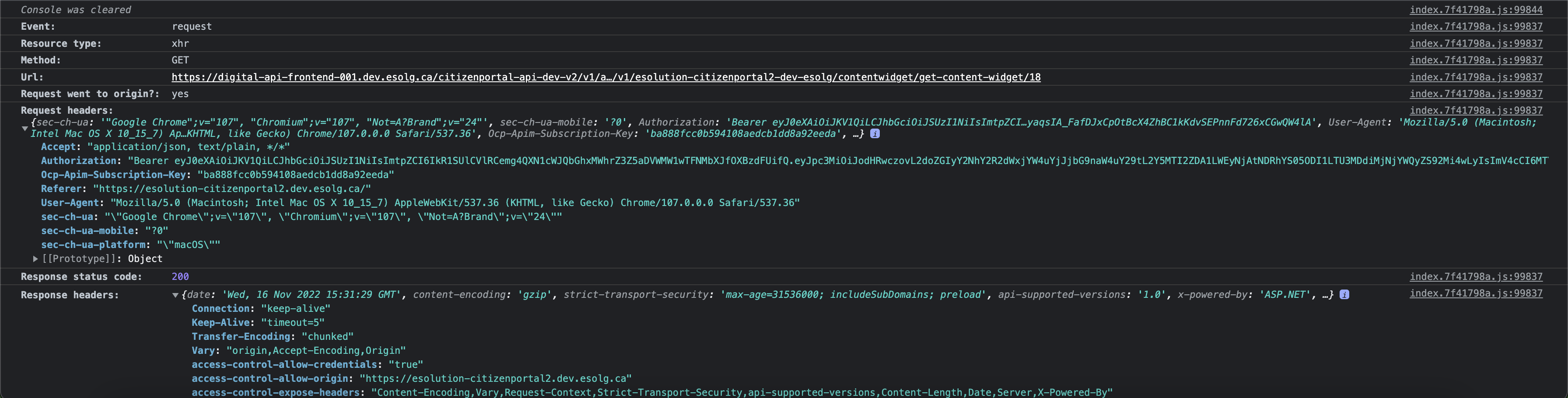
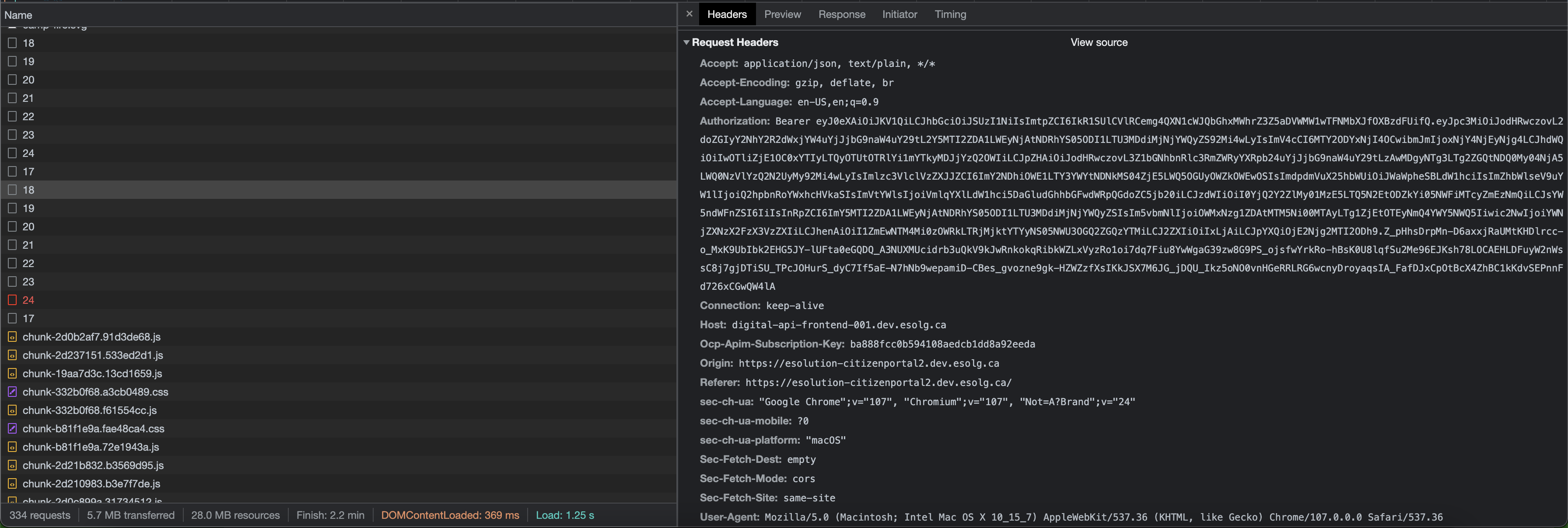
OK I can see those images now. For one of the requests that is failing can you send me what it looks like in the console when you click on it? And then if you can find the call on the network tab, can you send me the contents of the Headers, Preview, and Response tabs?
Example:
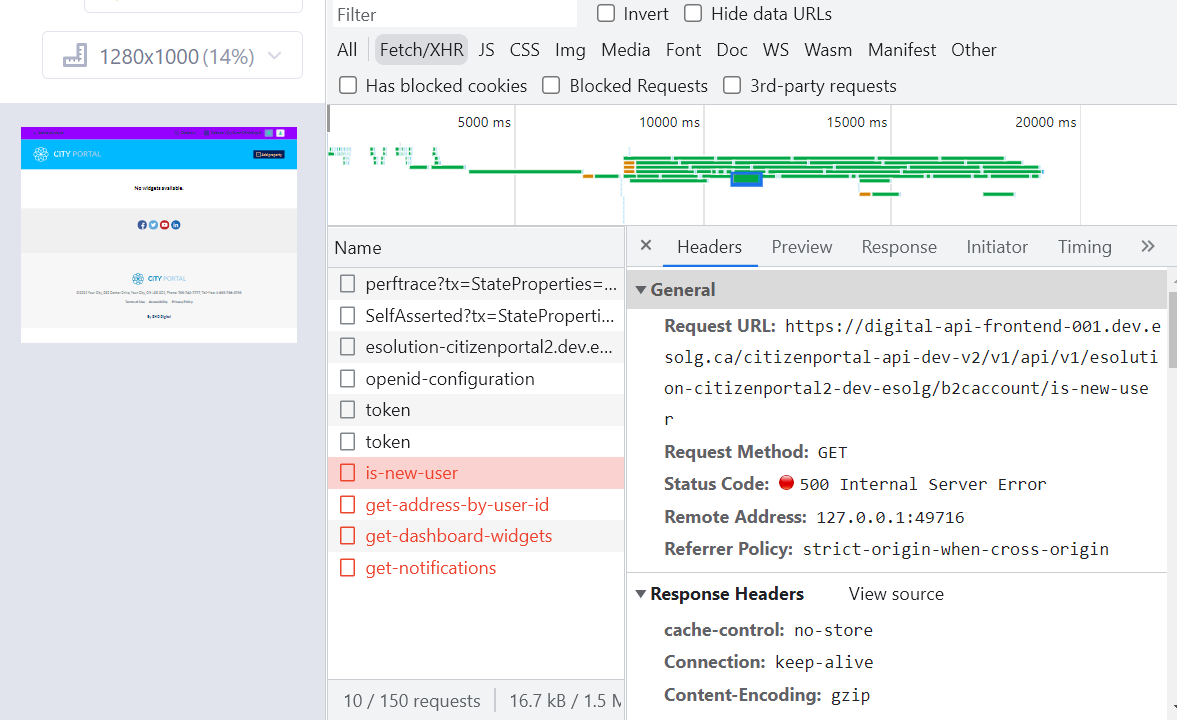 equest URL: https://digital-api-frontend-001.dev.esolg.ca/citizenportal-api-dev-v2/v1/api/v1/esolution-citizenportal2-dev-esolg/b2caccount/is-new-user
Request Method: GET
Status Code: 500 Internal Server Error
Remote Address: 127.0.0.1:49716
Referrer Policy: strict-origin-when-cross-origin
equest URL: https://digital-api-frontend-001.dev.esolg.ca/citizenportal-api-dev-v2/v1/api/v1/esolution-citizenportal2-dev-esolg/b2caccount/is-new-user
Request Method: GET
Status Code: 500 Internal Server Error
Remote Address: 127.0.0.1:49716
Referrer Policy: strict-origin-when-cross-origin
Response Headers: Accept: application/json, text/plain, / Accept-Encoding: gzip, deflate, br Accept-Language: en-US,en;q=0.9 Authorization: Bearer eyJ0eXAiOiJKV1QiLCJhbGciOiJSUzI1NiIsImtpZCI6IkR1SUlCVlRCemg4QXN1cWJQbGhxMWhrZ3Z5aDVWMW1wTFNMbXJfOXBzdFUifQ.eyJpc3MiOiJodHRwczovL2doZGIyY2NhY2R2dWxjYW4uYjJjbG9naW4uY29tL2Y5MTI2ZDA1LWEyNjAtNDRhYS05ODI1LTU3MDdiMjNjYWQyZS92Mi4wLyIsImV4cCI6MTY2ODYxNjgwMCwibmJmIjoxNjY4NjEzMjAwLCJhdWQiOiIwOTliZjE1OC0xYTIyLTQyOTUtOTRlYi1mYTkyMDJjYzQ2OWIiLCJpZHAiOiJodHRwczovL3Z1bGNhbnRlc3RmZWRyYXRpb24uYjJjbG9naW4uY29tLzAwMDgyNTg3LTg2ZGQtNDQ0My04NjA5LWQ0NzVlYzQ2N2UyMy92Mi4wLyIsImlzc3VlclVzZXJJZCI6ImY2NDhiOWE1LTY3YWYtNDNkMS04ZjE5LWQ5OGUyOWZkOWEwOSIsImdpdmVuX25hbWUiOiJWaWpheSBLdW1hciIsImZhbWlseV9uYW1lIjoiQ2hpbnRoYWxhcHVkaSIsImVtYWlsIjoiVmlqYXlLdW1hci5DaGludGhhbGFwdWRpQGdoZC5jb20iLCJzdWIiOiI0YjQ2Y2ZlMy01MzE5LTQ5N2EtODZkYi05NWFiMTcyZmEzNmQiLCJsYW5ndWFnZSI6IiIsInRpZCI6ImY5MTI2ZDA1LWEyNjAtNDRhYS05ODI1LTU3MDdiMjNjYWQyZSIsIm5vbmNlIjoiMGUxYTJlNzAtNTQ3My00ZTNkLWFlZTAtODYzMTBmYmQ2ZTRlIiwic2NwIjoiYWNjZXNzX2FzX3VzZXIiLCJhenAiOiI1ZmEwNTM4Mi0zOWRkLTRjMjktYTYyNS05NWU3OGQ2ZGQzYTMiLCJ2ZXIiOiIxLjAiLCJpYXQiOjE2Njg2MTMyMDB9.YapQJ41KvSDp0cjAnFSPGN388avsvz0D90Q3O5q8rjmE_41nlxGbWVKleoOzVhxQMRE9TYW-cTksqrbazPoZpqZ74IYxLQTdwPHQx5YI-HSE79SIAdu0MWwzYzYvV032wCl2b3TmgK4mtjGowwX6PJpyFizzp8vJaOg3r8Jajtv8cZdrjhCsRN_52f0_l8exr2T0Crz2-l35fgfVpRY9mO0Baej3wcRjkNYEUNqkHCUZ7sooDDrdzC2OEVqDgjENfjWv6UzSa24lQFTjGaVPrve2Rug48HestJILjHRMoEVFongktz6ABUwpNDVOp1zpOv4OBjYXRMRhnGjzfQkY_g Connection: keep-alive Cookie: __cypress.initial=true Host: digital-api-frontend-001.dev.esolg.ca Ocp-Apim-Subscription-Key: ba888fcc0b594108aedcb1dd8a92eeda Referer: https://esolution-citizenportal2.dev.esolg.ca/ sec-ch-ua: "Google Chrome";v="107", "Chromium";v="107", "Not=A?Brand";v="24" sec-ch-ua-mobile: ?0 sec-ch-ua-platform: "Windows" Sec-Fetch-Dest: empty Sec-Fetch-Mode: cors Sec-Fetch-Site: same-site User-Agent: Mozilla/5.0 (Windows NT 10.0; Win64; x64) AppleWebKit/537.36 (KHTML, like Gecko) Chrome/107.0.0.0 Safari/537.36 X-Cypress-Is-XHR-Or-Fetch: xhr
All the errors are related to the internal server error. Origin: https://esolution-citizenportal2.dev.esolg.ca the origin header is missing
@vijaykumar59694 do you happen to have chromeWebSecurity: false set in your cypress config?
 yes
yes
Can you try removing that option or setting it to true? I believe that when that is set to false, chrome will no longer send the origin header which will break APIs that are reliant upon it. A lot of the reasons you might want to use that option go away if you're using cy.origin (which it looks like you are.
I tried changing it to true and even tried by removing that piece of code. But it didn't work out.
Just to check. Did you restart Cypress after making those changes? Some of them are weird and don't take effect unless you actually restart. Also, are you working in chrome? What browsers have you tried this in and do they all fail the same way?
Hello Ryan, After making the above changes, I am able to load the product. But the above scenario isn't working for the Signup testcase. it('Makes a Password Reset request', () => { cy.visit('https://esolution-citizenportal2.dev.esolg.ca/') const sentArgs = { username: '[email protected]', password: 'Amstrong@66' } cy.origin('https://vulcantestfedration.b2clogin.com/', { args: sentArgs }, ({ username, password }) => {
            cy.get('#createAccount').click()

        })
})
I'm getting the below error:
 Can you please help me unblock this issue asap. I have been blocked on this since one month.
The above code is all about the sign up testcase. It is able to click the signup button but it's not able to find the email selectors to fill the details and failing with the above error.
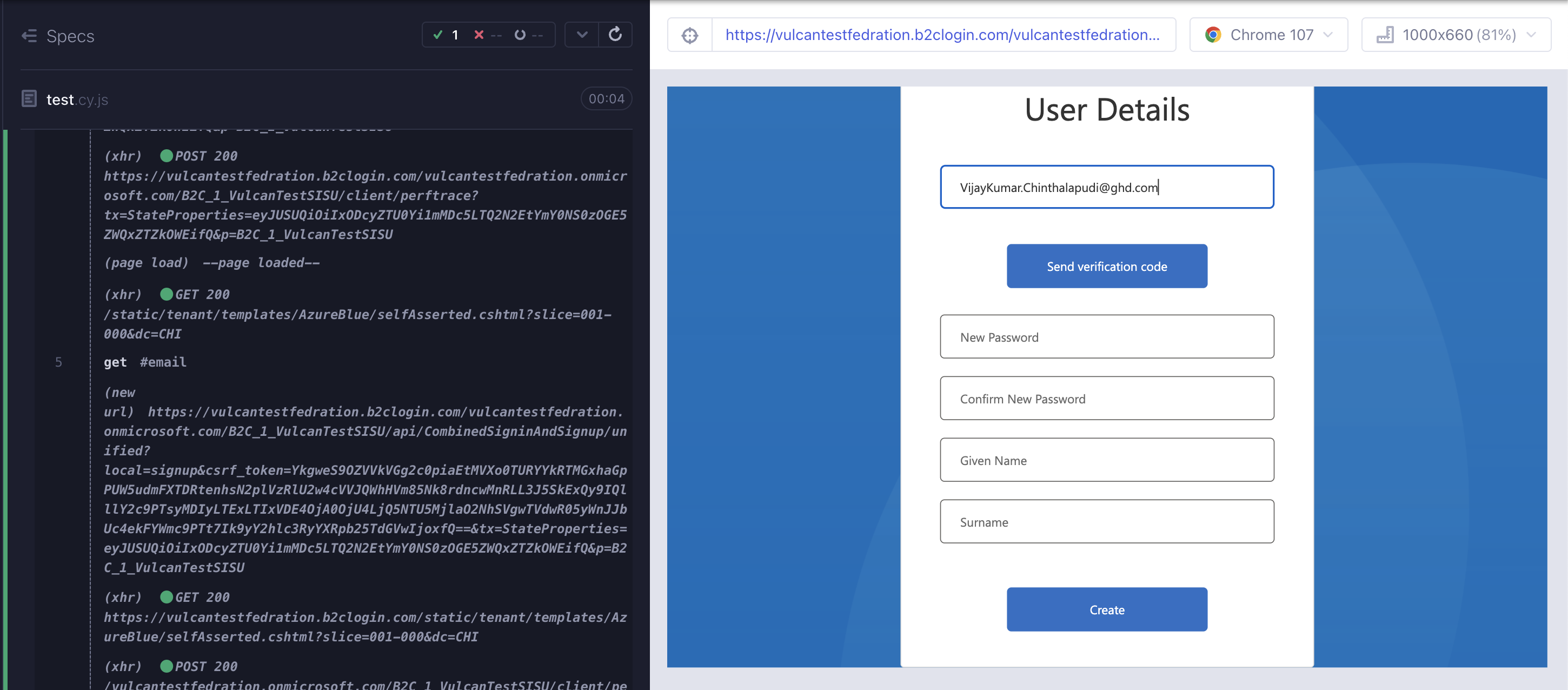
Is your cy.get('#email code inside of cy.origin? I can get it to type in the email with this code:
  it('signup', () => {
    cy.visit('https://esolution-citizenportal2.dev.esolg.ca/')
    const sentArgs = { username: '[email protected]', password: 'Amstrong@66' }
    cy.origin('https://vulcantestfedration.b2clogin.com/',
      { args: sentArgs },

      ({ username, password }) => {
        cy.get('#createAccount').click()
        cy.get('#email').clear().type('[email protected]');
      }
    )
  })
it('signup', () => {
  cy.visit('https://esolution-citizenportal2.dev.esolg.ca/')
  const sentArgs = { username: '[email protected]', password: 'Amstrong@66' }
  cy.origin('https://vulcantestfedration.b2clogin.com/', { args: sentArgs }, ({ username, password }) => {
    const serverId = 'as5tfpgg'; // Replace SERVER_ID with an actual Mailosaur Server ID
    const testEmail = `something@${serverId}.mailosaur.net`;
    cy.get('#createAccount').click()
    cy.get('#email').clear().type(testEmail);
    cy.get('#emailVerificationControl_but_send_code').click();
    cy.mailosaurGetMessage(serverId, {
       sentTo: testEmail
    }).then(email => {
      // expect(email.subject).to.equal('Reset your password');
      //console.log(message.text.codes.length)
      const firstCode = message.text.codes[0];
       cy.get('#emailVerificationCode').clear().type(firstCode);
       cy.get('#emailVerificationControl_but_verify_code').click();
    })
  })
  //  cy.title().should('equal', 'Forgot your password?')
})
It's throwing the below error while trying to use the API to generate the random user for the sign up testcase.
testEmail is not defined

Hi I'm also having issues with cy.origin, headers and cookies (CSRF): sometimes XSRF cookie is correctly set but cannot be used inside the cy.origin code (XSRF security on the target page is blocking everything), sometimes it's not set at all. So, with the exact same code, I can have different behavior and it's driving me crazy!
I subscribe to this ticket to see if you find something. Not sure to be able to share code to reproduce, I'll let you know.

@StephaneColson, could you log a separate issue for this? I'd be interested if you could give us a reproducible example, Cookie handling is tricky.

@vijaykumar59694 are you trying to use cy.origin to test an iframe? unfortunately that functionality is not yet available.
https://github.com/cypress-io/cypress/issues/136
Right now there doesn't seem to be enough information to reproduce the problem on our end. Unless we receive a reliable reproduction, we'll eventually have to close this issue until we can reproduce it. This does not mean that your issue is not happening - it just means that we do not have a path to move forward.
Please provide a reproducible example of the issue you're encountering. Here are some tips for providing a Short, Self Contained, Correct, Example and our own Troubleshooting Cypress guide.
First check whether your server has a proper Access-Control-Allow-Origin header set for the domain you are using for running your Cypress tests.
i.e. you run Cypress tests in Angular on localhost port 4200 then check whether your server has the following CORS header: Access-Control-Allow-Origin: http://localhost:4200.
If such issue persists it might also be related with the chromeWebSecurity flag set to false also mentioned in this other Cypress GitHub post here.
This is also mentioned by @ryanthemanuel here
Changing the flag needs a FULL restart of Cypress to become fully effective.
I struggled with this in a cross domain fetch request in my test setup and changing the flag and restarting cypress resolved my issues.
