

 cydrobolt
Installation help, please!
I can't access the "example.com/setup" page on the web, despite having followed the installation instructions at: https://docs.polrproject.org/en/latest/user-guide/installation/, as far as I know.
Since I'm new to all this, I don't know if the issue is with the server setup, or maybe some dns configuration. I've configured an A record linking the domain to the ip address of my linode server, which is running ubuntu 17.10.
I'm using apache with mysql.
My virtual-host file, called polr.conf, is located in the directory /etc/apache2/sites-enabled:
nerfed_user@ringnot:/etc/apache2$ cd sites-enabled
nerfed_user@ringnot:/etc/apache2/sites-enabled$ ls
polr.conf
The configuration file looks like this:
<virtualHost *:80>
    ServerName  ringras.fo
    ServerAlias ringras.fo

    DocumentRoot "/var/www/polr/public"
    <Directory "/var/www/polr/public">
        Require all granted
        Options Indexes FollowSymLinks
        AllowOverride All
        Order allow,deny
        Allow from all
    </Directory>
</VirtualHost>
These are the folders in the /var/www directory:

These are the files and folders in the /var/www/polr directory:

Or:
nerfed_user@ringnot:/var/www/polr$ ls
app      bootstrap      composer.lock  config    docs     mkdocs.yml   public     resources   storage  util
artisan  composer.json  composer.phar  database  LICENSE  phpunit.xml  README.md  server.php  tests    vendor
mod_rewrite is enabled and I've created a mysql database called polr.
I think my issue might be with the last step: "Option 1: Run the automatic setup script"
Because as I understand it, cp .env.setup .env is supposed to copy a file called .env.setup into the website's root directory, which I understand as the directory /var/www/polr/public, as this is what is stated in the configuration file. But I don't see how the about command would execute this copy/paste, so I'm probably misunderstanding something here.
Also, this is what's in the /var/www/polr/public folder:
nerfed_user@ringnot:/var/www/polr/public$ ls
css  directives  fonts  img  index.php  js
Apache status:
nerfed_user@ringnot:/var/www/polr/public$ /etc/init.d/apache2 status
* apache2.service - The Apache HTTP Server
   Loaded: loaded (/lib/systemd/system/apache2.service; enabled; vendor preset: enabled)
  Drop-In: /lib/systemd/system/apache2.service.d
           `-apache2-systemd.conf
   Active: active (running) since Sat 2018-02-10 01:34:29 UTC; 37min ago
  Process: 2073 ExecReload=/usr/sbin/apachectl graceful (code=exited, status=0/SUCCESS)
 Main PID: 1459 (apache2)
    Tasks: 22 (limit: 4915)
   Memory: 43.8M
      CPU: 573ms
   CGroup: /system.slice/apache2.service
           |-1459 /usr/sbin/apache2 -k start
           |-2116 /usr/sbin/apache2 -k start
           |-2117 /usr/sbin/apache2 -k start
           |-2118 /usr/sbin/apache2 -k start
           |-2119 /usr/sbin/apache2 -k start
           |-2144 /usr/sbin/apache2 -k start
           |-2146 /usr/sbin/apache2 -k start
           |-2149 /usr/sbin/apache2 -k start
           |-2150 /usr/sbin/apache2 -k start
           |-2151 /usr/sbin/apache2 -k start
           |-2153 /usr/sbin/apache2 -k start
           |-2157 /usr/sbin/apache2 -k start
           |-2159 /usr/sbin/apache2 -k start
           |-2160 /usr/sbin/apache2 -k start
           |-2161 /usr/sbin/apache2 -k start
           |-2162 /usr/sbin/apache2 -k start
           |-2163 /usr/sbin/apache2 -k start
           |-2164 /usr/sbin/apache2 -k start
           |-2165 /usr/sbin/apache2 -k start
           |-2166 /usr/sbin/apache2 -k start
           |-2167 /usr/sbin/apache2 -k start
           `-2168 /usr/sbin/apache2 -k start
nerfed_user@ringnot:/var/www/polr/public$
MySQL status
mysql> use polr
Database changed
mysql> status
--------------
mysql  Ver 14.14 Distrib 5.7.21, for Linux (x86_64) using  EditLine wrapper

Connection id:          11
Current database:       polr
Current user:           root@localhost
SSL:                    Not in use
Current pager:          stdout
Using outfile:          ''
Using delimiter:        ;
Server version:         5.7.21-0ubuntu0.17.10.1 (Ubuntu)
Protocol version:       10
Connection:             Localhost via UNIX socket
Server characterset:    latin1
Db     characterset:    latin1
Client characterset:    latin1
Conn.  characterset:    latin1
UNIX socket:            /var/run/mysqld/mysqld.sock
Uptime:                 1 hour 2 min 1 sec

Threads: 1  Questions: 27  Slow queries: 0  Opens: 111  Flush tables: 1  Open tables: 30  Queries per second avg: 0.007
Anyway, some help would be much appreciated! And let me know if some information is needed to answer my question, and I get it to you soon!
- Version or latest commit hash (
git rev-parse HEAD): Polr 2.2.0 - Instance link (optional): ringras.fo/setup

You should copy .env.setup to .env in the root folder of the project, i.e not in public. Can you share your apache logs from /var/log/apache2?

Thanks for the quick reply.
Sorry, where should I expect the root folder of the project to be under normal circumstances?
Apache logs: access.log Blank error.log errorlog_02.10.2018_13-45.txt
other_vhosts_access.log I think this file got corrupted when I tried to save it, so I blanked it. We'll have to wait for new logs to see this.
Could you explain the step of copying the .env.setup to the root folder of the project? Where is the .env.setup file originally located?
@MSBack .env.setup file is hidden by default. You can create it yourself https://github.com/cydrobolt/polr/blob/master/.env.setup

@DT27 Thanks for the info, but I'm still unsure where it belongs - could you enlighten me?
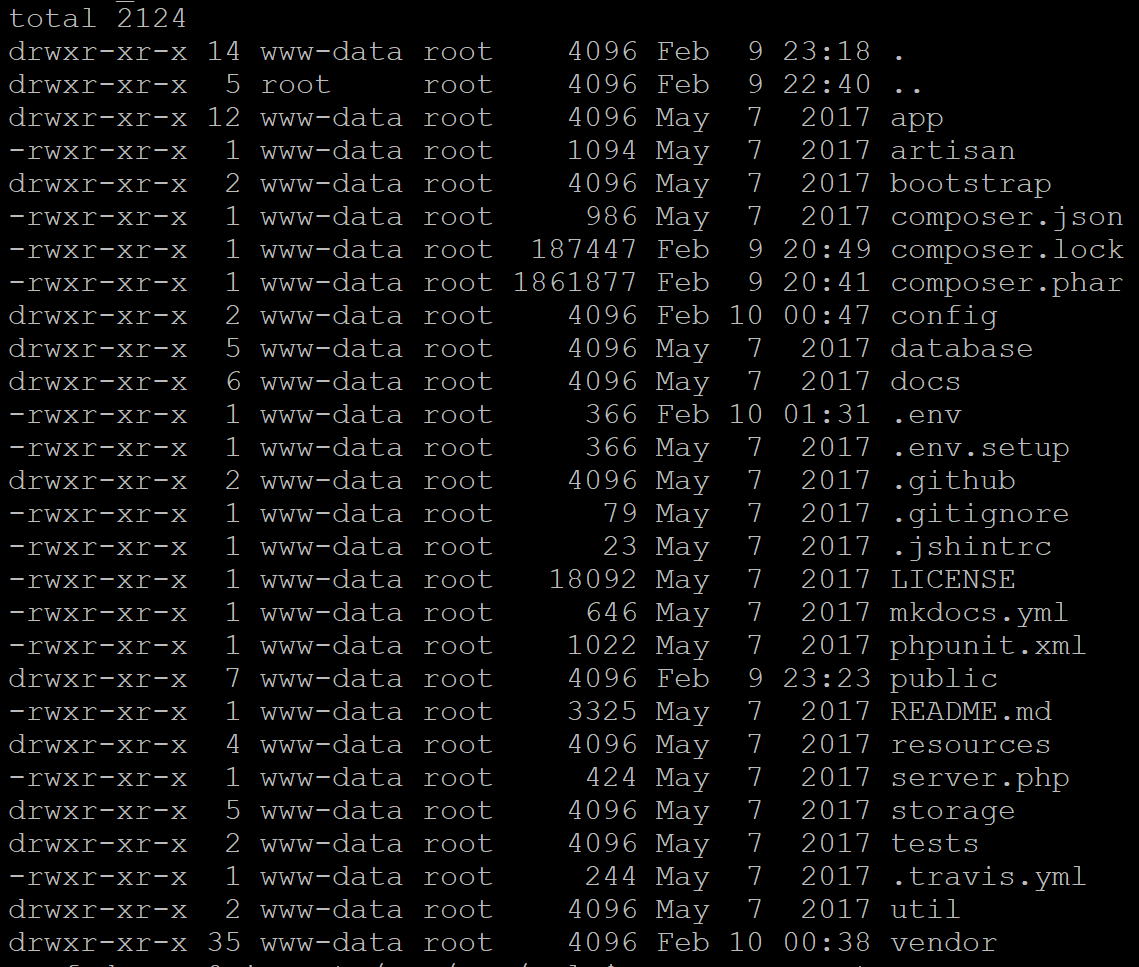
I just checked, and both .env.setup and .env are present in the /var/www/polr folder, so that doesn't appear to be the issue:
I think I'm gonna reinstall, and make sure the server is configured properly this time.
I just had this same issue. For me, the issue was the trailing "/" on the URL. It needs to be there.
So http://example.com/setup/

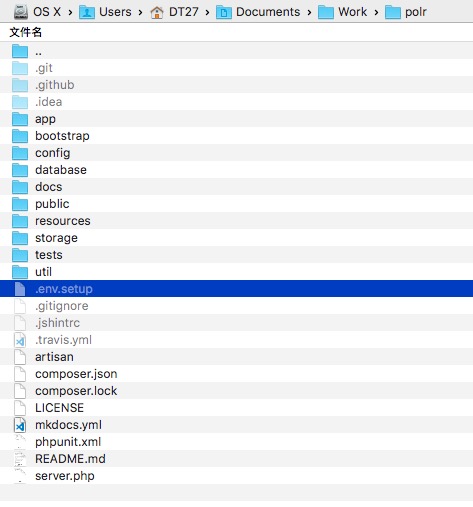
@MSBack just put it in your Polr‘s folder. like this:
I am not able to setup in macbook can you help me in that

@MSBack just put it in your Polr‘s folder. like this:
I am not able to setup in macbook can you help me in that
rename .env.setup to .env