
TabFern
 TabFern copied to clipboard
 cxw42
cxw42
Please add ability to open urls, address bar input in your window

@vitaly-zdanevich I appreciate the request! Please help me understand.
- Do you use the TabFern window itself full-screen?
- Do you want the address bar at the top of the TabFern window? Do you want it on the main menu or right-click menu?
- Should the address bar be visible all the time?
- Would typing in an address bar in the TabFern window open a new window? Would it open a new tab?
- Do you have a workaround? If so, what is it?
- My workaround is: Hit Ctrl+N or Ctrl+T to open a window/tab. Then, type in the address bar of the new tab. Does that work for you? If not, why not? I want to understand the reasons. That will help me know what to implement.
Edit Could you send me a sketch of what you want the TabFern window to look like with this change? If not, that's OK. I am just trying to understand.
Thank you very much!

I use TabFern for full screen on second display; would be great to have address bar at the top, visible all the time, for example:
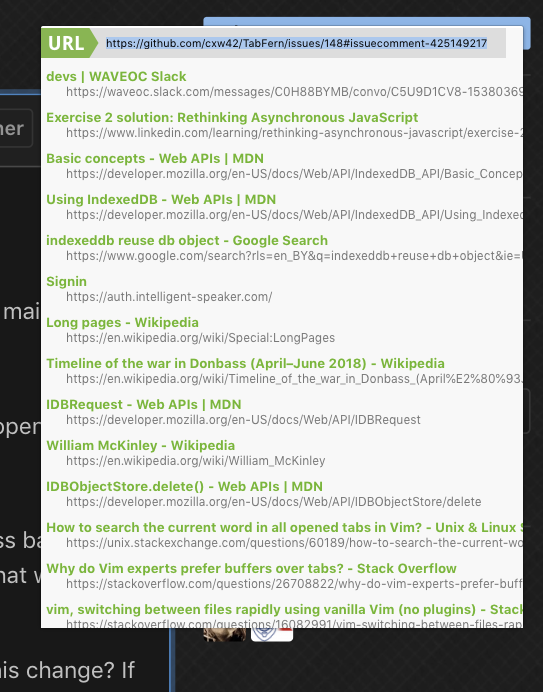
I hope that it is possible to implement addres bar with typing suggestiong - as in default addres bar.
Opening a new TAB by enter is a expected behaviour for me.
My current workaround - Bookmarks menu and Google Voice Search through another extension, because no address bar in fullscreen Chrome.
Thanks for the reply and picture! I will think about this. I know I can open a tab at the top of the TF window once I implement plugins (#26), but I'm not sure about making the address bar visible. I'll let you know if I figure out anything.

@philiprhoades Please use the "react" button (cartoon face) in the upper-right corner of the original post to vote for this issue, and the same for other issues or posts you support! That makes it easier for me to see at a glance how much interest there is in particular issues or posts. Thanks!