
react-wordle
 react-wordle copied to clipboard
 cwackerfuss
Screen reader support (accessibility)
I am thinking about making the game playable with a screen reader to be more accessible for the visually impaired.
Note: I am guessing and throwing around ideas yet, please let me know if I am on the wrong track or you have any ideas. Tell me what you think.
Example game (sorry for the spoiler):
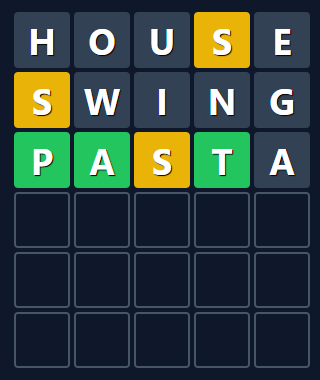
I think adding alt text to each letter would be overwhelming. Like "house. H is absent, O is absent, U is absent, S is present but not on position 4, E is absent" sounds a lot and this is just the first guess.
Summing up each line would be a bit better "S is present but not on position 4. S is present but not on position 1. P is correct at position 1. A is correct on position 2. S is present but not on position 3.", etc.
Summing up the game state sounds the best so far, like "P is correct at position 1. A is correct at position 2. T is correct at position 4. S is present but not at position 3. W, E, U, I, O, G, H, N are absent."
Shortening might help as well "P on 1. A on 2. T on 4. S not on 3. Absent: W, E, U, I, O, G, H, N"
Or even "P, A, blank, T, blank. S not on 3. Absent: W, E, U, I, O, G, H, N"
(Of course alphabetical order for absent letters might be better.)
It might be better to have two parts: descrbing the guesses and their results (first approach is more viable here), and a summary.
Also, this is a game not a typical HTML document/article. So I am not sure if using alt text and ARIA or using SpeechSynthesis of Web Speech API would be better. I think the former is more widely adopted but the latter might fit the current purpose better.
Also, we could test the latter on any browser without extra configuration on the client side.
Please let me know your thoughts. Thanks!

Great initiative!
I think adding alt text to each letter would be overwhelming
Alt text or aria descriptions aren't read out automatically by screen readers, but just when the user focuses the text. So marking up each guessed word (not individual letter) with its hints makes total sense.
For the hints you could take inspiration from the https://wa11y.co project which generates alt text for the shareable emoji grids. For example:
Line 1: 4th perfect.
Line 2: 4th perfect, but 1st in the wrong place.
Line 3: 2nd and 4th perfect.
Line 4: 1st, 2nd and 4th perfect.
Line 5: Won!
The lines of the in-game grid could be marked up in the same way, but of course including the guessed word.
In general, I think that a combination of aria live regions and aria labels that translate the on-screen colours should go a long way to making the game more accessible.
Some notes and ideas:
- Since there's no text input to be focused and typed into, we probably need a (visually hidden) hint that notifies people that they can start typing their first word. A live region could be used to announce each typed letter and its status (as shown on the on-screen keyboard) as it is typed. Deleted letters must be announced, too.
- (Instead of doing that, there could also be an option to replace the grid line that's being played with an appropriately styled standard text input field. It would probably still be nice if the status of each typed character was read out, though, so maybe sticking to the current approach is better, especially as it would never clash with the on-screen keyboard.)
- All current alerts should be made accessible by wrapping them in a live region.
- The basic accessibility of the app is still severely lacking. For example, all icon buttons (in the navigation bar, or modal close button) are not actually buttons, just icons with click handlers, and they don't even have labels for screen readers. So they're effectively invisible. The same goes for the toggles in the settings modal. They're not actually inputs or toggle buttons.
- The focus order of modals needs some work. When the game is first played, the How To Play modal opens with focus placed on the first link in that modal which happens to be after the instructions - very confusing
That's all I can think of for now.

(Sorry about the delay, I've been traveling and didn't bring my personal machine)
First of all, thank you so much for thinking this through @gheja and @diondiondion ... This is definitely a great initiative and admittedly something we hadn't thought much about for the initial version of this project. I see a few discreet PRs we can introduce to start whittling away at this:
- accessibility for button-like controls (icon buttons, toggles, keyboard)
- accessibility for modal focus
- accessibility for alerts
- Adding an "Accessible share" option to the share button, maybe as a "button with additional options hidden under a caret" approach, where you can click the normal "Share" action, or alternatively click the dropdown and then the "Accessible share" button. This isn't a feature that's in the OG wordle but I think we should make an exception here.
- Speech synthesis api would be super awesome but I think this just requires digging into the code and drafting an implementation for us to review and give feedback on. If you're interested, I would support a PR to start tackling this. Maybe we can break this out into a few PRs if it makes sense in order to incrementally add full support for this bigger feature.

Thank you for the very supportive responses!
I'll be thinking, asking around and start working on this. I agree, this should be broken into several PRs, I will link those here.
The focus order of modals needs some work. When the game is first played, the How To Play modal opens with focus placed on the first link in that modal which happens to be after the instructions - very confusing
I noticed and checked this earlier, the Dialog component makes the opened modal focused which causes this, from the docs:
When the Dialog's
openprop istrue, the contents of the Dialog will render and focus will be moved inside the Dialog and trapped there. The first focusable element according to DOM order will receive focus, although you can use theinitialFocusref to control which element receives initial focus. Pressing Tab on an open Dialog cycles through all the focusable elements.

Thank you @bkmgit! It looks very useful and seems like we were on the right track :)
I'd give a +1 to this request as I have had people ask for it. Seems like it has lost a bit of traction.
