

 cryptomator
App says folder on SMB share is not a vault despite it being one
Please agree to the following
- [X] I have searched existing issues for duplicates
- [X] I agree to follow this project's Code of Conduct
Summary
The app says the folder I selected on iOS isn’t a vault, despite it containing Cryptomator vault keys
System Setup
- iOS: 16.0.2 (20A380)
- Cryptomator: Version 2.4.1 (997)
Cloud Type
Other File Provider
Steps to Reproduce
- Add existing vault
- Choose folder of Cryptomator vault
Expected Behavior
Vault is added and the user is prompted for password
Actual Behavior
Cryptomator complains that the folder is not a Cryptomator vault

Reproducibility
Always
Relevant Log Output
2022/10/01 08:55:30:793  Error: domainNotFound
2022/10/01 08:55:45:223  Error: domainNotFound
2022/10/01 08:55:45:228  Error: domainNotFound
2022/10/01 08:56:08:591  Error: noVaultFound
2022/10/01 08:56:29:685  Error: domainNotFound
2022/10/01 08:56:29:692  Error: domainNotFound
2022/10/01 08:56:33:136  Error: noVaultFound
2022/10/01 08:56:50:230  Error: noVaultFound
2022/10/01 08:57:03:509  Error: noVaultFound
2022/10/01 08:57:15:038  Error: noVaultFound
2022/10/01 08:57:34:828  Error: domainNotFound
2022/10/01 08:57:34:831  Error: domainNotFound
2022/10/01 08:57:46:295  Error: noVaultFound
2022/10/01 09:04:13:969  Error: domainNotFound
2022/10/01 09:04:13:973  Error: domainNotFound
2022/10/01 09:04:30:815  Error: noVaultFound
2022/10/01 09:04:45:476  Error: noVaultFound
2022/10/01 09:05:20:650  Error: domainNotFound
2022/10/01 09:05:20:654  Error: domainNotFound
2022/10/01 09:06:54:261  Error: noVaultFound
Anything else?
The vault resides on an SMB mount mounted on the iOS files app.
I’ve tried selecting the folder above the Cryptomator vault but that didn’t work. Just thought I’d give it a try and see if Cryptomator would detect the vault folder enclosed within.

This is all the logs (or rather, log) I get when I enable debug mode and try opening the vault folder again:
2022/10/01 09:13:09:102 Error: noVaultFound
Just tested it with a local folder and it opened properly. So it seems like Cryptomator is failing to open vaults stored on SMB shares mounted through iOS Files.
I'm unable to reproduce this issue. Maybe it's specific to the SMB share? I used the "File Sharing" functionality on my Mac to create an SMB share.

@tobihagemann it used to work before on the exact same SMB share on the exact same server. The only thing that changed that might’ve broken the process is the iOS update to iOS 16 and updates to the underlying server OS (UnRAID), although I’m pretty sure the server updates are irrelevant.
In any case, is there a way to get Cryptomator to say exactly why it thinks a given folder is not a vault folder? Right now the logs are rather unhelpful at debugging the problem.
@tobihagemann are you not able to reproduce this issue on iOS/iPadOS 16? I've updated both of my devices to the latest iOS/iPadOS version and am now unable to open SMB vaults on any one of them.
Tried the SMB share (via "File Sharing" on my Mac) once again and it still works with iOS 16. Regarding your previous question: Cryptomator does the following checks in order to detect a vault.
- Is there a file named
vault.cryptomatorinside the selected folder?- If yes, also check if there is a folder named
dinside the selected folder? If yes, success! - If not, continue with step 2.
- If yes, also check if there is a folder named
- Is there a file named
masterkey.cryptomatorinside the selected folder?- If yes, also check if there is a folder named
dinside the selected folder? If yes, success! - If not, continue with step 3.
- If yes, also check if there is a folder named
- There is no further check, throw a
noVaultFounderror.
That’s strange. I just tried again with iOS 16.1.1 and I get the same error.
For some reason, the files in the share are grayed out, like so:


I’m wondering if this is what’s causing Cryptomator to error out and not see the vault files.
I’ll try again with my Mac instead of my unRAID server and see if a Samba configuration is causing the issue.
It should be fine that the files are grayed out because you have to select a folder and not a file. In that screen with the grayed-out files, you then tap "Open" at the top-right? And then the error message appears?
I'm currently improving debug logging and I hope we can gain more insight after the next update. But I really don't know what the issue might be at the moment. Would be great if I could reproduce it.
@tobihagemann yes, that is what I am doing. In the screen in the screenshot, I press "Open". I assume that selects the folder that I am currently in (that screen).
I will retry with File Sharing on macOS and see if that works.
@tobihagemann just re-tested with File Sharing on macOS and a different problem occurs. If I try and open the folder with the "Open" button nothing happens. See the attached screen recording:
https://user-images.githubusercontent.com/13326074/201687855-94789ab2-6e1c-4154-9f35-3dd8732fecd0.MOV
I don't think that you're doing anything wrong. But I really don't understand why it's not working. Haven't improved debug logging yet but there's still nothing of relevance?
When I try opening a vault on macOS File Share there is absolutely nothing printed to the logs, even with Debug Logging turned on.
Not entirely sure but this seems somehow like an iOS 16 bug to me as the documents picker is an isolated component provided by iOS and it just returns us a URL after the folder has been picked, i.e. after you tapped the open button. It shouldn't have an effect on the dismissal of the document picker if we mess something up afterwards. But I agree we should add more logging to the cloud providers in general and also to the part where we use the document picker.

Issue persists on iOS/iPadOS 16.2 (20C65). Tested on two different devices, same server (again, I don't believe this to be a server issue since older devices on iOS/iPadOS 15 connected just fine and nothing changed server-side). I updated Cryptomator to 2.4.3 (1038) on both devices and it did not make a difference.
Any updates regarding improved debugging logging? I'm using a WebDAV bridge as a temporary means of accessing my shares, but it's rather inconvenient and I'd like to drop the bridge software ASAP.
@ericswpark logging has been improved with 2.4.2. Therefore, you should have now more meaningful logs when you enable the debug mode.
I just tried with debugging mode on and here's the log output:
2022/12/17 13:05:31:756  Setting hasRunningSubscription was written with value false
2022/12/17 13:05:49:607  LocalFileSystemProvider: fillCache(for: /) called with startAccessingSecurityScopedResource: true
2022/12/17 13:05:49:932  LocalFileSystemProvider: fillCache(for: /) finished
2022/12/17 13:05:49:940  Error: noVaultFound
2022/12/17 13:05:53:722  Setting trialExpirationDate was removed
2022/12/17 13:05:53:722  Setting fullVersionUnlocked was written with value true
2022/12/17 13:05:53:722  Setting hasRunningSubscription was written with value false
2022/12/17 13:05:54:704  Setting debugModeEnabled was written with value false
I don't know if fillCache(for: ...) describes the file path passed by the file provider but if it is then it seems to be incorrect?
Edit: unless of course it's accessing the root of the folder that the FileProvider passes through.
I don't know if
fillCache(for: ...)describes the file path passed by the file provider but if it is then it seems to be incorrect?Edit: unless of course it's accessing the root of the folder that the FileProvider passes through.
Exactly! The urls are relative to the url of the vault folder.
@phil1995 just had an idea, can you guys please add another logging level where it prints out the directory listing of the directory passed through by FileProvider?
We're actually already doing that, I didn't even notice that it's "empty" in your case. This is how it should look like:
2022/12/19 10:13:10:044  LocalFileSystemProvider: fillCache(for: /) called with startAccessingSecurityScopedResource: true
2022/12/19 10:13:10:087  LocalFileSystemProvider: getItemName(forItemAt: file:///<vault-location>/vault.cryptomator) called
2022/12/19 10:13:10:087  LocalFileSystemProvider: getItemMetadata(forItemAt: file:///<vault-location>/vault.cryptomator, parentCloudPath: /) called
2022/12/19 10:13:10:090  LocalFileSystemProvider: getItemMetadata(forItemAt: file:///<vault-location>/vault.cryptomator, parentCloudPath: /) read attributes: ["NSURLContentModificationDateKey": 2021-07-02 08:22:42 +0000, "NSURLFileResourceTypeKey": NSURLFileResourceTypeRegular, "NSURLFileSizeKey": 287, "NSURLNameKey": vault.cryptomator]
2022/12/19 10:13:10:102  LocalFileSystemProvider: getItemName(forItemAt: file:///<vault-location>/masterkey.cryptomator) called
2022/12/19 10:13:10:102  LocalFileSystemProvider: getItemMetadata(forItemAt: file:///<vault-location>/masterkey.cryptomator, parentCloudPath: /) called
2022/12/19 10:13:10:105  LocalFileSystemProvider: getItemMetadata(forItemAt: file:///<vault-location>/masterkey.cryptomator, parentCloudPath: /) read attributes: ["NSURLNameKey": masterkey.cryptomator, "NSURLContentModificationDateKey": 2021-07-02 08:22:42 +0000, "NSURLFileResourceTypeKey": NSURLFileResourceTypeRegular, "NSURLFileSizeKey": 329]
2022/12/19 10:13:10:116  LocalFileSystemProvider: getItemName(forItemAt: file:///<vault-location>/d/) called
2022/12/19 10:13:10:116  LocalFileSystemProvider: getItemMetadata(forItemAt: file:///<vault-location>/d/, parentCloudPath: /) called
2022/12/19 10:13:10:118  LocalFileSystemProvider: getItemMetadata(forItemAt: file:///<vault-location>/d/, parentCloudPath: /) read attributes: ["NSURLNameKey": d, "NSURLContentModificationDateKey": 2022-11-29 15:19:47 +0000, "NSURLFileResourceTypeKey": NSURLFileResourceTypeDirectory]
2022/12/19 10:13:10:126  LocalFileSystemProvider: fillCache(for: /) finished
This part would require more logging: https://github.com/cryptomator/cloud-access-swift/blob/c9373ecb6b7d0dfe9041a71c32ddcd52d7716658/Sources/CryptomatorCloudAccess/LocalFileSystem/LocalFileSystemProvider.swift#L147-L151
- Either the
directoryEnumeratordoesn't deliver anything and the whole loop gets skipped. - Or the
childURLis hidden for all files/folders even though they aren't.
I don't see any other possibilities because otherwise we'd see more log entries.
@ericswpark Are you willing to join TestFlight so that we can do some "beta testing" without going through the App Store?
@tobihagemann of course, I'd be happy to test builds and help out. Please let me know where I can sign up for TestFlight.
You can sign up here: https://testflight.apple.com/join/WMtYSrzD
I will let you know when the test build goes up.
@tobihagemann I tried joining but it seems like your TF pool is full: This beta isn't accepting any new testers right now.
Okay, I don't understand what's up with that but never mind this TestFlight link. I'll add a new TestFlight group specific for this issue only and then post a new link. Can't generate it right now because the build is missing. Will get back to you!
Just wanted to let you know that I've submitted a TestFlight build. Unfortunately, also with beta builds, we have to wait for Apple's approval. Not sure how fast they are during the holidays.
While waiting for the Testflight build I thought I'd try creating a vault on the SMB share and it works??
Click for screenshots
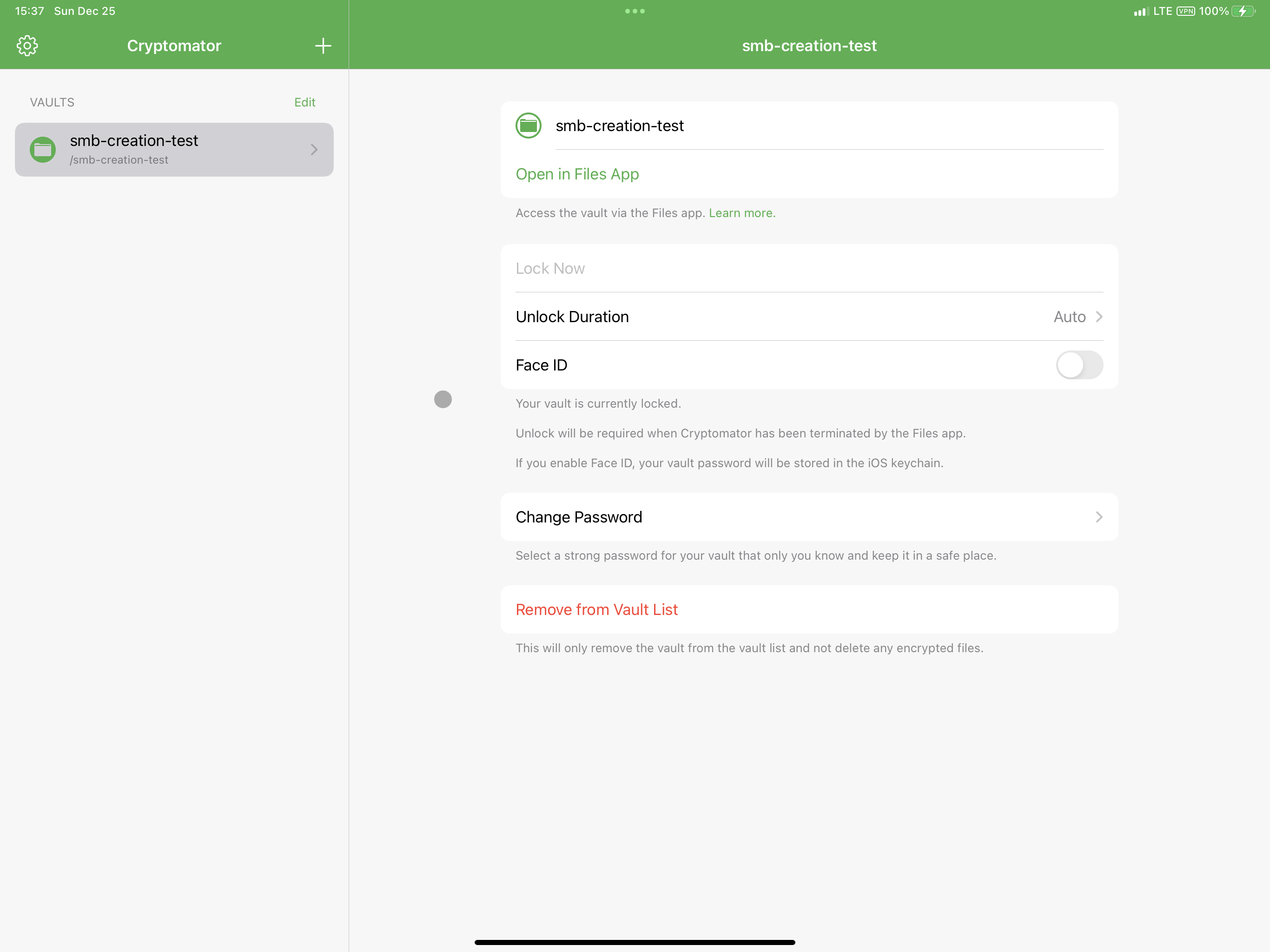
I'm even able to create folders and see them appear in the SMB share:
Click for screenshots
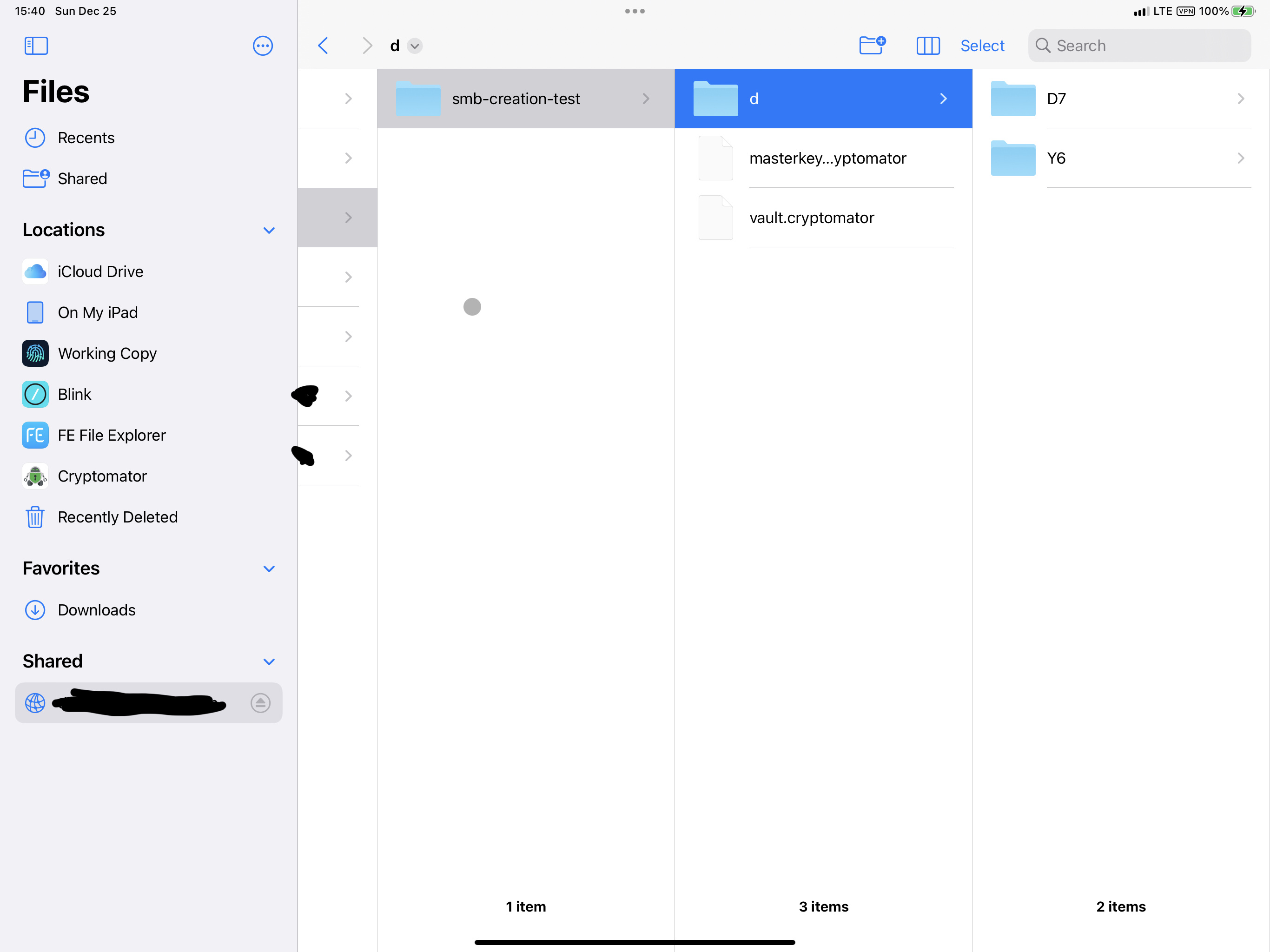
So I tried re-adding the vault inside Cryptomator, and it predictably failed, which is funny because you can see the vault that Cryptomator claims isn't one in the background:
Click for screenshots
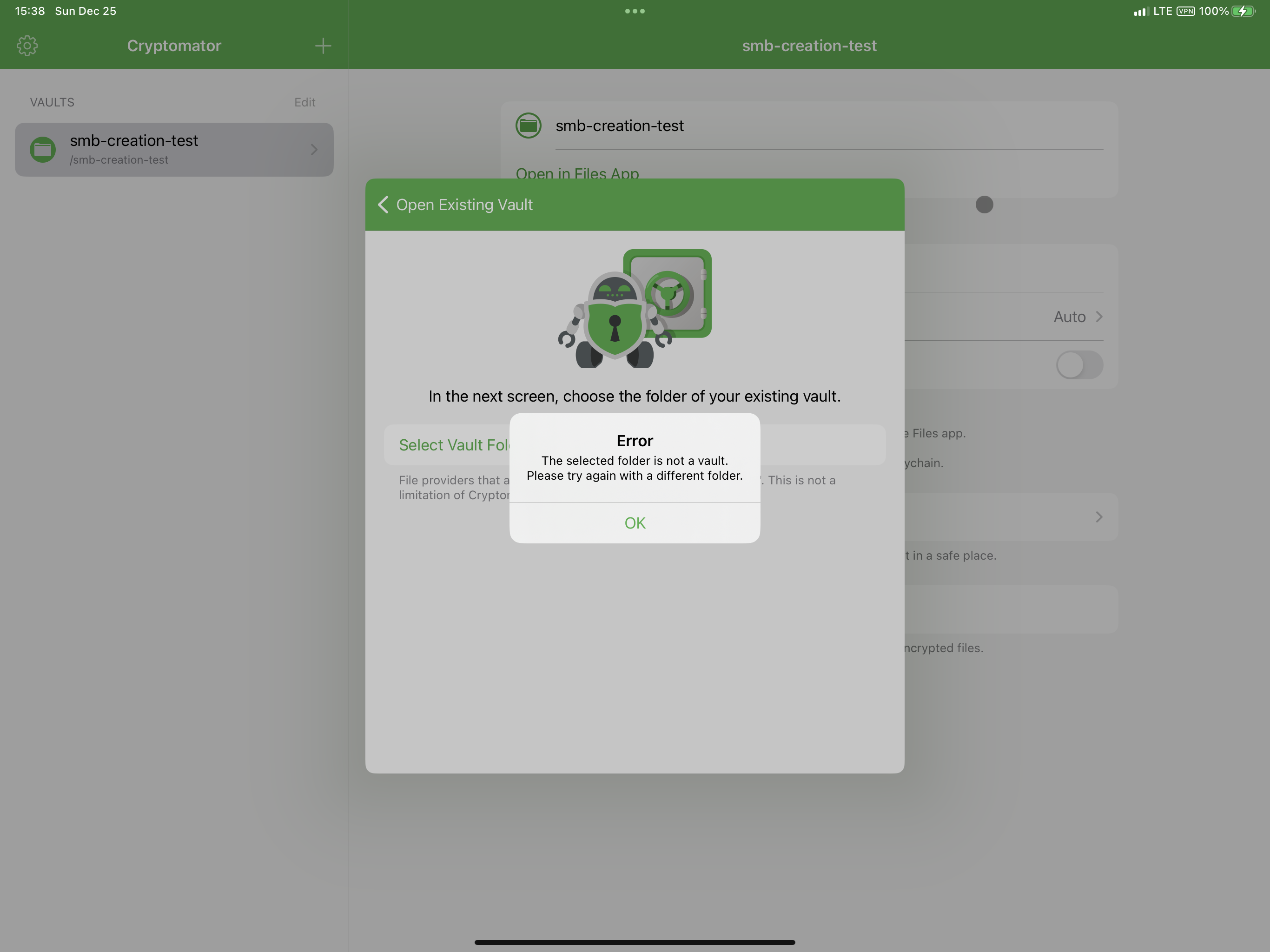
Anyways, I have no idea why one works and one doesn't, so I'll wait for the test build, but it might be interesting to add some sort of debug toggle to force Cryptomator to add a vault and skip past all the detection logic.
@tobihagemann thanks, just tested the build. Unfortunately the logs still don't indicate anything useful:
2022/12/25 14:32:29:107  LocalFileSystemProvider: fillCache(for: /) called with startAccessingSecurityScopedResource: true
2022/12/25 14:32:29:619  LocalFileSystemProvider: fillCache(for: /) finished
2022/12/25 14:32:29:627  Error: noVaultFound
This is with the debug mode enabled.
Dunno if this is relevant, but while messing around with permissions on the server-side (tried chmoding all files and directories to 777 on a test vault to see if that would help – it did not), I deleted the smb-creation-test vault and attempted to re-create it on the app. But it complained that the vault exists in the location I defined, but it doesn't anymore.
Click for screenshot
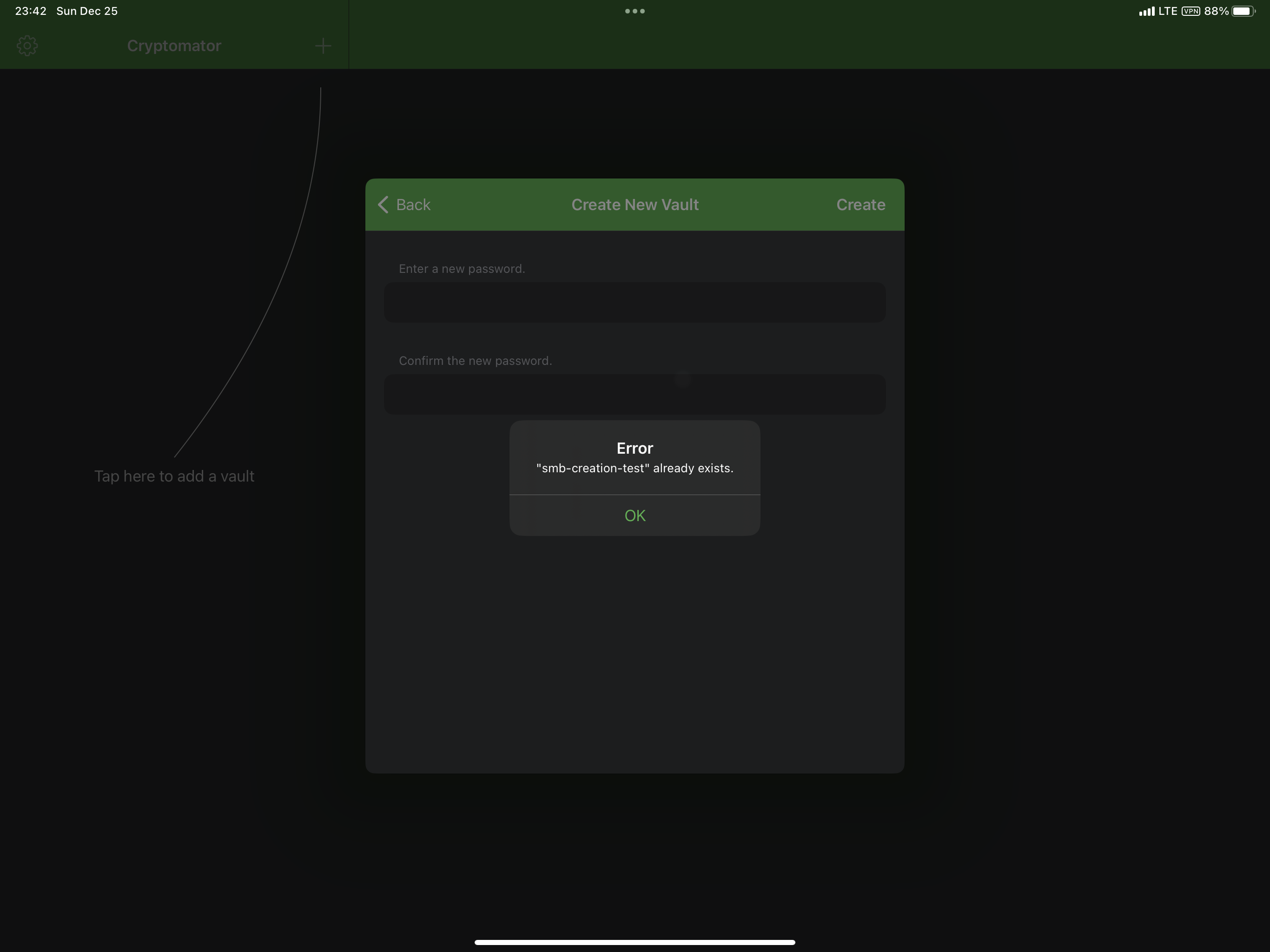
I tried creating a directory for Cryptomator to create the vault in and it worked.
TL;DR - vault was in smbshareroot/smb-creation-test, did a bunch of testing and deleted the vault, then tried to re-create it in the exact same spot (at this point the folder didn't exist), but Cryptomator said the folder was there, so tried creating in smbshareroot/test/smb-creation-test and it worked.
So I'm wondering if Cryptomator is having some sort of caching issue with the external File Provider that leverages SMB. For the issue where existing vaults on SMB shares are not detected as a vault, maybe Cryptomator queries the file listing while the cache is being filled, so it sees an empty directory listing and decides it's an empty folder, AKA not a vault. Whereas with the second issue, even though the folder does not exist anymore on the SMB share and file provider (I went inside the Files app and confirmed that the folder didn't show anymore), Cryptomator queries the file provider and somewhere along the way a stale cache is used and delivered to Cryptomator and it thinks the vault still exists. I dunno if that's the actual reasoning but the behavior I've encountered seems rather odd otherwise. Any idea what could be going on here?
@ericswpark we actually cache the directory listing to fake pagination for the LocalFileSystemProvider (which we use to utilize SMB via the Files app) which is required to avoid the termination of the FileProviderExtension due to the memory limit constraint when browsing large folders in the Files app. But afaik we don't use the cache for other operations. I'll need to check the code again as we probably check in the main app for every Cloud Provider via the folder listing if the folder already exists, which could introduce the issue you described above.
Well... I believe the worst case happened:
- Either the
directoryEnumeratordoesn't deliver anything and the whole loop gets skipped.
I even added this code in the test build, just in case:
do {
	let children = try FileManager.default.contentsOfDirectory(at: readingIntent.url, includingPropertiesForKeys: [.isHiddenKey])
	for case let childURL in children {
		CloudAccessDDLogDebug("LocalFileSystemProvider: fillCache(for: \(cloudPath.path)) has childURL \(childURL) and isHidden \(childURL.isHidden)")
	}
} catch {
	CloudAccessDDLogDebug("LocalFileSystemProvider: fillCache(for: \(cloudPath.path)) failed contentsOfDirectory with error: \(error)")
	promise.reject(error)
	return
}
But it's completely missing in your log output, meaning that it got skipped because the contents of the directory is empty.
And since your log output includes LocalFileSystemProvider: fillCache(for: /) finished, I can confidently say that the following loop gets skipped:
for case let childURL as URL in directoryEnumerator {
...
}
What's up with that? :eyes:
Edit: To be clear, I don't think that it has to do anything with caching even though the function name suggest that. It's really a plain old directory listing without caching involved (at least our own caching).