

 cryptomator
IOS 16 - Couldn't communicate with a helper application
Please agree to the following
- [X] I have searched existing issues for duplicates
- [X] I agree to follow this project's Code of Conduct
Summary
Couldn't communicate with a helper application.
System Setup
- iOS: 16.0
- Cryptomator: 2.4.1 (997)
- iPhone Files App
Cloud Type
No response
Steps to Reproduce
- Go to your folder. Doesn't matter if you go directly from the iPhone files app, or the cryptomator 2 app.
- Press and hold any of your files.
- Click on any cryptomator action like "Clear from Cache"
The result: Couldn't communicate with a helper application.
Expected Behavior
It worked before the IOS update.
Actual Behavior
Couldn't communicate with a helper application.
Reproducibility
Always
Relevant Log Output
No response
Anything else?
No response

Hi. I uninstalled cryptomator from my iPhone then install it again. Signed in to my webdav again, open my existing vault and now is working fine.
I have the same problem. The following happened: after the iOS update to version 16, Cryptomator lost somehow the license key activation, saying my trial period ended. No big deal, just tapped the "restore activation" button inside the Cryptomator app.
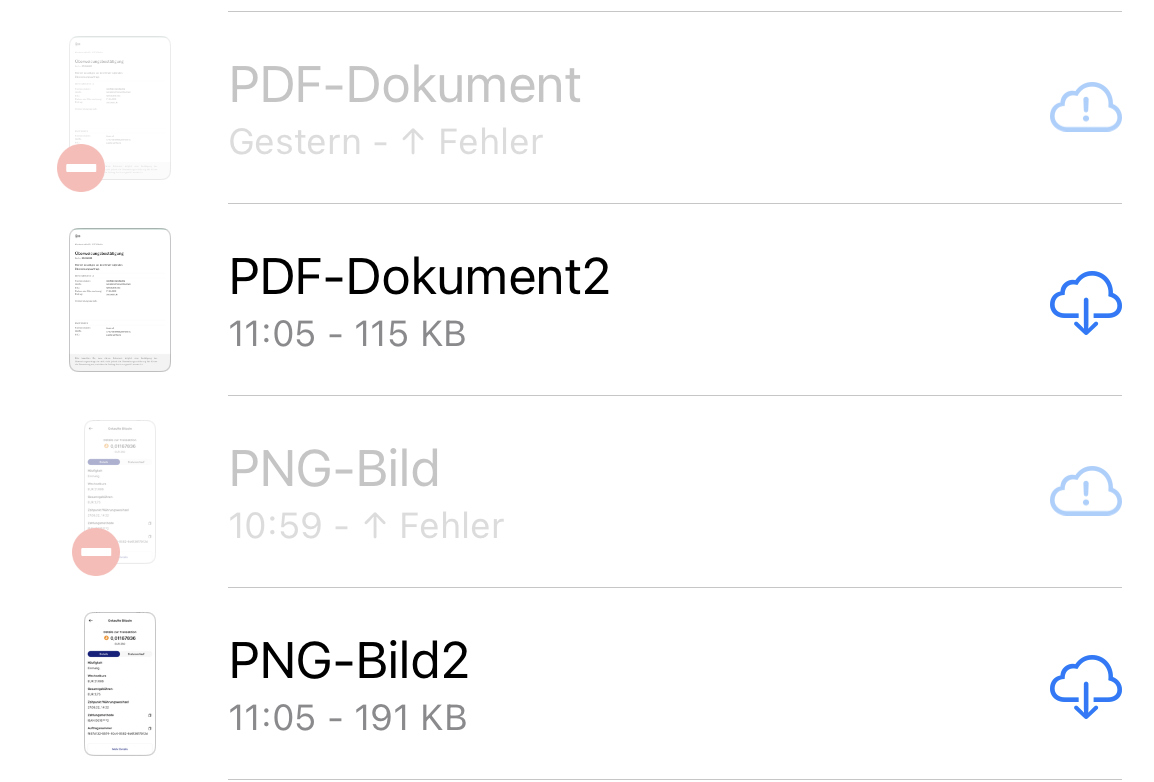
The Issues is, that while Cryptomator was not activated (key lost), I uploaded 2 files via the standard iOS files app, but the upload was never completed and the files are greyed out (with an error icon). I can't get rid of those files now from within the files app, because every action fails.

Is uninstalling and reinstalling the app the only fix for this? I get this error frequently

I have the same problem. The following happened: after the iOS update to version 16, Cryptomator lost somehow the license key activation, saying my trial period ended. No big deal, just tapped the "restore activation" button inside the Cryptomator app.
The Issues is, that while Cryptomator was not activated (key lost), I uploaded 2 files via the standard iOS files app, but the upload was never completed and the files are greyed out (with an error icon). I can't get rid of those files now from within the files app, because every action fails.
Did you try to restart the upload via the action menu (tap and hold onto the item)? If this also fails could you please provide us the log files?

Is uninstalling and reinstalling the app the only fix for this? I get this error frequently
If you get this error frequently, please provide us some more details (like cloud provider, os version and especially enabling the debug mode and send us the logs - see https://docs.cryptomator.org/en/latest/ios/settings/#support for more details).
Hi,
I am using pCloud as my provider. I am using iOS version 14.8.1 on my IPhone 12 Pro Max. I am using Windows 11 on my HP Envy laptop. I just enabled the debug mode. Included are the logs. The files are all working on my desktop app. This is where I normally go to replace files that did not save properly when I tried to add them to the phone app. Here also is a screenshot of the type of messages I get when it doesn’t save properly. After I have replaced the error files from the iPhone app with working copies on my PC, the iphone app still shows this error for them.
Sent from Proton Mail for iOS
On Tue, Oct 25, 2022 at 9:36 AM, Philipp Schmid @.***> wrote:
Is uninstalling and reinstalling the app the only fix for this? I get this error frequently
If you get this error frequently, please provide us some more details (like cloud provider, os version and especially enabling the debug mode and send us the logs - see https://docs.cryptomator.org/en/latest/ios/settings/#support for more details).
— Reply to this email directly, view it on GitHub, or unsubscribe. You are receiving this because you commented.Message ID: @.***>
@Torch0000 Your attachments (logs and screenshot) didn't arrive at GitHub. It would be great if you could add them via GitHub (not email). Thank you!

Did you try to restart the upload via the action menu (tap and hold onto the item)? If this also fails could you please provide us the log files?
OK, I remember the first time I tried, it failed to re-upload. Now it did work, without issues and the files have been correctly uploaded to the cloud. All good, thanks.
I'm under the impression that this issue contains several non-related issues that have been resolved (somehow). Closing this for now. If this happens again, please create a new issue and make sure to attach a debug log.
Have same error on iPad 6th gen, iOS 16.3, cryptomator ios 2.4.5. It was working fine on previous IOS version.
I tried: deleted the app, re-installed, re-created webdav and re-added the vault, the helper error was displayed again
Additionaly I am missing the cryptomator icon on the Files sidebar, it shows the default one (white background with some circles).


