
cryostat-operator
 cryostat-operator copied to clipboard
 cryostatio
Generic way to pass through any Cryostat config option
There seems to be no way for setting arbitrary config options via the Cryostats CRD.
To keep the CRD stable maybe a generic configOptions: map<CONFIG_KEY, CONFIG_VALUE> could be an option?

Hi Florian, do you have any options in particular that you'd like to be able to set? Some of these variables need to be controlled by the operator. For example, CRYOSTAT_WEB_PORT needs to match the value from the Service Options in the CRD.


I wanted to configure CRYOSTAT_AUTH_MANAGER via the operator, and with that, I thought it could be a good idea, to have a generic solution for future flags as well.
For now, when running on OpenShift the operator will use the OpenShift authentication mechanism, which requires some additional setup and permissions on the operator's part. In Kubernetes, the operator uses no authentication, which is not ideal. We have an open issue to add support for Basic authentication for Kubernetes: https://github.com/cryostatio/cryostat-operator/issues/206.
In terms of allowing the user to override any option, we had a discussion previously about doing this, and I think the consensus was to only expose parameters that user couldn't shoot themselves in the foot with.
Ok, understood. Sounds sensible.
I investigated on this, as the Cryostat view only showed me "Login" as headline but without a form to fill data in. I accessed the UI via a port-forward. Any idea what could be the issue?
To put this practice into context: I have an authenticating reverse-proxy in front of internal applications like grafana, prometheus and so on. so I'd like to have Cryostat either completely open, or, if user management is required, accepting a http header carrying the user-name authenticated by the proxy like e.g. grafana supports. The incoming connection to Cryostat is also plain http, as https is terminated upfront - can this be the issue? In this case, a x-forwarded-proto header could be a solution.
Are you using OpenShift or Kubernetes?
The operator currently works either using Routes on OpenShift or Ingress on Kubernetes. For the latter, there's some manual setup that must be done when creating the Cryostat CR. If you can't use Routes or Ingress and need to expose Cryostat using the Service, this can only be done with the Helm Chart currently.
By default Cryostat will only accept HTTPS connections, this can be disabled be setting spec.enableCertManager to false in the Cryostat CR.
It's Kubernetes (Google Kubernetes Engine).
I've installed the operator using your Kustomization (on purpose using the main branch with the dev-version because of the new serviceOptions): https://github.com/cryostatio/cryostat-operator/tree/main/config/default
Configuration looks as follows:
---
apiVersion: operator.cryostat.io/v1beta1
kind: Cryostat
metadata:
  name: cryostat
  namespace: cryostat-operator-system
spec:
  minimal: false
  enableCertManager: false
  storageOptions:
    pvc:
      spec:
        resources:
          requests:
            storage: 10Gi
  serviceOptions:
    coreConfig:
      serviceType: ClusterIP
Accessing the ClusterIP service by port-forwarding looks as follows:
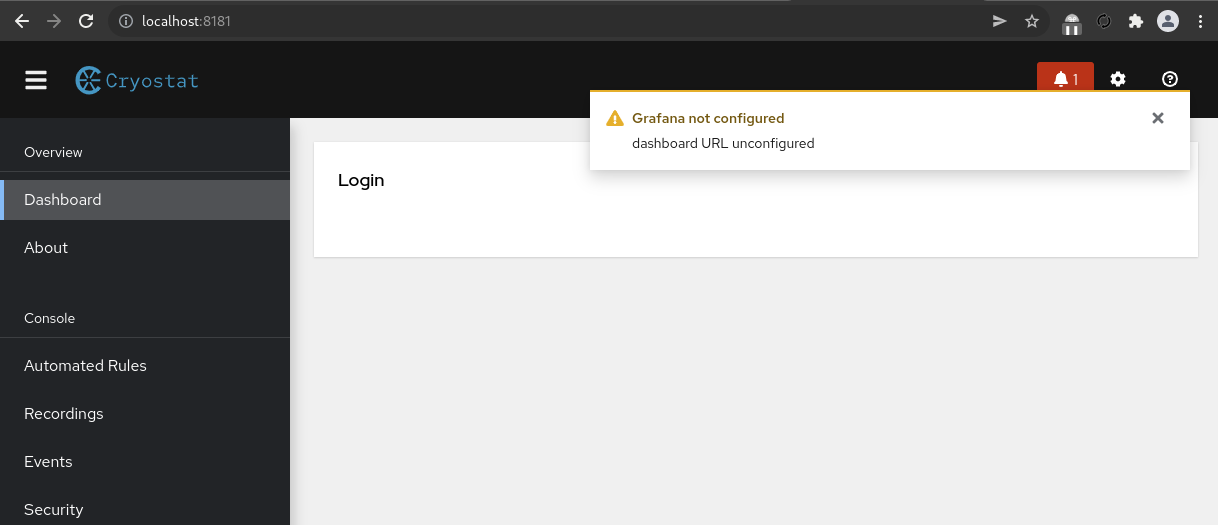
btw: looks exactly the same when using the helm-chart without overriding any values (what makes sense according to your explanation).
Thank you @ebaron for helping - I know that this isn't the scope of this issue ;)
I don't expect that configuration to work on Kubernetes without setting the Ingress configs in the CR. The empty login screen is somewhat unexpected though, would you be able to share the logs for the main Cryostat container in the Cryostat pod?
Thank you @ebaron for helping - I know that this isn't the scope of this issue ;)
Glad to help. We'd like this to work on as many environments as possible, but have only been able to test with a few of them.
The main Cryostat logs as well as the -web logs from the browser developer console, please!
Thanks to both of you for helping.
I've created a reproducer using a local k8s kind cluster, behavior is identical to what I see in the managed Kubernetes.
Please find my test setup here: https://github.com/heubeck/cryostat-local-test The log folder contains the output you were interested in.
Please let me know, if I shall try out further things, really looking forward to my full functional Cryostat installation ;)
Hi again @heubeck, thanks for the logs and sharing your setup steps with us. I'm just working through some tasks for the upcoming 2.1 release, but I'll give it a try myself as soon as I'm able.
Hi @heubeck! Sorry for taking a while to circle back to this, but our 2.1 release is now out. I took a look at your Kind setup, and in order to work with a ClusterIP service and kubectl port-forward, you would need to use our Helm Chart instead of the operator. I've filed an issue to support this configuration for the operator as well: https://github.com/cryostatio/cryostat-operator/issues/403.
You can install the Helm Chart with:
helm install cryostat https://github.com/cryostatio/cryostat-helm/releases/download/v0.1.1/cryostat-0.1.1.tgz
By default, it deploys Cryostat with ClusterIP services and no Ingresses, which I believe matches your desired configuration. After installing, you'll see some post-install commands to run, including setting some environment variables and running kubectl port-forward. I hope this helps!
Hey @ebaron, thank you and no worries, I'm stuck in other topics as well right now. Will have a look as soon as I can make it, really looking forward to experience the new version and playing with Cryostat again. All the best to you and the team, you'll read me ;)
Pardon me, but it seems, that I keep stuck on the (impossible) login using the helm chart and a local kind cluster:
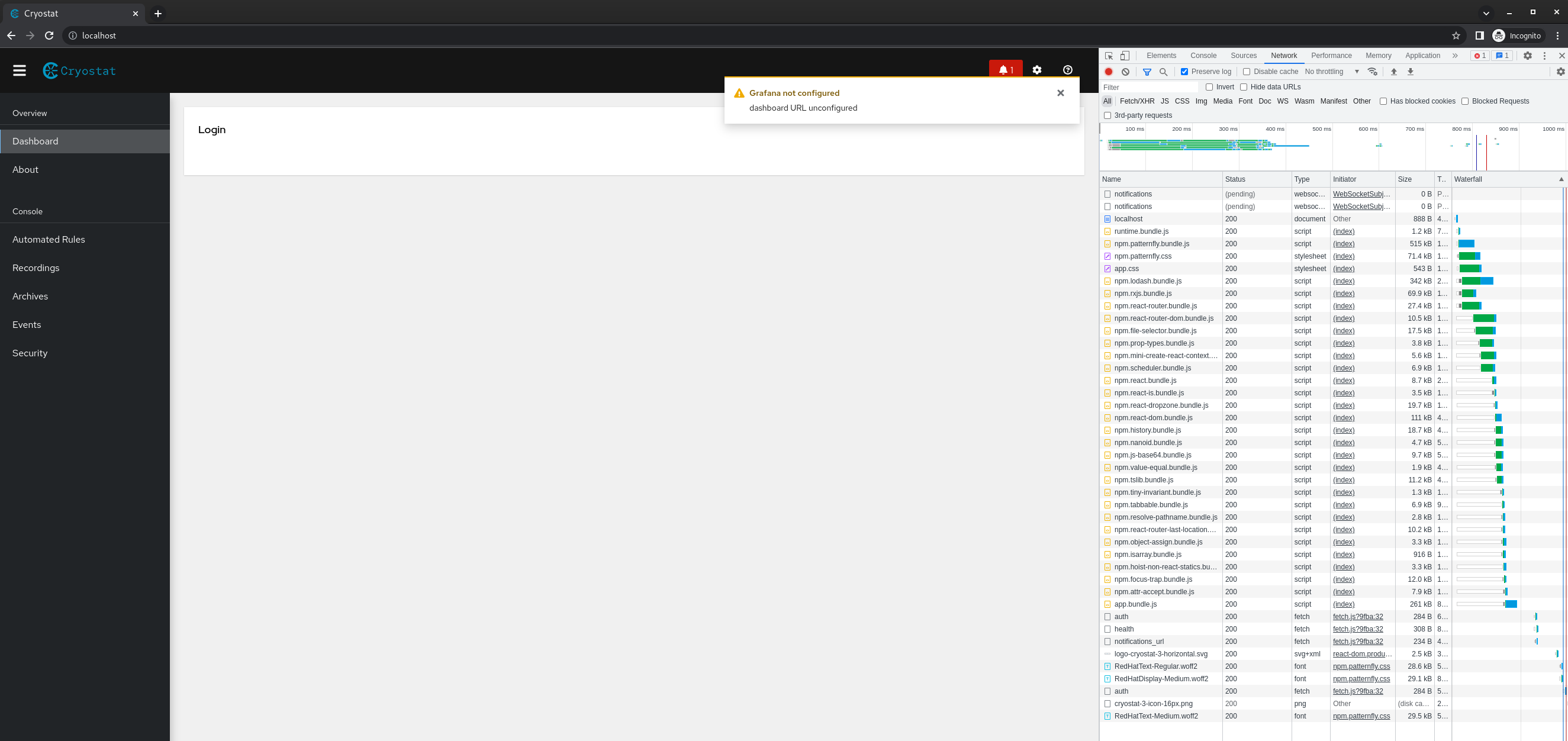
btw (propably expected): same behavior on installation using the cryostat-operator. :sob:
Hi @heubeck, I'm sorry to hear that. I was able to get a working installation with the Helm Chart and a new Kind cluster. I ran the following:
$ kind create cluster
Creating cluster "kind" ...
 ✓ Ensuring node image (kindest/node:v1.24.0) 🖼
 ✓ Preparing nodes 📦
 ✓ Writing configuration 📜
 ✓ Starting control-plane 🕹️
 ✓ Installing CNI 🔌
 ✓ Installing StorageClass 💾
Set kubectl context to "kind-kind"
You can now use your cluster with:

kubectl cluster-info --context kind-kind

Not sure what to do next? 😅  Check out https://kind.sigs.k8s.io/docs/user/quick-start/

$ kubectl cluster-info --context kind-kind
Kubernetes master is running at https://127.0.0.1:36337
CoreDNS is running at https://127.0.0.1:36337/api/v1/namespaces/kube-system/services/kube-dns:dns/proxy

To further debug and diagnose cluster problems, use 'kubectl cluster-info dump'.

$ kubectl create namespace helm-test
namespace/helm-test created

$ kubectl config set-context --current --namespace=helm-test
Context "kind-kind" modified.

$ helm install cryostat https://github.com/cryostatio/cryostat-helm/releases/download/v0.1.3/cryostat-0.1.3.tgz
NAME: cryostat
LAST DEPLOYED: Mon Jul 11 17:08:18 2022
NAMESPACE: helm-test
STATUS: deployed
REVISION: 1
NOTES:
1. Tell Cryostat how to serve external traffic:
  export POD_NAME=$(kubectl get pods -n helm-test -l "app.kubernetes.io/name=cryostat,app.kubernetes.io/instance=cryostat"  --sort-by=.metadata.creationTimestamp -o jsonpath="{.items[-1:].metadata.name}")
  export CONTAINER_PORT=$(kubectl get pod -n helm-test $POD_NAME -o jsonpath="{.spec.containers[0].ports[0].containerPort}")
  export GRAFANA_CONTAINER_PORT=$(kubectl get pod -n helm-test $POD_NAME -o jsonpath="{.spec.containers[1].ports[0].containerPort}")
  kubectl -n helm-test set env deploy --containers=cryostat cryostat CRYOSTAT_WEB_HOST=127.0.0.1 CRYOSTAT_EXT_WEB_PORT=8080 GRAFANA_DASHBOARD_URL=http://127.0.0.1:$GRAFANA_CONTAINER_PORT GRAFANA_DASHBOARD_EXT_URL=http://127.0.0.1:8081

2. Forward local ports to the application's pod:
  export POD_NAME=$(kubectl get pods -n helm-test -l "app.kubernetes.io/name=cryostat,app.kubernetes.io/instance=cryostat"  --sort-by=.metadata.creationTimestamp -o jsonpath="{.items[-1:].metadata.name}")
  kubectl -n helm-test wait --for=condition=available --timeout=60s deploy/cryostat
  kubectl -n helm-test port-forward $POD_NAME 8080:$CONTAINER_PORT 8081:$GRAFANA_CONTAINER_PORT

3. Visit the Cryostat application at:
  http://127.0.0.1:8080

$ export POD_NAME=$(kubectl get pods -n helm-test -l "app.kubernetes.io/name=cryostat,app.kubernetes.io/instance=cryostat"  --sort-by=.metadata.creationTimestamp -o jsonpath="{.items[-1:].metadata.name}")
  export CONTAINER_PORT=$(kubectl get pod -n helm-test $POD_NAME -o jsonpath="{.spec.containers[0].ports[0].containerPort}")
  export GRAFANA_CONTAINER_PORT=$(kubectl get pod -n helm-test $POD_NAME -o jsonpath="{.spec.containers[1].ports[0].containerPort}")
  kubectl -n helm-test set env deploy --containers=cryostat cryostat CRYOSTAT_WEB_HOST=127.0.0.1 CRYOSTAT_EXT_WEB_PORT=8080 GRAFANA_DASHBOARD_URL=http://127.0.0.1:$GRAFANA_CONTAINER_PORT GRAFANA_DASHBOARD_EXT_URL=http://127.0.0.1:8081
deployment.apps/cryostat env updated

$ export POD_NAME=$(kubectl get pods -n helm-test -l "app.kubernetes.io/name=cryostat,app.kubernetes.io/instance=cryostat"  --sort-by=.metadata.creationTimestamp -o jsonpath="{.items[-1:].metadata.name}")
  kubectl -n helm-test wait --for=condition=available --timeout=60s deploy/cryostat
  kubectl -n helm-test port-forward $POD_NAME 8080:$CONTAINER_PORT 8081:$GRAFANA_CONTAINER_PORT
deployment.apps/cryostat condition met
Forwarding from 127.0.0.1:8080 -> 8181
Forwarding from [::1]:8080 -> 8181
Forwarding from 127.0.0.1:8081 -> 3000
Forwarding from [::1]:8081 -> 3000
Handling connection for 8080
Handling connection for 8080
Handling connection for 8080
Handling connection for 8080
Handling connection for 8080
Handling connection for 8080
Handling connection for 8080
Did you run similar steps when installing the chart in your cluster?
Thanks @ebaron - did similar, but not exactly the same. will give it another try, thanks for your patience.
Aweome! Thank you @ebaron. I didn't set the env values for the cryostat deployment, and I port forwarded the cryostat service.
Will try to properly configure my helm release for being able to deploy your approach one-shot.
:tada: it works :partying_face: the env vars derived from the ingress configuration made the difference. thanks so much, now the party starts :smile:
tada it works partying_face the env vars derived from the ingress configuration made the difference. thanks so much, now the party starts smile
That's great to hear! Let us know if we can help with anything else.
Hi guys. Can you tell me if the issue with authorization from kubernetes is resolved or does authorization only work in openshift? And maybe there is a solution to this problem ?
websocket connection loss
on the web, when I try to attach the
nginx.ingress.kubernetes.io/auth-type: basic

Hi guys. Can you tell me if the issue with authorization from kubernetes is resolved or does authorization only work in openshift? And maybe there is a solution to this problem ?
websocket connection losson the web, when I try to attach the
nginx.ingress.kubernetes.io/auth-type: basic
Hi @SergeyLadutko, unfortunately authentication is still only supported in OpenShift at the moment. We would like to implement add support for basic authentication #206, but our team has not been able to prioritize this yet.
Cryostat should function properly without authentication on Kubernetes. Are you seeing WebSocket connection issues without the nginx.ingress.kubernetes.io/auth-type: basic annotation as well?
Hi guys. Can you tell me if the issue with authorization from kubernetes is resolved or does authorization only work in openshift? And maybe there is a solution to this problem ?
websocket connection losson the web, when I try to attach the
nginx.ingress.kubernetes.io/auth-type: basicHi @SergeyLadutko, unfortunately authentication is still only supported in OpenShift at the moment. We would like to implement add support for basic authentication #206, but our team has not been able to prioritize this yet.
Cryostat should function properly without authentication on Kubernetes. Are you seeing WebSocket connection issues without the
nginx.ingress.kubernetes.io/auth-type: basicannotation as well?
Thanks for the quick response, when there is no authorization, there is no error
In that case I think the best current approach is something similar to what @heubeck was describing before. Deploy Cryostat without authz enabled, but place it behind a proxy that handles the authz. You would still need to consider the security implications for intra-cluster traffic here however if there are ways for traffic to reach Cryostat without hitting that proxy.