
opnsense-plugin-crowdsec
 opnsense-plugin-crowdsec copied to clipboard
 crowdsecurity
Unable to edit the auto-generated floating firewall rule
OPNSense plugin v0.0.7 OPNSense v 22.1
The new automatically generated floating firewall rule is made as "automatic" type in OPNSense. That prevents it from being editable. The resasons we might want it editable is to for example toggle the logging options on/off. Also we can't add a category label that is useful when diagnosing rules as it allows filtering, like a tag. I believe that auto addition of the floating rule is a great feature, but needs to be created not as "automatic" type in OPN jargon. Could it be investigated how to create it as an editable type.

I can easily add logging and tag, as plugin options. This is the list of the accepted parameters: https://github.com/opnsense/core/blob/master/src/opnsense/mvc/app/library/OPNsense/Firewall/FilterRule.php#L39
I understand there are persistent, editable rules in the default configuration, I just don't see where they are created and how. Do you know of any plugin that creates editable rules for example? I'll have a better look at the core sources, or ask upstream.

Could it be? : https://github.com/opnsense/core/blob/master/src/opnsense/mvc/app/library/OPNsense/Firewall/Plugin.php https://docs.opnsense.org/development/api/plugins/firewall.html But to your question, I'm afraid I don't. CS is the first plugin I've tested that does that. Is there a way to figure it out from creating a manual rule? I've tried unsuccessfully by starting it on the UI and looking for references in the page source. Maybe best to ask the dev forum section. I could try.
I did v0.0.8 with options to add rule logging, and change the LAPI address/port (which does not mean disable LAPI and connect to a different machine, just move it to a different interface on opnsense).
Rules are still not editable. I saw that all the pre-existing editable rules on my instance were coming from the config.xml built when the (custom) opnsense image was burned. Does it make sense to have an option to add tags too? Even if packets are dropped? Because I don't think it's a good idea in general to allow changing the "drop quick" behavior.
Thanks @mmetc for this. I'll need to reinstall to check it. I still think being editable would be a great option but perhaps a lower priority as the bulk of the functionality would be in place. It does make sense to have an option to add tags. That is what allows to filter when diagnosing. Say for instance I want to know the drops that are dropped but only those that are dropped because they matched the CS rule. That's when you can focus on them. Without the tag, those dropped packets will be indistinguishable from all the other packets dropped by other rules in the firewall.
You should be able to add a tag with https://github.com/crowdsecurity/opnsense-plugin-crowdsec/releases/tag/v0.0.9
Thanks @mmetc . I've upgraded now to 0.0.9 (all three components of the release) but there is no option to tag or edit the floating rule in any way. I've not rebooted, only logged out and back in as root. Do I need to do anything else?
Sorry, where in the OPNSense UI? To ensure I am looking in the right place.
This is what I see in Firewall > Aliases


Sorry for the delay. I have no control over that page, or making rules editable except by adding them by hand. The option you are looking for is here.
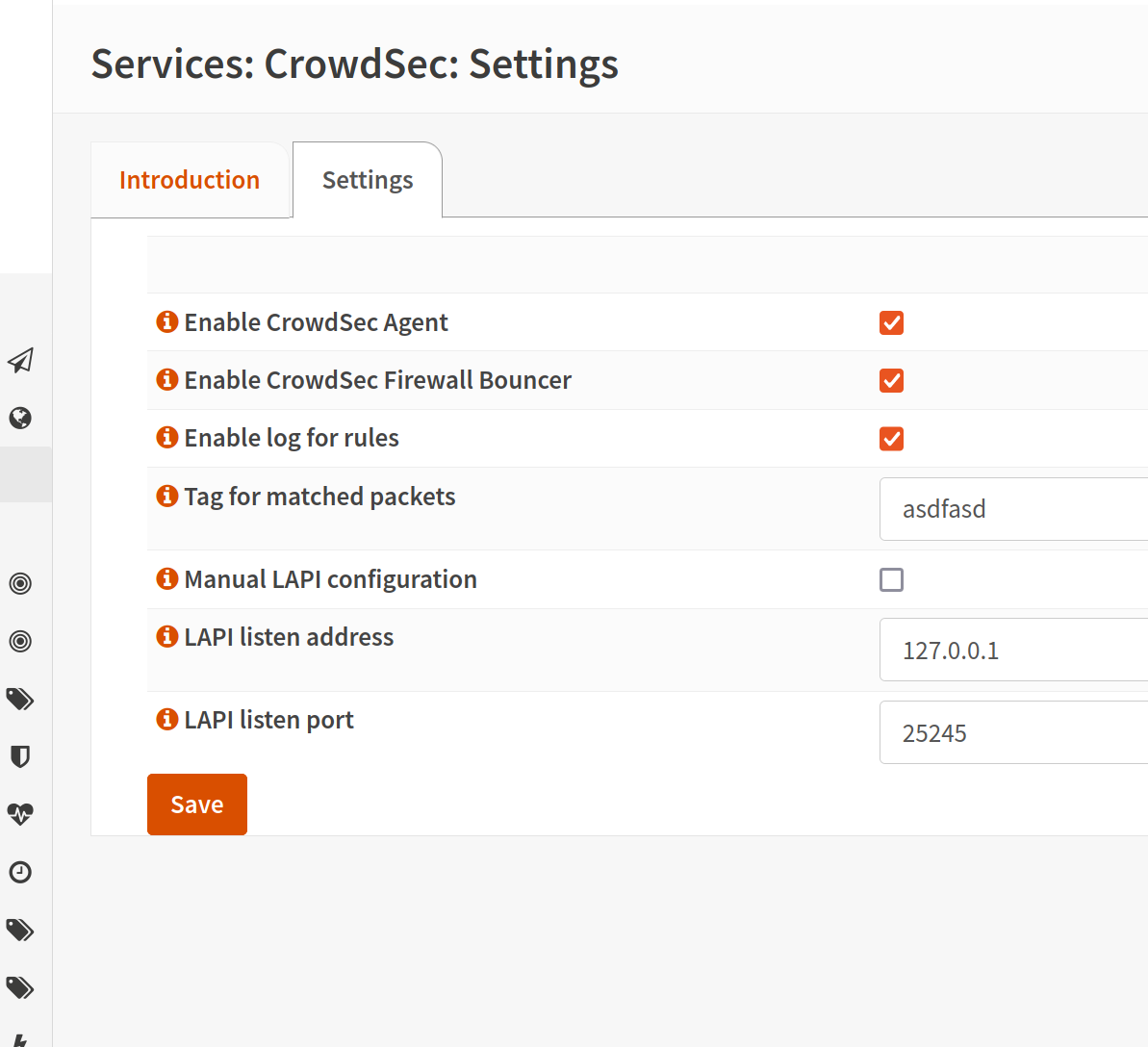
By the way due to a silly typo, tags only work with ipv4. I'm fixing that right now. You can verify with "pfctl -s all | grep crowdsec".
Thanks again