

 crazycodeboy
Build failed on Android, HELP
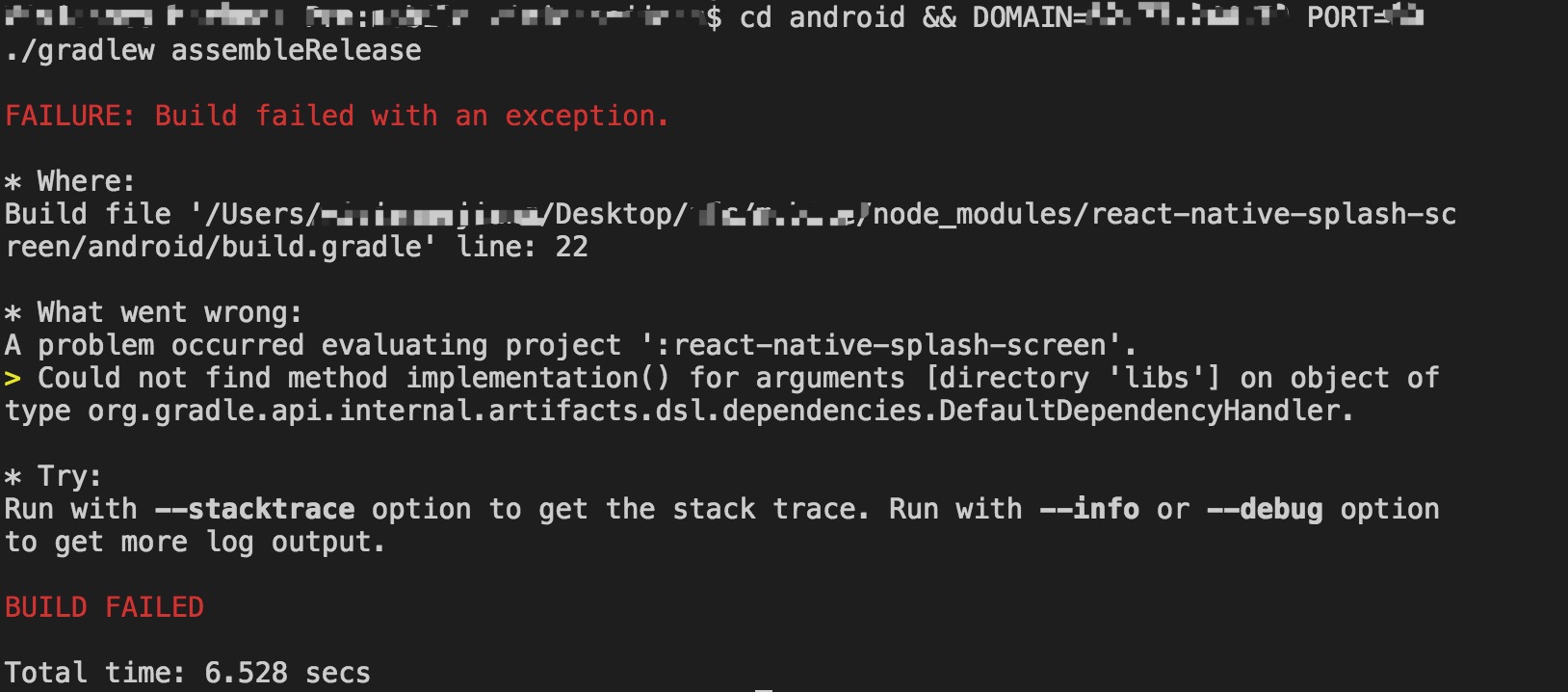
FAILURE: Build failed with an exception.
-
Where: Build file '/Users/----/workspace/----/node_modules/react-native-splash-screen/android/build.gradle' line: 22
-
What went wrong: A problem occurred evaluating project ':react-native-splash-screen'.
Could not find method implementation() for arguments [directory 'libs'] on object of type org.gradle.api.internal.artifacts.dsl.dependencies.DefaultDependencyHandler.
I followed the instruction again and again, but still build failed on Android, no problem on IOS.

same issue here. I can build the APK successfully yesterday, but it fails today without any code change.
react native version:
"react": "^16.0.0-alpha.12",
"react-native": "^0.47.0",
In build.gradle under app folder:
dependencies {
    compile project(':react-native-splash-screen')
    ....
    compile fileTree(dir: "libs", include: ["*.jar"])
    compile 'com.android.support:appcompat-v7:23.0.1'
    compile 'com.facebook.react:react-native:+'
}
Also, I've imported the package in MainActivity & MainApplication.java file.
Not sure what cause this issue.
I run the same project which I clone from gitlab yesterday, it works fine now.
But I run the same project which I clone today, it pop up this issue.
Does the splash package cause this problem or gitlab cause this problem?
Anyone has any idea what cause this issue? really appreciate.

I googled and found out this might be a problem related to gradle, and I found that in the /node_module/react-native-splash/-screen/android/build.gradle are using implementation instead of compile, implementation is a new gradle version api, and I am using gradle:2.2.3.
Should I update my gradle and give it a try? but I don't want to cause other problem from my other libs
https://stackoverflow.com/questions/45099716/error40-0-could-not-find-method-implementation-for-arguments-directory-l try?

If anyone have any other errors after upgrading gradle, then try to upgrade compileSdkVersion& buildToolsVersion in android/app/build.gradle
I reopened this issue cause I realized more and more people are having this issue, I think upgrading gradle would be the best solution, although it is quite painful.
Hope this gets fixed soon.
I'm using gradle3.1.1 and still having this issue #220. The only solution is to change com.android.support:appcompat-v7:27.0.2 to com.android.support:appcompat-v7:23.0.1 and change compiledSdkVersion to 23.
Any solutions?

@vikrantnegi
// in the android/build.gradle
buildscript {
...
}

allprojects {
...
}

// add this
subprojects {
    project.configurations.all {
        resolutionStrategy.eachDependency { details ->
            if (details.requested.group == 'com.android.support'
                && !details.requested.name.contains('multidex') )
            {
                details.useVersion "26.1.0"
            }
        }
    }
}
@jaychenjun That but it did not help.
I think that this since this library is using gradle
implementation 'com.android.support:appcompat-v7:27.0.2' & compileSdkVersion 27
and my react native is using gradle
implementation 'com.android.support:appcompat-v7:23.0.1' & compileSdkVersion 23
This is the reason that is causing the error. When I change this library gradle to match the project gradle the project builds successfully.
Fixed it, it is due to the com.android.support:appcompat version.
The solution from @vikrantnegi works, thank you.
I upgraded com.android.support:appcompat-v7:23.0.1 to compile 'com.android.support:appcompat-v7:27.0.2'
and upgraded compileSdkVersion 23 to compileSdkVersion 27
Android APK can build successfully now.
@jaychenjun Hi, My gradle version in android/build.gradle is classpath 'com.android.tools.build:gradle:2.3.3' But I have same problem. What version of gradle do I install?

classpath 'com.android.tools.build:gradle:3.1.0'
Upgrading gradle is my solution though, you can try to upgrade com.android.support:appcompat first as mentioned by others above.
@jaychenjun I upgraded gradle to 3.1.2 but I have error! Please see the Image. How to solve errors?!
 Also When I run
 react-native run-android get this error in terminal:
* What went wrong:
Execution failed for task ':app:mergeDebugResources'.
> Error: java.util.concurrent.ExecutionException: com.android.builder.internal.aapt.v2.Aapt2Exception: AAPT2 error: check logs for details
This seems to be caused by 3.0.7 upgrade. If it requires gradle upgrade, it should be a major revision, not a patch

Syncing gradle versions is a very very very painful process!
Dear contributors please don't change the default gradle/supportlibs/buildTools/... versions! and leave them as react-native default version.

Ok, so i tried to repair this issue without any change to my code:
First I initiate a new project, and installed react-native-splash-screen
I removed locally, the changes made before https://github.com/crazycodeboy/react-native-splash-screen/commit/c078edfb93640b96ef5cda877a716cb500366a15 and the building part is looking fine with react-native default gradle/supportlibs/buildTools/...

Still doesnt seem to work:
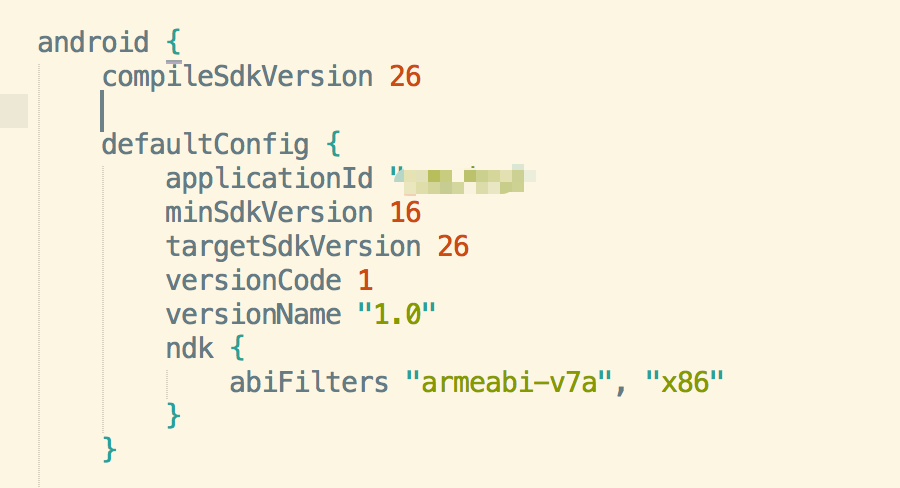
android {
    compileSdkVersion 27
    buildToolsVersion "27.0.3"

    defaultConfig {
        applicationId "com.blog"
        minSdkVersion 16
        targetSdkVersion 27
        versionCode 1
        versionName "1.0"
        ndk {
            abiFilters "armeabi-v7a", "x86"
        }
    }
dependencies {
    compile 'com.android.support:appcompat-v7:27.0.2'
}

I finally made It works, here is my conf if anyone want to test.
- I had to enable
multiDexEnabledbecause I had a error on opening. - I also had to add a piece of code because I used Onesignal
These two steps above are specific to my use case.
My android/app/build.gradle
android {
    compileSdkVersion 27
    buildToolsVersion '25.0.3'

    defaultConfig {
        applicationId "YOUR APP ID"
        minSdkVersion 16
        targetSdkVersion 27
        versionCode 12
        versionName "2.0"
        multiDexEnabled true
        ndk {
            abiFilters "armeabi-v7a", "x86"
        }
    }
My android/build.gradle
buildscript {
    repositories {
        jcenter()
    }
    dependencies {
        classpath 'com.android.tools.build:gradle:2.3.3'

        // NOTE: Do not place your application dependencies here; they belong
        // in the individual module build.gradle files
react-native-splash-screen build.gradle c078edf
apply plugin: 'com.android.library'

android {
    compileSdkVersion 25
    buildToolsVersion "25.0.3"

    defaultConfig {
        minSdkVersion 16
        targetSdkVersion 23
        versionCode 1
        versionName "1.0"
    }
    buildTypes {
        release {
            minifyEnabled false
            proguardFiles getDefaultProguardFile('proguard-android.txt'), 'proguard-rules.pro'
        }
    }
}

dependencies {
    compile fileTree(dir: 'libs', include: ['*.jar'])
    testCompile 'junit:junit:4.12'
    compile 'com.android.support:appcompat-v7:23.4.0'
    compile "com.facebook.react:react-native:+"  // From node_modules
}
@vivikenen yes, I also tried https://github.com/facebook/react-native/issues/15448 and everything works fine now with last gradle's version and build tools (react-native default ones are pretty old)
I also upvoted : https://react-native.canny.io/feature-requests/p/update-android-build-tools-version-in-project-generated-by-react-native-init
Upgrade gradle can fixed this,but change default setting is not a good way.

I don't know what's happen....
I was build successfully use the solution for upgrading com.android.support:appcompat-v7:23.0.1 to 'com.android.support:appcompat-v7:27.0.2' and upgrading compileSdkVersion 23 to compileSdkVersion 27.
But suddenly, it does not work again since yesterday.
And I try to upgrade the gradle to distributionUrl=https\://services.gradle.org/distributions/gradle-4.4-all.zip in gradle-wrapper.properties and classpath 'com.android.tools.build:gradle:3.1.0' in build.gradle under android folder.
It helped me to build APK successfully, but the app keep crashing when I try to open it, it says The app has stoped.
And then, I try to run on ios, ios does not throw any error message, but the splash image does not show when I open the app, just black screen, and then navigate to the main page.
Do you have the same issue?
    compileSdkVersion 27
    buildToolsVersion "27.0.3"

    defaultConfig {
        minSdkVersion 16
        targetSdkVersion 23
        ...
    }
@vivikenen, try upgrading buildToolsVersion, minSdkVersion and targetSdkVersion?
Hi @MR03web ,
Thx for your help, but I try to upgrading the buildToolsVersion, minSdkVersion and targetSdkVersion.
Doesn't work as well.
It can be built successfully, but crash when I try to open it. (No code change)
Even when I try to upgrade the gradle to classpath 'com.android.tools.build:gradle:3.1.0', still crash when I try to open the app.
@vivikenen,
I created a demo only used react-native-splash-screen. It can be built successfully and running on my phone,if still can't succeed. you may need to check the android sdk environment or change a phone...
PS: delete android/app/build and build apk
https://github.com/MR03web/splashDemo
this is my app/build.gradle
compile fileTree(dir: "libs", include: ["*.jar"]) compile "com.android.support:appcompat-v7:23.0.1" compile "com.facebook.react:react-native:+" // From node_modules
I replaced the react-native-splash-screen build.gradle with app/build.gradle
implementation fileTree(dir: 'libs', include: ['*.jar']) testImplementation 'junit:junit:4.12' implementation 'com.android.support:appcompat-v7:27.0.2' implementation "com.facebook.react:react-native:+"
to
compile fileTree(dir: "libs", include: ["*.jar"]) compile "com.android.support:appcompat-v7:23.0.1" compile "com.facebook.react:react-native:+" // From node_modules
I'm not sure but it worked. I'm not sure is this correct approaach or not. Because no one goes to change the content inside node_modules folder.

