

 craftworkgames
Method not found: 'Microsoft.Xna.Framework.Color.get_TransparentBlack()'
Getting the following error when trying to follow the tiled documentation here: https://www.monogameextended.net/docs/features/tiled/tiled
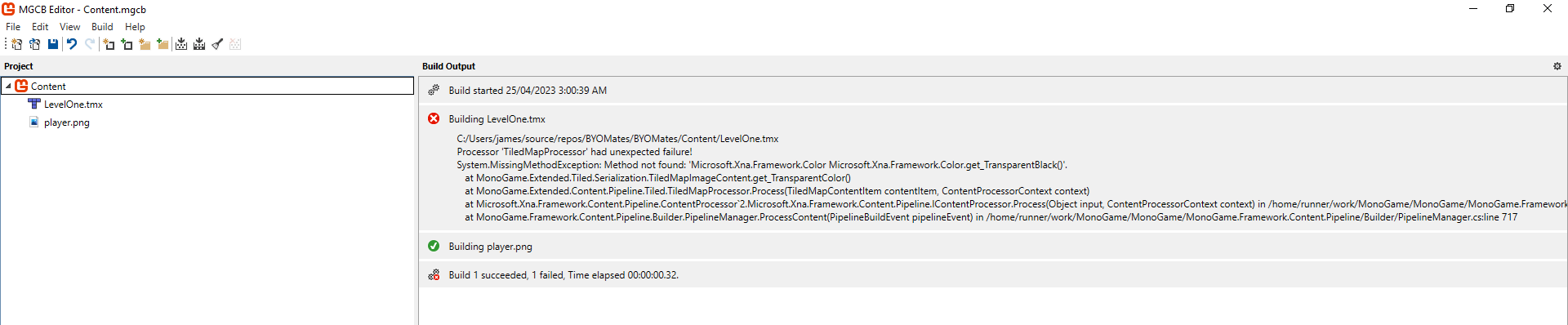
Have searched in the discord and it looks like a problem other people are having as there is a bit of talk about it but no resolution that I could see.
I have the following dependency versions installed:
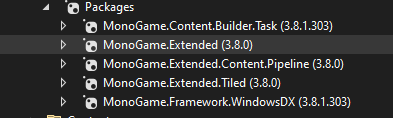
and have installed the extended content pipeline dll as follows:
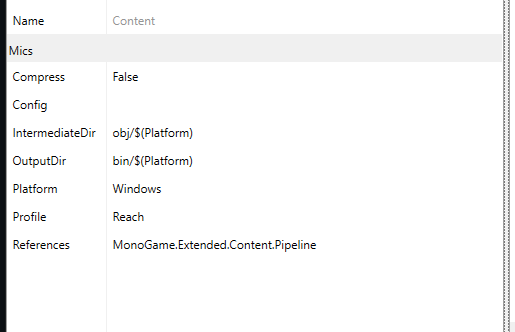
it's breaking with the sample map from the docs so it's not something I'm doing wrong in tiled.
Anybody know how to resolve this?


I solved this by using the pre-release rolling builds feed. A NuGet.config is needed with the feed from the readme of this project:
<?xml version="1.0" encoding="utf-8"?>
<configuration>
    <config>
        <add key="globalPackagesFolder" value=".nuget\packages" />
    </config>
    <packageSources>
        <add key="lithiumtoast" value="https://www.myget.org/F/lithiumtoast/api/v3/index.json" />
        <add key="NuGet" value="https://api.nuget.org/v3/index.json" />
    </packageSources>
</configuration>
As package version I set 3.9.0-alpha0093
<PackageReference Include="MonoGame.Extended.Tiled" Version="3.9.0-alpha0093" />
<PackageReference Include="MonoGame.Extended.Content.Pipeline" Version="3.9.0-alpha0093" />

This issue was caused due to the removal of Color.TransparentBlack in MonoGame 3.8.1.303.
This is no longer an issue in develop since it has been updated to the latest MonoGame version.
Until the MonoGame.Extended v4.0.0 release you can use one of the following workaround
- Use the source code of MonoGame.Extended directly and reference it in your project
- Use the most recent (at the time of writing this) prerelease NuGet https://www.nuget.org/packages/MonoGame.Extended/3.9.0-prerelease.4
