

 craftcms
Can't edit order with custom shipping methods
Description
Trying to edit (add items) to an existing order. The order's shipping comes from our custom shipping calculator that works in all other areas/ways/respects.
This calculator will continue to return a valid method even with the new items (same method but a higher price).
We do get a yellow 'Previous Shipping Method is no longer available' - but nothing can be selected on the order, the drop down either isn't available or shows only 'None' as an option.
We can do a manual 'edit adjustments' but cannot, in there, select a valid shipping method. This leads to staff putting random things in there, and then the order fails to push through to our accounting system (as their is no valid shipping on the order) - and means we might just as well have edited the order in the accounts system anyway.
Steps to reproduce
Have a custom shipping calculator, edit orders.
Additional info
All very latest versions.

@bossanova808 It is hard to tell what caused the orders to not function as expected without tracking how the custom shipping method is coded. I would suggest to track the custom shipping method and look at the events that being watch. The event trigger could cause this.

@pdaleramirez I am not following you at all.
Commerce custom shipping calculators do not listen to events. They are registered (by my shipping module) - and called by Commerce when needed. That is not happening properly, though, when editing an order in the back end. This shipping calculator works fine on the front end (and has done for 5 years now...)
For further context, here's the calculator working correctly when creating an order (although it would be much improved by showing the amount there, rather than having to select it - when you're on the phone with the customer, it would be super handy to have the info to hand).
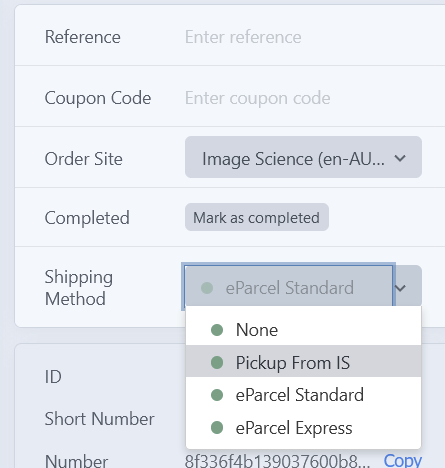
However if you take an existing completed order, and edit it, then Commerce should also re-calculate the shipping quote. Instead it doesn't allow you to select anything here, either remaining as unselectable, or showing only the option 'None'.
@bossanova808 Sorry for the misunderstanding. Your main issue is the UI, isn't it? You are not able to select any shipping method when you edit an order. Have you checked if you have JavaScript errors on the page by checking you console dev tools?
There's no JS errors in the console, no. I just don't get re-calculated quotes or the option to choose hipping methods:
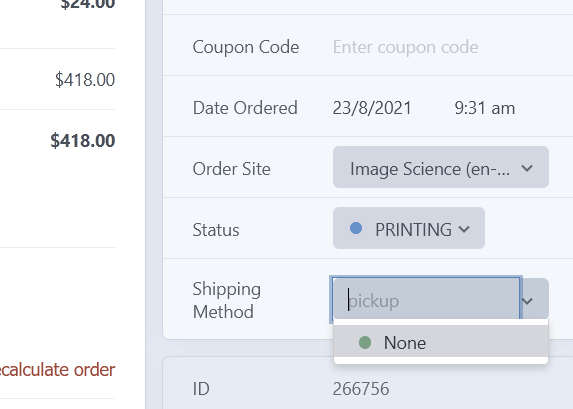
I've had a thought about what might be happening here - but I can't test until tomorrow. Please ignore this for now and I'll post back once I know, thanks,
Right, so last night I recalled that previously I'd been advised to add the following:
        // Ref: luke - short circuit - don't waste time re-calculating shipping for completed orders
        // @TODO - if we later allow back end changes to orders, this might need to become more clever?
        if ($this->cart->isCompleted){
            self::debug("Short circuit, order is already completed");
            return;
        }
...to prevent constant shipping recalculations occurring (unfortunately I haven't noted there exactly why I got that advice, but I am guessing it was performance related...because long ago there were issues with the shipping calculator being called excessively and necessarily during various order processing operations).
Of course that prevents this order editing scenario, as these orders are obviously completed. Removing this short circuit means I do then get the option of choosing shipping methods.
However, this does then present a new issue, which is that then choosing one of these shipping methods (in the right column) does not, in fact, actually update the shipping adjustment on the order, or the shipping costs.
Here I have changed the shipping from Standard to Express and saved the order, but the shipping and total in the order itself have not changed (should have gone from $12 to $15 as per the quote returned by the calculator):

I can manually edit the shipping adjustment, and that seems to work - but it's clunky - surely choosing the shipping on the right should cause the actual shipping quote on the order to change?
(I'm also a bit nervous about removing that short circuit but I'll give it a go and see if it cause other issues...)
@bossanova808 In order for it to add the adjustment, you'll have to click the Recalculate Order after you've changed the shipping method then hit Update Order. Have you tried that step?
Err, no, I hadn't as such, because that is a just a really weird workflow...including a popup with 'all manual changes will be removed' message that makes zero sense in this context (what exactly will be removed?...and then if that doesn't put you off and you proceed - in fact nothing IS removed??)...and then the line items spontaneously re-sort themselves so it looks like things have been removed & what you have just added has disappeared....
...but yeah, ok, that ultimately does change the order.... if by some divine providence you happen to hit upon the unique sequence of edit order, add some stuff, ignore scary message if you hit recalculate at this point as the red text makes you feel like you should, choose changed shipping, nothing happens, hmmm ok maybe if I hit recalculate again, and then use 'update order'. Oh and then there's the yellow notice thing in there as well.
The UX here is...not good.
And (as in the case above) e.g. it happily lets me change the shipping in the right column, then if I forget to hit the recalculate button (easy to go)... I get no warning, but the shipping on the right is now set to the changed, but not on the order itself, nor the amount or paid status. That shouldn't be a situation an order processor can get to at all..