

 coteditor
Question, maybe a request: how to change font for 'write to console'?
I use 'write to console' to show the output of some linting tools. They all have the same structure: row, col, errorno, error-message. Because auf two spaces e.g. in lineno (line 1 up to 9) and one space (line 10 up to 99) the output looks a little messed up; what I'm trying is to change to a monospaced-font. Is there any way to do this?
BTW: Dark Mode without changing the complete desktop is a really great thing; but why stays console in Normal Mode?
Thank you for taking a look in this

Currently, there is no way to change the font in console to keep the preferences not (too) messy. However, as you pointed out, an implicit way to change the font (maybe through the font panel and remember the setting among sessions) may help some users. I’ll consider.
In term of the dark mode, I’ve just forgotten to implement :-P I’ll do it in the next version.

By the way, this is the 1,000th issue in this CotEditor repository. Congratulation 🎉
BTW: Dark Mode without changing the complete desktop is a really great thing; but why stays console in Normal Mode?
In term of the dark mode, I’ve just forgotten to implement :-P I’ll do it in the next version.
Sorry I misread your question. The preference option to keep the appearance to the specific mode against the system mode is only for document windows in spec. All other windows/panels (incl. Console) follow the system appearance without exception. I suppose it is not a good idea to change all the windows' appearances only in an app even when some users desire and doubt that the Console window can be the single exception in addition to the document windows...
I looked into the code and now feel a large refactoring is required to improve the Console so that users can change the appearance flexible. I should do it somedays but it may take time and needs careful designing.
So, I quickly changed just the contents font to a monospaced one in the next version CotEditor 3.8.5, because your request, changing the console font to a monospace, seems reasonable.
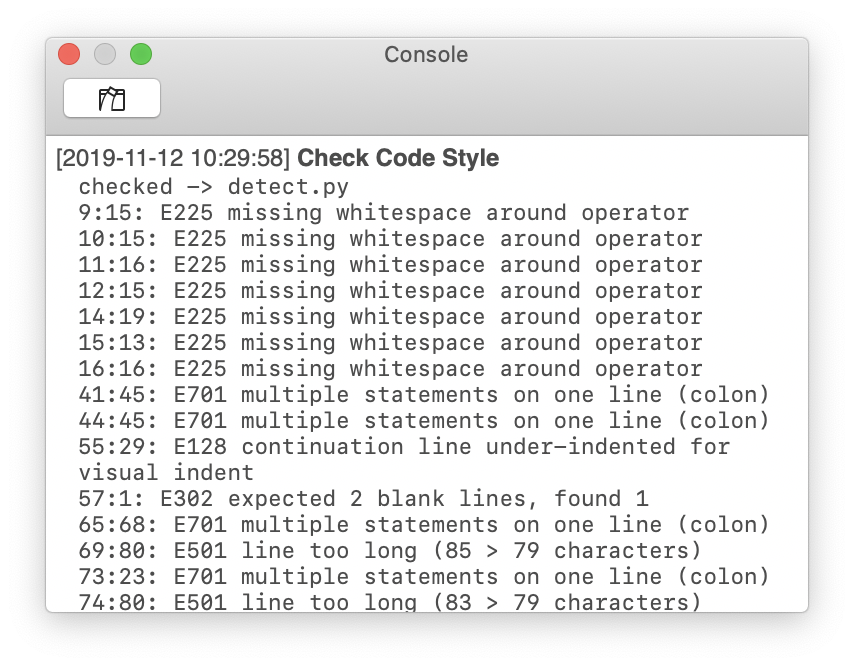
Thank you for your message and your search for a solution.
The new feature shows exactly what I've requested and I'm looking forward to install the update:
BTW - I would like to know which script you've used for the example shown?
Thank you for your time and this great 'little' editor ;-)))
Mike
BTW - I would like to know which script you've used for the example shown?
I just ran pycodestyle (former pep8) for the frontmost document.
You can see the script below.
https://github.com/1024jp/python-coteditor/blob/master/05)Check%20Code%20Style.py
- Note that you need to install
pycodestylecommand beforehand.
I've tried this script sometimes ago but wasn't able to start it from Coteditor's script menue ... so I created my own 'Apple'-script (using flake8):
https://github.com/mer60/Coteditor-scripts/blob/master/07)Flake8.%5Ef.applescript
mayby you're interested to look at it - there are some other scripts I use with Coteditor
the monospaced font in console is a great feature - I enjoy it very much ;-))
thank you for that and the thumps up
the monospaced font in console is a great feature - I enjoy it very much ;-))
thank you for that and the thumps up
Is this a feature already added to v3.8.5 ??? I'm running v3.8.5 (app store version), the console font seems sans-serif, not monospace.
BTY, is there a way to clear the console before writing and to hide the timestamp or customize the timestamp format?

@Antisunny Yes, the font in console has already been changed since CotEditor 3.8.5. If not in your CotEditor 3.6.5, there must be some issue. Please share with me the version of your macOS and a screenshot of your console with some output.
BTY, is there a way to clear the console before writing and to hide the timestamp or customize the timestamp format?
Regarding those two features, they are both not implemented (yet). I'll consider.
In the next version, CotEditor 4.5.6, console will accept and remember the font size change by the Bigger / Smaller Font commands (⌘-Plus / ⌘-Minus keys).