
react-native-fabric
 react-native-fabric copied to clipboard
 corymsmith
Argument list too long: recursive header expansion failed
While building below error :
Argument list too long: recursive header expansion failed at /Users/dev/fabric/ignite-drive2success-react/node_modules/react-native-fabric/ios/../../../ios/Pods/React/node_modules/diff/lib/patch.

Have this same problem too, although the offending folder was /ios/Pods/React/node_modules/typedarray/test/server.
How to resolve?

I was having the same problem because I'd installed react-native-fabric as a Pod.
My currently working setup for iOS is the following:
- Installed Crashlytics and Fabric through CocoaPods and set them up in Xcode by following the official installation guide. So now my Podfile only has these two entries:
pod 'Fabric'
pod 'Crashlytics'
- Installed
react-native-fabricthrough npm withyarn add react-native-fabric. - Then I received an error while compiling:
ld: framework not found Crashlytics
I added $(inherited) to all Framework Search Paths in my project target's Xcode Build Settings as described in this Stackoverflow answer.

@tiagoalves , thanks for the tip. Although my solution not exactly the same, cause I already had $(inherited) in the Framework search paths, but removing react-native-fabric from the pod file was the key to the solution.
Had to do the manual steps of adding the node_modules/react-native-fabric/ios/SMXCrashlytics.xcodeproject to the Libraries folder and the libSMXCrashlytics.a to the linked Framework and Libraries in the General tab of the project
For those of you feeling completely lost like I was, I experienced this in updating from 0.4.1 to 0.5.1; not sure where the regression occurred between there, but downgrading is this only thing that resolved the issue (after trying just about everything on StackOverflow).

@sandeep-t2s the same appeared in SMXCrashlytics.xcodeproj after I updated xcode.
Just removed it and added to Library from node_modules/react-native-fabric/ios/..
I found that it changed the Framework Search Paths to correct path.

Any one the solution did not work for me. Facing the same issue. Argument list too long: recursive header expansion failed at /Users/fari/ReactNativeApps/jem-app/node_modules/react-native-fabric/ios/../../../ios/Pods/boost-for-react-native/boost/numeric/odeint/external/viennacl.

I was experiencing this error. Switching to a more recent iPhone version and iOS version for the simulator seemed to fix it

I can confirm this is broken in 1.5.1 but works fine in 1.4.1 . There are two libSMXCrashlytics.a files, one for tvOS. I know I'm linking the proper one. But not sure why this is broken.


Specifically getting: Argument list too long: recursive header expansion failed at {peoject_path}/node_modules/react-native-fabric/ios/../../../ios/build/Index/DataStore/v5/records/IQ.
Ok, a solution that worked for me was to set all the paths on the Header Search Paths to non-recursive

FYI I'm not at all familiar with xcode, but some time ago I add this same issue with RNcamera, and this comment on the issue fixed it for me. Tried the same with RNfabric and it seems to fix it.
create a file to be called on postinstall script with the following:
./scripts/fix-rn-ios-search-paths.sh
#!/bin/bash
set -e

# Make RNfabric search paths non-recursive for ios to avoid recursion overflow in build
sed -i -e 's/ios\/\*\*/ios\/\*/g' ./node_modules/react-native-fabric/ios/SMXCrashlytics.xcodeproj/project.pbxproj

echo 'RNfabric paths corrected'
call it on postinstall script:
./package.json
  "scripts": {
     ...
    "postinstall": "./scripts/fix-rn-ios-search-paths.sh"
  },
As the autor said in the comment this should be a temporary fix.


I temporally fixed it modifying headers path on SMXCrashlytics project.
On xCode you must tap on SMXCrashlytics.xcodeproj, then in the main screen go to: Build settings -> Search Paths -> Header Search Paths
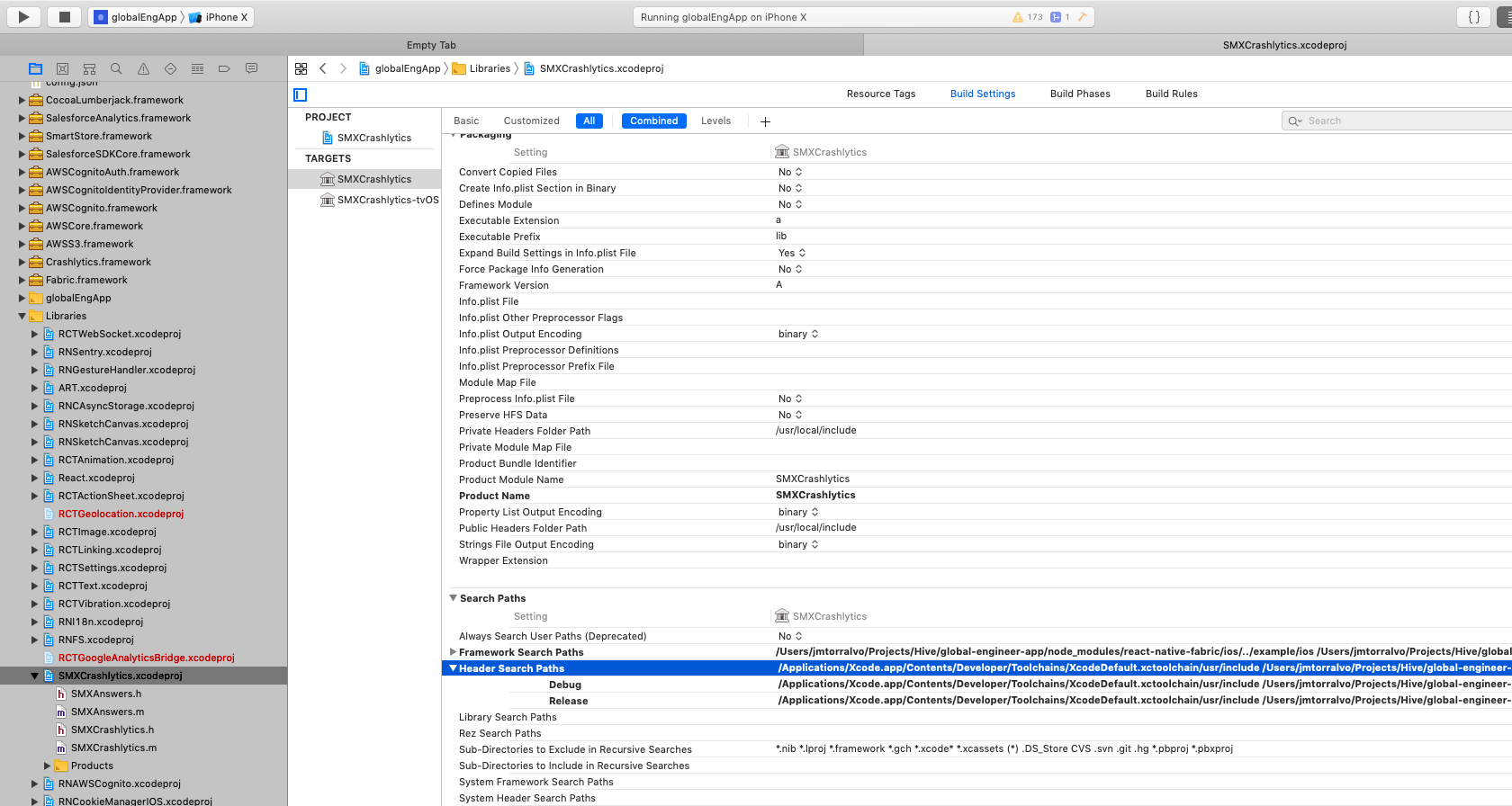
Then you must replace $(SRCROOT)/../../../ios for $(SRCROOT)/../../ios
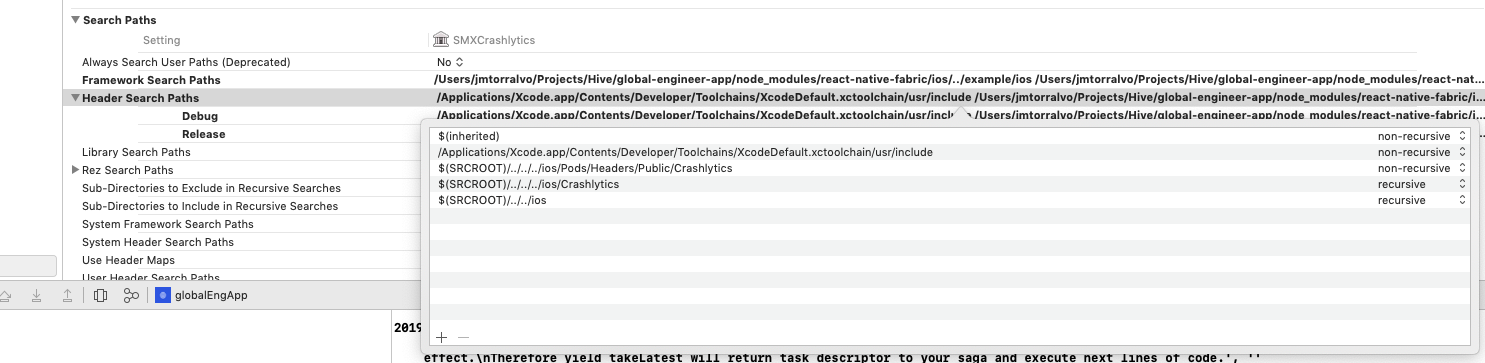
It solves the problem but you will get it again even time you do an dependency installation.

In my case it happened because i was using deps with cocoapods mixed with normal dependencies linked directly to the project.
I definitively solved it movin react-native-fabric dependency to Podfile.