
phy
 phy copied to clipboard
 cortex-lab
Activate lazo in waveform view
Hi
This is a feature request.
It would be useful (at least for me :) ) to have the ability to select some waveforms that I would like to remove from the cluster.
Similar to what you can do in the feature view, but in the waveform view.
For example select all spikes that any point of the waveform are inside the selected area.
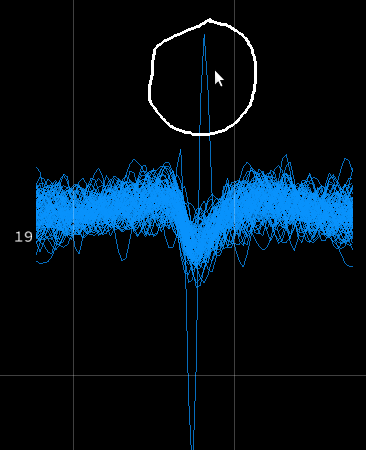 In this example I can remove that spike from the amplitude view or feature view, but some times I can not find the way and having this feature will make the cleaning easier.
I don't know how feasible it is to do it. Just a wish :D
In this example I can remove that spike from the amplitude view or feature view, but some times I can not find the way and having this feature will make the cleaning easier.
I don't know how feasible it is to do it. Just a wish :D
Thanks

I'm also interested in that. What I did so far, is writing a Phy Script that allows me to move the times of these spikes to a dummy (or 'noise') channel.

Phy is only showing a fixed number of randomly selected spikes in a given cluster in the WaveformView. So while the lasso in this view can be useful, it can not be used to remove manually all "bad" waveforms.
Le mar. 24 sept. 2019 à 17:53, Ariel Burman [email protected] a écrit :
Jose, do you have that code available?
— You are receiving this because you are subscribed to this thread. Reply to this email directly, view it on GitHub https://github.com/cortex-lab/phy/issues/897?email_source=notifications&email_token=AAMYJ737JIKHCOVLFO2BRPDQLIZYHA5CNFSM4IYMVOR2YY3PNVWWK3TUL52HS4DFVREXG43VMVBW63LNMVXHJKTDN5WW2ZLOORPWSZGOD7O3MOI#issuecomment-534623801, or mute the thread https://github.com/notifications/unsubscribe-auth/AAMYJ757P5RPK5TG5T7SJ4DQLIZYHANCNFSM4IYMVORQ .

yger, yes I understand that. But I think the same thing happens in the Feature View, and in the Amplitud View. So you can select certain regions that you might think there is something to remove from the cluster, o select only the region that you want to leave in the cluster, and then do a split. That is what I do with those views, and having the same feature in the WaveForm View for me it would be a great help. Also you can manually change the amount of spikes shown in the WaveformView and also I do that to see if there is more noisy Waveforms. Maybe another feature could it be to toggle between the random selection (as it is now, as I understand), and a probabilistic selection based in likelihood of belonging to the cluster and that will give the opportunity to show a certain amount of outliers.
When splitting in the feature view, all spikes are loaded before computing the points belonging within the lasso so as to delete all spikes that should be deleted. The problem with the waveform view is that it is currently prohibitively slow to load all spike waveforms before computing the intersection with the lasso, so much as to be unusable in practice.

Jose, do you have that code available?
I do it with the IPython console, I will copy here as a pluging soon.
When splitting in the feature view, all spikes are loaded before computing the points belonging within the lasso so as to delete all spikes that should be deleted. The problem with the waveform view is that it is currently prohibitively slow to load all spike waveforms before computing the intersection with the lasso, so much as to be unusable in practice.
I see. I really don't understand yet how the lasso and the views works. My idea is to somehow get the points included in the lasso, select only the waveform of the main channel that is being used, and find the ones that are included in the lasso. For example if a unit has 200000 spikes and assuming 100 data points per waveform, doesn't seem a big amount of data that can't be handled. Using all the waveforms of all the channels I can see that would be a problem. What I mean with the main channel, is the one selected with 'ctrl+left_click' (or the 'bestchannel if no channel has been selected, the same way that amplitudview and featureview seems to work).
I can see there will be an overlap on the lasso command because right now 'ctrl+click' is used for selecting channels, but I think is a minor problem.
For example if a unit has 200000 spikes and assuming 100 data points per waveform, doesn't seem a big amount of data that can't be handled.
If a unit has 200 000 spikes, then we need to extract 200 000 waveforms on a single channel. The current waveform extraction procedure is really slow and may take about 1 ms per waveform. So that's about 3 minutes to wait after you've drawn a lasso in the waveform view and requested a waveform split. It's surely not impossible to speed that up, there are several solutions like precomputing the waveforms or considerably improving the waveform extraction code. It just requires quite some work.
Jose, do you have that code available?
Hi, here the Plugin I use to remove single spikes (it's very preliminary). The class I use is called SpikeSplitter, and at the moment, I simply use it to prompt in the status bar the id of event that I want to split. With Alt+p you can activate a menu that ask you a time where to start to look for the first spike to remove (e.g., 156.1 s will look for the first spike in the selected cluster that appears). When that spike is found, you will see the id in the status bar (something like Spike id: 99) .
After that, I simply type in the IPython console the following command:
emit('action', s.action_creator, 'split', [spike_ids])
where spike_ids is a list containing the number (e.g, [99]) of a list of numbers of the spikes that you want to split. At the moment, I do not know how to call emit from the script, that's why I'm doing this.
Let me know if it helps.
Jose
At the moment, I do not know how to call emit from the script, that's why I'm doing this.
does this work? from phy import emit
I tried and it does not work. I think I'm doing somethign wrong with spike_ids in 'emit' .Here is the code
import numpy as np

from phy import IPlugin, connect
from phy import emit

class SpikeSplitter(IPlugin):
    """
    This Plugin select single spikes to be splitted
    """
    def attach_to_controller(self, controller):
        """
        This function is called at initialization time before
        creation of the supervisor object (s) which controls
        ClusterView and SimilarityView.
        """
        @connect(sender=controller)
        def on_gui_ready(sender, gui):
            """
            Called when the GUI and all objects are fully loaded.
            It makes sure that controller.supervisor is properly defined.
            """
            #------------------------------------------
            # in File->Display message
            #------------------------------------------
            gui.file_actions.separator()
            @gui.file_actions.add()
            def show_selected_clusters():
                """
                Display selected clusters in the status bar
                """
                sel = controller.supervisor.selected
                gui.status_message = "Selected cluster/s: %s"%sel

            #------------------------------------------
            # in Select->MyPlugins:
            #------------------------------------------
            gui.select_actions.separator()
            myparams = dict(submenu = 'MyPlugins', shortcut = 'alt+p',
                prompt = True, prompt_default = lambda: 0)
            @gui.select_actions.add( **myparams )
            def split_spike(time):
                """
                split the spike next to the time entered
                """
                # get id from selected cluster
                mycluster_id = controller.supervisor.selected
                # get the sample of the first spike
                t = controller.get_spike_times(mycluster_id[0])
                p = controller.get_spike_ids(mycluster_id[0])
                x = np.argmax(t>time)
                # remove this p[x]
                #emit('action', s.action_creator, 'split', list(p[x])) #WONT WORK!
                gui.status_message = 'Spike id: %s'%p[x]
How it is not working, do you get any error message, or isn't it doing anything?
Yes, I also do not understand it. If I uncomment the line containing emit the everything works until that line containing gui.status_message. The only thing that phy returns is:
11:34:14.504 [W] actions:204 Error when executing action Split spike.
In $HOME/.phy/config I have
from phy import IPlugin

c = get_config()
# local path to plugins subdirectory
c.Plugins.dirs = [r'/home/segundo.martinez/git/minibrain/phy']

# add the classes to be used TemplateGUI
c.TemplateGUI.plugins = ['Test', 'ISImedian', 'SpikeSplitter']
Actually could you use the following command instead to make a split?
controller.supervisor.actions.split([p[x]])
See this plugin example
Hi @rossant
I started to write a plugin to do this feature and its roughly working. https://github.com/yagui/phy-plugins/blob/master/plugins/waveformCuttingView.py
I fix almost everything that I asked before, but I'm still having this problem and I couldn't figure it out. I'm having the same problem that was happening in the feature view, in this issue #857. I tried to understand the commit that fixed that issue, but I still can't get it.
I'm using a PlotVisual, with a stacked layout, only one plot.
I checked that when I click in [1,1] the function box_map in phy/plot/base.py return [1.05263321 1.11110505]
Could I have some ideas how to fix it or where to look?
Thanks
I solved the problem I was having. The solution was to not set any layout. 'Grid' Layout with only 1 subplot, was the closest thing to make it work, because the plots were at the right position, but the lasso was shifted. 'stacked', and 'boxed' not only had the lasso shifted, but also the plots theirself were shifted. Based on the ClusterScatterView, I didn't set any layout and it worked perfectly
This is the my plugin to remove strange waveforms: https://github.com/jiumao2/PhyWaveformPlugin I met the same issue with 'stacked' layout and I did some correction to get the right point position. Here is the code:
box_size_x, box_size_y = layout.box_size
box, pos = layout.box_map(e.pos)

x = pos[0] * box_size_x * (self.data_bounds[2] - self.data_bounds[0]) / 2 + (
            self.data_bounds[0] + self.data_bounds[2]) / 2
y = pos[1] * box_size_y * (self.data_bounds[3] - self.data_bounds[1]) / (1 + box_size_y) + (
        self.data_bounds[3] - self.data_bounds[1]) / (1 + box_size_y) + self.data_bounds[1]
