
Rigbox
 Rigbox copied to clipboard
 cortex-lab
Sync square 'triple-state' behavior
Sync square in some signals experiments is flickering between three states - white, black and background. The order seems to be random. It looks like it might just be rendered fully transparent or just behind the main texture on some frames.
Example trace ('2019-09-12_11_test', sparse noise experiment, ZMAZE stim PC, B-Scope rig, ):
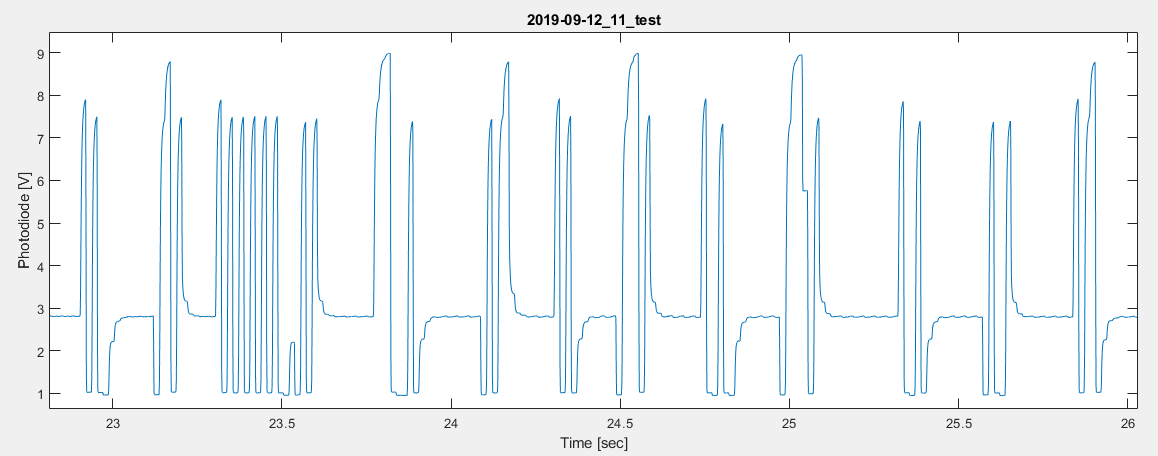
The same was true running one of the ChoiceWorld Expdefs, I could turn the wheel slowly and stop with the sync square being in one of the three states.

After some more investigation the findings are:
- It is happening a lot on slower computers
- It is still happening on faster computers, especially when the wheel is turning fast, and the textures need to update fast. It is just not obvious by eye, as white and black get fused into gray anyway. (this becomes more apparent if you set background to be not gray, e.g. cyan)
A possible, and quite likely explanation is that the Screen('Flip') (inside the callback that flips textures from the buffer) happens in between the two lines of Screen('DrawTexture') and Screen('FillRect') (inside the callback that prepares the buffer for the next flip), as everything happens asynchronously in signals. (Not exact code that is used, just something to illustrate the idea)
A proposed solution to test is to use the following code in the callback that fills the buffer:
drawnow nocallbacks;
Screen('DrawTexture');
Screen('FillRect');
drawnow;
The two Screen commands now should be forced to be executed one after another uninterrupted by other callbacks (hopefully).
Cheers for the info. I'll look into this next week. I'll try to build a test class for SignalsExp so that we can check for this sort of thing. I'm also hesitant to make any changes to the code until we have a test.

A possible, and quite likely explanation is that the
Screen('Flip')(inside the callback that flips textures from the buffer) happens in between the two lines ofScreen('DrawTexture')andScreen('FillRect')(inside the callback that prepares the buffer for the next flip), as everything happens asynchronously in signals. (Not exact code that is used, just something to illustrate the idea)A proposed solution to test is to use the following code in the callback that fills the buffer:
drawnow nocallbacks;
Screen('DrawTexture');
Screen('FillRect');
drawnow;
I'm still puzzled by this because the main loop of SignalsExp is actually synchronous. The values of signals can update any time but the drawing of the frame can only happen once per loop. Here's the (simplified) code:
if obj.StimWindowInvalid % flag set asynchronously by signals callback
  ensureWindowReady(obj); % complete any outstanding refresh, i.e. Screen('AsyncFlipEnd')
  drawFrame(obj); % draw the visual frame, i.e.
  if ~isempty(obj.SyncBounds) % render sync rectangle
    % render sync region with next colour in cycle
    col = obj.SyncColourCycle(obj.NextSyncIdx,:);
    % render rectangle in the sync region bounds in the required colour
    Screen('FillRect', obj.StimWindowPtr, col, obj.SyncBounds);
    % cyclically increment the next sync idx
    obj.NextSyncIdx = mod(obj.NextSyncIdx, size(obj.SyncColourCycle, 1)) + 1;
  end
  % start the 'flip' of the frame onto the screen
  Screen('AsyncFlipBegin', obj.StimWindowPtr);
  obj.AsyncFlipping = true;
  obj.StimWindowInvalid = false;
end
drawnow; % allow other callbacks to execute
None of these function are associated with any event callbacks. The only think affected by the signals callbacks is the StimWindowInvalid flag.
I've written a full test suite for expServer and now I will move on to tests for SignalsExp...
Adding drawnow nocallbacks after if obj.StimWindowInvalid on line 707 apparently works. I don't yet understand why.
I don't know if adding this affects performance.
when a visual stimulus element's show property is set to true, could this trigger a callback that fills the Screen buffer? If not, do you know of code anywhere else that fills the Screen buffer?
Because of this line
Screen('AsyncFlipBegin', obj.StimWindowPtr); in exp.SignalsExp/mainLoop, it seems possible that the screen buffer is getting filled (by a visual stimulus element?) after the sync square gets sent to the buffer, which effectively overwrites the sync square from the buffer?

when a visual stimulus element's
showproperty is set to true, could this trigger a callback that fills theScreenbuffer?
When show is set to true a callback sets the StimWindowInvalid flag to true and the screen is redrawn the next run of the main loop. I can't yet see how any of this would lead to the sync square failing to get filled.
Screen('AsyncFlipBegin', obj.StimWindowPtr);inexp.SignalsExp/mainLoop, it seems possible that the screen buffer is getting filled (by a visual stimulus element?) after the sync square gets sent to the buffer, which effectively overwrites the sync square from the buffer?
If that were the case you would never see a stimulus at the same time as the sync square.
If that were the case you would never see a stimulus at the same time as the sync square.
I hypothesize that you would still see both so long as in the time between the sync square being drawn to buffer and that buffer being flipped to screen, nothing else is drawn to buffer. However, if something is drawn to buffer between this time, this would overwrite the sync square from the buffer. I think drawing to the buffer is happening asynchronously.
Again, the main loop is synchronous. I can't see anyway in which that would happen.
Also I've tried adding drawnow nocallbacks like Peter did and for me the problem still persisted, so I don't think it's this. I will have a look at the update times from the experiment Krumin mentioned...
Okay, by recreating the problem in a controlled way and spying on the function calls I can rule out Jai's hypothesis. It looks to me as though this may be a psychtoolbox issue. On my laptop the FillRect fails in a stochastic manner that may be slightly correlated with CPU load. I will try to recreate the issue outside of Signals next.
Great you found what is likely the cause! That is interesting/concerning though that it is a FillRect issue. Wonder if it's an issue with other Screen function calls as well...
Before I post an issue to PTB, @mkrumin and @peterzh could you please give me more info about the computers on which this happens? Ideally update the graphics drivers and restart the computer before running the task, then check if it still happens. Pay attention to the command prompt; there might be informative warnings from PTB. I doubt they'll look much into it if we don't sort out any sync failures first. Also give me some info on the PTB version and GPU, OS, etc.
I've attached a script that redraws a GL texture and calls FillRect each time the mouse is moved. On my laptop the square disappears a small percentage of the time, regardless of how fast I move the mouse. NB: change the extension from .txt to .m.
have you tried with other Screen function calls? e.g., using the following as Screen input args: FillArc, FillOval, FillPoly, DrawArc, DrawLine ?
Another thing worth noting is that the issue may be caused by Screen('AsyncFlipBegin') instead of using Screen('Flip'). http://psychtoolbox.org/docs/Screen-AsyncFlipBegin.
In general you should avoid using asynchronous flips and instead use conventional ‘Flip’ unless you have a good reason to do otherwise... You can not do anything with textures or offscreen windows while their parent-onscreen window is in async flip state
This could mean that Screen('FillRect') is not doing anything at certain times?
Is there a reason we're using AsyncFlipBegin here instead of Flip?
have you tried with other
Screenfunction calls? e.g., using the following asScreeninput args:FillArc,FillOval,FillPoly,DrawArc,DrawLine?
No but I'd be surprised if the shape had anything to do with this.
Nothing is drawn to the frame before the previous flip has finished so this shouldn't be an issue. The reason we use asynchronous flips is to allow other stuff to happen at the same time, namely updating the inputs, doing the keyboard check and sending Signals updates.
Could it be the case that the Screen('FillRect') sometimes does nothing because there are times when it is run when the Screen is in an async flip state?
Before I post an issue to PTB, @mkrumin and @peterzh could you please give me more info about the computers on which this happens? Ideally update the graphics drivers and restart the computer before running the task, then check if it still happens. Pay attention to the command prompt; there might be informative warnings from PTB. I doubt they'll look much into it if we don't sort out any sync failures first. Also give me some info on the PTB version and GPU, OS, etc.
I've attached a script that redraws a GL texture and calls
FillRecteach time the mouse is moved. On my laptop the square disappears a small percentage of the time, regardless of how fast I move the mouse. NB: change the extension from .txt to .m.
Following up on this, I need some system info before going further.
Hi @k1o0 , I ran your screenPoke script. I found that the corner box was cyan occasionally, for certain horizontal positions of the mouse. If I left the mouse in the same position, it would stay cyan until I move the mouse. If I later return the mouse to the same horizontal position, it would go cyan again. I don't know if this was expected behaviour, but to me it suggests that the red/green box wasn't being drawn due to something wrong about the horizontal position value (a rounding error?). So perhaps the reason we get this triple-state behaviour in the signals experiments is due to a similar error in estimating whether stimuli had moved on the screen?
PC specs:
Intel Core i5-8500 CPU @ 3GHz
16GB RAM
Onboard graphics card Intel UHD Graphics 630 (we don't use an external graphics card because we don't need 3 screens)

Hi @k1o0 , I ran your screenPoke script. I found that the corner box was cyan occasionally, for certain horizontal positions of the mouse.
The location of the cursor shouldn't have any baring on the whether the sync square is successfully drawn. The square should simply cycle between red and green each time the screen is redrawn, and this should only happen if the cursor position doesn't match the previous one. The positions are integers so there's no rounding error, and if the current position is the same as the previous one the sync square won't be redrawn at all (it checks this in a while loop).
Mind also giving me the output of PsychtoolboxVersion? I assume you're using Windows 10?
Using a virtual framebuffer fixes this issue on my laptop. I've added an option to activate this but left it off by default because it needs testing at a real rig.