
cornerstoneWADOImageLoader
 cornerstoneWADOImageLoader copied to clipboard
 cornerstonejs
Wrong minPixel and maxPixel values for DICOM images
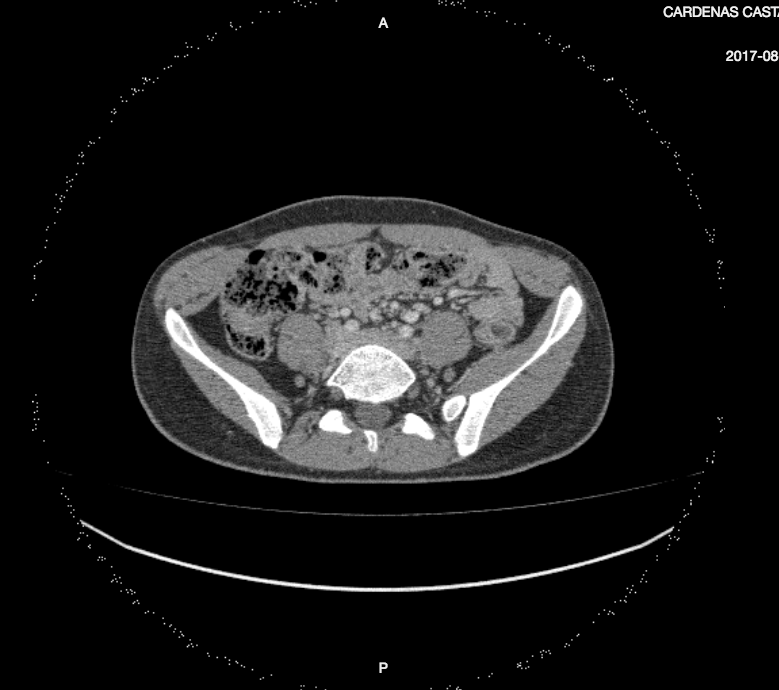
For some DICOM images the minimun and maximum pixel values are set incorrectly. Rendering performance suffers considerably. Here's an example of this. The current min pixel value is 0, when it should be -2048. The current max pixel value is 65535, when it should be 2047.
This is how the image is displaying:

And this is how it should be displayed:

@catalinaduplat do you have an image you can share or a steps to reproduce the issue?

Here's the file IM-0001-0478-0001.dcm.zip
you can test it here: https://rawgit.com/cornerstonejs/cornerstoneWADOImageLoader/master/examples/dicomfile/index.html
That looks like a codec problem (the circle of noise). This probably causes the incorrect pixel values.

@catalinaduplat if @pieper is right, and this is a codec problem, we've had a long running issue to make updating codecs easier and more streamlined; unfortunately, I don't believe we've made much progress on this.
If we can identify the specific codec used for this image, we could test a newer version and see if that resolves the issue. If not, a potential workaround could be converting the image to a different format that has less issues and then loading it with the image loader.
@swederik, please feel free to weigh in.

Tags:
- 1.2.840.10008.1.2.4.51 / JPEG Extended (Process 2 & 4): Default Transfer Syntax for Lossy JPEG 12 Bit Image Compression (Process 4 only)
- Pixel Representation: 1 (signed pixel data)

Here is my guess (have not checked). Signed pixel data compression is hard to implement with lossy compression maybe there is an overflow in the encoded dataset (so this is a data problem, not a rendering problem). 2cts