
netoviz
 netoviz copied to clipboard
 corestate55
RFC8345-based Network Topology Visualizer
Netoviz

Netoviz (Network Topology Visualizer) is a tool to visualize network topology data that based on RFC8345.
See also Netomox (Network topology modeling toolbox), the tool to construct RFC8345 based network topology data.
Demo
Live demo
A live demo (with limited functions) can be viewed at the following URI,
- https://netoviz.herokuapp.com/
All-in-one docker image.
There is netoviz docker container on Docker Hub.
You can run it with docker and use it via http://localhost:3000.
docker pull netoviz/allinone
docker run -p3000:3000 --name nv-allinone netoviz/allinone
If you change the port number to access it, set -p option.
docker run -p3005:3000 --name nv-allinone netoviz/allinone
             ^^^^
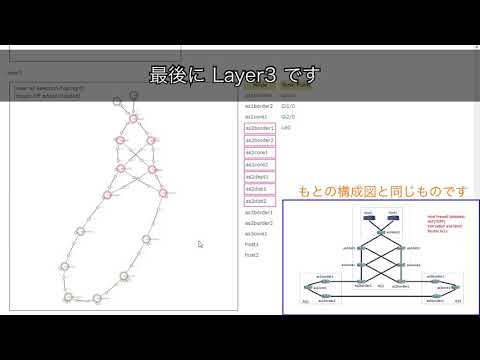
Demo movie
Links
Blog
- Batfish を使ってネットワーク構成を可視化してみよう (1) - Qiita
- Batfish を使ってネットワーク構成を可視化してみよう (2) - Qiita
- Batfish を使ってネットワーク構成を可視化してみよう (3) - Qiita
- モデルベースのNW図で差分を可視化する - Qiita
- ネットワーク構成図のレイアウト処理を考えてみる (1) - Qiita
- ネットワーク構成図のレイアウト処理を考えてみる (2) - Qiita
- Batfish を使ってネットワーク構成を可視化してみよう・改 - Qiita
Slide
- 「ネットワーク図」のモデル化とモデルを起点にした自動化の可能性 / onic2018 - Speaker Deck
- ここまでできる! 設定ファイルからのネットワーク構成可視化 / npstudy17 - Speaker Deck
Installation
Environment setup
This application depends on:
Project setup
This application depends on:
npm install [--legacy-peer-deps]
Install docker/gRPC tools
Currently, Netoviz has gRPC and REST API.
It choose API according to NETOVIZ_API value (rest or grpc).
So it needs gRPC tools to run netoviz with gRPC mode
and docker tools to manipulate docker image of envoy proxy.
Install docker and docker-compose.
sudo apt install docker-ce docker-compose
Install grpc-tools. (grpc_tools_node_protoc)
sudo npm install -g --unsafe-perm grpc-tools
Download protoc-gen-grpc-web binary from grpc/grpc-web
and install it.
sudo cp ~/Downloads/protoc-gen-grpc-web-1.0.7-linux-x86_64 /usr/local/bin/protoc-gen-grpc-web
sudo chmod +x /usr/local/bin/protoc-gen-grpc-web
Build envoy docker image
See Dockerfile for netoviz/envoy and docker-compose config.
Copy dot.env to .env and edit environment variables.
cp dot.env .env
# edit NETOVIZ_GRPC_HOST to set gRPC server host/address for envoy proxy
# vi .env
Check parameters.
docker-compose config
Build envoy docker image for netoviz.
docker-compose build
Run Netoviz
Configure environment variable
Netoviz has REST and gRPC API.
Its frontend application and backend server changes API to communicate each other by value of NETOVIZ_API.
You can change (override) the API to use by the variable at run-time like that:
NETOVIZ_API=grpc npm run (dev|start)
NETOVIZ_API=rest(default): frontend (client) and backend (server) use only REST.NETOVIZ_API=grpc: frontend (client) and backend (server) use REST and gRPC.- Not all the features of the REST API are achieved with the gRPC API.
Netoviz server (development mode)
npm run dev
Netoviz server (production mode)
Build (compile and minify) script for production,
npm run build
and run the application.
npm run start
Run envoy proxy (for gRPC API)
Run envoy container to proxy grpc-web request.
docker-compose up
All-in-one docker container
Build all-in-one container. (See detail: Dockerfile for all-in-one container. NOTICE: It copies current sources/packages and rebuild netoviz.)
docker build -t netoviz/allinone .
# or
npm run docker-build
Run.
docker run -p3000:3000 --name nv-allinone netoviz/allinone
It can run with gRPC API (port 9090 is for gRPC) with environment variable NETOVIZ_API=grpc.
Then, it need envoy proxy to use gRPC-web.
# build and run envoy proxy at first.
docker run -p3000:3000 -p9090:9090 --env NETOVIZ_API=grpc --name nv-allinone netoviz/allinone
Debug.
docker run -it netoviz/allinone /bin/sh
Development
Document
Generate documents with JSDoc.
npm run doc
Directory
- libraries
fig/: UML class diagramlib/diagram: Visualizer libraryserver/graph: RFC8345 data model and data convert library
static/model: Topology data files (json)- Each topology data files are generated by Netomox. (see. netomox-examples)
server: API Server
Application URI
Application (see pages)
- List/Table to select diagram
//model[/:modelFile]/visualizer[/:visualizer]
- Diagram
/model/:modelFile/:visualizer/visualizer/:visualizer/:modelFile
REST API
Server (JSON API) (see server/api.js)
- Topology data handling
- GET
/api/models(return topology model list) - POST
/api/graph/:graphName/:jsonName- to save layout (for nested-graph)
- GET
/api/graph/:graphName/:jsonName- return diagram data converted from RFC8345-based topology model.
- GET
gRPC API
Compile protocol buffer. (It can run with npm run protoc.)
hagiwara@dev01:~/nwmodel/netoviz/server/graph-api/grpc$ grpc_tools_node_protoc \
  --js_out=import_style=commonjs,binary:. \
  --grpc-web_out=import_style=commonjs,mode=grpcwebtext:. \
  --grpc_out=. \
  topology-data.proto
Run test-server (returns dummy data)
hagiwara@dev01:~/nwmodel/netoviz/$ node bin/grpc-server.js
Run test-client (CLI-client)
# PWD: ~/nwmodel/netoviz/

# Arguments: graph <graph_name> <json>
node bin/grpc-client.js graph force_simulation nlink_check.json

# Arguments: graph <number>
node bin/grpc-client.js alerts 3
Format, Lints and fixes files
prettier
npm run format
eslint
npm run lint
npm run lint:fix
 corestate55