

 corecoding
Disk I/O not available
Has this issue been covered in the Wiki?
- [X] I have read the Wiki and my issue is not covered.
Is there an existing issue reported already?
- [X] I have searched the existing issues, it does not exist.
What is the unexpected behavior?
Reading issues (#69) and Git history and code mentioning /proc/diskstats, it seems disk I/O should be available, but I cannot find it on my installation.
Steps to reproduce the unexpected behavior.
- Install the extension
- Look for disk I/O in the sensors
- Fail to find it
Relevant log output
$ df -h
Sys. de fichiers Taille Utilisé Dispo Uti% Monté sur
devtmpfs           4,0M       0  4,0M   0% /dev
tmpfs              7,8G    1,4M  7,8G   1% /dev/shm
tmpfs              3,1G    2,0M  3,1G   1% /run
/dev/dm-0          1,8T    190G  1,6T  11% /
tmpfs              7,8G    856K  7,8G   1% /tmp
/dev/dm-0          1,8T    190G  1,6T  11% /mnt/faile
/dev/dm-0          1,8T    190G  1,6T  11% /home
/dev/dm-0          1,8T    190G  1,6T  11% /home/mildred/Data
/dev/sda4          959M    480M  425M  54% /boot
/dev/sda1           96M     28M   69M  29% /boot/efi
tmpfs              1,6G    408M  1,2G  26% /run/user/1000
$ cat /proc/diskstats
   8       0 sda 2198382 460636 104489834 145633746 2406401 3522646 293275780 201601112 0 32972966 355149778 0 0 0 0 88394 7914919
   8       1 sda1 280 285 8746 3849 0 0 0 0 0 3687 3849 0 0 0 0 0 0
   8       2 sda2 1857489 49513 98449654 128750352 2203563 141962 264499760 180512260 0 32126351 309262612 0 0 0 0 0 0
   8       3 sda3 339975 410597 6012552 16860194 202638 3380542 28665440 21073017 0 7678256 37933212 0 0 0 0 0 0
   8       4 sda4 494 241 13802 16839 200 142 110580 15834 0 22562 32673 0 0 0 0 0 0
 253       0 dm-0 1901060 0 98448440 193581830 2338300 0 264499760 3860759577 0 32373997 4054341407 0 0 0 0 0 0
 252       0 zram0 794159 0 6353272 8170 3795418 0 30363344 32201 0 223957 40371 0 0 0 0 0 0
What distribution and version of Linux are you using?
Fedora 36
What version of Gnome are you using?
42.5

I see no errors on the session logs, except when enabling the extension the following messages (which does not seem to cause an issue):
oct. 11 12:45:13 faile gnome-shell[223716]: st_widget_get_theme_node called on the widget [0x55b377d548a0 StLabel.vitals-panel-label:insensitive ("…")] which is not in the stage.
oct. 11 12:45:13 faile gnome-shell[223716]: st_widget_get_theme_node called on the widget [0x55b373459f80 StLabel.vitals-panel-label:insensitive ("…")] which is not in the stage.
oct. 11 12:45:13 faile gnome-shell[223716]: st_widget_get_theme_node called on the widget [0x55b377ac2310 StLabel.vitals-panel-label:insensitive ("…")] which is not in the stage.
oct. 11 12:45:13 faile gnome-shell[223716]: st_widget_get_theme_node called on the widget [0x55b377e29cb0 StLabel.vitals-panel-label:insensitive ("…")] which is not in the stage.
Extension with the disk metrics opened :
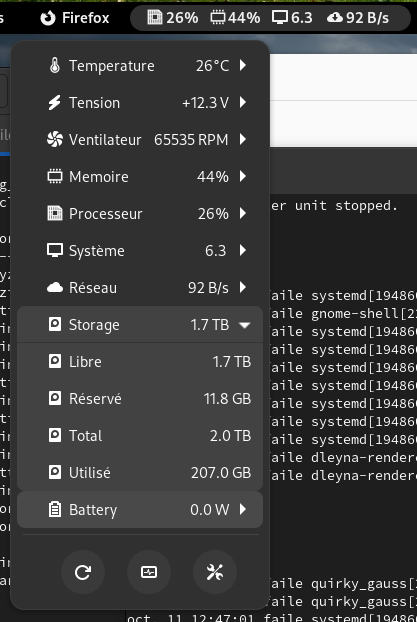
dconf write /org/gnome/shell/extensions/vitals/hot-sensors "['_processor_usage_', '_memory_usage_', '_system_load_1m_', '__network-rx_max__', '_storage_read_rate_']" does nothing to show the IO read rate.
By the way it would be nice to have cumulated read and write rate to get an idea of the traffic while saving space for small screens on the top bar.
The entries in /proc/mounts must match the entries in /proc/diskstats. This is the only way I know to match the devices to get read/write rates. Adding storage_read_rate by itself won't show anything.
