

 corecoding
Unable to hide network DL indicator, etc
Has this issue been covered in the Wiki?
- [X] I have read the Wiki and my issue is not covered.
Is there an existing issue reported already?
- [X] I have searched the existing issues, it does not exist.
What is the unexpected behavior?
- Unable to expand network submenu and disable DL indicator.
- hide zero value is ON, but still shows battery Rate indicator (while charging)
Manjaro, local/gnome-shell-extension-vitals 57.0.0-1
Steps to reproduce the unexpected behavior.
...
Relevant log output
No response
What distribution and version of Linux are you using?
Manjaro
What version of Gnome are you using?
42

- Can you provide a screen recording of you not being able to expand the network submenu?
- This is expected - hide zero values is only for Temperature, Volt, Fan and once a value is >0, it will show even if it is 0.

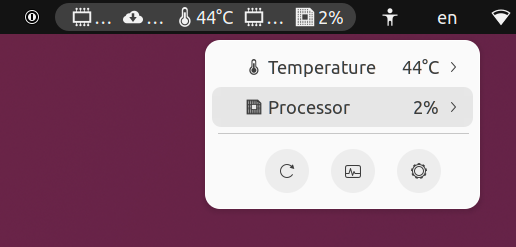

Can you confirm that if you enable the Network section under preferences, that you can then deselect the download indicator? Or am I misunderstanding the issue and that the Network section under preferences is enabled?
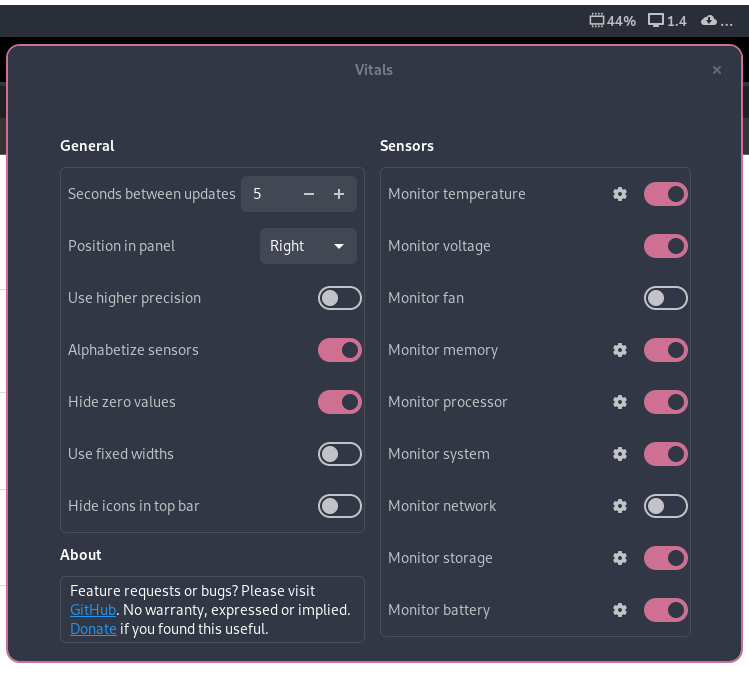
Even for me, it is just the cloud icon with three dots. I cannot hide it.

Great extension, thanks. Temperature has been playing up and i wanted to keep a closer eye on it.
But network speed is irrelevant to me, and i too switched it off. And it still shows the ...
That i guess is the bug, but as a new feature it might be nice to configure what is shown.
Still, thanks is the word.

Somewhat old issue, but I just installed the extension today and was faced with this problem but was able to work around it:
- click on the sensors icons in the panel, it will show the sensors currently enable
- expand any of the sensors sub menu and change the displayed value for any other value (you can change it back later). For example: change the network sensor from "device rx" to "session rx"
- after this, the disabled sensors that were showing "..." on the panel should disappear

Somewhat old issue, but I just installed the extension today and was faced with this problem but was able to work around it:
- click on the sensors icons in the panel, it will show the sensors currently enable
- expand any of the sensors sub menu and change the displayed value for any other value (you can change it back later). For example: change the network sensor from "device rx" to "session rx"
- after this, the disabled sensors that were showing "..." on the panel should disappear
Thanks for the workaround, but this needs to be fixed in the code. (GNOME 44.1 here on Clear Linux.)
