

 cordova-plugin-camera-preview
Mobile app freezes for 5-10s when camera CameraPreview.stopCamera() or CameraPreview.startCamera() are called
We need a way to make sure that the app doesn't freeze when we start/stop the CameraPreview. In our use-case, we don't need or want for the camera start or stop to need to complete (and therefore be blocking) before other actions continue. What is happening now is that the whole UI hangs for 5-10s and the app appears to have broken. Is there a solution / fix for this?
Can this process be made asynchronous rather than (it appears) blocking? Or, is this actually a CPU problem, and if so is there a way to solve it?
We're seeing this even on a relatively high-performance test device (iphone 6 plus) using current iOS.
Thanks

I found the CameraPreview.startCamera() would slightly slow down my multi view, single page app. My solution was to start the CameraPreview after the view had loaded, and stop it before the next view loaded.

It is not CPU or memory problem. I worked around problem hiding camera before stopping.
this.cameraPreview.hide();
this.cameraPreview.stopCamera();
And there is another way. I commented out 2 lines in stopCamera function CameraPreview.h I really don't have an idea what I'm doing (what side effects will cause) but it is working fine.
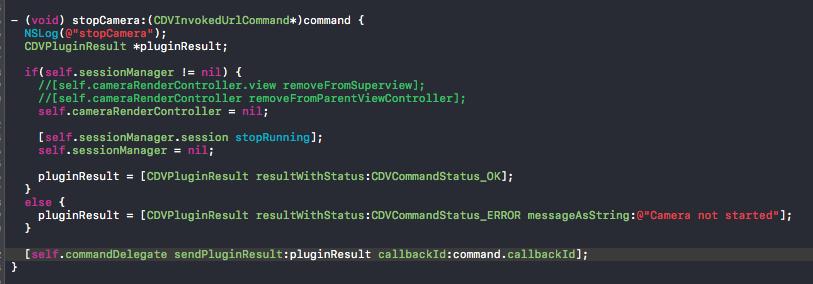

Commenting out these two lines works for me too, but I'm afraid the camera is still in use in the background.

I'm having the same issue too.
It only happens after i try to cameraApp.stopCamera(); after taking photo for the first time.
The app will freeze for about 5-10 seconds. and then everything works fine after.
Tried both the plugin's example app and also installed it on a clean cordova hello world app. Tested on both iPad Pro (12.9-inch) on IOS11 and iPad (5th gen) on IOS11.
i tried @roddicki 's solution of hidng the camera first beofre stopping, but the same problem peersists.

Install the master branch from GitHub, the issue seems to be resolved there @fariskas

@kentongray i dont mean to sound dense. How do i replace the current version im using with the master version? pretty new to this. many thanks
Sure I'm on my phone so can't give exact commands but basically remove the plug-in, then install using the GitHub url instead of the plugin name

I've just installed from the master branch, and now the problem is much worse -- freezing the phone for over 30 seconds

Btw, this appears to be a duplicate of issue #20.
Updated: So the latest from master does, in fact, appear to be working for me. It looks like it was really a DOM update which was making it appear like the stopCamera() process was taking so long.
I have run into this issue when stopping the camera. The app hangs for ~10-15 seconds.
- Latest master as of [4c844ae72abc207a2d650d969bd822fccaa09991]
- Tested on an iPhone 6s and iPhone 5
It is intermittent. I can sometimes start, take picture and stop the camera 10 times in a row, other times it will freeze over and over.
Hiding the camera before stopping it does make it hang every time.
Debugging in xcode led to AVCaptureSession.stopRunning, which intermittently takes 10+ seconds.
Since the success callback doesn't fire until that completes, it's not good to have things waiting on it, unless you want to lock up the UI.


This issue is still there and has not been fixed completely yet. Today I tried this plugin and it took 10s to open the Camera.
And without no fix/response from authors or contributors, I would recommend everyone stop installing/using this plugin until this issue is fixed.

@quangpdt - I use this plugin every day, and there is no delay for me (iPhone 6). Are you sure you're using the latest from the master branch?
I'm also using the latest version of this plugin, and it takes around 10 seconds to open the camera.
It is related to this exception which is thrown when the camera is opened for the first time:
=================================================================
Main Thread Checker: UI API called on a background thread: -[UIApplication statusBarOrientation]
PID: 268, TID: 6357, Thread name: (none), Queue name: session queue, QoS: 0
Backtrace:
4   AppMobile                          0x0000000100adee04 -[CameraSessionManager getCurrentOrientation] + 96
5   AppMobile                          0x0000000100adf7ac __48-[CameraSessionManager setupSession:completion:]_block_invoke + 1900
6   libdispatch.dylib                   0x0000000101ad3824 _dispatch_call_block_and_release + 24
7   libdispatch.dylib                   0x0000000101ad4dc8 _dispatch_client_callout + 16
8   libdispatch.dylib                   0x0000000101adce6c _dispatch_lane_serial_drain + 720
9   libdispatch.dylib                   0x0000000101addb60 _dispatch_lane_invoke + 460
10  libdispatch.dylib                   0x0000000101ae7bfc _dispatch_workloop_worker_thread + 1220
11  libsystem_pthread.dylib             0x00000002063c10dc _pthread_wqthread + 312
12  libsystem_pthread.dylib             0x00000002063c3cec start_wqthread + 4
2019-04-24 09:10:29.259655+0100 VRM Mobile[268:6357] [reports] Main Thread Checker: UI API called on a background thread: -[UIApplication statusBarOrientation]
PID: 268, TID: 6357, Thread name: (none), Queue name: session queue, QoS: 0
Backtrace:
4   AppMobile                          0x0000000100adee04 -[CameraSessionManager getCurrentOrientation] + 96
5   AppMobile                          0x0000000100adf7ac __48-[CameraSessionManager setupSession:completion:]_block_invoke + 1900
6   libdispatch.dylib                   0x0000000101ad3824 _dispatch_call_block_and_release + 24
7   libdispatch.dylib                   0x0000000101ad4dc8 _dispatch_client_callout + 16
8   libdispatch.dylib                   0x0000000101adce6c _dispatch_lane_serial_drain + 720
9   libdispatch.dylib                   0x0000000101addb60 _dispatch_lane_invoke + 460
10  libdispatch.dylib                   0x0000000101ae7bfc _dispatch_workloop_worker_thread + 1220
11  libsystem_pthread.dylib             0x00000002063c10dc _pthread_wqthread + 312
12  libsystem_pthread.dylib             0x00000002063c3cec start_wqthread + 4

I am also facing the same issue as @quangpdt mentioned. If anyone got the fix for this problem please help us out.
