

 coollabsio
[Bug]: Laravel 9 Yarn Command Issue
Is there an existing issue for this?
- [X] I have searched the existing issues
Example public repository
No response
Description
Laravel, starting from version 9, no longer using Laravel Mix to compile frontend things. Laravel moved to Vite for this.
Therefore, yarn production during image building won't work since they're no longer have that command.
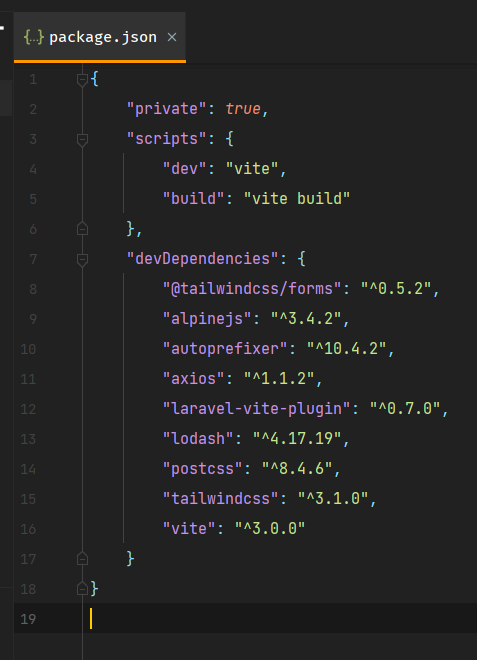
To solve this issue, I think it's simply to change this line from yarn production to yarn build. But that will create new issue for devs that haven't moved to Vite yet. Probably adding configuration for user to select either Vite (yarn build instead) or Mix (yarn production)?
For other developers that run to this issue
This issue can be solved easily by adding "production" script in your package.json file.

Steps To Reproduce
- Create a new Laravel version 9 application
- Run in Coolify
- Failing at step 5/5
Version
3.12.1

Also I think it's not only that. Since they moved from Webpack+Mix to Vite, the config file also changed.

from this should be changed to COPY *.json *.config.js /app/ (or something like that) as well.
I'm having a similar problem deploying Laravel (both with and without a frontend). Here is the error message:
[00:17:00.908] #9 20.09 yarn run v1.22.19
[00:17:00.919] #9 20.12 $ vite build
[00:17:01.192] #9 20.44 vite v3.2.5 building for production...
[00:17:01.328] #9 20.58 ✓ 0 modules transformed.
[00:17:01.414] #9 20.58 Could not resolve entry module (index.html).
[00:17:01.445] #9 20.59 error during build:
[00:17:01.458] #9 20.59 Error: Could not resolve entry module (index.html).
[00:17:01.468] #9 20.59     at error (file:///app/node_modules/rollup/dist/es/shared/rollup.js:1858:30)
[00:17:01.486] #9 20.59     at ModuleLoader.loadEntryModule (file:///app/node_modules/rollup/dist/es/shared/rollup.js:22175:20)
[00:17:01.492] #9 20.59     at async Promise.all (index 0)
[00:17:01.498] #9 20.63 error Command failed with exit code 1.
[00:17:01.504] #9 20.63 info Visit https://yarnpkg.com/en/docs/cli/run for documentation about this command.
[00:17:01.511] #9 ERROR: executor failed running [/bin/sh -c yarn install && yarn production]: exit code: 1
[00:17:01.556] ------
[00:17:01.569] > [5/5] RUN yarn install && yarn production:
[00:17:01.582] ------
[00:17:01.598] executor failed running [/bin/sh -c yarn install && yarn production]: exit code: 1

Yep, that's, I suspect, because the Dockerfile didn't copy the config files (vite.config.js, postcss.config.js, and tailwind.config.js). Hence returned an error.
I tried running vite build on local and all good though.
Is there an existing issue for this?
- [x] I have searched the existing issues
Example public repository
No response
Description
Laravel, starting from version 9, no longer using Laravel Mix to compile frontend things. Laravel moved to Vite for this.
Therefore,
yarn productionduring image building won't work since they're no longer have that command.To solve this issue, I think it's simply to change this line from
yarn productiontoyarn build. But that will create new issue for devs that haven't moved to Vite yet. Probably adding configuration for user to select either Vite (yarn buildinstead) or Mix (yarn production)?For other developers that run to this issue
This issue can be solved easily by adding "production" script in your
package.jsonfile.Steps To Reproduce
- Create a new Laravel version 9 application
- Run in Coolify
- Failing at step 5/5
Version
3.12.1
you solved this?

Simply adding "production": "vite build" to my package.json file didn't work. Still got the same error.
Simply adding
"production": "vite build"to mypackage.jsonfile didn't work. Still got the same error.
Yeah I alr reported another issue with the Dockerfile here and here (in fact that is my reply to your comment).
What can be done now? Best bet is to create your own Dockerfile, but I'm too lazy to make one lol. I already opened another issue (#789) to add feature to edit Coolify's Dockerfile template.
For now (since I also don't understand the source code of Coolify), either make our own Dockerfile (feel free to share here) or wait until Coolify team respond and solve the issue.
If someone could make a Dockerfile and share it here, that would be great. I'm not familiar enough with Docker to do it myself.
Not for ARM
FROM node:18-slim as build
WORKDIR /app

COPY *.json *.js /app/
COPY resources /app/resources
RUN npm install && npm run build

# Production build
FROM webdevops/php-nginx:8.2-alpine
ENV WEB_DOCUMENT_ROOT=/app/public
WORKDIR /app
COPY --chown=application:application composer.* ./
COPY --chown=application:application database/ database/
RUN composer install --ignore-platform-reqs --no-interaction --no-plugins --no-scripts --prefer-dist

COPY --chown=application:application . ./
COPY --from=build /app/public/build /app/public/build

RUN php artisan optimize
RUN php artisan config:clear

Has this been fixed yet?
EDIT: No, it hasn't - just checked. Can this be added to the next release please?
I'm here with a question that might be related, sorry, I know close to nothing about Laravel. My build of https://github.com/mitchy-crypto/cryptosite.git fails because "composer not found", I can see Composer is a package download on Ubuntu but am I supposed to trigger it somehow with these yarn finesses or is the problem even deeper?

I'm closing this issue, because tracking features will be moved to GitHub discussions. Github issues will be only for bugs.
Version 4 is in full focus. v3 related issues will be closed, if it is not a critical bug.
Thanks for your understanding.
