

 conversejs
Seems that shared rosters does not work
Describe the bug Shared roster groups seems to not be retrieved as expected.
To Reproduce
- Create a shared roster group with members on XMPP server (ejabberd for me)
- Ensure that parameter roster_groups is set at true value on ConverseJS initialization
- Start ConverseJS
Expected behavior The shared roster groups shoud be displayed.
Environment (please complete the following information):
- Desktop
- Chrome, Firefox, etc.
- Converse.js version 7.0.5
Additional context I created on an ejabberd server a shared roster group with two members:
- first
POST /api/srg_create { "group": "agroup", "host": "myown.xmppserver.org", "name": "A group with two members", "description": "Test", "display": "" } - then
POST /api/srg_user_add { "user": "toto", "host": "myown.xmppserver.org", "group": "agroup", "grouphost": "myown.xmppserver.org" }andPOST /api/srg_user_add { "user": "titi", "host": "myown.xmppserver.org", "group": "agroup", "grouphost": "myown.xmppserver.org" } - then verifying group and members well registered with
POST /api/srg_get_members { "host": "myown.xmppserver.org", "group": "agroup" }that answers[ "[email protected]", "[email protected]" ]
On ConversJS initialization I take care to let the parameter roster_groups at true value.
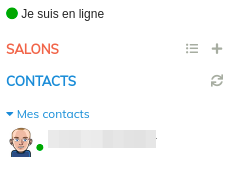
The UI seems to be broken ("Mes contacts" is not displayed):

When I deactivate roster_groups into ConverseJS parameters, then it is displayed that:

Set loglevel to debug (see https://conversejs.org/docs/html/configuration.html#loglevel)
Then turn on verbose logging in your browser's developer console. Then do the same tests that you explained in this ticket.
In the developer console, save the console output to a file.
Then you can send that to me. jc at opkode dot com.

Set
logleveltodebug(see https://conversejs.org/docs/html/configuration.html#loglevel)Then turn on verbose logging in your browser's developer console. Then do the same tests that you explained in this ticket.
In the developer console, save the console output to a file.
Then you can send that to me. jc at opkode dot com.
I just sent you the file from habafo at gmail dot com. Thank you.
@SilverYoCha I had a look at the logs you sent me, but the roster XML traffic is not in those logs, so they're unfortunately not helpful.
You need to log out of Converse, then log in again and capture the logs from the moment you logged in.