

 contentful
Issue with Paragraph tag rendered with List Item tag
Hi,
My rendered List Item content is being wrapped with a Paragraph tag. Is this expected functionality?
Thanks,


@damienroche based on a recent discussion I had on Slack, it seems to be "normal". To quote the answer I was given: "we wrap every text in a p tag to keep a consistent styling to every element type.".
This is really annoying, we use utility classes to style blocks, but the paragraph styles just end up overwriting the parent block styles in a lot of cases. Let users decide how to manage their in-code consistency. Contentful should be all about flexibility.

Had the same issue, this is how we processed it.
We take the current node and parse it through a new documentToReactComponents with renderNodes removing the p tags and in our case also the li tags to enable our Component library to style the li tags.
[BLOCKS.LIST_ITEM]: (node, children) => {
        const UnTaggedChildren = documentToReactComponents(node, {
          renderNode: {
            [BLOCKS.PARAGRAPH]: (node, children) => children,
            [BLOCKS.LIST_ITEM]: (node, children) => children,
          },
        })

        return (
          <li>
            {UnTaggedChildren}
          </li>
        )
      }

This is extremely irritating.
we wrap every text in a p tag to keep a consistent styling to every element type.
I don't see the argument for consistency here.
If anything, it's inconsistent with the way list items work normally.
All it does is create a weird line break where none is wanted or expected. It's inflexible and obstructive.
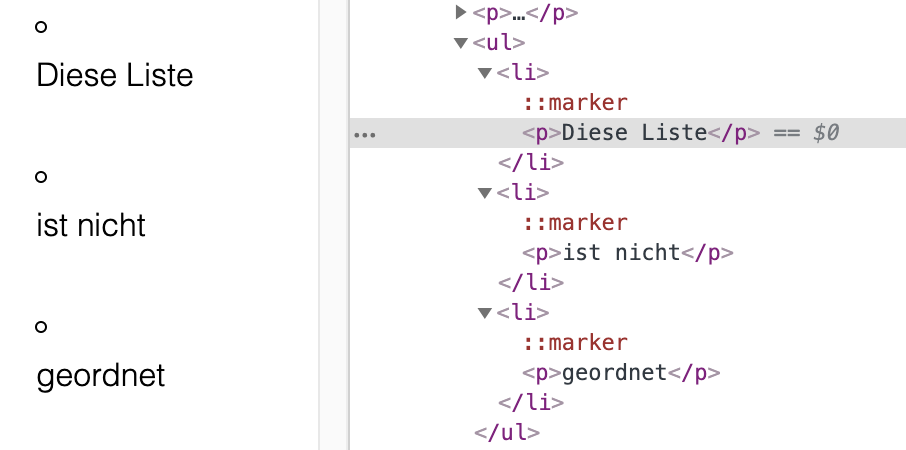

We also prefer lists rendered without paragraph tags. We don't want the "p" tags in there for SEO/styling reasons. It shouldn't be a decision forced upon us.
I request that we have full flexibility in the rich text field without adding extra elements.
Current workaround: We're planning to strip the "p" and "/p" tags from "li"'s rendered by contentful via regex.

If anyone happens upon this and is struggling with a solution for .net. This implementation of IContentRender has worked for me:
public class NoParagraphInsideListItemContentRenderer : IContentRenderer
    {
        private readonly ContentRendererCollection _rendererCollection;

        public NoParagraphInsideListItemContentRenderer(ContentRendererCollection rendererCollection)
        {
            _rendererCollection = rendererCollection;
        }

        public bool SupportsContent(IContent content)
        {
            return content is ListItem;
        }

        public string Render(IContent content)
        {
            var listItem = content as ListItem;

            var sb = new StringBuilder();

            sb.Append($"<li>");

            foreach (var subContent in listItem.Content)
            {
                if (subContent is Paragraph)
                {
                    // Ignore paragraphs in list items
                    var pContent = subContent as Paragraph;
                    foreach (var pSubContent in pContent.Content)
                    {
                        var renderer = _rendererCollection.GetRendererForContent(pSubContent);
                        sb.Append(renderer.Render(pSubContent));
                    }
                }
                else
                {
                    var renderer = _rendererCollection.GetRendererForContent(subContent);
                    sb.Append(renderer.Render(subContent));
                }
            }

            sb.Append($"</li>");

            return sb.ToString();
        }

        public Task<string> RenderAsync(IContent content)
        {
            return Task.FromResult(Render(content));
        }

        public int Order { get; set; }

    }
It's just a modified version of the ListItemRenderer here.
Additionally I had to make a custom html renderer class (again modified from the one provided by contentful) so that I was able to pass the ContentRendererCollection into my custom renderer:
public class CustomHtmlRenderer {

        public ContentRendererCollection RendererCollection => _contentRendererCollection;
        public CustomHtmlRenderer()
                {
                    _contentRendererCollection = new ContentRendererCollection();
                    _contentRendererCollection.AddRenderers(new List<IContentRenderer> {
                        new ParagraphRenderer(_contentRendererCollection),
                        new HyperlinkContentRenderer(_contentRendererCollection),
                        new TextRenderer(),
                        new HorizontalRulerContentRenderer(),
                        new HeadingRenderer(_contentRendererCollection),
                        new ListContentRenderer(_contentRendererCollection),
                        // Contentful wraps everything in <p></p> and we don't want that inside of <li></li>
                        //new ListItemContentRenderer(_contentRendererCollection),
                        new QuoteContentRenderer(_contentRendererCollection),
                        new AssetRenderer(_contentRendererCollection),
                        new NoParagraphInsideListItemContentRenderer(_contentRendererCollection) { Order = 10 },
                        new NullContentRenderer()
                    });
                }
      ...
}

👋 Just wanted to +1 this issue. The promise of Contentful Rich Text is that we can render "clean" markup from the structured data. This is its primary renderer, and users should have some control over the output.
To quote the answer I was given: "we wrap every text in a p tag to keep a consistent styling to every element type.".
There is no semantic reason for a p element within list items. If it's there because of a wish for appearance reasons, CSS is the easy solution. One helpful path might be letting the developer pass along a parameter to the renderer to indicate the preference (say, cleanlist=true or semanticLists=true). This would preserve existing implementations.

For those of you that still haven't found a decent/simple workaround, this seems to have worked for me with Vue/Gridsome:
// Add this line to regex replace all html inside the <li> tag. Change the regex to suit your needs.
[BLOCKS.LIST_ITEM]: (node, next) => `<li>${next(node.content).replace(/<[^>]*>/g, '')}</li>`
Here's what the script tag looks like in my Vue component:
import { BLOCKS } from "@contentful/rich-text-types";
import { documentToHtmlString } from "@contentful/rich-text-html-renderer";

export default {
  methods: {
    richtextToHTML(content) {
      return documentToHtmlString(content, {
        renderNode: {
          [BLOCKS.EMBEDDED_ASSET]: (node) => {
            return `<img src="${node.data.target.fields.file.url}" alt="${node.data.target.fields.title}" />`;
          },
          [BLOCKS.LIST_ITEM]: (node, next) => `<li>${next(node.content).replace(/<[^>]*>/g, '')}</li>`
        },
      });
    },
  },
};

Hello all, I'm also dealing with this annoying and unnecessary issue. Another (not so clean) workaround is to dig the content out of the node parameter passed to the renderer:
[BLOCKS.LIST_ITEM]: (node, children) => {
  return <li>{node.content[0].content[0].value}</li>
}
This way it is rendered without the <p> tag.
Good luck!

[BLOCKS.LIST_ITEM]: (node, children) => {
  return <li>{node.content[0].content[0].value}</li>
}
These kinds of solutions would probably lose any styling done in list tags (bold, etc.), even the one above it that strips HTML tags altogether would likely have a similar issue. It would be better if the P tags were not included in the first place. Otherwise, better to just provide a custom renderer that follows the Contentful pattern of passing along to the next function EXCEPT when it's a paragraph (in that case, just skip that node and move on to the children nodes).

Would also prefer no <p> tags inside <li>.
@OPerel your solution worked well for me, thanks!

Had the same issue, this is how we processed it.
We take the current node and parse it through a new
documentToReactComponentswithrenderNodesremoving the p tags and in our case also the li tags to enable our Component library to style thelitags.[BLOCKS.LIST_ITEM]: (node, children) => { const UnTaggedChildren = documentToReactComponents(node, { renderNode: { [BLOCKS.PARAGRAPH]: (node, children) => children, [BLOCKS.LIST_ITEM]: (node, children) => children, }, }) return ( <li> {UnTaggedChildren} </li> ) }
I tried this, but nested li tags were rendered as text strings. I tweaked the solution to work with these:
        [BLOCKS.LIST_ITEM]: (node, children) => {
          const normalisedChildren = documentToReactComponents(node, {
            renderNode: {
              [BLOCKS.PARAGRAPH]: (node, children) => children,
              [BLOCKS.LIST_ITEM]: (node, children) => <li>{children}</li>,
            },
          });
          return normalisedChildren;
        },
~It may have other side-effects, but none that I've run into yet~
EDIT:
It does have side effects! The nested children aren't parsed with the original options, but with the options for the nested documentToReactComponents, so they both need to have all of the potential children listed in there:
    const nestedMarks = {
      [MARKS.BOLD]: (text) => <strong>{text}</strong>,
      [MARKS.ITALIC]: (text) => <em>{text}</em>,
    };
    const nestedBlocks = {
      // I have excluded HEADING_3 onward for brevity in the code snippet
      [BLOCKS.HEADING_2]: (node, children) => (
        <ArticleHeading level="h2">{children}</ArticleHeading>
      ),
      [BLOCKS.UL_LIST]: (node, children) => (
        <ul className={styles.List}>{children}</ul>
      ),
      [BLOCKS.OL_LIST]: (node, children) => (
        <ol className={styles.List}>{children}</ol>
      ),
    };

    const options = {
      renderMark: nestedMarks,
      renderNode: {
        ...nestedBlocks,
        [BLOCKS.PARAGRAPH]: (node, children) => (
          <Paragraph className={styles.Paragraph}>{children}</Paragraph>
        ),
        [BLOCKS.LIST_ITEM]: (node, children) => {
          const normalisedListChildren = documentToReactComponents(node, {
            renderMark: nestedMarks,
            renderNode: {
              ...nestedBlocks,
              [BLOCKS.PARAGRAPH]: (node, children) => children,
              [BLOCKS.LIST_ITEM]: (node, children) => (
                <li className={styles.ListItem}>{children}</li>
              ),
            },
          });
          return normalisedListChildren;
        },
      },
    };

    return documentToReactComponents(body.fields.body, options);
This is super messy and no doubt prone to unexpected breakage, would be way better to be able to control what is wrapped in paragraph tags as previously suggested

Still an issue?
All paths lead to this issue and specifically the hack proposed initially by @14850842 however my question is:
Where is documentToReactComponents defined?

@skoch I've used
import { documentToReactComponents } from "@contentful/rich-text-react-renderer"
Yep, just found ... thanks for the quick reply @unimprobable!
Also note that for TS I had to do the following (note: node as Document):
[BLOCKS.LIST_ITEM]: node => {
  const transformedChildren = documentToReactComponents(node as Document, {
    renderMark: options.renderMark,
    renderNode: {
      [BLOCKS.PARAGRAPH]: (_node, children) => children,
      [BLOCKS.LIST_ITEM]: (_node, children) => children,
    },
  });
  return <li>{transformedChildren}</li>;
},
Also note that for TS I had to do the following (note:
node as Document)
Shame that we have to do this extra step and thank you for work around.

I may be late, but researching on this issue, I found a simple solution using only CSS, you just need to target the tag inside the unordered/ordered item, and you can style the p tag separated, in my case I'm using styled components:
const options = {
  renderNode: {
    [BLOCKS.OL_LIST]: (node, children) => <ListTitle>{children}</ListTitle>,
    [BLOCKS.PARAGRAPH]: (node, children) => <Text>{children}</Text>
  }
};

export const ListTitle = styled.ol`
margin: 1rem 0 0;
padding: 0 2rem;

p {
padding: 0 1rem;
}
`
export const Text = styled.p`
  margin: 0;
  padding: 0 3rem;
`;

@SimonPrato11 I don't think the ability to style the tag was really ever an issue. While it could resolve visual discrepancies introduced by having the p tag embedded, it is still not what is expected. It could be a problem for things like accessibility, for example, introducing extra paragraphs (screen readers can navigate paragraph by paragraph, for example). It's also messy and potentially bug prone to need to add extra styling every time an LI is rendered via the Rich Text plugin (or add a global style that would then need to overwritten if that WAS the desired markup).
@localpcguy Ohh sorry, I misunderstood because one of the comments it was that the paragraph styles end up overwriting the block styles (which happened to me). I can see the issue but I guess there is not solution for now
No worries @SimonPrato11, it's good to have it documented in here for those where the visual issue the only thing they need to resolve. And who knows, the Contentful team has said that's currently how it is, so it still remains to be seen if they decide to change it or not, and in the meantime, it's good to have a variety of workarounds!
It's unnerving that this issue has gone unaddressed for this long. I haven't seen a single person happy about these unwanted <p>-tags. Since this was an alien design decision in the first place, and it seems reasonably simple to change it, the fact that it hasn't been adjusted or even commented on by staff in years does not inspire confidence in Contentful for me. I'm a little glad my employer has decided to switch to other alternatives for future projects.

Chiming in on this issue because I just landed into this issue and after a few hours spinning my head on this, realized that we have a simple data issue, if we get to remove the step with the nodeType = 'paragraph' by replacing it with its own content we will have no lingering issue as we are editing the content before it even goes to documentToReactComponents method
I also want to mention that I am highly concerned about the performance of this request since it is a recursive method, but perhaps this idea allows someone to place a more performant solution.
Here's part of my custom RTE component, don't forget to perform the appropriate imports at the top of the document.
export default function RTE({data}) {
  const removeParagraphs = (node) => {
    if(Array.isArray(node.content)) {
      const items = node.content.map(listItem => {
        const newContent = listItem.content.map(child => {
          if(child.nodeType == 'paragraph') {
            return child.content[0];
          }
          if(child.nodeType == 'unordered-list' || node.nodeType == 'ordered-list') {
            return removeParagraphs(child);
          }
          return child;
        })
        listItem.content = newContent;
        return listItem;
      })

      node.content = items;
    }

    return node;
  }
  data.content = data.content.map(node => {
    if(node.nodeType == 'unordered-list' || node.nodeType == 'ordered-list') {
      removeParagraphs(node);
    }
    return node;
  })
  const renderOptions = {
    renderNode: { ... Any custom render needed for the data ...
    }
  }

  return (
    documentToReactComponents(data, renderOptions)
  )
}

I've created the a component that removes the P-tags. For me this was the most readable solution. This component should not be used elsewhere. Using React.Children is uncommon and can lead to fragile code, but should be safe here. https://react.dev/reference/react/Children
import { cloneElement, Children, ReactNode, ReactElement } from 'react';

function CleanListItem({ children }: { children: ReactNode }) {
    const processChild = (child: ReactNode): ReactNode => {
        if (typeof child === 'string') {
            return child;
        }

        const elementChild = child as ReactElement;

        if (elementChild.type === 'p') {
            return <>{elementChild.props.children}</>;
        }

        if (elementChild.props && elementChild.props.children) {
            return cloneElement(elementChild, {
                children: Children.map(elementChild.props.children, processChild),
            });
        }

        return child;
    };

    return <>{Children.map(children, processChild)}</>;
}
Usage:
[BLOCKS.UL_LIST]: (node: Block | Inline, children: ReactNode) => {
    return (
        <ul>
            <CleanListItem>{children}</CleanListItem>
        </ul>
    );
},


There is a similar issue with the MARKS.CODE. All code blocks are wrapped in <p> tags so it breaks a block of code into multiple lines of code wrapping each line in a separate p tag.
<p>
 <code>Line 1</code>
</p>
<p>
 <code>Line 2</code>
</p>

For anyone using documentToHtmlString instead of documentToReactComponents, you have to call the next() function.
I did the following:
[BLOCKS.LIST_ITEM]: (node) => {
  const transformedChildren = documentToHtmlString(node, {
    renderNode: {
      [BLOCKS.PARAGRAPH]: (node, next) => `${next(node.content)}`,
      [BLOCKS.LIST_ITEM]: (node, next) => `${next(node.content)}`,
    },
  });

  return `<li>${transformedChildren}</li>`;
},

For anyone using
documentToHtmlStringinstead ofdocumentToReactComponents, you have to call thenext()function.I did the following:
[BLOCKS.LIST_ITEM]: (node) => {
  const transformedChildren = documentToHtmlString(node, {
    renderNode: {
      [BLOCKS.PARAGRAPH]: (node, next) => `${next(node.content)}`,
      [BLOCKS.LIST_ITEM]: (node, next) => `${next(node.content)}`,
    },
  });

  return `<li>${transformedChildren}</li>`;
},
And if you are using TypeScript, in documentToHtmlString, you'll need to add node as Document