
watchtower
 watchtower copied to clipboard
 containrrr
Watchtower deleted containers without recreating
Describe the bug Watchtower has been running fine with no issues for a long time, but today it looks like it ran and deleted half of my containers without recreating them. I'm afraid I have to recreate these manually (since I am bad and don't use compose), but hoping there's a way to kick start Watchtower into doing it.
To Reproduce Steps to reproduce the behavior: Unknown
Expected behavior Containers to be recreated after a new image is pulled, as they have been for months.
Screenshots Last 100 lines of logs here, including the deletions: https://pastebin.com/BmMqyqdV
Environment Ubuntu server Docker version: 19.03.6
Additional context Two separate network issues that occured around the same time: lost connectivity from my ISP and my pihole hosed up, requiring a lot of modem/router/switch/host/containers reboots.

Hi there! 👋🏼 As you're new to this repo, we'd like to suggest that you read our code of conduct as well as our contribution guidelines. Thanks a bunch for opening your first issue! 🙏
![github-actions[bot] avatar](https://avatars.githubusercontent.com/in/15368?v=4 "Published by a pub.dev verified publisher")
Something happened while watchtower were starting the new containers and it seems like it was interrupted before completing the startup. Watchtower does not have any kind of persistent storage, so if its container is restarted it has no recollection of prior containers. I don't think there is any other way to restore them, than to manually recreate them.

Thanks @piksel! Recreating them won't be too much of a problem, but is there anything in logs that indicate more than "something happened"? Just want to make sure I'm doing everything I can to minimize risk of this happening again in the future.
Same problem here. He deletes the containers and when he should recreate them errors appear
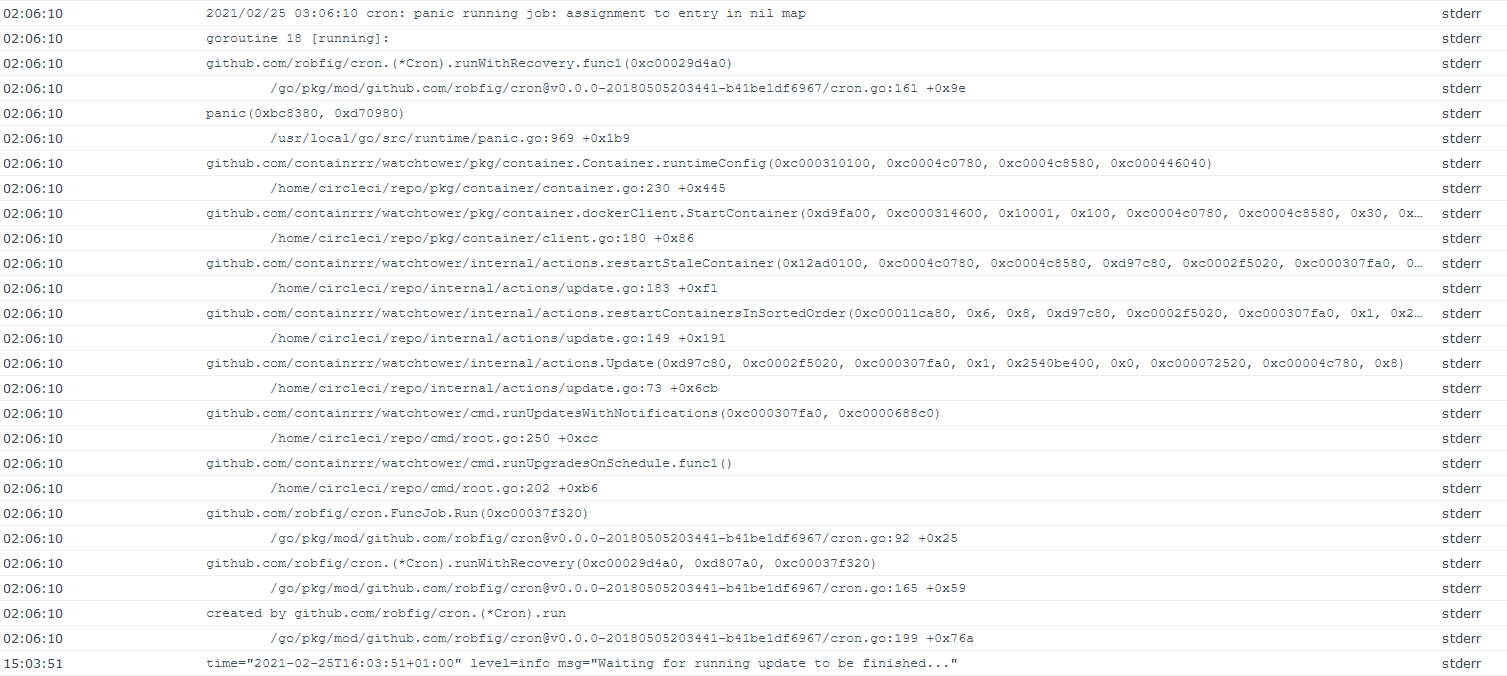
Running on a synology 218+ with DSM 7 Beta

@TheUntouchable that is not the same type of issue. Yours is one of the classical Synology Docker errors, where their Docker daemon just doesn't return any container information. We have no way to fix that, but we try to add nil checks to prevent crashes at least.
@piksel Thanks for clarifying that! Are there any information I can provide to Synology when I would open a ticket regarding this with them or did you try this way already too? By the way, this never happend in the past to me and started the last 1-2 weeks.
@TheUntouchable, yeah, that's the problem with this issue. It only happens sometimes, and trying to reproduce the error in the DSM demo environment within the allotted demo time is basically impossible.
To summarize the issue:
Watchtower updates containers by reading all the container information about a running container. stopping and removing that container and then starting a new container with the same configuration, but with a newer image.
On Synology devices, the docker daemon sometimes only gives a partial configuration, where parts are just missing (nil pointers instead of data).
If watchtower beforehand can realize that the configuration is missing parts, it can then opt to not even try to update the container, but we have no idea why parts are missing, or what parts to check (except for looking through stack traces of issues).
My guess is that the docker daemon running on Synology devices has been altered in some way to make it play nicely with the DSM framework, but if they could either fix the issue where it doesn't return the full config, or provide some documentation that explains when to expect it and what parts to check for, that would help to prevent this from happening to their users. I have tried setting up a testing environment using a VM, but could not get it to work properly. I am willing to spend some time trying to fix this, but in the current state it's too much of a fool's errand.
I am not sure how to help here, but just reporting that my 'linuxserver-domoticz' container always seems to disappear after an update. The other containers (I am not sure how often those are updated) seem to reappear without problems. So happy to help if someone can tell me what to do...

I am not sure how to help here, but just reporting that my 'linuxserver-domoticz' container always seems to disappear after an update. The other containers (I am not sure how often those are updated) seem to reappear without problems. So happy to help if someone can tell me what to do...
Out of curiosity, is this container linked, or depending on, any other containers?

Out of curiosity, is this container linked, or depending on, any other containers?
No it isn't. This is on a Synology, I have 7 unrelated, non-linked Docker containers (of which Watchtower is one). Only one has problems. I just checked the logs. Yesterday Watchtower was unable to stop the container:
time="2021-04-19T15:32:09Z" level=info msg="Found new linuxserver/domoticz:latest image (sha256:d0d9a13209773417f48e99be8c0d306987a84e9368c802a1b55f4c5770396072)"
time="2021-04-19T15:32:16Z" level=info msg="Stopping /linuxserver-domoticz1 (4cae3b68efc60732097680854c665ffe8fdac3c281dbe2c0213a398cbbc683ac) with SIGTERM"
2021/04/19 15:32:37 cron: panic running job: assignment to entry in nil map
goroutine 1430 [running]:
github.com/robfig/cron.(*Cron).runWithRecovery.func1(0xc0003aef00)
	/home/runner/go/pkg/mod/github.com/robfig/[email protected]/cron.go:161 +0x9e panic(0xc144a0, 0xdcc760)
	/opt/hostedtoolcache/go/1.15.10/x64/src/runtime/panic.go:969 +0x1b9
github.com/containrrr/watchtower/pkg/container.Container.runtimeConfig(0xd20100, 0xc0004e0540, 0xc0000ca840, 0xc000166a50)
github.com/containrrr/watchtower/pkg/container.dockerClient.StartContainer(...)
github.com/containrrr/watchtower/internal/actions.restartStaleContainer(...)
github.com/containrrr/watchtower/internal/actions.restartContainersInSortedOrder(...)
github.com/containrrr/watchtower/internal/actions.Update(...)
github.com/containrrr/watchtower/cmd.runUpdatesWithNotifications(...)
github.com/containrrr/watchtower/cmd.runUpgradesOnSchedule.func1()
github.com/robfig/cron.FuncJob.Run(...)
github.com/robfig/cron.(*Cron).runWithRecovery(...)
created by github.com/robfig/cron.(*Cron).run
The container is still active. A couple of days before the output was the same and the (domoticz) container was nowhere to be found anymore.
I think issues like this could at least be noticed by running a sanity check as part of the update check, and if detected the "restart" can be skipped. In this case the imageConfig.ExposedPorts map is just nil, which shouldn't normally happen, but if it does, we could just detect it and skip.
In this case the
imageConfig.ExposedPortsmap is just nil, which shouldn't normally happen, but if it does, we could just detect it and skip. My knowledge of Docker is too limited, but just so you know: a domoticz container does have (TCP) ports exposed to the outside world. So it would be alright to skip it (as a sanity check) but if this results in a rebirth of the container without those ports the we are creating a new problem....
Earlier you wrote:
If watchtower beforehand can realize that the configuration is missing parts, it can then opt to not even try to update the container, but we have no idea why parts are missing, or what parts to check (except for looking through stack traces of issues).
Is there a possibility to get this above board? If I am pointed into the right direction as to how watchtower retrieves the configuration, I might be able to try to interrogate the Synology Docker daemon myself the same way and find out what configuration it spills.
The exposed ports should never be nil, if there are none it should be an empty map instead. By skipping I mean it shouldn't stop and start it at all if this happens.
Using docker inspect should essentially give you the same container configuration. If the ports are missing from it we have a good bug ticket to send to Synology at least.
Actually, there is!
Config vs HostConfig in your docker.inspect.txt
$ cat docker.inspect.txt | tail -n +2 | jq -C .[0].HostConfig.PortBindings
{
  "1443/tcp": [
    {
      "HostIp": "0.0.0.0",
      "HostPort": "9143"
    }
  ],
  "8080/tcp": [
    {
      "HostIp": "0.0.0.0",
      "HostPort": "9090"
    }
  ]
}

$ cat docker.inspect.txt | tail -n +2 | jq -C .[0].Config.ExposedPorts
null
Config vs HostConfig in "real" docker
$ docker inspect domoticz-local | jq -C .[0].HostConfig.PortBindings
{
  "1443/tcp": [
    {
      "HostIp": "",
      "HostPort": "9143"
    }
  ],
  "8080/tcp": [
    {
      "HostIp": "",
      "HostPort": "9090"
    }
  ]
}


$ docker inspect domoticz-local | jq -C .[0].Config.ExposedPorts
{
  "1443/tcp": {},
  "8080/tcp": {}
}
That is really interesting! Now we actually have the actual cause of the errors. The Config.ExposedPorts is not populated in the config sent from your docker daemon. Why? No idea.
But at least we know enough to leave those containers alone for now. Perhaps it's as easy as to just recreate the same entries, then again, I don't know enough about docker internals to know what effect that would have...
I checked differences between my domoticz docker and others (that do return to life) and found that in this container there was no EXPOSE keyword. According to the documentation this means that ports can be made available (via the -p option), but those are not exposed/published. Hence my request for a patch. That said, I think that given the possibility of having ports made available (ie. in PortBindings) but nog exposed (ie. in ExposedPorts) watchtowerrr probably should be able to deal with that situation....
Chimed in on your issue in the linuxserver repo, but I wouldn't expect them to make any changes. I do agree with you that we need to have another look at this. Given that the EXPOSE keyword isn't mandated, we need to be able to handle the lack of it gracefully as well. 👍🏼
The thing is, I used their Dockerfile, and it automatically filled in the exposed ports (based on what was forwarded?). But yeah, if we can confirm that this is the difference between the Synology Docker and the "regular" one, then we can just populate it ourselves...
@piksel @simskij Very similar Issue on Docker-Synology 20.10.3-1308
OBSERVATION Watchtower cannot bring those containers up, which have a port assignment. All other containers (e.g. which only have a volume attached or nothing) can be pull down, updated and pulled up again. So, those with a port we need to pull up manually again (and they run stable until the image:latest is updated again).
Below is the log file and further below is the docker container inspection. Any ideas what's the cause? Any ideas are appreciated.
LOG FILE
time="2022-09-08T21:41:59Z" level=info msg="Stopping /fa-mgmt-dashboard (ddd88e6777a412b8c22bc2a12b0f2232f3c35ea0a46eabd91853bb661f905ce2) with SIGTERM"
time="2022-09-08T21:42:01Z" level=debug msg="Skipped another update already running."
time="2022-09-08T21:42:01Z" level=debug msg="Scheduled next run: 2022-09-08 21:42:31 +0000 UTC"
time="2022-09-08T21:42:03Z" level=debug msg="Removing container ddd88e6777a412b8c22bc2a12b0f2232f3c35ea0a46eabd91853bb661f905ce2"
2022/09/08 21:42:05 cron: panic running job: assignment to entry in nil map
goroutine 200 [running]:
github.com/v2tec/watchtower/vendor/github.com/robfig/cron.(*Cron).runWithRecovery.func1(0xc4203be5a0)
/go/src/github.com/v2tec/watchtower/vendor/github.com/robfig/cron/cron.go:154 +0xbc
panic(0x894d00, 0xc4203340c0)
/usr/local/go/src/runtime/panic.go:458 +0x243
github.com/v2tec/watchtower/container.Container.runtimeConfig(0x1, 0xc4204677a0, 0xc4204132c0, 0x0)
/go/src/github.com/v2tec/watchtower/container/container.go:164 +0x3df
github.com/v2tec/watchtower/container.dockerClient.StartContainer(0xc42021ed80, 0x1, 0xc420467701, 0xc4204677a0, 0xc4204132c0, 0x0, 0x0)
/go/src/github.com/v2tec/watchtower/container/client.go:135 +0x6b
github.com/v2tec/watchtower/container.(*dockerClient).StartContainer(0xc4202a57d0, 0xc42046af01, 0xc4204677a0, 0xc4204132c0, 0xbd7440, 0x0)
<autogenerated>:19 +0x7f
github.com/v2tec/watchtower/actions.Update(0xb8c400, 0xc4202a57d0, 0xc4200560b0, 0x0, 0x0, 0xc4203e0000, 0x685968, 0xc4203e1f10)
/go/src/github.com/v2tec/watchtower/actions/update.go:91 +0x4fb
main.start.func1()
/go/src/github.com/v2tec/watchtower/main.go:212 +0x12c
github.com/v2tec/watchtower/vendor/github.com/robfig/cron.FuncJob.Run(0xc4203c0000)
/go/src/github.com/v2tec/watchtower/vendor/github.com/robfig/cron/cron.go:94 +0x19
github.com/v2tec/watchtower/vendor/github.com/robfig/cron.(*Cron).runWithRecovery(0xc4203be5a0, 0xb857a0, 0xc4203c0000)
/go/src/github.com/v2tec/watchtower/vendor/github.com/robfig/cron/cron.go:158 +0x57
created by github.com/v2tec/watchtower/vendor/github.com/robfig/cron.(*Cron).run
/go/src/github.com/v2tec/watchtower/vendor/github.com/robfig/cron/cron.go:192 +0x48e
DOCKER INSPECT
[
    {
        "Id": "1528ec32861b89428811136b048674a59445589becb98edb40bab4fec5eb1557",
        "Created": "2022-09-08T22:18:54.967586593Z",
        "Path": "uvicorn",
        "Args": [
            "src.main:webapp",
            "--host",
            "0.0.0.0",
            "--port",
            "8010",
            "--proxy-headers"
        ],
        "State": {
            "Status": "running",
            "Running": true,
            "Paused": false,
            "Restarting": false,
            "OOMKilled": false,
            "Dead": false,
            "Pid": 31433,
            "ExitCode": 0,
            "Error": "",
            "StartedAt": "2022-09-08T22:18:58.814282896Z",
            "FinishedAt": "0001-01-01T00:00:00Z",
            "StartedTs": 1662675538,
            "FinishedTs": -62135596800
        },
        "Image": "sha256:3719a7f001f6547df1887559c1ca2492aa03b1a7779527cd7a3e914b3a2e7250",
        "ResolvConfPath": "/volume1/@docker/containers/1528ec32861b89428811136b048674a59445589becb98edb40bab4fec5eb1557/resolv.conf",
        "HostnamePath": "/volume1/@docker/containers/1528ec32861b89428811136b048674a59445589becb98edb40bab4fec5eb1557/hostname",
        "HostsPath": "/volume1/@docker/containers/1528ec32861b89428811136b048674a59445589becb98edb40bab4fec5eb1557/hosts",
        "LogPath": "/volume1/@docker/containers/1528ec32861b89428811136b048674a59445589becb98edb40bab4fec5eb1557/log.db",
        "Name": "/fa-mgmt-dashboard",
        "RestartCount": 0,
        "Driver": "btrfs",
        "Platform": "linux",
        "MountLabel": "",
        "ProcessLabel": "",
        "AppArmorProfile": "docker-default",
        "ExecIDs": null,
        "HostConfig": {
            "Binds": [
                "/volume1/docker/fa/secrets:/app/secrets:ro",
                "/volume1/docker/fa/fa-mgmt-dashoard:/app/storage:rw"
            ],
            "ContainerIDFile": "",
            "LogConfig": {
                "Type": "db",
                "Config": {}
            },
            "NetworkMode": "bridge",
            "PortBindings": {
                "8010/tcp": [
                    {
                        "HostIp": "",
                        "HostPort": "8010"
                    }
                ]
            },
            "RestartPolicy": {
                "Name": "always",
                "MaximumRetryCount": 0
            },
            "AutoRemove": false,
            "VolumeDriver": "",
            "VolumesFrom": null,
            "CapAdd": [],
            "CapDrop": [],
            "CgroupnsMode": "host",
            "Dns": null,
            "DnsOptions": null,
            "DnsSearch": null,
            "ExtraHosts": null,
            "GroupAdd": null,
            "IpcMode": "private",
            "Cgroup": "",
            "Links": null,
            "OomScoreAdj": 0,
            "PidMode": "",
            "Privileged": false,
            "PublishAllPorts": false,
            "ReadonlyRootfs": false,
            "SecurityOpt": null,
            "UTSMode": "",
            "UsernsMode": "",
            "ShmSize": 67108864,
            "Runtime": "runc",
            "Env": [
                "PATH=/usr/local/bin:/usr/local/sbin:/usr/local/bin:/usr/sbin:/usr/bin:/sbin:/bin",
                "LANG=C.UTF-8",
                "GPG_KEY=E3FF2839C048B25C084DEBE9B26995E310250568",
                "PYTHON_VERSION=3.9.13",
                "PYTHON_PIP_VERSION=22.0.4",
                "PYTHON_SETUPTOOLS_VERSION=58.1.0",
                "PYTHON_GET_PIP_URL=https://github.com/pypa/get-pip/raw/5eaac1050023df1f5c98b173b248c260023f2278/public/get-pip.py",
                "PYTHON_GET_PIP_SHA256=5aefe6ade911d997af080b315ebcb7f882212d070465df544e1175ac2be519b4",
                "PYTHONDONTWRITEBYTECODE=1",
                "PYTHONUNBUFFERED=1"
            ],
            "ConsoleSize": [
                0,
                0
            ],
            "Isolation": "",
            "CpuShares": 0,
            "Memory": 0,
            "NanoCpus": 0,
            "CgroupParent": "",
            "BlkioWeight": 0,
            "BlkioWeightDevice": null,
            "BlkioDeviceReadBps": null,
            "BlkioDeviceWriteBps": null,
            "BlkioDeviceReadIOps": null,
            "BlkioDeviceWriteIOps": null,
            "CpuPeriod": 0,
            "CpuQuota": 0,
            "CpuRealtimePeriod": 0,
            "CpuRealtimeRuntime": 0,
            "CpusetCpus": "",
            "CpusetMems": "",
            "Devices": null,
            "DeviceCgroupRules": null,
            "DeviceRequests": null,
            "KernelMemory": 0,
            "KernelMemoryTCP": 0,
            "MemoryReservation": 0,
            "MemorySwap": 0,
            "MemorySwappiness": null,
            "OomKillDisable": false,
            "PidsLimit": null,
            "Ulimits": null,
            "CpuCount": 0,
            "CpuPercent": 0,
            "IOMaximumIOps": 0,
            "IOMaximumBandwidth": 0,
            "MaskedPaths": [
                "/proc/asound",
                "/proc/acpi",
                "/proc/kcore",
                "/proc/keys",
                "/proc/latency_stats",
                "/proc/timer_list",
                "/proc/timer_stats",
                "/proc/sched_debug",
                "/proc/scsi",
                "/sys/firmware"
            ],
            "ReadonlyPaths": [
                "/proc/bus",
                "/proc/fs",
                "/proc/irq",
                "/proc/sys",
                "/proc/sysrq-trigger"
            ]
        },
        "GraphDriver": {
            "Data": null,
            "Name": "btrfs"
        },
        "Mounts": [
            {
                "Type": "bind",
                "Source": "/volume1/docker/fa/secrets",
                "Destination": "/app/secrets",
                "Mode": "ro",
                "RW": false,
                "Propagation": "rprivate"
            },
            {
                "Type": "bind",
                "Source": "/volume1/docker/fa/fa-mgmt-dashoard",
                "Destination": "/app/storage",
                "Mode": "rw",
                "RW": true,
                "Propagation": "rprivate"
            }
        ],
        "Config": {
            "Hostname": "fa-mgmt-dashboard",
            "Domainname": "",
            "User": "",
            "AttachStdin": false,
            "AttachStdout": false,
            "AttachStderr": false,
            "Tty": true,
            "OpenStdin": true,
            "StdinOnce": false,
            "Env": [
                "PATH=/usr/local/bin:/usr/local/sbin:/usr/local/bin:/usr/sbin:/usr/bin:/sbin:/bin",
                "LANG=C.UTF-8",
                "GPG_KEY=E3FF2839C048B25C084DEBE9B26995E310250568",
                "PYTHON_VERSION=3.9.13",
                "PYTHON_PIP_VERSION=22.0.4",
                "PYTHON_SETUPTOOLS_VERSION=58.1.0",
                "PYTHON_GET_PIP_URL=https://github.com/pypa/get-pip/raw/5eaac1050023df1f5c98b173b248c260023f2278/public/get-pip.py",
                "PYTHON_GET_PIP_SHA256=5aefe6ade911d997af080b315ebcb7f882212d070465df544e1175ac2be519b4",
                "PYTHONDONTWRITEBYTECODE=1",
                "PYTHONUNBUFFERED=1"
            ],
            "Cmd": [
                "uvicorn",
                "src.main:webapp",
                "--host",
                "0.0.0.0",
                "--port",
                "8010",
                "--proxy-headers"
            ],
            "Image": "svabra/fa-mgmt-dashboard:latest",
            "Volumes": null,
            "WorkingDir": "/app",
            "Entrypoint": null,
            "OnBuild": null,
            "Labels": {},
            "DDSM": false
        },
        "NetworkSettings": {
            "Bridge": "",
            "SandboxID": "8265ea4ea983ea565bd3739b54d2441333d218f9b161adb42dad372d797b2591",
            "HairpinMode": false,
            "LinkLocalIPv6Address": "",
            "LinkLocalIPv6PrefixLen": 0,
            "Ports": {
                "8010/tcp": [
                    {
                        "HostIp": "0.0.0.0",
                        "HostPort": "8010"
                    }
                ]
            },
            "SandboxKey": "/var/run/docker/netns/8265ea4ea983",
            "SecondaryIPAddresses": null,
            "SecondaryIPv6Addresses": null,
            "EndpointID": "4e1daf0603db4d7ebcf03e35913ccd4deb7140e50a3e3315156ece28a2f6c40d",
            "Gateway": "172.17.0.1",
            "GlobalIPv6Address": "",
            "GlobalIPv6PrefixLen": 0,
            "IPAddress": "172.17.0.6",
            "IPPrefixLen": 16,
            "IPv6Gateway": "",
            "MacAddress": "02:42:ac:11:00:06",
            "Networks": {
                "bridge": {
                    "IPAMConfig": null,
                    "Links": null,
                    "Aliases": null,
                    "NetworkID": "ef8a4664733bc609b86059ba45808e2e22227ed5ce7458677514f0a8962fe9a3",
                    "EndpointID": "4e1daf0603db4d7ebcf03e35913ccd4deb7140e50a3e3315156ece28a2f6c40d",
                    "Gateway": "172.17.0.1",
                    "IPAddress": "172.17.0.6",
                    "IPPrefixLen": 16,
                    "IPv6Gateway": "",
                    "GlobalIPv6Address": "",
                    "GlobalIPv6PrefixLen": 0,
                    "MacAddress": "02:42:ac:11:00:06",
                    "DriverOpts": null
                }
            }
        }
    }
]

@svabra That's because you are running the old v2tec/watchtower and not containrrr/watchtower where the fixes were added.
@piksel I confirm, containrrr/watchtower works. If you have a patreon page, let us know. I gladly buy you guys some "coffees". Why not putting that on your site? https://containrrr.dev/watchtower/