

 containerd
Cannot start previously stopped containers (`plugin type=\"bridge\" failed (add): failed to allocate for range 0: 10.4.0.4 has been allocated to default-XXXX, duplicate allocation is not allowed"`)
Similar to https://github.com/containerd/nerdctl/issues/492
System
macOS 12.1
nerdctl version
Client:
 Version:       v0.15.0
 Git commit:    b72b5ca14550b2e23a42787664b6182524c5053f

Server:
 containerd:
  Version:      v1.5.8-k3s1
  GitCommit:
How to reproduce
- Start container: e.g.:
nerdctl run -d -e POSTGRES_PASSWORD=postgres -p 5432:5432 postgres:latest - Stop your container runtime (e.g. Rancher Desktop)
- Start your container runtime
- Show existing containers
nerdctl ps --all - Try to start the existing container
nerdctl start dff170a6c9b1
FATA[0000] failed to create shim: OCI runtime create failed: container_linux.go:380: starting container process caused: process_linux.go:545: container init caused: Running hook #0:: error running hook: exit status 1, stdout: , stderr: time="2022-01-04T15:11:37Z" level=fatal msg="failed to call cni.Setup: plugin type=\"bridge\" failed (add): failed to allocate for range 0: 10.4.0.4 has been allocated to default-dff170a6c9b146701bba04d19ecfc27ae5a26374aeccc87be2f6b1a7993e537a, duplicate allocation is not allowed"
Failed to write to log, write /var/lib/nerdctl/dbb19c5e/containers/default/dff170a6c9b146701bba04d19ecfc27ae5a26374aeccc87be2f6b1a7993e537a/oci-hook.createRuntime.log: file already closed: unknown


@Junnplus Okay interesting. I didn't see that issue with this context, but it could make sense. Should I close this one then?

I'm sorry for i didn't double check :(
I reproduced this issue, the task status will be displayed as Created after restart qemu.
Update: It actually works after a few tries, so after 3-4 times nerdctl start f01efaea7cce, it works.
> nerdctl start devOraDB
FATA[0000] failed to create shim: OCI runtime create failed: container_linux.go:380: starting container process caused: process_linux.go:545: container init caused: Running hook #0:: error running hook: exit status 1, stdout: , stderr: time="2022-02-15T10:02:36Z" level=fatal msg="failed to call cni.Setup: plugin type=\"bridge\" failed (add): failed to allocate for range 0: 10.4.0.3 has been allocated to default-418e62d24bcd44f0be76e13a7c05ded9140c9cf956d068193042c4b9ed5b5108, duplicate allocation is not allowed"
Failed to write to log, write /var/lib/nerdctl/dbb19c5e/containers/default/418e62d24bcd44f0be76e13a7c05ded9140c9cf956d068193042c4b9ed5b5108/oci-hook.createRuntime.log: file already closed: unknown
> nerdctl ps -a
CONTAINER ID    IMAGE                                                  COMMAND                   CREATED              STATUS     PORTS                     NAMES
418e62d24bcd    docker.io/store/oracle/database-enterprise:12.2.0.1    "/bin/sh -c /bin/bas…"    About an hour ago    Created    0.0.0.0:1521->1521/tcp    devOraDB
8cfcd3da9696    docker.io/library/nginx:alpine                         "/docker-entrypoint.…"    8 minutes ago        Up         0.0.0.0:8080->80/tcp      nginx
> nerdctl start 418e62d24bcd
418e62d24bcd
> nerdctl ps
CONTAINER ID    IMAGE                                                  COMMAND                   CREATED              STATUS    PORTS                     NAMES
418e62d24bcd    docker.io/store/oracle/database-enterprise:12.2.0.1    "/bin/sh -c /bin/bas…"    About an hour ago    Up        0.0.0.0:1521->1521/tcp    devOraDB
8cfcd3da9696    docker.io/library/nginx:alpine                         "/docker-entrypoint.…"    9 minutes ago        Up        0.0.0.0:8080->80/tcp      nginx
OS: Windows 10 21H1 nerdctl version: 0.16.1


Update: It actually works after a few tries, so after 3-4 times
nerdctl start f01efaea7cce, it works. Thanks, this worked.
Same issue on Mac M1 Max Ventura + lima 0.13.0 + nerdctl 1.0.0. After gracefully stopping an oracle xe docker container and lima itself, restarting lima and then 'lima nerdctl start
FATA[0002] failed to create shim task: OCI runtime create failed: runc create failed: unable to start container process: error during container init: error running hook #0: error running hook: exit status 1, stdout: , stderr: time="2022-11-18T08:15:47Z" level=fatal msg="failed to call cni.Setup: plugin type="bridge" failed (add): failed to allocate for range 0: 10.4.0.15 has been allocated to default-363e3264c8187fe7c62a3da5599022a4cec63a97c0db08909ac40fca1b6c45b0, duplicate allocation is not allowed"
Failed to write to log, write /home/
After some retries/wait time, it works.

Needs a reproducer
@AkihiroSuda I can reproduce it consistently on macOS Monterey (Intel) with Lima 0.14.2:
$ limactl --version
limactl version 0.14.2

$ limactl start --tty=false
[...]

$ nerdctl.lima --version
nerdctl version 1.1.0

$ nerdctl.lima run -d --name nginx -p 8080:80 nginx
[...]
cae8a90f488edbe1a54cb23d05065873f3d0bc1c55ed21ac162aff6f9971895b

$ curl -s http://localhost:8080 | grep Welcome
<title>Welcome to nginx!</title>
<h1>Welcome to nginx!</h1>

$ limactl stop
[...]

$ limactl start
[...]

$ nerdctl.lima ps -a
CONTAINER ID    IMAGE                             COMMAND                   CREATED               STATUS     PORTS                   NAMES
cae8a90f488e    docker.io/library/nginx:latest    "/docker-entrypoint.…"    About a minute ago    Created    0.0.0.0:8080->80/tcp    nginx

$ nerdctl.lima start nginx
FATA[0000] failed to create shim task: OCI runtime create failed: runc create failed: unable to start container process: error during container init: error running hook #0: error running hook: exit status 1, stdout: , stderr: time="2023-01-05T22:10:10Z" level=fatal msg="failed to call cni.Setup: plugin type=\"bridge\" failed (add): failed to allocate for range 0: 10.4.0.2 has been allocated to default-cae8a90f488edbe1a54cb23d05065873f3d0bc1c55ed21ac162aff6f9971895b, duplicate allocation is not allowed"
Failed to write to log, write /home/jan.linux/.local/share/nerdctl/1935db59/containers/default/cae8a90f488edbe1a54cb23d05065873f3d0bc1c55ed21ac162aff6f9971895b/oci-hook.createRuntime.log: file already closed: unknown
As mentioned above, the command will eventually succeed if you retry a couple of times.
Restarting the VM seems to be an essential step; I have not been able to reproduce it by simply stopping the container.
The issue happens with both rootful and rootless installations of containerd, and can be reproduced on Alpine as well (using Rancher Desktop).

Note that the container restarts properly if you deploy it with --restart=always:
$ nerdctl.lima run -d --name nginx --restart=always -p 8080:80 nginx
d761b17ffe563acb55fa5c557b5e5c6d572666b350f5e39ce1f0c4c3a77de3c4

$ curl -s http://localhost:8080 | grep Welcome
<title>Welcome to nginx!</title>
<h1>Welcome to nginx!</h1>

$ limactl stop
[...]

$ limactl start
[...]

$ nerdctl.lima ps -a
CONTAINER ID    IMAGE                             COMMAND                   CREATED               STATUS    PORTS                   NAMES
d761b17ffe56    docker.io/library/nginx:latest    "/docker-entrypoint.…"    About a minute ago    Up        0.0.0.0:8080->80/tcp    nginx

$ curl -s http://localhost:8080 | grep Welcome
<title>Welcome to nginx!</title>
<h1>Welcome to nginx!</h1>

About the problem of restarting the container after stopping, this error has been there for most of the year, I have this problem is in every boot, restarting the corresponding container will report an error, but when you start again can start normally
I use rootless containers
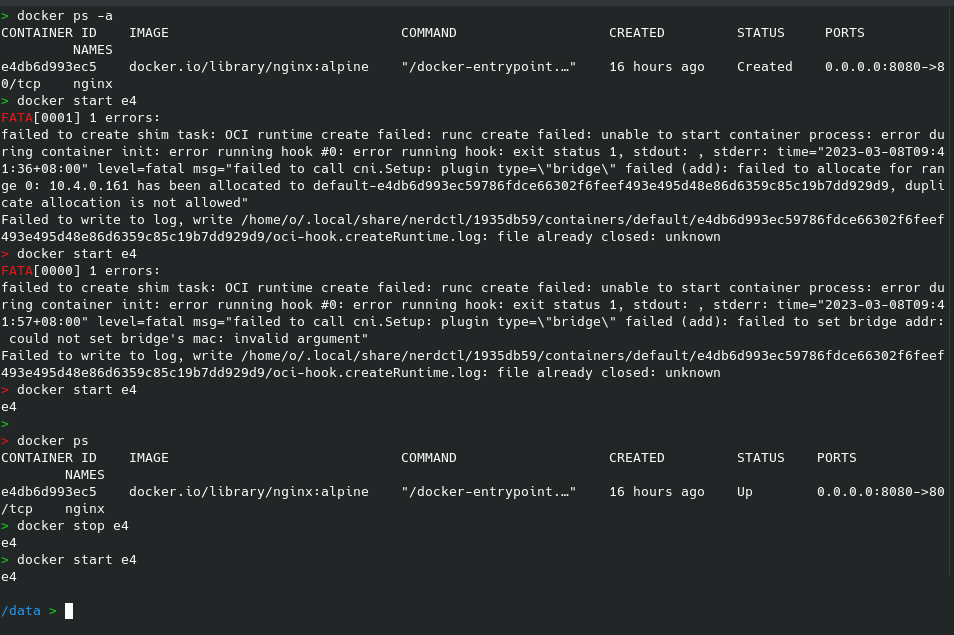
Hmm... About the docker in the picture, it's actually a call to nerdctl, I set alias docker='nerdctl' in the shell.
