

 connectbot
Display/fonts broken after OnePlus 6 os update
Bug description
OnePlus 6 update. OS now oxygen 11.1.1.1 Build a6000_22_210917
- ConnectBot Version: 19.8 ? (From help)
The OS fonts, globally, seem a bit more crisp, the letters' lines thinner. Once in connectbot, on a host, the text spacing is off. It's as if a bounding box width calculation is not matching the actual text areas' rendered width. The cursor is far ahead of each char typed, for instance. Other areas of consecutive text (like, same color) seem bundled together, with gaps between (see screenshot)

Steps to reproduce
- Hm. Not sure how without a OnePlus 6, or maybe it's Oxygen. I don't know if this is happening on any other devices. It does it, in the text from the hosts' display, on every host I connect to.
Expected behavior
Sequential letters should be sequential.
Server information
Linux debian testing, and an old raspberry pi on Raspbian.

I see the same thing when a global font is selected on my Oneplus 8 Pro since the Update to Android 11.
WhatsApp message formatting is lost as well. Termux works fine.

It looks like they broke font selection somehow. We are requesting a monospace font, but it's giving you a variable width font. I'm not sure what could be done from the app level here.

I concur regarding the reason. It was already discussed in the Oneplus forum but there was no resolution and no fix. I believe Termux works around this by using a specific font (user selectable).
Hi I confirm same issue with oneplus 6T. @eljoest would you mind share the forum post you mentioned for follow up?

(OnePlus should fix their stuff!) But maybe there was an API change to the [monosoace] font selection? I 'can't believe' they broke all such selection and haven't put out a fix yet.
Hi, While I agree OP should fix their stuff, I think a selectable font would be a nice feature as well for connectbot (I think it's a feature some people wait too). Anyway, at the moment, connectbot is not really usable on OnePlus phone affected by this issue.
For information, I also just upgraded my OP6T with 11.1.2.2 and unfortunately, no improvement with the font issue.
It looks like they broke font selection somehow. We are requesting a monospace font, but it's giving you a variable width font. I'm not sure what could be done from the app level here.
Can you show us where in the code this is being handled?
Looks like it's right here;
https://github.com/connectbot/connectbot/blob/28fcb05a8f741e0aeadc77a729f139a20da56d9c/app/src/main/java/org/connectbot/util/TerminalTextViewOverlay.java#L64
Or here?
https://github.com/connectbot/connectbot/blob/c912fa07000d921c1c1a7c32edc5534ce7f965ef/app/src/main/java/org/connectbot/service/TerminalBridge.java#L182
Surely other programs are requesting fixed width fonts and, if all failing, a fix would have been out? Are we sure this is the only and proper way to request the system's fixed width/mono font, or maybe something else with the way it's coded is resetting it, or causing it to not apply to the actual text used? (Hey, maybe the os software has a new wrapper in it that's grabbing the ssh screens' text. This can be used for tracking, text recognition, text to speech, etc )
Surely other programs are requesting fixed width fonts and, if all failing, a fix would have been out?
All are failing, if they don't use a specific font. e. g. WhatsApp:
 .
.
However, it works fine when the system font selection is set to Roboto (Settings - Customisation - Font):
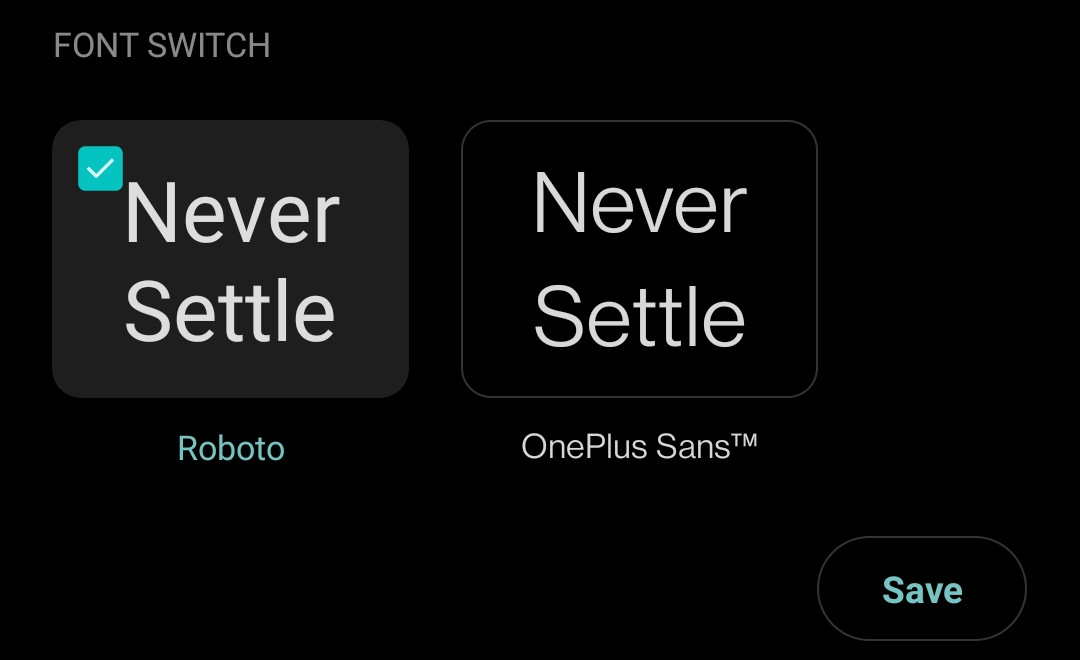

Seems this font customization is implemented by just overriding whatever font was requested. If you want, you can search the OnePlus forum for other issues one would think might get fixed. It seems that setting the system font back to Roboto is deemed sufficient for those that want to use monospace fonts in apps (other than their browser and apps that use explicit fonts).
Okay, that's a very strange bug. The posted "fix" does work; thank you.
I think, in ConnectBot, many users might appreciate selecting their own font (a global option, maybe with a per-host override). I myself am happy to have the fix though; editing a command in shell was quite problematic. :)
(I wonder why OnePlus is leaving that bug there. I'm going to guess either):
- When overriding the setTypeface() they aren't accounting for the MONOSPACE request (or maybe they ignore them all: "normal, sans, serif, monospace")
- They might be trying to encourage apps to not overuse fixed-width fonts??
Anyway. Little use in continuing to speculate. (I've only briefly glanced through their repositories and have no clue where that stuff is.)
However, it works fine when the system font selection is set to Roboto (Settings - Customisation - Font):
Looks like only monospace is ignored (from what's available in WhatsApp) 🤷♂️ No idea about the typefaces (sans, serif etc).


This is also an issue on the S22 Ultra running Android 12. Will double check font settings but default font is set to Samsung Sans.

Same on Samsung S10e with Android 12. Looks like it's now broken everywhere. Just gives us a font selection so we can choose ourselves.

I have the same issue on Motorola Moto G Power (2021). The font in Connectbot is monospaced with the default "Moto" style. However, I was using a custom style with different font, and Connectbot was using a variable width font. It turns out Connectbot is using monospaced font if and only if I select the first font in the style customization dialog. There are 4 fonts available, selecting any font other than number 1 triggers the bug.

I tried setting the fonts to monospaced in the the xml files as suggested online, but it had no effect with non-default styles active. I assume the non-default styles on Motorola Moto G Power (2021) don't define the monospaced font. The fix is probably shipping a font with the Connectbot app or using an existing monospace font by name.
