
apps-android-commons
 apps-android-commons copied to clipboard
 commons-app
Can not type Japanese space in caption field
This is the Japanese space character:
It is wider than the non-Japanese space character.
While not used as often, it can still be useful to separate expressions.
When uploading a picture with the app, this character can not be typed into the caption field. When I type the space character on the phone's keyboard, nothing happens. Pasting it does not work either, the character is removed from the pasted text.
With the Commons website I can enter Japanese spaces in the filename, caption, description fields. After pressing "Publish", the Japanese space of the filename field is converted to a non-Japanese space. Example: https://commons.wikimedia.org/wiki/File:%E5%BA%83%E5%B0%BE_%E3%82%AD%E3%83%A9%E3%82%AD%E3%83%A9%E3%83%80%E3%83%B3%E3%83%97%E3%82%AB%E3%83%BC.jpg
How about doing like the web UI?
- Allow the Japanese whitespace in fields.
- Transform it into a non-Japanese whitespace before uploading.
I am pretty sure we still have a method somewhere that sanitizes a few "bad" characters before upload. We could stop blocking these few characters in UploadMediaDetailInputFilter.java.
If you notice any other character that has the same issue, please comment below, thanks!
Context: https://github.com/commons-app/apps-android-commons/pull/4955


I think the solution to this problem is to add a method such as "jpSpace2EnSapce" to be called in the filter. In this way, and when the query enters Japanese spaces, it is converted into English space. I will try to complete the method
@zhihaoyuu Does your solution actually solve it? I've given your code a go and it seems I cannot type in a Japanese space in the caption field still.

@zhihaoyuu Does your solution actually solve it? I've given your code a go and it seems I cannot type in a Japanese space in the caption field still.
hi, I just tested it too and I think I found the real problem. The real problem is that when your language setting in the emulator is English, you can only type in English, no other languages are allowed. But if you switch to Japanese, you can type any Japanese normally (including Japanese spaces)
The following screenshot is the input of Japanese space, it can be displayed:
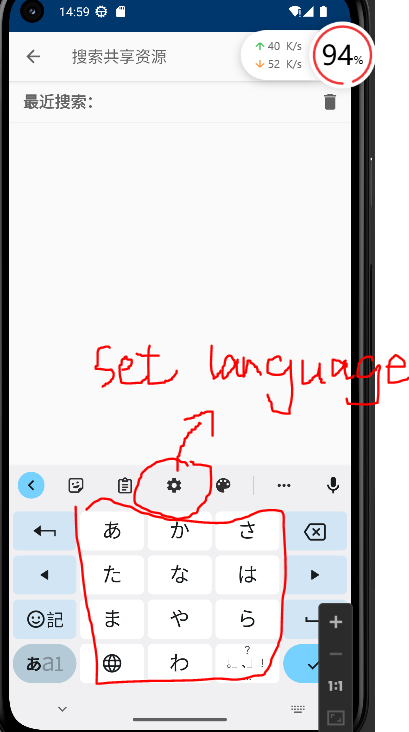
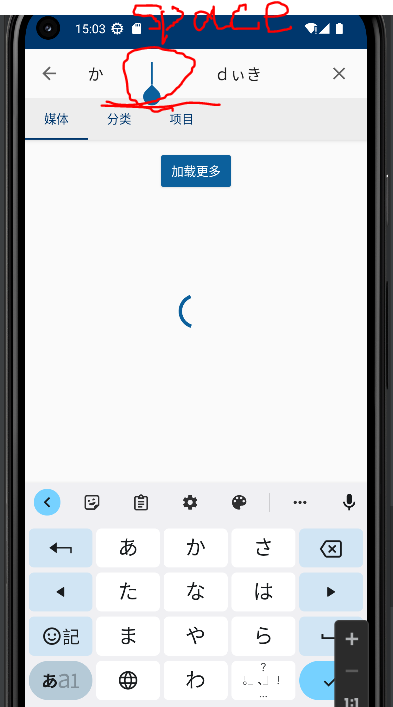
Oh, I see. setting the language as Japanese was what I didn't think about. Thanks for your reply :)
Also, please ignore my own repo if it appears. It is just my approach for my group assignment in which we chose to analyze and solve issues for this project. I'm all new to an open source (guess I shouldn't reference the issue).
@zhihaoyuu Also, I'm a bit confused about your code.
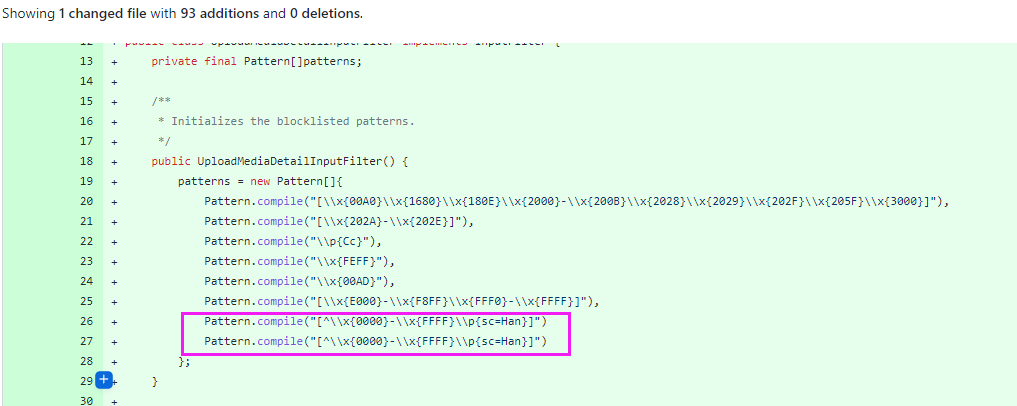 I have the following doubts:
- Why is your code all green? I think you've only added and used the method
jpSpace2EnSapce. - Why are there two duplicate lines? Additionally, I think by having it without a comma at the end of the first line, the IDE would give an error and not let it compile.
thanks for your question. q1:At first I created the method to convert Japanese space to English space, but it seems that the problem is not this, the problem is that the software only allows input in the language you set. so in fact, you just need to manually switch to the Japanese input method. just ignore this code( we don't need it now)
q2:yes it was a bug, I added one less ";", if you want it to work, just add it manually